


一、列表页面
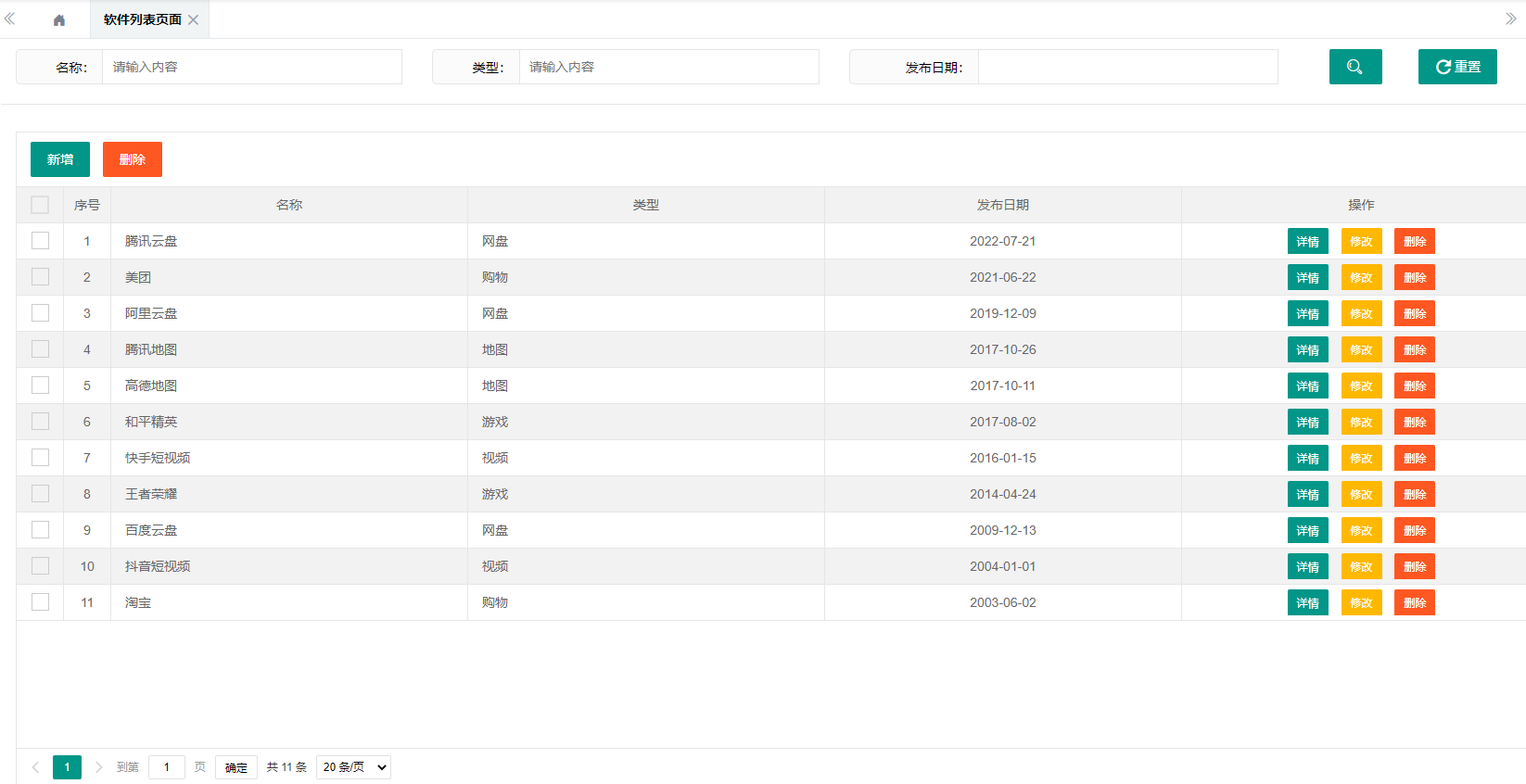
1.1 属性
列表数据接口属性: ${ctx}/app/appList
工具栏属性:
<button class="layui-btn" onclick="addApp()">新增</button>
<button class="layui-btn layui-btn-danger" onclick="delPartApp()">删除</button>
列属性:
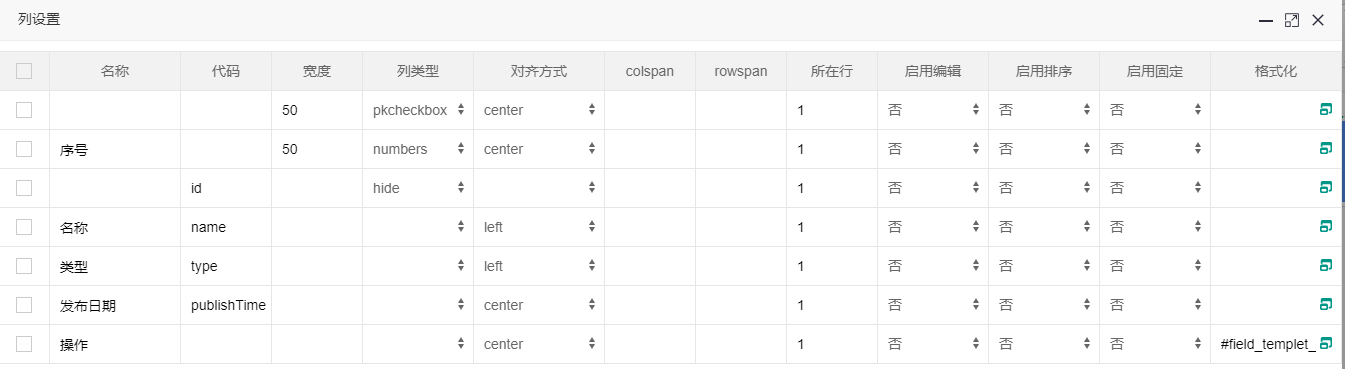
<button class="layui-btn layui-btn-sm" onclick="appDetail('{{d.id}}')">详情</button>
<button class="layui-btn layui-btn-sm layui-btn-warm" onclick="updateApp('{{d.id}}')">修改</button>
<button class="layui-btn layui-btn-sm layui-btn-danger" onclick="delApp('{{d.id}}')">删除</button>
1.2 事件
// 搜索按钮点击事件
grid1.reload({
    where: {
        name: $("#textfield4").val(),
        type: $("#textfield5").val(),
        publishTime: $("#datepicker22").val()
    },
    page: {
        curr: 1
    }
});

//重置按钮点击事件
$("#textfield4").val('')
$("#textfield5").val('')
$("#datepicker22").val('')
grid1.reload({
    where: {
        name: $("#textfield4").val(),
        type: $("#textfield5").val(),
        publishTime: $("#datepicker22").val()
    },
    page: {
        curr: 1
    }
});
function appDetail(id) {
    win.openLayerIframe({
        type: 2,
        title: '软件信息详情',
        id: 'add_detail',
        content: "${ctx}/editor/preview?page=mature/appManager/appInfo.xml&id=" + id,
        area: ["40%", "50%"],
        maxmin: true
    }, true);
}

function addApp() {
    win.openLayerIframe({
        type: 2,
        title: '新增软件信息',
        id: 'add_app',
        content: "${ctx}/editor/preview?page=mature/appManager/appInfo.xml",
        area: ["40%", "50%"],
        maxmin: true,
        btn: ['提交', '取消'],
        yes: function(index, layero) {
            var iframeWin = parent.$("#add_app").find("iframe")[0].contentWindow;
            iframeWin.addInfo();
        }
    }, true);
}

function updateApp(id) {
    win.openLayerIframe({
        type: 2,
        title: '软件信息修改',
        id: 'update_app',
        content: "${ctx}/editor/preview?page=mature/appManager/appInfo.xml&id=" + id,
        area: ["40%", "50%"],
        maxmin: true,
        btn: ['提交', '取消'],
        yes: function(index, layero) {
            var iframeWin = parent.$("#update_app").find("iframe")[0].contentWindow;
            iframeWin.updateInfo();
        }
    }, true);
}

function delApp(id) {
    message.confirm("确定删除吗?", function() {
        $.post("${ctx}/app/delApp", {
            ids: id
        }, function(result) {
            if (result.code == "1") {
                message.info("删除成功!");
                grid1.reload();
            } else {
                message.error("删除失败!");
            }
        });
    });
}

function delPartApp() {
    var selRows = grid1.getSelectRow();
    if (!selRows || selRows.length === 0) {
        message.info("请选择数据!");
        return;
    }
    var ids = [];
    for (var i = 0; i < selRows.length; i++) {
        var selRow = selRows[i];
        ids.push(selRow.id);
    }
    message.confirm("确定删除吗?", function() {
        $.post("${ctx}/app/delApp", {
            ids: ids.join(",")
        }, function(result) {
            if (result.code == "1") {
                message.info("删除成功!");
                grid1.reload();
            } else {
                message.error("删除失败!");
            }
        });
    });
}
二、信息页面(详情,添加,修改共用)
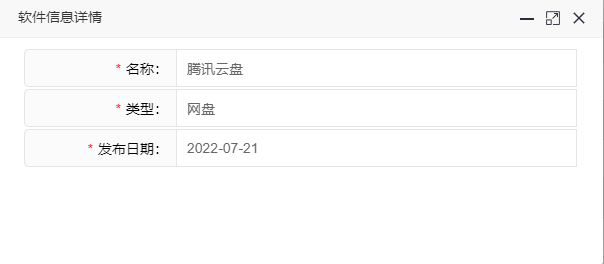
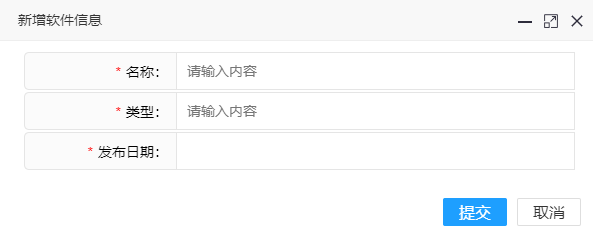
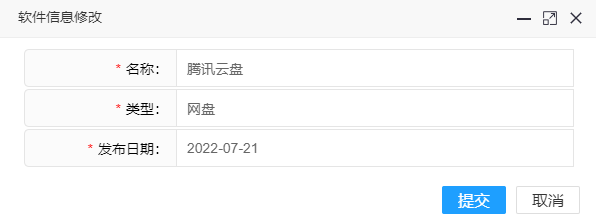
2.1 属性
表单中每个组件 名称: 后台接收的实体类参数字段,如 name、type等
表单中每个组件 所属表单: 统一为 form1 等
底部功能组 选择 HTML控件 ,自定义内容为: <input type="hidden" name="id" id="id" value="${id!}" form-type="form1" />
2.2 事件
var id = '${id!}';

$(function() {
    if (id) {
        ajax.post("${ctx}/app/appDetail", {
            id: id
        }, function(result) {
            rzui.setFormValue("form1", result.data);
        })
    }
});

function paramsCheck(data) {
    var msg = '';
    if (!data.name) {
        msg = '请输入姓名';
        return msg;
    }
    if (!data.type) {
        msg = '请输入类型';
        return msg;
    }
    if (!data.publishTime) {
        msg = '请选择日期';
        return msg;
    }
    return msg;
}

function addInfo() {
    var data = rzui.getFormValue("form1");
    var msg = paramsCheck(data);
    if (msg) {
        message.info(msg);
    } else {
        $.post("${ctx}/app/addApp", data, function(result) {
            if (result.code == 1) {
                win.getParent().message.info(result.msg);
                win.getParent().grid1.reload();
                win.close();
            } else {
                message.error(result.msg);
            }
        });
    }
}

function updateInfo() {
    var data = rzui.getFormValue("form1");
    var msg = paramsCheck(data);
    if (msg) {
        message.info(msg);
    } else {
        $.post("${ctx}/app/updateApp", data, function(result) {
            if (result.code == 1) {
                win.getParent().message.info(result.msg);
                win.getParent().grid1.reload();
                win.close();
            } else {
                message.error(result.msg);
            }
        });
    }
}
O(∩_∩)O开心就好O(∩_∩)O

 浙公网安备 33010602011771号