
解决Spring boot 3.4.5 集成springdoc时报错
一、问题
- 这是一个非常烦人的错误,虽然我们使用了springdoc-openapi代替swagger,但是这玩意底层还是使用了它,因此在新的高版本上,就不能很好的兼容了。
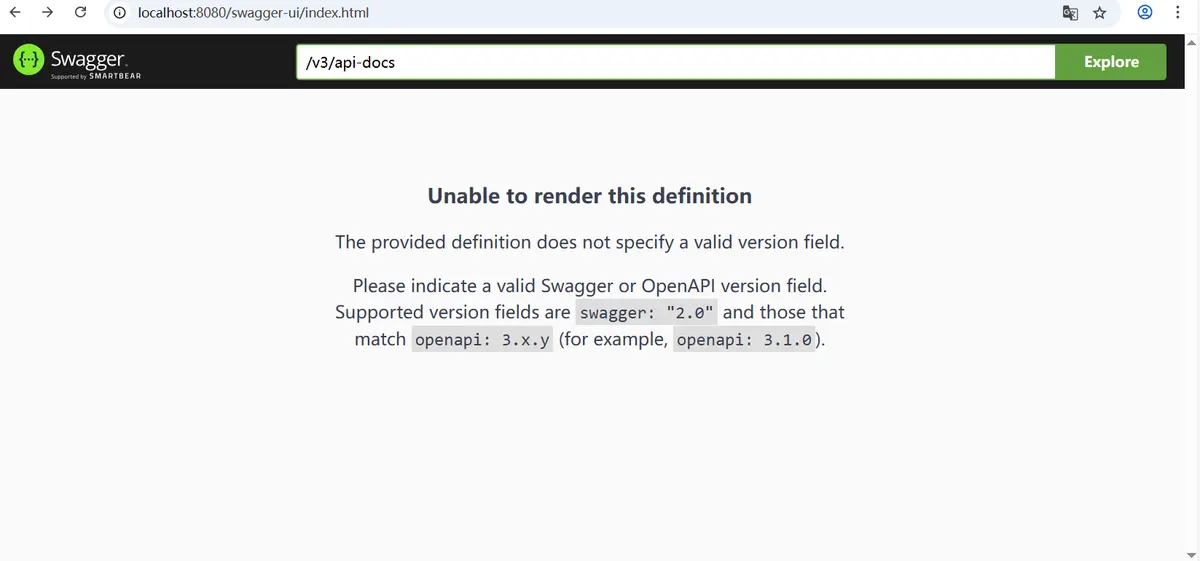
Unable to render this definition
The provided definition does not specify a valid version field.
Please indicate a valid Swagger or OpenAPI version field. Supported version fields are swagger: "2.0" and those that match openapi: 3.x.y (for example, openapi: 3.1.0).
- 这也提示了,要么你降低回去使用swagger2.0,要么你就等使用3.x.y的版本。很明显现在它最高版本的版本还是2.8.8版本,因此你只能放弃使用好了。
二、集成
- 集成非常的简单,就加这个一个依赖包就可以了。
 <dependency>
        <groupId>org.springdoc</groupId>
         <artifactId>springdoc-openapi-starter-webmvc-ui</artifactId>
         <version>2.8.8</version>
 </dependency>
- 接着在application.yml里面配置一下:
# swagger-ui custom path
springdoc:
  swagger-ui:
    # 修改Swagger UI路径
    path: /swagger-ui.html
    # 开启Swagger UI界面
    enabled: true
  api-docs:
    # 修改api-docs路径
    path: /v3/api-docs
    # 开启api-docs
    enabled: true
  # 配置需要生成接口文档的扫描包
  packages-to-scan: com.wewetea.open.weadmin.controller
  # 配置需要生成接口文档的接口路径
  paths-to-match: /Users/**,/admin/**
不出意外的话,你一定会出现,如图所示的问题:
三、解决
网上说了一堆的解决,就是检查控制是否写重复的问题,甚至还有点就是简单的,告诉你下面这样,然后你还是不会去处理。
错误原因:Controller 的 public 方法没有指定 HttpMethodAttribute
解决:设置为 HttpGet 或者 HttpPost
这些都只是小问题,是因为你自己不够细心的导致代码问题,和本次的真正的问题并无太多关联。
- 【敲重点】等待一系列的问题,就是因为某个错误导致,他们不能反序列话读取值。因此,我们要增加一个序列化的转化器给过去就可以了。
package com.wewetea.open.weadmin.config;

import com.alibaba.fastjson.serializer.SerializerFeature;
import com.alibaba.fastjson.support.config.FastJsonConfig;
import com.alibaba.fastjson.support.spring.FastJsonHttpMessageConverter;
import org.springframework.context.annotation.Configuration;
import org.springframework.http.MediaType;
import org.springframework.http.converter.ByteArrayHttpMessageConverter;
import org.springframework.http.converter.HttpMessageConverter;
import org.springframework.web.servlet.config.annotation.EnableWebMvc;
import org.springframework.web.servlet.config.annotation.WebMvcConfigurer;

import java.nio.charset.StandardCharsets;
import java.util.ArrayList;
import java.util.List;

@EnableWebMvc
@Configuration
class WebMvcConfig implements WebMvcConfigurer {
    @Override
    public void configureMessageConverters(List<HttpMessageConverter<?>> converters) {
        FastJsonHttpMessageConverter converter = new FastJsonHttpMessageConverter();
        List<MediaType> supportMediaTypeList = new ArrayList<>();
        supportMediaTypeList.add(MediaType.APPLICATION_JSON);
        FastJsonConfig config = new FastJsonConfig();
        config.setSerializerFeatures(SerializerFeature.DisableCircularReferenceDetect);
        converter.setFastJsonConfig(config);
        converter.setSupportedMediaTypes(supportMediaTypeList);
        converter.setDefaultCharset(StandardCharsets.UTF_8);
        converters.add(new ByteArrayHttpMessageConverter()); // 增加二进制转换器
        converters.add(converter);
    }
}
就是这段代码:new ByteArrayHttpMessageConverter()就可以解决问题了。
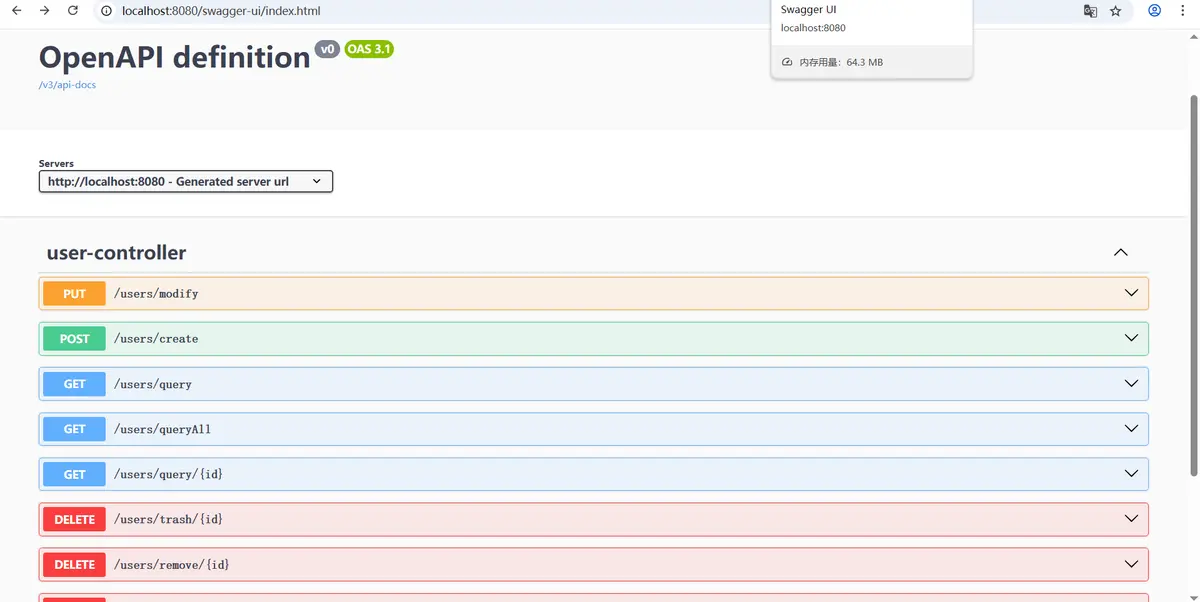
问题立马得到解决:
当然,这样配置会产生一个新的问题:
{"createTime":1748613783631,"id":60,"name":"张三","updateTime":1748613783631}]
日期变成了时间戳了,但这个不是问题,因为原本它的序列化就是这样的。后面自己写一下自己的配置就可以解决了。配置参考:
package com.wewetea.open.weadmin.config;

import com.alibaba.fastjson.serializer.SerializerFeature;
import com.alibaba.fastjson.support.config.FastJsonConfig;
import com.alibaba.fastjson.support.spring.FastJsonHttpMessageConverter;
import org.springframework.beans.factory.annotation.Value;
import org.springframework.boot.autoconfigure.http.HttpMessageConverters;
import org.springframework.context.annotation.Bean;
import org.springframework.context.annotation.Configuration;
import org.springframework.http.MediaType;

import java.util.Arrays;

@Configuration
class FastJsonConverterConfig {
    @Value("${spring.jackson.date-format:yyyy-MM-dd HH:mm:ss}")
    private String pattern;

    @Value("${spring.jackson.time-zone:GMT+8}")
    private String zone;

    @Bean
    public HttpMessageConverters fastJsonHttpMessageConverters() {
        FastJsonHttpMessageConverter fastConverter = new FastJsonHttpMessageConverter();
        FastJsonConfig fastJsonConfig = new FastJsonConfig();
        fastJsonConfig.setSerializerFeatures(
                SerializerFeature.WriteMapNullValue,
                SerializerFeature.WriteNullListAsEmpty,
                SerializerFeature.WriteNullStringAsEmpty,
                SerializerFeature.WriteNullBooleanAsFalse,
                SerializerFeature.WriteDateUseDateFormat
        );
        fastConverter.setFastJsonConfig(fastJsonConfig);

        // 全局指定了日期格式
        fastJsonConfig.setDateFormat(pattern);

        // 该设置目的,为了兼容jackson
        fastConverter.setSupportedMediaTypes(Arrays.asList(MediaType.APPLICATION_JSON,MediaType.APPLICATION_JSON_UTF8,MediaType.APPLICATION_OCTET_STREAM));
        return new HttpMessageConverters(fastConverter);
    }
}
把两者结合起来,就能解决整体的问题了。最后给出完整的处理代码:
package com.wewetea.open.weadmin;

import com.alibaba.fastjson.serializer.SerializerFeature;
import com.alibaba.fastjson.support.config.FastJsonConfig;
import com.alibaba.fastjson.support.spring.FastJsonHttpMessageConverter;
import org.springframework.beans.factory.annotation.Value;
import org.springframework.context.annotation.Configuration;
import org.springframework.http.MediaType;
import org.springframework.http.converter.ByteArrayHttpMessageConverter;
import org.springframework.http.converter.HttpMessageConverter;
import org.springframework.web.servlet.config.annotation.EnableWebMvc;
import org.springframework.web.servlet.config.annotation.WebMvcConfigurer;

import java.nio.charset.StandardCharsets;
import java.text.SimpleDateFormat;
import java.util.ArrayList;
import java.util.List;
import java.util.TimeZone;

@EnableWebMvc
@Configuration
class WebMvcConfig implements WebMvcConfigurer {
    @Value("${spring.jackson.date-format:yyyy-MM-dd HH:mm:ss}")
    private String pattern;

    @Value("${spring.jackson.time-zone:GMT+8}")
    private String zone;

    @Override
    public void configureMessageConverters(List<HttpMessageConverter<?>> converters) {
        FastJsonHttpMessageConverter converter = new FastJsonHttpMessageConverter();

        List<MediaType> supportMediaTypeList = new ArrayList<>();
        supportMediaTypeList.add(MediaType.APPLICATION_JSON);
        supportMediaTypeList.add(MediaType.APPLICATION_ATOM_XML);
        supportMediaTypeList.add(MediaType.APPLICATION_FORM_URLENCODED);
        supportMediaTypeList.add(MediaType.APPLICATION_OCTET_STREAM);

        FastJsonConfig config = new FastJsonConfig();
        config.setSerializerFeatures(SerializerFeature.DisableCircularReferenceDetect);

        // 统一处理时区和时间格式
        SimpleDateFormat dateFormat = new SimpleDateFormat(pattern);
        dateFormat.setTimeZone(TimeZone.getTimeZone(zone));
        // 全局指定了日期格式
        config.setDateFormat(dateFormat.toPattern());

        converter.setFastJsonConfig(config);
        converter.setSupportedMediaTypes(supportMediaTypeList);
        converter.setDefaultCharset(StandardCharsets.UTF_8);

        // 增加二进制转换器,解决Spring doc的问题。
        converters.add(new ByteArrayHttpMessageConverter());
        converters.add(converter);
    }
}
- 配置如下,在application.yml里面配置一下:
spring:
  # 统一编码
  jackson:
    time-zone: GMT+8
    date-format: yyyy-MM-dd HH:mm:ss
至此,所有问题都可以得到解决。
本文来自博客园,作者:刘文江,转载请注明原文链接:https://www.cnblogs.com/liuwenjiang/p/18905005

 浙公网安备 33010602011771号