


squid代理服务器
一、squid概述
Squid(Squid cache,简称Squid)是Linux系统中最常用的一款开源代理服务软件,可以很好地实现HTTP和FTP,以及DNS查询、SSL等应用的缓存代理,功能十分强大,本篇博客详细介绍了传统代理、透明代理,squid日志分析的配置。squid的官方网站为http://www.squid-cache.org
- 代理用户向web服务器请求数据并进行缓存,可以过滤流量帮助网络安全。
- 可以作为代理服务器链中的一环,向上级代理转发数据或直接连接互联网。
- 可以用在局域网中,使局域网用户通过代理上网。
- 可以将数据缓存在内存中,同时也缓存DNS查询的结果,还支持非模块化的DNS查询,对失败的请求进行消极缓存。
- Squid支持SSL,支持ACL访问控制。
二、代理的基本问题
传统代理:适用于lnernet,需明确指定服务器
透明代理:客户机不需指定代理服务器的地址和端口,而是通过默认路由、防火墙策略将web访问重定向给代理服务器处理
三、使用代理的好处
提高web访问速度
隐藏客户机的真实IP地址
四、Squid各种代理的定义
4.1、传统代理
| 主机 | IP地址 |
| squid代理服务器 | 20.0.0.10 |
| web网站服务 | 20.0.0.20 |
| 客户机 | 20.0.0.50 |
(1)squid代理服务器配置
安装依赖环境
[root@squid ~]# yum -y install gcc gcc-c++ make
(2)安装squid服务
[root@squid ~]# tar zxf squid-3.5.23.tar.gz -C /opt
[root@squid ~]# cd /opt/squid-3.5.23/
[root@squid squid-3.5.23]# ./configure --prefix=/usr/local/squid \
> --sysconfdir=/etc \                                                   ###指定配置文件位置
> --enable-arp-acl \                                                    ###支持acl访问控制列表
> --enable-linux-netfilter \                                          ###打开网络筛选
> --enable-linux-tproxy \                                            ###支持透明代理
> --enable-async-io=100 \                                         ###io优化
> --enable-err-language="Simplify_Chinese" \             ###报错显示简体中文
> --enable-underscore \                                             ###支持下划线
> --enable-poll \                                                     ###默认使用poll模式,开启epoll模式时提升性能
> --enable-gnuregex                                                ###支持正则表达式
[root@squid squid-3.5.23]# make && make install

优化路径
[root@squid squid-3.5.23]# ln -s /usr/local/squid/sbin/* /usr/local/sbin
[root@squid squid-3.5.23]# useradd -M -s /sbin/nologin squid     (创建不可登录的程序用户)
[root@squid squid-3.5.23]# chown -R squid.squid /usr/local/squid/var
(3)修改配置文件
[root@squid ~]# vi /etc/squid.conf

cache_effective_user squid                                 #添加   指定程序用户
cache_effective_group squid                               #添加   指定账号基本组

[root@squid ~]# squid -k parse                           ###检查配置文件语法
[root@squid ~]# squid -z                                     ###初始化缓存目录
[root@squid ~]# squid                                         ###启动服务
[root@squid ~]# netstat -anpt | grep squid             #查看服务是否开启
tcp6       0      0 :::3128                 :::*                     LISTEN      104314/(squid-1)
[root@squid ~]# vi /etc/init.d/squid
#!/bin/bash
#chkconfig: 2345 90 25
PID="/usr/local/squid/var/run/squid.pid"
CONF="/etc/squid.conf"
CMD="/usr/local/squid/sbin/squid"
case "$1" in
   start)
     netstat -natp | grep squid &> /dev/null
     if [ $? -eq 0 ]
     then
       echo "squid is running"
       else
       echo "正在启动 squid..."
       $CMD
     fi
   ;;
   stop)
     $CMD -k kill &> /dev/null
     rm -rf $PID &> /dev/null
   ;;
   status)
     [ -f $PID ] &> /dev/null
        if [ $? -eq 0 ]
          then
            netstat -natp | grep squid
          else
            echo "squid is not running"
        fi
   ;;
   restart)
      $0 stop &> /dev/null
      echo "正在关闭 squid..."
         $0 start &> /dev/null
      echo "正在启动 squid..."
   ;;
   reload)
      $CMD -k reconfigure
   ;;
   check)
      $CMD -k parse
   ;;
   *)
      echo "用法:$0{start|stop|status|reload|check|restart}"
   ;;
esac

[root@squid ~]# chmod +x /etc/init.d/squid
[root@squid ~]# chkconfig --add squid
[root@squid ~]# chkconfig --level 35 squid on
[root@squid ~]# vi /etc/squid.conf

# And finally deny all other access to this proxy     ##在此行修改
http_access allow all              #添加
http_access deny all
# Squid normally listens to port 3128
http_port 3128
cache_mem 64 MB                ###指定缓存功能所使用的内存空间大小,便于保持访问较频繁的WEB对象,容量最好为4的倍数,单位为MB,建议设为物理内存的1/4
reply_body_max_size 10 MB     ###允许用户下载的最大文件大小,以字节为单位。默认设置0表示不进行限制
maximum_object_size 4096 KB     ###允许保存到缓存空间的最大对象大小,以KB为单位,超过大小限制的文件将不被缓存,而是直接转发给用户


[root@squid ~]# setenforce 0
[root@squid ~]# iptables -F      ###清空表信息
[root@squid ~]# iptables -I INPUT -p tcp --dport 3128 -j ACCEPT
[root@squid ~]# systemctl restart squid
[root@web ~]# yum -y install httpd
[root@web ~]# cd /var/www/html/
[root@web html]# vi index.html
<h1>uzi111 yyds!!!</h1>
[root@web html]# systemctl restart httpd
[root@web html]# netstat -anpt | grep httpd
tcp6       0      0 :::80                   :::*                    LISTEN      3432/httpd
[root@web html]# curl http://localhost
<h1>uzi111 yyds!!!</h1>
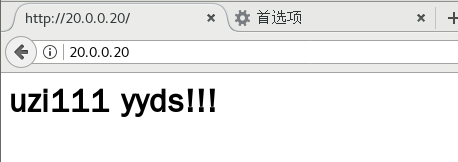
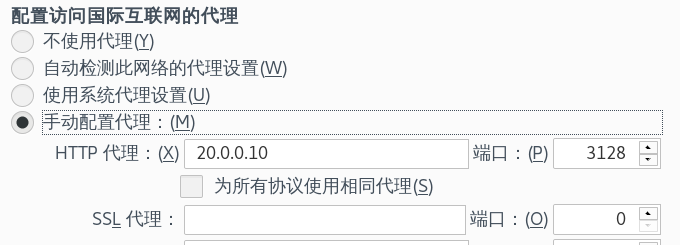
再网页上进行代理配置并测试
查看web日志文件,看访问的IP
[root@web html]# cat /var/log/httpd/access_log
20.0.0.10 - - [18/Nov/2020:08:46:39 +0800] "GET / HTTP/1.1" 304 - "-" "Mozilla/5.0 (X11; Linux x86_64; rv:52.0) Gecko/20100101 Firefox/52.0"
20.0.0.10 - - [18/Nov/2020:08:46:40 +0800] "GET / HTTP/1.1" 304 - "-" "Mozilla/5.0 (X11; Linux x86_64; rv:52.0) Gecko/20100101 Firefox/52.0"
这里变成了Squid服务器的IP地址20.0.0.10,说明代理成功。
4.2、透明代理
| 主机 | IP地址 |
| squid代理服务器 | 20.0.0.10(外网)192.168.100.10(内网,手动添加一块网卡) |
| web网站服务(源主机) | 20.0.0.20(外网) |
| 客户机 | 192.168.100.20,网关NETMASK设置成squid内网地址 |
[root@squid ~]# vi /etc/squid.conf
http_port 192.168.100.10:3128 transparent      ##找到此行修改
[root@squid ~]# systemctl restart squid.service
[root@squid ~]# netstat -anpt | grep squid
tcp        0      0 192.168.100.10:3128     0.0.0.0:*               LISTEN      13963/(squid-1)


开启路由功能
[root@squid ~]# vi /etc/sysctl.conf
net.ipv4.ip_forward = 1                  #末尾添加
[root@squid ~]# sysctl -p
net.ipv4.ip_forward = 1
[root@squid ~]# iptables -F
[root@squid ~]# iptables -t nat -F
[root@squid ~]# iptables -t nat -I PREROUTING -i ens37 -s 192.168.100.0/24 -p tcp --dport 80 -j REDIRECT --to 3128
[root@squid ~]# iptables -t nat -I PREROUTING -i ens37 -s 192.168.100.0/24 -p tcp --dport 443 -j REDIRECT --to 3128
[root@squid ~]# iptables -I INPUT -p tcp --dport 3128 -j ACCEPT
[root@web ~]# route add -net 192.168.100.0/24 gw 20.0.0.10 ###添加一条静态路由
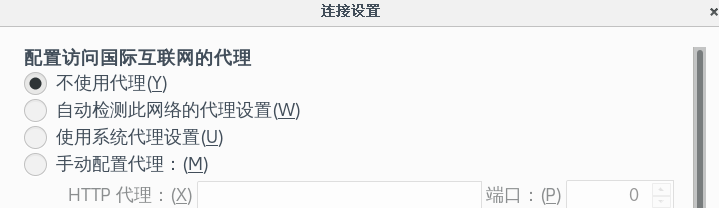
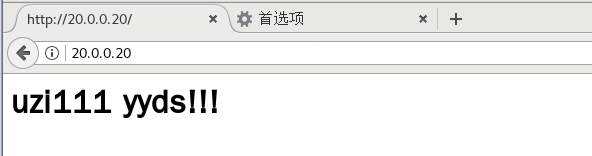
访问查看IP
[root@web1 ~]# cat /var/log/httpd/access_log
20.0.0.10 - - [18/Nov/2020:09:00:43 +0800] "GET / HTTP/1.1" 304 - "-" "Mozilla/5.0 (X11; Linux x86_64; rv:52.0) Gecko/20100101 Firefox/52.0"
20.0.0.10 - - [18/Nov/2020:09:00:44 +0800] "GET / HTTP/1.1" 304 - "-" "Mozilla/5.0 (X11; Linux x86_64; rv:52.0) Gecko/20100101 Firefox/52.0"
20.0.0.10 - - [18/Nov/2020:09:00:45 +0800] "GET / HTTP/1.1" 304 - "-" "Mozilla/5.0 (X11; Linux x86_64; rv:52.0) Gecko/20100101 Firefox/52.0"
ip为squid服务器地址说明代理成功
4.3、squid反向代理
| 主机 | ip地址 |
| squid服务器 | 20.0.0.10 |
| web1 | 20.0.0.20 |
| web2 | 20.0.0.30 |
| web3 | 20.0.0.40 |
| 客户机 | 20.0.0.50 |
在透明代理的基础上做反向代理web1设置
[root@web1 ~]# yum -y install httpd
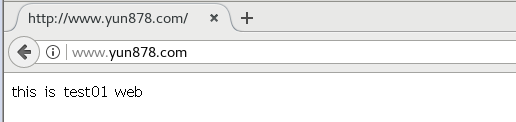
[root@web1 ~]# echo "<h1>this is test01 web</h1>" > /var/www/html/index.html
[root@web1 ~]# systemctl start httpd
[root@web1 ~]# netstat -anpt | grep httpd
tcp6       0      0 :::80                   :::*                    LISTEN      58987/httpd
[root@web1 ~]# route add -net 192.168.100.0/24 gw 20.0.0.10     ###添加静态路由
web2设置
[root@web2 ~]# yum -y install httpd
[root@web2 ~]# echo "<h1>this is test02 web</h1>" > /var/www/html/index.html
[root@web2 ~]# systemctl start httpd
[root@web2 ~]# netstat -anpt | grep httpd
tcp6       0      0 :::80                   :::*                    LISTEN      54931/httpd
[root@web2 ~]# route add -net 192.168.100.0/24 gw 20.0.0.10      ###添加静态路由
web3设置
[root@web3 ~]# yum -y install httpd
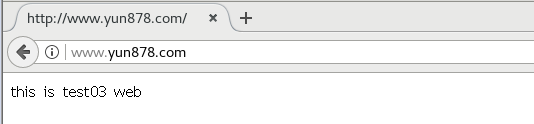
[root@web3 ~]# echo "<h1>this is test03 web</h1>" > /var/www/html/index.html
[root@web3 ~]# systemctl start httpd
[root@web3 ~]# netstat -anpt | grep httpd
tcp6       0      0 :::80                   :::*                    LISTEN      2556/httpd
[root@web3 ~]# route add -net 192.168.100.0/24 gw 20.0.0.10      ###添加静态路由
squid配置
[root@squid ~]# iptables -F
[root@squid ~]# iptables -t nat -F
[root@squid ~]# iptables -I INPUT -p tcp --dport 3128 -j ACCEPT
修改配置文件
[root@squid ~]# vi /etc/squid.conf
# Squid normally listens to port 3128            ###在此行修改
http_port 20.0.0.10:80 accel vhost vport
cache_peer 20.0.0.20 parent 80 0 no-query originserver round-robin max_conn=30 weight=1 name=web1
cache_peer 20.0.0.30 parent 80 0 no-query originserver round-robin max_conn=30 weight=1 name=web2
cache_peer 20.0.0.40 parent 80 0 no-query originserver round-robin max_conn=30 weight=1 name=web3
cache_peer_domain web1 web2 web3 www.yun878.com   ###网址名自己设置

[root@squid ~]# systemctl restart squid
客户机添加hosts文件
vi /etc/hosts
127.0.0.1   localhost localhost.localdomain localhost4 localhost4.localdomain4
::1         localhost localhost.localdomain localhost6 localhost6.localdomain6
20.0.0.10   www.yun878.com
客户机访问

 浙公网安备 33010602011771号