
selenium java 自动化测试环境(亲测可用)
1、安装V61 版本的Chrome浏览器(请不要打开“设置”-->"关于Chrome浏览器",会触发更新最新版本)
2、测试服务端环境搭建,将以下三个文件放到同一目录下
selenium-server-standalone-2.40.0.jar
selenium-server-start.bat
chromedriver.exe
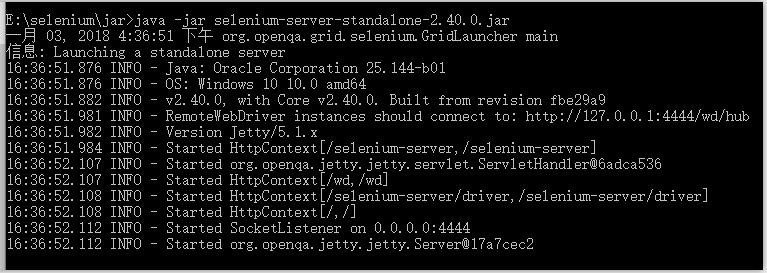
3、双击selenium-server-start.bat,执行结果如下:
4、测试脚本编写
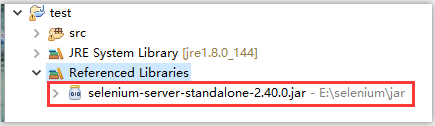
4.1 新建一个普通java工程,要引入jar包,如下图:
4.2 测试代码:
package test.selenium;

import java.net.MalformedURLException;
import java.net.URL;

import org.openqa.selenium.By;
import org.openqa.selenium.WebDriver;
import org.openqa.selenium.WebElement;
import org.openqa.selenium.remote.DesiredCapabilities;
import org.openqa.selenium.remote.RemoteWebDriver;

public class Rcdemo {
    public static void main(String[] args) throws InterruptedException, MalformedURLException {
        ChromeOptions options = new ChromeOptions(); // set some options
        options.addArguments("--disable-infobars");
        options.addArguments("--start-maximized");
        DesiredCapabilities dc = DesiredCapabilities.chrome();
        dc.setCapability(ChromeOptions.CAPABILITY, options);
        WebDriver driver = new RemoteWebDriver(new URL("http://127.0.0.1:4444/wd/hub"), dc);

        //登录系统
        driver.get("http://127.0.0.1:8080/my/login");
        WebElement loginname = driver.findElement(By.name("uname"));
        WebElement password = driver.findElement(By.name("pwd"));
        loginname.sendKeys("admin");
        password.sendKeys("admin1@");
        WebElement btn = driver.findElement(By.xpath("//*[@id=\"login_submit\"]"));
        btn.click();
        driver.close();
    }
}
5、遇到过的问题:
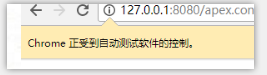
下面这个条条,有时会影响selenium的click事件,原因是它盖住了要点击的页面元素
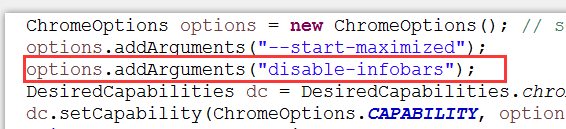
解决办法:在代码中加入以下参数即可
6、相关文件下载:
链接:https://pan.baidu.com/s/1pyKVf6HsPCYjO3j1Jccd7w 密码:u5p1

 浙公网安备 33010602011771号