thymeleaf模板引擎的使用
在早期开发的时候,我们完成的都是静态页面也就是html页面,随着时间轴的发展,慢慢的引入了jsp页面,当在后端服务查询到数据之后可以转发到jsp页面,可以轻松的使用jsp页面来实现数据的显示及交互,jsp有非常强大的功能,但是,在使用springboot的时候,整个项目是以jar包的方式运行而不是war包,而且还嵌入了tomcat容器,因此,在默认情况下是不支持jsp页面的。如果直接以纯静态页面的方式会给我们的开发带来很大的麻烦,springboot推荐使用模板引擎。
模板引擎有很多种,jsp,freemarker,thymeleaf,模板引擎的作用就是我们来写一个页面模板,比如有些值呢,是动态的,我们写一些表达式。而这些值,从哪来呢,我们来组装一些数据,我们把这些数据找到。然后把这个模板和这个数据交给我们模板引擎,模板引擎按照我们这个数据帮你把这表达式解析、填充到我们指定的位置,然后把这个数据最终生成一个我们想要的内容给我们写出去,这就是我们这个模板引擎,不管是jsp还是其他模板引擎,都是这个思想。只不过不同的模板引擎语法不同而已,下面重点学习下springboot推荐使用的thymeleaf模板引擎,语法简单且功能强大
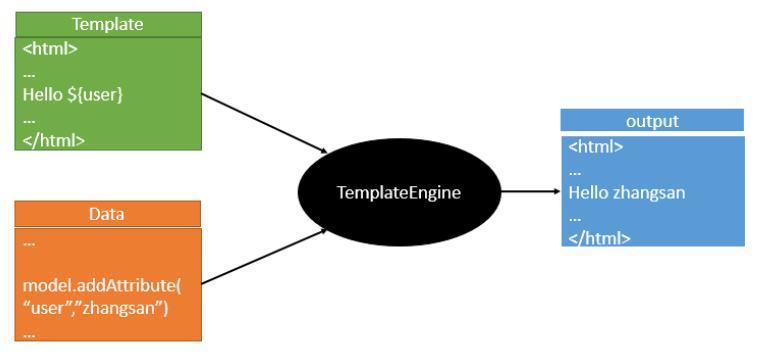
1、thymeleaf的介绍
官网地址:https://www.thymeleaf.org/
thymeleaf在github的地址:https://github.com/thymeleaf/thymeleaf
中文网站:https://raledong.gitbooks.io/using-thymeleaf/content/
导入依赖:
        <!--thymeleaf模板-->
        <dependency>
            <groupId>org.thymeleaf</groupId>
            <artifactId>thymeleaf-spring5</artifactId>
        </dependency>
        <dependency>
            <groupId>org.thymeleaf.extras</groupId>
            <artifactId>thymeleaf-extras-java8time</artifactId>
        </dependency>
在springboot中有专门的thymeleaf配置类:ThymeleafProperties
@ConfigurationProperties(prefix = "spring.thymeleaf")
public class ThymeleafProperties {
	private static final Charset DEFAULT_ENCODING = StandardCharsets.UTF_8;
	public static final String DEFAULT_PREFIX = "classpath:/templates/";
	public static final String DEFAULT_SUFFIX = ".html";
	/**
	 * Whether to check that the template exists before rendering it.
	 */
	private boolean checkTemplate = true;
	/**
	 * Whether to check that the templates location exists.
	 */
	private boolean checkTemplateLocation = true;
	/**
	 * Prefix that gets prepended to view names when building a URL.
	 */
	private String prefix = DEFAULT_PREFIX;
	/**
	 * Suffix that gets appended to view names when building a URL.
	 */
	private String suffix = DEFAULT_SUFFIX;
	/**
	 * Template mode to be applied to templates. See also Thymeleaf's TemplateMode enum.
	 */
	private String mode = "HTML";
	/**
	 * Template files encoding.
	 */
	private Charset encoding = DEFAULT_ENCODING;
	/**
	 * Whether to enable template caching.
	 */
	private boolean cache = true;
2、thymeleaf使用模板
在java代码中写入如下代码:
    @RequestMapping("/hello")
    public String hello(Model model){
        model.addAttribute("msg","Hello");
        //classpath:/templates/hello.html
        return "hello";
    }
html页面中写入如下代码:
<!DOCTYPE html>
<html lang="en" xmlns:th="http://www.thymeleaf.org">
<body>
<h1>Hello</h1>
<div th:text="${msg}"></div>
</body>
</html>
3、thymeleaf的表达式语法
Simple expressions:
	Variable Expressions: ${...}
	Selection Variable Expressions: *{...}
	Message Expressions: #{...}
	Link URL Expressions: @{...}
	Fragment Expressions: ~{...}
Literals
	Text literals: 'one text', 'Another one!',…
	Number literals: 0, 34, 3.0, 12.3,…
	Boolean literals: true, false
	Null literal: null
	Literal tokens: one, sometext, main,…
Text operations:
	String concatenation: +
	Literal substitutions: |The name is ${name}|
Arithmetic operations:
	Binary operators: +, -, *, /, %
	Minus sign (unary operator): -
	Boolean operations:
	Binary operators: and, or
	Boolean negation (unary operator): !, not
Comparisons and equality:
	Comparators: >, <, >=, <= (gt, lt, ge, le)
	Equality operators: ==, != (eq, ne)
	Conditional operators:
	If-then: (if) ? (then)
	If-then-else: (if) ? (then) : (else)
	Default: (value) ?: (defaultvalue)
Special tokens:
	No-Operation: _
4、thymeleaf实例演示
1、th的常用属性值
一、th:text :设置当前元素的文本内容,相同功能的还有th:utext,两者的区别在于前者不会转义html标签,后者会。优先级不高:order=7
二、th:value:设置当前元素的value值,类似修改指定属性的还有th:src,th:href。优先级不高:order=6
三、th:each:遍历循环元素,和th:text或th:value一起使用。注意该属性修饰的标签位置,详细往后看。优先级很高:order=2
四、th:if:条件判断,类似的还有th:unless,th:switch,th:case。优先级较高:order=3
五、th:insert:代码块引入,类似的还有th:replace,th:include,三者的区别较大,若使用不恰当会破坏html结构,常用于公共代码块提取的场景。优先级最高:order=1
六、th:fragment:定义代码块,方便被th:insert引用。优先级最低:order=8
七、th:object:声明变量,一般和*{}一起配合使用,达到偷懒的效果。优先级一般:order=4
八、th:attr:修改任意属性,实际开发中用的较少,因为有丰富的其他th属性帮忙,类似的还有th:attrappend,th:attrprepend。优先级一般:order=5
thymeleaf.html
<!DOCTYPE html>
<html lang="en" xmlns:th="http://www.thymeleaf.org">
<head>
    <meta charset="UTF-8">
    <title>Title</title>
</head>
<body>
    <p th:text="${thText}"></p>
    <p th:utext="${thUText}"></p>
    <input type="text" th:value="${thValue}">
    <div th:each="message:${thEach}">
        <p th:text="${message}"></p>
    </div>
    <div>
        <p th:text="${message}" th:each="message:${thEach}"></p>
    </div>
    <p th:text="${thIf}" th:if="${not #strings.isEmpty(thIf)}"></p>
    <div th:object="${thObject}">
        <p>name:<span th:text="*{name}"/></p>
        <p>age:<span th:text="*{age}"/></p>
        <p>gender:<span th:text="*{gender}"/></p>
    </div>

</body>
</html>
ThymeleafController.java
package com.mashibing.controller;

import com.mashibing.entity.Person;
import org.springframework.stereotype.Controller;
import org.springframework.ui.ModelMap;
import org.springframework.web.bind.annotation.RequestMapping;

@Controller
public class ThymeleafController {

    @RequestMapping("thymeleaf")
    public String thymeleaf(ModelMap map){

        map.put("thText","th:text设置文本内容 <b>加粗</b>");
        map.put("thUText","th:utext 设置文本内容 <b>加粗</b>");
        map.put("thValue","thValue 设置当前元素的value值");
        map.put("thEach","Arrays.asList(\"th:each\", \"遍历列表\")");
        map.put("thIf","msg is not null");
        map.put("thObject",new Person("zhangsan",12,"男"));
        return "thymeleaf";
    }
}
2、标准表达式语法
${...} 变量表达式,Variable Expressions
*{...} 选择变量表达式,Selection Variable Expressions
一、可以获取对象的属性和方法
二、可以使用ctx,vars,locale,request,response,session,servletContext内置对象
session.setAttribute("user","zhangsan");
th:text="${session.user}" 三、可以使用dates,numbers,strings,objects,arrays,lists,sets,maps等内置方法
standardExpression.html
<!--
一、strings:字符串格式化方法,常用的Java方法它都有。比如:equals,equalsIgnoreCase,length,trim,toUpperCase,toLowerCase,indexOf,substring,replace,startsWith,endsWith,contains,containsIgnoreCase等

二、numbers:数值格式化方法,常用的方法有:formatDecimal等

三、bools:布尔方法,常用的方法有:isTrue,isFalse等

四、arrays:数组方法,常用的方法有:toArray,length,isEmpty,contains,containsAll等

五、lists,sets:集合方法,常用的方法有:toList,size,isEmpty,contains,containsAll,sort等

六、maps:对象方法,常用的方法有:size,isEmpty,containsKey,containsValue等

七、dates:日期方法,常用的方法有:format,year,month,hour,createNow等
-->
<!DOCTYPE html>
<html lang="en" xmlns:th="http://www.thymeleaf.org">
<head>
    <meta charset="UTF-8">
    <title>thymeleaf内置方法</title>
</head>
<body>
    <h3>#strings </h3>
    <div th:if="${not #strings.isEmpty(Str)}" >
        <p>Old Str : <span th:text="${Str}"/></p>
        <p>toUpperCase : <span th:text="${#strings.toUpperCase(Str)}"/></p>
        <p>toLowerCase : <span th:text="${#strings.toLowerCase(Str)}"/></p>
        <p>equals : <span th:text="${#strings.equals(Str, 'blog')}"/></p>
        <p>equalsIgnoreCase : <span th:text="${#strings.equalsIgnoreCase(Str, 'blog')}"/></p>
        <p>indexOf : <span th:text="${#strings.indexOf(Str, 'r')}"/></p>
        <p>substring : <span th:text="${#strings.substring(Str, 2, 4)}"/></p>
        <p>replace : <span th:text="${#strings.replace(Str, 'it', 'IT')}"/></p>
        <p>startsWith : <span th:text="${#strings.startsWith(Str, 'it')}"/></p>
        <p>contains : <span th:text="${#strings.contains(Str, 'IT')}"/></p>
    </div>
    <h3>#numbers </h3>
    <div>
        <p>formatDecimal 整数部分随意,小数点后保留两位,四舍五入: <span th:text="${#numbers.formatDecimal(Num, 0, 2)}"/></p>
        <p>formatDecimal 整数部分保留五位数,小数点后保留两位,四舍五入: <span th:text="${#numbers.formatDecimal(Num, 5, 2)}"/></p>
    </div>

    <h3>#bools </h3>
    <div th:if="${#bools.isTrue(Bool)}">
        <p th:text="${Bool}"></p>
    </div>

    <h3>#arrays </h3>
    <div th:if="${not #arrays.isEmpty(Array)}">
        <p>length : <span th:text="${#arrays.length(Array)}"/></p>
        <p>contains : <span th:text="${#arrays.contains(Array,2)}"/></p>
        <p>containsAll : <span th:text="${#arrays.containsAll(Array, Array)}"/></p>
    </div>
    <h3>#lists </h3>
    <div th:if="${not #lists.isEmpty(List)}">
        <p>size : <span th:text="${#lists.size(List)}"/></p>
        <p>contains : <span th:text="${#lists.contains(List, 0)}"/></p>
        <p>sort : <span th:text="${#lists.sort(List)}"/></p>
    </div>
    <h3>#maps </h3>
    <div th:if="${not #maps.isEmpty(hashMap)}">
        <p>size : <span th:text="${#maps.size(hashMap)}"/></p>
        <p>containsKey : <span th:text="${#maps.containsKey(hashMap, 'thName')}"/></p>
        <p>containsValue : <span th:text="${#maps.containsValue(hashMap, '#maps')}"/></p>
    </div>
    <h3>#dates </h3>
    <div>
        <p>format :