
ES
简介
全称 elasticsearch。
隶属于 elsastic stack。官网地址:https://www.elastic.co/cn/
其中包含我们的 elasticsearch,kibana,beats,logstash。(ELK)。
es 主要是对数据进行搜索,分析,倒排。他是一个开源的高扩展的分布式全文搜索引擎。近实时的搜索。扩展性高。处理 PB 级别的数据。
特点
1、搜索的数据对象大量的非结构化的文本
2、倒排索引
3、每个字段都可以被索引和搜索
4、近实时分析,还可以做聚合,支持各种查询
全文检索
比如我们的数据分为结构化和非结构化。非结构化数据,相当于是全文数据,文本,文档,图片啊。
搜索方式有两种:
1、顺序扫描
2、全文的搜索:全文检索是指计算机索引程序通过扫描文章中的每一个词,对每一个词建立一个索引,指明该词在文章中出现的次数和位置,当用户查询时,检索程序就根据事先建立的索引进行查找,并将查找的结果反馈给用户的检索方式。这个过程类似于通过字典中的检索字表查字的过程。
倒排索引
我是经典鸡翅  id为1
我是程序员鸡翅 id为2
拆词!
我,是,经典,鸡翅
我,是,程序员,鸡翅
|
关键词(keyword) |
文档 id |
出现频次 |
出现位置 |
|
我 |
1,2 |
2 |
1 |
|
是 |
1,2 |
2 |
2 |
|
经典 |
1 |
1 |
3 |
|
鸡翅 |
1,2 |
2 |
5 |
|
程序员 |
2 |
1 |
6 |
倒排索引(另外加一个keyword的关键字,例如id作为value;由原来的根据id查改为value来反查内容)
应用场景
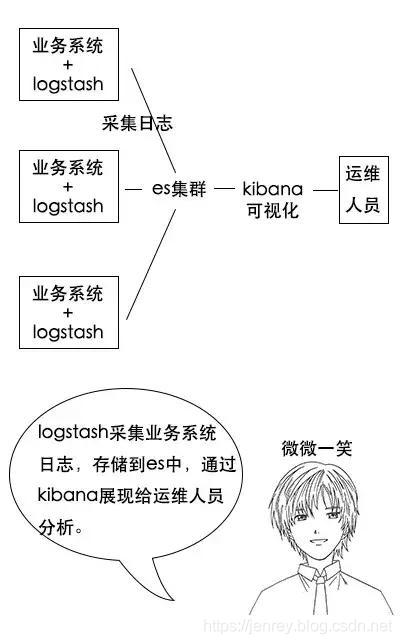
① 监控。对日志类数据进行存储、分析、可视化。对日志数据,ES给出了ELK的解决方案。其中logstash采集日志,ES进行复杂的数据分析,转换你的日志,并将他们存储在es中,kibana进行可视化展示。
② 线上商城系统,用户需要搜素购物系统网站上的商品信息。es可以存储所有的商品信息和一些库存信息,用户通过搜索引擎可以查询到自己需要的商品信息。
③ json文档数据库。用于存放java格式的文档。
④ 提供全文搜素并高亮关键字。
es概念上与数据库关系
|
es |
mysql |
|
Index |
Database |
|
Type |
Table |
|
Document |
行数据 row |
|
field |
列 |
|
mapping |
schema |
|
dsl |
sql |
|
get 形式的 http |
select |
es分词问题
我是经典鸡翅
es 原生的分词器。对中文分词效果不好,对英文效果好
ik分词器
https://github.com/medcl/elasticsearch-analysis-ik/releases/download/v7.3.1/elasticsearch-analysis-ik-7.3.1.zip
解压后,上传到服务器 的 ik 文件夹下面
mkdir /soft/ik

进入容器内部
docker exec -it elasticsearch /bin/bash
cd plugins
mkdir ik

回到外部
docker cp /soft/ik/. 73438a827b55:/usr/share/elasticsearch/plugins/ik

重启es
基本操作
索引
创建
PUT http://127.0.0.1:9200/shopping
返回
{
    "acknowledged": true,//响应结果
    "shards_acknowledged": true,//分片结果
    "index": "shopping"//索引名称
}
查看所有索引
GET http://127.0.0.1:9200/_cat/indices?v
返回
health status index    uuid                   pri rep docs.count docs.deleted store.size pri.store.size
yellow open   shopping J0WlEhh4R7aDrfIc3AkwWQ   1   1          0            0       208b           208b


health	当前服务器健康状态: green(集群完整) yellow(单点正常、集群不完整) red(单点不正常)
status	索引打开、关闭状态
index	索引名
uuid	索引统一编号
pri	主分片数量
rep	副本数量
docs.count	可用文档数量
docs.deleted	文档删除状态(逻辑删除)
store.size	主分片和副分片整体占空间大小
pri.store.size	主分片占空间大小
查看单个索引
GET http://127.0.0.1:9200/shopping
返回
{
    "shopping": {//索引名
        "aliases": {},//别名
        "mappings": {},//映射
        "settings": {//设置
            "index": {//设置 - 索引
                "creation_date": "1617861426847",//设置 - 索引 - 创建时间
                "number_of_shards": "1",//设置 - 索引 - 主分片数量
                "number_of_replicas": "1",//设置 - 索引 - 主分片数量
                "uuid": "J0WlEhh4R7aDrfIc3AkwWQ",//设置 - 索引 - 主分片数量
                "version": {//设置 - 索引 - 主分片数量
                    "created": "7080099"
                },
                "provided_name": "shopping"//设置 - 索引 - 主分片数量
            }
        }
    }
}
删除索引
DELETE http://127.0.0.1:9200/shopping
返回
{
    "acknowledged": true
}
创建文档
POST http://127.0.0.1:9200/shopping/_doc
# http://127.0.0.1:9200/shopping/_doc/1  明确数据主键,那么请求方式也可以为 PUT。
请求体JSON内容为:
{
    "title":"小米手机",
    "category":"小米",
    "images":"http://www.gulixueyuan.com/xm.jpg",
    "price":3999.00
}

返回
{
    "_index": "shopping",//索引
    "_type": "_doc",//类型-文档
    "_id": "ANQqsHgBaKNfVnMbhZYU",//唯一标识,可以类比为 MySQL 中的主键,随机生成
    "_version": 1,//版本
    "result": "created",//结果,这里的 create 表示创建成功
    "_shards": {//
        "total": 2,//分片 - 总数
        "successful": 1,//分片 - 总数
        "failed": 0//分片 - 总数
    },
    "_seq_no": 0,
    "_primary_term": 1
}
查询
主键查询
GET http://127.0.0.1:9200/shopping/_doc/1
返回
{
    "_index": "shopping",
    "_type": "_doc",
    "_id": "1",
    "_version": 1,
    "_seq_no": 1,
    "_primary_term": 1,
    "found": true,
    "_source": {
        "title": "小米手机",
        "category": "小米",
        "images": "http://www.gulixueyuan.com/xm.jpg",
        "price": 3999
    }
}
全量查询
GET http://127.0.0.1:9200/shopping/_search
返回
{
    "took": 133,
    "timed_out": false,
    "_shards": {
        "total": 1,
        "successful": 1,
        "skipped": 0,
        "failed": 0
    },
    "hits": {
        "total": {
            "value": 2,
            "relation": "eq"
        },
        "max_score": 1,
        "hits": [
            {
                "_index": "shopping",
                "_type": "_doc",
                "_id": "ANQqsHgBaKNfVnMbhZYU",
                "_score": 1,
                "_source": {
                    "title": "小米手机",
                    "category": "小米",
                    "images": "http://www.gulixueyuan.com/xm.jpg",
                    "price": 3999
                }
            },
            {
                "_index": "shopping",
                "_type": "_doc",
                "_id": "1",
                "_score": 1,
                "_source": {
                    "title": "小米手机",
                    "category": "小米",
                    "images": "http://www.gulixueyuan.com/xm.jpg",
                    "price": 3999
                }
            }
        ]
    }
}
条件查询
2.1 match查询
ES的查询有一个很大的特点就是分词。所以大家在使用ES的过程中脑子要始终有这么一个意识,你要查找的text是通过分词器分过词的,所以你去匹配的实际上是一个个被分词的片段。而你搜索的query也有可能会被分词,match就是一种会将你搜索的query进行分词的查询方法。我们结合例子来看!
比如我们要查询的索引结构如下:
{
    "_index": "textbook",
    "_id": "kIwXeYQB8iTYJNkI986Y",
    "_source": {
        "bookName": "This is a test doc",
        "author": "老坛",
        "num": 20
    }
}
_index代表索引名称,_id代表该条数据唯一id,_source代表该条数据具体的结构。
这里我们通过bookName字段来查询。
输入query语句如下:
GET http://ip:prot/textbook/_search
{
  "query": {
    "match": {
      "bookName":"test"
    }
  }
}
该条语句代表用match方式搜索索引为textbook中bookName可以匹配到test的语句。因为:
"bookName": "This is a test doc"原文被分词器分词后包含test这个词语,所以可以正常被匹配出来。
这个例子比较简单,我们换个复杂一点的例子:
GET http://ip:prot/textbook/_search
{
  "query": {
    "match": {
      "bookName":"my test"
    }
  }
}
大家认为这个能否被匹配出来呢?
原文中根本就没有my这个词语,那怎么被匹配出来?但实际上是可以匹配出来的。
原因是match查询里,会对你查询的query也进行分词,也就是会将你的"my test"进行分词,得到my与test两个词语,然后用这两个词语分别去匹配文本,发现虽然my匹配不到,但是test可以匹配到,所以依然可以查出来。这个和我们传统的搜索方式确实存在差异,大家要注意。
那这种搜索方式存在的价值是什么呢?其实还有蛮大用处的。比如我们的ES库存储的是很多的英文好词好句,然后用户想提高自己的英文写作,因此想搜索出一些比较好的表达加在自己的文章中,那这个时候对于用户来讲,严格的匹配方式大概率什么都搜不到,但是像match这样的搜索方式便非常合适。例如有个好句是这样的:
If at first you don't succeed, try again.然后用户用下面的方式搜索:
If you don't success用match就可以很好的匹配出来。
2.2 match_phrase查询
既然match的限制比较小,那如果我们需要这个限制更强一点用什么方式呢?match_phrase便是一个比较不错的选择。match_phrase和match一样也是会对你的搜索query进行分词,但是,不同的是它不是匹配到某一处分词的结果就算是匹配成功了,而是需要query中所有的词都匹配到,而且相对顺序还要一致,而且默认还是连续的,如此一来,限制就更多了。我们还是举个例子。比如还是刚刚的索引数据:
{
    "_index": "textbook",
    "_id": "kIwXeYQB8iTYJNkI986Y",
    "_source": {
        "bookName": "This is a test doc",
        "author": "老坛",
        "num": 20
    }
}
如果我们还用刚刚的方式搜索:
GET http://ip:prot/textbook/_search
{
  "query": {
    "match_phrase": {
      "bookName":"my test"
    }
  }
}
这次是匹配不到结果的。那么怎样才能匹配到结果呢?只能是搜索原文中的连续字串:
GET http://ip:prot/textbook/_search
{
  "query": {
    "match_phrase": {
      "bookName":"is a test"
    }
  }
}
这样是可以匹配到结果的。但是如此一来限制可能太大了一点,所以官方还给了一个核心餐宿可以调整搜索的严格程度,这个参数叫slop,我们举个例子:
GET http://ip:prot/textbook/_search
{
  "query": {
    "match_phrase": {
      "bookName":{
        "query":"is test",
        "slop":1
      }
    }
  }
}
比如我们将slop置为1,然后搜索"is test",虽然is test中间省略了一个词语"a",但是在slop为1的情况下是可以容忍你中间省略一个词语的,也可以搜索出来结果。以此类推,slop为2就可以省略两个词语了。大家可以根据自己的实际情况进行调整。
另外我们可以发现,如果在搜索时添加了辅助参数(比如slop)我们搜索格式的层级要往下扩展一层,之前的
"bookName":"my test"要改为:
"bookName":{
    "query":"is test",
    "slop":1
}
我们注意一下就好了。
2.3 multi_match查询
有了前面的基础,multi_match比较好理解。实际上就是可以从多个字段中去寻找我们要查找的query:
GET http://ip:prot/textbook/_search
{
  "query": {
    "multi_match": {
        "query" : "老坛",
        "fields" : ["bookName", "author"]
    }
  }
}
比如这里我们是从bookName和author两个字段里去寻找老坛,虽然bookName没有,但是author可以匹配到,那也可以找到数据。所以本质上就是对bookName和author分别做了一次match:
{
    "_index": "textbook",
    "_id": "kIwXeYQB8iTYJNkI986Y",
    "_source": {
        "bookName": "This is a test doc",
        "author": "老坛",
        "num": 20
    }
}
2.4 term查询
term查询也是比较常用的一种查询方式,它和match的唯一区别就是match需要对query进行分词,而term是不会进行分词的,它会直接拿query整体和原文进行匹配。所以不理解的小伙伴使用起来可能会非常奇怪:
GET http://ip:prot/textbook/_search
{
  "query": {
    "term": {
      "bookName": "This is a test doc"
    }
  }
}
当我们用这种方式进行搜索时,明明要搜索的和被搜索的文本一模一样,确就是搜不出来。这就是因为我们去搜的实际上并不是原文本身,而是被分词的原文,在原文被分好的每一个词语里,没有一个词语是:"This is a test doc",那自然是什么都搜不到了。所以在这种情况下就只能用某一个词进行搜索才可以搜到:
GET http://ip:prot/textbook/_search
{
  "query": {
    "term": {
      "bookName": "This"
    }
  }
}
2.5 terms查询
terms查询事实上就是多个term查询取一个交集,也就是要满足多个term查询条件匹配出来的结果才可以查到,所以是比单纯的term条件更为严格了:
GET http://ip:prot/textbook/_search
{
  "query": {
    "terms": {
      "bookName": ["This", "is"]
    }
  }
}
比如这个例子,是要求原文中既有This这个词,又有is这个词才可以被查到,那按照这个规则我们是可以匹配到数据的:
{
    "_index": "textbook",
    "_id": "kIwXeYQB8iTYJNkI986Y",
    "_source": {
        "bookName": "This is a test doc",
        "author": "老坛",
        "num": 20
    }
}
但是如果改成了一个不存在的词便匹配不到了:
GET http://ip:prot/textbook/_search
{
  "query": {
    "terms": {
      "bookName": ["This", "my"]
    }
  }
}
2.6 fuzzy查询
fuzzy是ES里面的模糊搜索,它可以借助term查询来进行理解。fuzzy和term一样,也不会将query进行分词,但是不同的是它在进行匹配时可以容忍你的词语拼写有错误,至于容忍度如何,是根据参数fuzziness决定的。fuzziness默认是2,也就是在默认情况下,fuzzy查询容忍你有两个字符及以下的拼写错误。即如果你要匹配的词语为test,但是你的query是text,那也可以匹配到。这里无论是错写多写还是少写都是计算在内的。我们同样还是举例说明。
对于索引数据:
{
    "_index": "textbook",
    "_id": "kIwXeYQB8iTYJNkI986Y",
    "_source": {
        "bookName": "This is a test doc",
        "author": "老坛",
        "num": 20
    }
}
如果查询语句为:
GET http://ip:prot/textbook/_search
{
  "query": {
    "fuzzy": {
      "bookName":"text"
    }
  }
}
这时肯定是用text来匹配原文中的每一个词,发现text和test最为接近,但是有一个字符的差异,在默认fuzziness为2的情况下,依然可以匹配出来。
当然这个fuzziness是可以调的,比如:
GET http://ip:prot/textbook/_search
{
  "query": {
    "fuzzy": {
      "bookName":{
        "value":"texts",
        "fuzziness":1
      }
    }
  }
}
在容忍度为1的情况下,如果你想查texts就查不到结果了。
2.7 range查询
range查询时对于某一个数值字段的大小范围查询,比如我这里特意所加的nums字段就是这个时候派上用场的。range的语法设计到了一些关键字:
- gte:大于等于
- gt:大于
- lt:小于
- lte:小于等于
GET http://ip:prot/textbook/_search
{
  "query": {
    "range": {
      "num": {
          "gte":20,
          "lt":30
      }
    }
  }
}
比如这样的条件就是去查找字段num大于等于20小于30的数据
那我们的数据便可以被查询到:
{
    "_index": "textbook",
    "_id": "kIwXeYQB8iTYJNkI986Y",
    "_source": {
        "bookName": "This is a test doc",
        "author": "老坛",
        "num": 20
    }
}
2.8 bool查询
bool查询是上面查询的一个综合,它可以用多个上面的查询去组合出一个大的查询语句,它也有一些关键字:
- must:代表且的关系,也就是必须要满足该条件
- should:代表或的关系,代表符合该条件就可以被查出来
- must_not:代表非的关系,也就是要求不能是符合该条件的数据才能被查出来
例如有这样一个查询:
GET http://ip:prot/textbook/_search
{
    "query":{
        "bool":{
            "must":{
                "match":{
                    "bookName":"老坛"
                }
            },
            "should":{
                "term":{
                    "author":"老坛"
                },
                "range":{
                    "num":{
                        "gt":20
                    }
                },
            }
        }
    }
}
这里就要求must里面的match是必须要符合的,但是should里面的两个条件就可以符合一条即可。
2.9 排序和分页
排序和分页也是建立在上述的那些搜索之上的。排序和分页的条件是和query平级去写的,我们一个一个来看。先举个例子:
GET http://ip:prot/textbook/_search
{
    "query":{
        "match":{
            "bookName":"老坛"
        }
    },
    "from":0,
    "size":100,
    "sort":{
        "num":{
            "order":"desc"
        }
    }
}
这里关于分页的语句是:
"from":0,
"size":100,
关于排序的语句是:
"sort":{
    "num":{
        "order":"desc"
    }
}
它需要指定一个字段,然后根据这个字段进行升序或降序。这里我们根据num来进行降序排序,如果想升序就把order的值改为asc就好了。
更新操作
全量修改
和新增文档一样,输入相同的 URL 地址请求,如果请求体变化,会将原有的数据内容覆盖
POST http://127.0.0.1:9200/shopping/_doc/1
{
    "title":"华为手机",
    "category":"华为",
    "images":"http://www.gulixueyuan.com/hw.jpg",
    "price":1999.00
}

返回
{
    "_index": "shopping",
    "_type": "_doc",
    "_id": "1",
    "_version": 2,
    "result": "updated",//<-----------updated 表示数据被更新
    "_shards": {
        "total": 2,
        "successful": 1,
        "failed": 0
    },
    "_seq_no": 2,
    "_primary_term": 1
}
局部修改
 POST http://127.0.0.1:9200/shopping/_update/1
{
	"doc": {
		"title":"小米手机",
		"category":"小米"
	}
}
返回
{
    "_index": "shopping",
    "_type": "_doc",
    "_id": "1",
    "_version": 3,
    "result": "updated",//<-----------updated 表示数据被更新
    "_shards": {
        "total": 2,
        "successful": 1,
        "failed": 0
    },
    "_seq_no": 3,
    "_primary_term": 1
}
删除
DELETE http://127.0.0.1:9200/shopping/_doc/1
返回
{
    "_index": "shopping",
    "_type": "_doc",
    "_id": "1",
    "_version": 4,
    "result": "deleted",//<---删除成功
    "_shards": {
        "total": 2,
        "successful": 1,
        "failed": 0
    },
    "_seq_no": 4,
    "_primary_term": 1
}
映射关系
有了索引库,等于有了数据库中的 database。
接下来就需要建索引库(index)中的映射了,类似于数据库(database)中的表结构(table)。
创建数据库表需要设置字段名称,类型,长度,约束等;索引库也一样,需要知道这个类型下有哪些字段,每个字段有哪些约束信息,这就叫做映射(mapping)。
先创建一个索引:
PUT http://127.0.0.1:9200/user
返回结果:
{
    "acknowledged": true,
    "shards_acknowledged": true,
    "index": "user"
}
创建映射
PUT http://127.0.0.1:9200/user/_mapping

{
    "properties": {
        "name":{
        	"type": "text",
        	"index": true
        },
        "sex":{
        	"type": "keyword",
        	"index": true
        },
        "tel":{
        	"type": "keyword",
        	"index": false
        }
    }
}
返回
{
    "acknowledged": true
}
查询映射
GET http://127.0.0.1:9200/user/_mapping
返回
{
    "user": {
        "mappings": {
            "properties": {
                "name": {
                    "type": "text"
                },
                "sex": {
                    "type": "keyword"
                },
                "tel": {
                    "type": "keyword",
                    "index": false
                }
            }
        }
    }
}
字段数据类型
数字类型
- long:64 位有符号整形。
- integer:32 位有符号整形。
- short:16 位有符号整形。
- byte:8位有符号整形。
- double:双精度64位浮点类型。
- float:单精度32位浮点类型。
- half_float:半精度16位浮点数。
- scaled_float:缩放类型浮点数,按固定 double 比例因子缩放。
- unsigned_long:无符号 64 位整数。
基本数据类型
- binary:存储二进制字符串,经过Base64编码处理。
- boolean:布尔类型,接收 ture 和 false 两个值。
Keywords 类型
- keyword:这种类型被用来索引结构化数据,如 email 地址、主机名、状态码以及标签等。这类数据可以以精确值的形式进行搜索,并且可以用于过滤 (filtering),排序 (sorting) 和聚合 (aggregating)。关键词字段只和其确切的值匹配,它们的查询不会进行分词处理。
- constant_keyword:这种类型适用于在所有文档中都始终有相同值的字段。比如在一次特定的索引操作中,所有的文档都需要包含一个常量字段,例如 env 的值可能为 “production”。
- wildcard:这种类型的字段可以存储任何字符串,并且对于这种类型的字段进行的查询可以使用通配符表达式。这种类型的字段对于像 grep 这样的场景非常有用,即当你需要在一个长字符串中搜索一个较短的子串时。但是要注意,虽然 wildcard 字段提供了强大的模式匹配能力,但是这种能力是需要付出性能代价的。
日期类型
JSON 没有日期数据类型,因此 Elasticsearch 中的日期可以是以下三种:
- 包含格式化日期的字符串:例如 “2015-01-01”、 “2015/01/01 12:10:30”。
- 时间戳:表示自"1970年 1 月 1 日"以来的毫秒数/秒数。
- date_nanos:此数据类型是对 date 类型的补充。但是有一个重要区别。date 类型存储最高精度为毫秒,而date_nanos 类型存储日期最高精度是纳秒,但是高精度意味着可存储的日期范围小,即:从大约 1970 到 2262。
对象类型
- object:默认情况下,Elasticsearch 使用 object 数据类型来处理 JSON 对象。
- flattened:这是用来索引对象数组或者具有未知结构的字段的特殊映射类型。其将整个JSON对象作为单个键值对存储,帮助降低索引大小和提高搜索速度。
- nested:这是一个类似于 object 的数据类型,但它能保存并查询对象数组内部对象的独立性,因此可以用来处理更复杂的结构。
- join:这是一个特殊数据类型,用于模拟在文档之间的父/子关系。这样可以创建一对多的连接,例如,在博客文章和评论这样的场景中使用。
空间数据类型
- geo_point:表示地理位置的点,存储纬度和经度信息。
- geo_shape:表示复杂的地理形状,如多边形、线、圆等。
- point:在笛卡尔空间中表示一个点,存储X和Y坐标。
- shape:在笛卡尔空间中表示任意复杂的几何形状。
文档排名类型
- dense_vector:记录浮点值的密集向量。这种类型常用于存储机器学习模型的输出,例如词嵌入、句子嵌入等。
- rank_feature:记录单个数值特征以优化排名。当这个字段被查询时,Elasticsearch 会考虑其值来重新排序搜索结果。
- rank_features:记录多个数值特征以优化排名。与rank_feature类似,但它能够处理包含多个特征的对象。当这些字段被查询时,Elasticsearch 会考虑它们的值来重新排序搜索结果。
文本搜索类型
- text:用于存储全文和进行全文搜索的数据类型。
- **annotated-text:**这是一个特殊的文本字段,它支持包含标记的文本。这些标记表示文本中的命名实体或其他重要项,可以在后续搜索中使用。
- completion :这是一个专门为自动补全和搜索建议设计的数据类型。
- search_as_you_type: 这是一种特殊的文本字段,它被优化以提供按键查询时的即时反馈,从而提高用户输入时的搜索体验。
- token_count:这是一种数值型字段,用于存储文本字段中的词元数量。此字段常用于信息检索场景,比如评估某个字段的长度。
两种映射类型
自动映射:Dynamic Field Mapping
Elasticsearch的Dynamic Field Mapping是一种自动产生index mapping的机制。在通常情况下,当一个新文档被索引到Elasticsearch中,如果其中包含了未在mapping中定义的字段,Elasticsearch就会尝试根据这个新字段的数据类型自动生成相应的mapping。
自动映射关系如下:
|
field type |
dynamic |
|
true/false |
boolean |
|
小数 |
float |
|
数字 |
long |
|
object |
object |
|
数组 |
取决于数组中的第一个非空元素的类型 |
|
日期格式字符串 |
date |
|
数字类型字符串 |
float/long |
|
其他字符串 |
text + keyword |
除了上述字段类型之外,其他类型都必须显式映射,也就是必须手工指定,因为其他类型ES无法自动识别。
这里有几点需要注意:
- 数据类型识别:Elasticsearch会按照以下顺序判断数据类型:长整数、浮点数、布尔值、日期、字符串(字符串可能会进一步映射为text或keyword)。
- 字段名称含义:Elasticsearch不会考虑字段名称的含义,它仅仅依靠字段的数据类型来生成mapping。
- 关闭动态映射:如果你不希望Elasticsearch自动创建mapping,可以将index的dynamic设置为false。
- 动态模板:你可以使用动态模板来改变默认的mapping规则,例如,你可以将所有看起来像日期的字符串都映射为date类型。
- 对象和嵌套字段:对于对象(object)和嵌套字段(nested),Elasticsearch也会递归地应用动态映射规则。
- 更新映射:请注意,一旦字段的映射被创建,就不能再修改字段的数据类型了。因此,如果你要索引的文档中有新的字段,最好事先定义好mapping,避免让Elasticsearch自动映射可能产生不符合你期望的结果。
- 当一个字段第一次出现时,Elasticsearch会使用先行数据类型来设置映射。如果后续数据类型与先前设置的映射类型不一致,Elasticsearch可能无法正确索引这些文档。
总的来说,虽然动态字段映射可以在某些情况下提供便利,但它也可能导致未预见的问题。因此,更推荐在开始索引文档之前就定义好mapping。
显式映射:Expllcit Field Mapping
在 Elasticsearch 中,显式映射(Explicit Field Mapping)是指为索引预定义的字段类型和行为。当你创建一个索引时,你可以定义每个字段的数据类型、分词器或者其他相关的配置。这就是显式映射。
以下是一些主要的显式映射类型:
- 核心数据类型:包括 string(字符串)、integer(整型)、long(长整型)、double(双精度浮点型)、boolean(布尔型)等。
- 复合数据类型:包括 object(对象),用于单个 JSON 对象,nested,用于 JSON 数组。
- 地理数据类型:如 geo_point 和 geo_shape。
- 专门用途的数据类型:例如 IP、自动完成、token count、join types 等。
通过显式映射,Elasticsearch 可以更准确地解析和索引数据,对查询性能优化起到关键作用。如果不提供显式映射,Elasticsearch 将会根据输入数据自动推断并生成隐式映射,但可能无法达到最理想的效果。
以下是一个示例,展示了怎么设置一个简单的显式映射:
PUT my_index
{
  "mappings": {
    "properties": {
      "name": { "type": "text" },
      "age": { "type": "integer" }
    }
  }
}
上述代码中,我们在 my_index 索引中定义了两个字段的映射,name 字段类型为 text,age 字段类型为 integer。
注意:在 Elasticsearch 7.0 之后,映射类型被废弃,所有的映射参数直接放在 “properties” 下。
映射参数
在Elasticsearch中,映射参数是用于定义如何处理文档和其包含的字段的规则。
主要参数有下:
- index:是否对当前字段创建倒排索引,默认 true,如果不创建索引,该字段不会通过索引被搜索到,但是仍然会在 source 元数据中展示。
- analyzer:指定分析器(character filter、tokenizer、Token filters)。
- boost:对当前字段相关度的评分权重,默认1。
- coerce:是否允许强制类型转换,为 true的话 “1”能被转为 1, false则转不了。虽然这个参数可以帮助我们强制类型转换,但是它可能会在数据质量管理中引起问题。如果原始数据包含错误的类型,使用 “coerce” 可能会隐藏这些问题,而不是将其暴露出来。
- copy_to:该参数允许将多个字段的值复制到组字段中,然后可以将其作为单个字段进行查询。
- doc_values:为了提升排序和聚合效率,默认true,如果确定不需要对字段进行排序或聚合,也不需要通过脚本访问字段值,则可以禁用doc值以节省磁盘空间,对于text字段和annotated_text字段,无法禁用此选项,因为这些字段类型在默认情况下不使用doc values。
- dynamic:控制是否可以动态添加新字段
- true :新检测到的字段将添加到映射中(默认)。
- false :新检测到的字段将被忽略。这些字段将不会被索引,因此将无法搜索,但仍会出现在_source返回的匹配项中。这些字段不会添加到映射中,必须显式添加新字段。
- strict :如果检测到新字段,则会引发异常并拒绝文档。必须将新字段显式添加到映射。
- eager_global_ordinals:用于聚合的字段上,优化聚合性能,但不适用于 Frozen indices。
- Frozen indices(冻结索引):有些索引使用率很高,会被保存在内存中,有些使用率特别低,宁愿在使用的时候重新创建,在使用完毕后丢弃数据,Frozen indices 的数据命中频率小,不适用于高搜索负载,数据不会被保存在内存中,堆空间占用比普通索引少得多,Frozen indices是只读的,请求可能是秒级或者分钟级。
- enable:是否创建倒排索引,可以对字段操作,也可以对索引操作,如果不创建索引,仍然可以检索并在_source元数据中展示,谨慎使用,该状态无法修改。enable的作用和index类似,区别就是enable可以对全局进行设置。例如:
PUT my_index
{
  "mappings": {
    "enabled": false
  }
}
- fielddata:查询时内存数据结构,在首次用当前字段聚合、排序或者在脚本中使用时,需要字段为fielddata数据结构,并且创建倒排索引保存到堆中。
- fields:给field创建多字段,用于不同目的(全文检索或者聚合分析排序)。
- format:格式化。例如:
"date": {
  "type":  "date",
  "format": "yyyy-MM-dd"
}
- ignore_above:这是一个针对keyword类型字段的设置,对于超过指定长度的字符串,ES 不会对其建立索引。
- ignore_malformed:忽略类型错误。
- index_options:控制将哪些信息添加到反向索引中以进行搜索和突出显示。仅用于text字段。
- Index_phrases:提升 exact_value 查询速度,但是要消耗更多磁盘空间。
- Index_prefixes:前缀搜索。
- min_chars:前缀最小长度> 0,默认 2(包含)。
- max_chars:前缀最大长度< 20,默认 5(包含)。
- meta:附加元数据。
- normalizer:normalizer 参数用于解析前(索引或者查询时)的标准化配置。
- norms:是否禁用评分(在 filter 和聚合字段上应该禁用)。
- null_value:为 null 值设置默认值。
- position_increment_gap:对于数组或者列表类型的字段,在进行phrase query或者phrase suggest时,允许用户自定义同一字段内两个相邻元素间的位置增量,默认100。
- properties:除了mapping还可用于object的属性设置。
- search_analyzer:设置单独的查询时分析器,如果定义了analyzer而没有定义search_analyzer,则search_analyzer的值默认会和analyzer保持一致,如果两个都没有定义,则默认是:“standard”。analyzer针对的是元数据,而search_analyzer针对的是传入的搜索词。
- similarity:为字段设置相关度算法,和评分有关。支持BM25、classic(TF-IDF)、boolean。
- store:设置字段是否仅查询。
- term_vector:运维参数。这个参数可以设置存储哪些信息用于更复杂的文本处理,例如在词向量建模或者更复杂的文本检索场景中使用。
Text & Keyword
Text
当一个字段是要被全文检索时,比如 Email 内容、产品描述,这些字段应该使用 text 类型。设置 text 类型以后,字段内容会被分析,在生成倒排索引之前,字符串会被分析器分成一个个词项。text类型的字段不用于排序,很少用于聚合。
注意事项
- 适用于全文检索:如 match 查询。
- 文本字段会被分词。
- 默认情况下,会创建倒排索引。
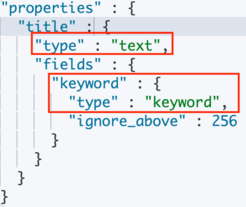
- 自动映射器会为 Text 类型创建 Keyword 字段。
Keyword
Keyword 类型适用于不分词的字段,如姓名、Id、数字等。如果数字类型不用于范围查找,用 Keyword 的性能要高于数值类型。
当使用 Keyword 类型查询时,其字段值会被作为一个整体,并保留字段值的原始属性。
GET index/_search
{
  "query": {
    "match": {
      "title.keyword": "测试文本值"
    }
  }
}
注意事项
- Keyword 不会对文本分词,会保留字段的原有属性,包括大小写等。
- Keyword 仅仅是字段类型,而不会对搜索词产生任何影响。
- Keyword 一般用于需要精确查找的字段,或者聚合排序字段。
- Keyword 通常和 Term 搜索一起用。
- Keyword 字段的 ignore_above 参数代表其截断长度,默认 256,如果超出长度,字段值会被忽略,而不是截断,忽略指的是会忽略这个字段的索引,搜索不到,但数据还是存在的。
JavaAPI
新建Maven工程。
添加依赖:
<dependencies>
    <dependency>
        <groupId>org.elasticsearch</groupId>
        <artifactId>elasticsearch</artifactId>
        <version>7.8.0</version>
    </dependency>
    <!-- elasticsearch 的客户端 -->
    <dependency>
        <groupId>org.elasticsearch.client</groupId>
        <artifactId>elasticsearch-rest-high-level-client</artifactId>
        <version>7.8.0</version>
    </dependency>
    <!-- elasticsearch 依赖 2.x 的 log4j -->
    <dependency>
        <groupId>org.apache.logging.log4j</groupId>
        <artifactId>log4j-api</artifactId>
        <version>2.8.2</version>
    </dependency>
    <dependency>
        <groupId>org.apache.logging.log4j</groupId>
        <artifactId>log4j-core</artifactId>
        <version>2.8.2</version>
    </dependency>
    <dependency>
        <groupId>com.fasterxml.jackson.core</groupId>
        <artifactId>jackson-databind</artifactId>
        <version>2.9.9</version>
    </dependency>
    <!-- junit 单元测试 -->
    <dependency>
        <groupId>junit</groupId>
        <artifactId>junit</artifactId>
        <version>4.12</version>
    </dependency>
</dependencies>
HelloElasticsearch
import java.io.IOException;

import org.apache.http.HttpHost;
import org.elasticsearch.client.RestClient;
import org.elasticsearch.client.RestHighLevelClient;

public class HelloElasticsearch {

    public static void main(String[] args) throws IOException {
        // 创建客户端对象
        RestHighLevelClient client = new RestHighLevelClient(
            RestClient.builder(new HttpHost("localhost", 9200, "http")));
        //		...
        System.out.println(client);

        // 关闭客户端连接
        client.close();
    }
}
索引-创建
import org.apache.http.HttpHost;
import org.elasticsearch.action.admin.indices.create.CreateIndexRequest;
import org.elasticsearch.action.admin.indices.create.CreateIndexResponse;
import org.elasticsearch.client.RequestOptions;
import org.elasticsearch.client.RestClient;
import org.elasticsearch.client.RestHighLevelClient;

import java.io.IOException;

public class CreateIndex {

    public static void main(String[] args) throws IOException {
        // 创建客户端对象
        RestHighLevelClient client = new RestHighLevelClient(
                RestClient.builder(new HttpHost("localhost", 9200, "http")));

        // 创建索引 - 请求对象
        CreateIndexRequest request = new CreateIndexRequest("user2");
        // 发送请求,获取响应
        CreateIndexResponse response = client.indices().create(request,
                RequestOptions.DEFAULT);
        boolean acknowledged = response.isAcknowledged();
        // 响应状态
        System.out.println("操作状态 = " + acknowledged);

        // 关闭客户端连接
        client.close();
    }

}

四月 09, 2021 2:12:08 下午 org.elasticsearch.client.RestClient logResponse
警告: request [PUT http://localhost:9200/user2?master_timeout=30s&include_type_name=true&timeout=30s] returned 1 warnings: [299 Elasticsearch-7.8.0-757314695644ea9a1dc2fecd26d1a43856725e65 "[types removal] Using include_type_name in create index requests is deprecated. The parameter will be removed in the next major version."]
操作状态 = true

Process finished with exit code 0
索引-查询 & 删除
查询
import org.apache.http.HttpHost;

import org.elasticsearch.client.RequestOptions;
import org.elasticsearch.client.RestClient;
import org.elasticsearch.client.RestHighLevelClient;
import org.elasticsearch.client.indices.GetIndexRequest;
import org.elasticsearch.client.indices.GetIndexResponse;

import java.io.IOException;

public class SearchIndex {
    public static void main(String[] args) throws IOException {
        // 创建客户端对象
        RestHighLevelClient client = new RestHighLevelClient(
                RestClient.builder(new HttpHost("localhost", 9200, "http")));

        // 查询索引 - 请求对象
        GetIndexRequest request = new GetIndexRequest("user2");
        // 发送请求,获取响应
        GetIndexResponse response = client.indices().get(request,
                RequestOptions.DEFAULT);

        System.out.println("aliases:"+response.getAliases());
        System.out.println("mappings:"+response.getMappings());
        System.out.println("settings:"+response.getSettings());

        client.close();
    }
}

aliases:{user2=[]}
mappings:{user2=org.elasticsearch.cluster.metadata.MappingMetadata@ad700514}
settings:{user2={"index.creation_date":"1617948726976","index.number_of_replicas":"1","index.number_of_shards":"1","index.provided_name":"user2","index.uuid":"UGZ1ntcySnK6hWyP2qoVpQ","index.version.created":"7080099"}}

Process finished with exit code 0
删除
import org.apache.http.HttpHost;
import org.elasticsearch.action.admin.indices.delete.DeleteIndexRequest;
import org.elasticsearch.action.support.master.AcknowledgedResponse;
import org.elasticsearch.client.RequestOptions;
import org.elasticsearch.client.RestClient;
import org.elasticsearch.client.RestHighLevelClient;

import java.io.IOException;

public class DeleteIndex {
    public static void main(String[] args) throws IOException {
        RestHighLevelClient client = new RestHighLevelClient(
            RestClient.builder(new HttpHost("localhost", 9200, "http")));
        // 删除索引 - 请求对象
        DeleteIndexRequest request = new DeleteIndexRequest("user2");
        // 发送请求,获取响应
        AcknowledgedResponse response = client.indices().delete(request,RequestOptions.DEFAULT);
        // 操作结果
        System.out.println("操作结果 : " + response.isAcknowledged());
        client.close();
    }
}

操作结果 : true

Process finished with exit code 0
文档-新增 & 修改
import org.elasticsearch.client.RestHighLevelClient;

public interface ElasticsearchTask {

    void doSomething(RestHighLevelClient client) throws Exception;

}
public class ConnectElasticsearch{
public static void connect(ElasticsearchTask task){
// 创建客户端对象
RestHighLevelClient client = new RestHighLevelClient(
RestClient.builder(new HttpHost("localhost", 9200, "http")));
try {
task.doSomething(client);
// 关闭客户端连接
client.close();
} catch (Exception e) {
e.printStackTrace();
}
}
}
接下来,如果想让Elasticsearch完成一些操作,就编写一个lambda式即可。
public class SomeClass {

    public static void main(String[] args) {
        ConnectElasticsearch.connect(client -> {
			//do something
        });
    }
}
新增
import com.fasterxml.jackson.databind.ObjectMapper;
import com.lun.elasticsearch.hello.ConnectElasticsearch;
import com.lun.elasticsearch.model.User;
import org.elasticsearch.action.index.IndexRequest;
import org.elasticsearch.action.index.IndexResponse;
import org.elasticsearch.client.RequestOptions;
import org.elasticsearch.common.xcontent.XContentType;

public class InsertDoc {

    public static void main(String[] args) {
        ConnectElasticsearch.connect(client -> {
            // 新增文档 - 请求对象
            IndexRequest request = new IndexRequest();
            // 设置索引及唯一性标识
            request.index("user").id("1001");

            // 创建数据对象
            User user = new User();
            user.setName("zhangsan");
            user.setAge(30);
            user.setSex("男");

            ObjectMapper objectMapper = new ObjectMapper();
            String productJson = objectMapper.writeValueAsString(user);
            // 添加文档数据,数据格式为 JSON 格式
            request.source(productJson, XContentType.JSON);
            // 客户端发送请求,获取响应对象
            IndexResponse response = client.index(request, RequestOptions.DEFAULT);
            3.打印结果信息
            System.out.println("_index:" + response.getIndex());
            System.out.println("_id:" + response.getId());
            System.out.println("_result:" + response.getResult());
        });
    }
}
_index:user
_id:1001
_result:UPDATED

Process finished with exit code 0
修改
import com.lun.elasticsearch.hello.ConnectElasticsearch;
import org.elasticsearch.action.update.UpdateRequest;
import org.elasticsearch.action.update.UpdateResponse;
import org.elasticsearch.client.RequestOptions;
import org.elasticsearch.common.xcontent.XContentType;

public class UpdateDoc {

    public static void main(String[] args) {
        ConnectElasticsearch.connect(client -> {
            // 修改文档 - 请求对象
            UpdateRequest request = new UpdateRequest();
            // 配置修改参数
            request.index("user").id("1001");
            // 设置请求体,对数据进行修改
            request.doc(XContentType.JSON, "sex", "女");
            // 客户端发送请求,获取响应对象
            UpdateResponse response = client.update(request, RequestOptions.DEFAULT);
            System.out.println("_index:" + response.getIndex());
            System.out.println("_id:" + response.getId());
            System.out.println("_result:" + response.getResult());
        });
    }

}

_index:user
_id:1001
_result:UPDATED

Process finished with exit code 0
文档-查询 & 删除
查询
import com.lun.elasticsearch.hello.ConnectElasticsearch;
import org.elasticsearch.action.get.GetRequest;
import org.elasticsearch.action.get.GetResponse;
import org.elasticsearch.client.RequestOptions;

public class GetDoc {

    public static void main(String[] args) {
        ConnectElasticsearch.connect(client -> {
            //1.创建请求对象
            GetRequest request = new GetRequest().index("user").id("1001");
            //2.客户端发送请求,获取响应对象
            GetResponse response = client.get(request, RequestOptions.DEFAULT);
            3.打印结果信息
            System.out.println("_index:" + response.getIndex());
            System.out.println("_type:" + response.getType());
            System.out.println("_id:" + response.getId());
            System.out.println("source:" + response.getSourceAsString());
        });
    }
}

_index:user
_type:_doc
_id:1001
source:{"name":"zhangsan","age":30,"sex":"男"}

Process finished with exit code 0
删除
import com.lun.elasticsearch.hello.ConnectElasticsearch;
import org.elasticsearch.action.delete.DeleteRequest;
import org.elasticsearch.action.delete.DeleteResponse;
import org.elasticsearch.client.RequestOptions;

public class DeleteDoc {
    public static void main(String[] args) {
        ConnectElasticsearch.connect(client -> {
            //创建请求对象
            DeleteRequest request = new DeleteRequest().index("user").id("1001");
            //客户端发送请求,获取响应对象
            DeleteResponse response = client.delete(request, RequestOptions.DEFAULT);
            //打印信息
            System.out.println(response.toString());
        });
    }
}
DeleteResponse[index=user,type=_doc,id=1001,version=16,result=deleted,shards=ShardInfo{total=2, successful=1, failures=[]}]

Process finished with exit code 0
文档-批量新增 & 批量删除
批量新增
import com.lun.elasticsearch.hello.ConnectElasticsearch;
import org.elasticsearch.action.bulk.BulkRequest;
import org.elasticsearch.action.bulk.BulkResponse;
import org.elasticsearch.action.index.IndexRequest;
import org.elasticsearch.client.RequestOptions;
import org.elasticsearch.common.xcontent.XContentType;

public class BatchInsertDoc {

    public static void main(String[] args) {
        ConnectElasticsearch.connect(client -> {
            //创建批量新增请求对象
            BulkRequest request = new BulkRequest();
            request.add(new
                        IndexRequest().index("user").id("1001").source(XContentType.JSON, "name",
                                                                       "zhangsan"));
            request.add(new
                        IndexRequest().index("user").id("1002").source(XContentType.JSON, "name",
                                                                       "lisi"));
            request.add(new
                        IndexRequest().index("user").id("1003").source(XContentType.JSON, "name",
                                                                       "wangwu"));
            //客户端发送请求,获取响应对象
            BulkResponse responses = client.bulk(request, RequestOptions.DEFAULT);
            //打印结果信息
            System.out.println("took:" + responses.getTook());
            System.out.println("items:" + responses.getItems());
        });
    }
}
took:294ms
items:[Lorg.elasticsearch.action.bulk.BulkItemResponse;@2beee7ff

Process finished with exit code 0
批量删除
import com.lun.elasticsearch.hello.ConnectElasticsearch;
import org.elasticsearch.action.bulk.BulkRequest;
import org.elasticsearch.action.bulk.BulkResponse;
import org.elasticsearch.action.delete.DeleteRequest;
import org.elasticsearch.client.RequestOptions;

public class BatchDeleteDoc {
    public static void main(String[] args) {
        ConnectElasticsearch.connect(client -> {
            //创建批量删除请求对象
            BulkRequest request = new BulkRequest();
            request.add(new DeleteRequest().index("user").id("1001"));
            request.add(new DeleteRequest().index("user").id("1002"));
            request.add(new DeleteRequest().index("user").id("1003"));
            //客户端发送请求,获取响应对象
            BulkResponse responses = client.bulk(request, RequestOptions.DEFAULT);
            //打印结果信息
            System.out.println("took:" + responses.getTook());
            System.out.println("items:" + responses.getItems());
        });
    }
}
took:108ms
items:[Lorg.elasticsearch.action.bulk.BulkItemResponse;@7b02881e

Process finished with exit code 0
文档-高级查询-全量查询
先批量增加数据
public class BatchInsertDoc {

    public static void main(String[] args) {
        ConnectElasticsearch.connect(client -> {
            //创建批量新增请求对象
            BulkRequest request = new BulkRequest();
            request.add(new IndexRequest().index("user").id("1001").source(XContentType.JSON, "name", "zhangsan", "age", "10", "sex","女"));
            request.add(new IndexRequest().index("user").id("1002").source(XContentType.JSON, "name", "lisi", "age", "30", "sex","女"));
            request.add(new IndexRequest().index("user").id("1003").source(XContentType.JSON, "name", "wangwu1", "age", "40", "sex","男"));
            request.add(new IndexRequest().index("user").id("1004").source(XContentType.JSON, "name", "wangwu2", "age", "20", "sex","女"));
            request.add(new IndexRequest().index("user").id("1005").source(XContentType.JSON, "name", "wangwu3", "age", "50", "sex","男"));
            request.add(new IndexRequest().index("user").id("1006").source(XContentType.JSON, "name", "wangwu4", "age", "20", "sex","男"));
            //客户端发送请求,获取响应对象
            BulkResponse responses = client.bulk(request, RequestOptions.DEFAULT);
            //打印结果信息
            System.out.println("took:" + responses.getTook());
            System.out.println("items:" + responses.getItems());
        });
    }
}

took:168ms
items:[Lorg.elasticsearch.action.bulk.BulkItemResponse;@2beee7ff

Process finished with exit code 0
查询所有索引数据
import com.lun.elasticsearch.hello.ConnectElasticsearch;
import org.elasticsearch.action.search.SearchRequest;
import org.elasticsearch.action.search.SearchResponse;
import org.elasticsearch.client.RequestOptions;
import org.elasticsearch.index.query.QueryBuilders;
import org.elasticsearch.search.SearchHit;
import org.elasticsearch.search.SearchHits;
import org.elasticsearch.search.builder.SearchSourceBuilder;

public class QueryDoc {

    public static void main(String[] args) {
        ConnectElasticsearch.connect(client -> {
            // 创建搜索请求对象
            SearchRequest request = new SearchRequest();
            request.indices("user");
            // 构建查询的请求体
            SearchSourceBuilder sourceBuilder = new SearchSourceBuilder();
            // 查询所有数据
            sourceBuilder.query(QueryBuilders.matchAllQuery());
            request.source(sourceBuilder);
            SearchResponse response = client.search(request, RequestOptions.DEFAULT);
            // 查询匹配
            SearchHits hits = response.getHits();
            System.out.println("took:" + response.getTook());
            System.out.println("timeout:" + response.isTimedOut());
            System.out.println("total:" + hits.getTotalHits());
            System.out.println("MaxScore:" + hits.getMaxScore());
            System.out.println("hits========>>");
            for (SearchHit hit : hits) {
                //输出每条查询的结果信息
                System.out.println(hit.getSourceAsString());
            }
            System.out.println("<<========");
        });
    }

}
took:2ms
timeout:false
total:6 hits
MaxScore:1.0
hits========>>
{"name":"zhangsan","age":"10","sex":"女"}
{"name":"lisi","age":"30","sex":"女"}
{"name":"wangwu1","age":"40","sex":"男"}
{"name":"wangwu2","age":"20","sex":"女"}
{"name":"wangwu3","age":"50","sex":"男"}
{"name":"wangwu4","age":"20","sex":"男"}
<<========

Process finished with exit code 0
文档-高级查询-分页查询 & 条件查询 & 查询排序
条件查询
import com.lun.elasticsearch.hello.ConnectElasticsearch;
import com.lun.elasticsearch.hello.ElasticsearchTask;
import org.elasticsearch.action.search.SearchRequest;
import org.elasticsearch.action.search.SearchResponse;
import org.elasticsearch.client.RequestOptions;
import org.elasticsearch.index.query.QueryBuilders;
import org.elasticsearch.search.SearchHit;
import org.elasticsearch.search.SearchHits;
import org.elasticsearch.search.builder.SearchSourceBuilder;
import org.elasticsearch.search.sort.SortOrder;

public class QueryDoc {

    public static final ElasticsearchTask SEARCH_BY_CONDITION = client -> {
        // 创建搜索请求对象
        SearchRequest request = new SearchRequest();
        request.indices("user");
        // 构建查询的请求体
        SearchSourceBuilder sourceBuilder = new SearchSourceBuilder();
        sourceBuilder.query(QueryBuilders.termQuery("age", "30"));
        request.source(sourceBuilder);
        SearchResponse response = client.search(request, RequestOptions.DEFAULT);
        // 查询匹配
        SearchHits hits = response.getHits();
        System.out.println("took:" + response.getTook());
        System.out.println("timeout:" + response.isTimedOut());
        System.out.println("total:" + hits.getTotalHits());
        System.out.println("MaxScore:" + hits.getMaxScore());
        System.out.println("hits========>>");
        for (SearchHit hit : hits) {
            //输出每条查询的结果信息
            System.out.println(hit.getSourceAsString());
        }
        System.out.println("<<========");
    };

    public static void main(String[] args) {
        ConnectElasticsearch.connect(SEARCH_BY_CONDITION);
    }
}
took:1ms
timeout:false
total:1 hits
MaxScore:1.0
hits========>>
{"name":"lisi","age":"30","sex":"女"}
<<========
分页查询
import com.lun.elasticsearch.hello.ConnectElasticsearch;
import com.lun.elasticsearch.hello.ElasticsearchTask;
import org.elasticsearch.action.search.SearchRequest;
import org.elasticsearch.action.search.SearchResponse;
import org.elasticsearch.client.RequestOptions;
import org.elasticsearch.index.query.QueryBuilders;
import org.elasticsearch.search.SearchHit;
import org.elasticsearch.search.SearchHits;
import org.elasticsearch.search.builder.SearchSourceBuilder;
import org.elasticsearch.search.sort.SortOrder;

public class QueryDoc {

	public static final ElasticsearchTask SEARCH_BY_PAGING = client -> {
        // 创建搜索请求对象
        SearchRequest request = new SearchRequest();
        request.indices("user");
        // 构建查询的请求体
        SearchSourceBuilder sourceBuilder = new SearchSourceBuilder();
        sourceBuilder.query(QueryBuilders.matchAllQuery());
        // 分页查询
        // 当前页其实索引(第一条数据的顺序号), from
        sourceBuilder.from(0);

        // 每页显示多少条 size
        sourceBuilder.size(2);
        request.source(sourceBuilder);
        SearchResponse response = client.search(request, RequestOptions.DEFAULT);
        // 查询匹配
        SearchHits hits = response.getHits();
        System.out.println("took:" + response.getTook());
        System.out.println("timeout:" + response.isTimedOut());
        System.out.println("total:" + hits.getTotalHits());
        System.out.println("MaxScore:" + hits.getMaxScore());
        System.out.println("hits========>>");
        for (SearchHit hit : hits) {
            //输出每条查询的结果信息
            System.out.println(hit.getSourceAsString());
        }
        System.out.println("<<========");
    };

    public static void main(String[] args) {
        ConnectElasticsearch.connect(SEARCH_BY_CONDITION);
    }

}
took:1ms
timeout:false
total:6 hits
MaxScore:1.0
hits========>>
{"name":"zhangsan","age":"10","sex":"女"}
{"name":"lisi","age":"30","sex":"女"}
<<========
查询排序
import com.lun.elasticsearch.hello.ConnectElasticsearch;
import com.lun.elasticsearch.hello.ElasticsearchTask;
import org.elasticsearch.action.search.SearchRequest;
import org.elasticsearch.action.search.SearchResponse;
import org.elasticsearch.client.RequestOptions;
import org.elasticsearch.index.query.QueryBuilders;
import org.elasticsearch.search.SearchHit;
import org.elasticsearch.search.SearchHits;
import org.elasticsearch.search.builder.SearchSourceBuilder;
import org.elasticsearch.search.sort.SortOrder;

public class QueryDoc {

	public static final ElasticsearchTask SEARCH_WITH_ORDER = client -> {
        // 创建搜索请求对象
        SearchRequest request = new SearchRequest();
        request.indices("user");

        // 构建查询的请求体
        SearchSourceBuilder sourceBuilder = new SearchSourceBuilder();
        sourceBuilder.query(QueryBuilders.matchAllQuery());
        // 排序
        sourceBuilder.sort("age", SortOrder.ASC);
        request.source(sourceBuilder);
        SearchResponse response = client.search(request, RequestOptions.DEFAULT);
        // 查询匹配
        SearchHits hits = response.getHits();
        System.out.println("took:" + response.getTook());
        System.out.println("timeout:" + response.isTimedOut());
        System.out.println("total:" + hits.getTotalHits());
        System.out.println("MaxScore:" + hits.getMaxScore());
        System.out.println("hits========>>");
        for (SearchHit hit : hits) {
        //输出每条查询的结果信息
            System.out.println(hit.getSourceAsString());
        }
        System.out.println("<<========");
    };

    public static void main(String[] args) {
        ConnectElasticsearch.connect(SEARCH_WITH_ORDER);
    }

}

took:1ms
timeout:false
total:6 hits
MaxScore:NaN
hits========>>
{"name":"zhangsan","age":"10","sex":"女"}
{"name":"wangwu2","age":"20","sex":"女"}
{"name":"wangwu4","age":"20","sex":"男"}
{"name":"lisi","age":"30","sex":"女"}
{"name":"wangwu1","age":"40","sex":"男"}
{"name":"wangwu3","age":"50","sex":"男"}
<<========
高级查询-组合查询 & 范围查询
组合查询
import com.lun.elasticsearch.hello.ConnectElasticsearch;
import com.lun.elasticsearch.hello.ElasticsearchTask;
import org.elasticsearch.action.search.SearchRequest;
import org.elasticsearch.action.search.SearchResponse;
import org.elasticsearch.client.RequestOptions;
import org.elasticsearch.index.query.BoolQueryBuilder;
import org.elasticsearch.index.query.QueryBuilders;
import org.elasticsearch.search.SearchHit;
import org.elasticsearch.search.SearchHits;
import org.elasticsearch.search.builder.SearchSourceBuilder;
import org.elasticsearch.search.sort.SortOrder;

public class QueryDoc {

	public static final ElasticsearchTask SEARCH_BY_BOOL_CONDITION = client -> {
        // 创建搜索请求对象
        SearchRequest request = new SearchRequest();
        request.indices("user");
        // 构建查询的请求体
        SearchSourceBuilder sourceBuilder = new SearchSourceBuilder();
        BoolQueryBuilder boolQueryBuilder = QueryBuilders.boolQuery();
        // 必须包含
        boolQueryBuilder.must(QueryBuilders.matchQuery("age", "30"));
        // 一定不含
        boolQueryBuilder.mustNot(QueryBuilders.matchQuery("name", "zhangsan"));
        // 可能包含
        boolQueryBuilder.should(QueryBuilders.matchQuery("sex", "男"));
        sourceBuilder.query(boolQueryBuilder);
        request.source(sourceBuilder);
        SearchResponse response = client.search(request, RequestOptions.DEFAULT);
        // 查询匹配
        SearchHits hits = response.getHits();
        System.out.println("took:" + response.getTook());
        System.out.println("timeout:" + response.isTimedOut());
        System.out.println("total:" + hits.getTotalHits());
        System.out.println("MaxScore:" + hits.getMaxScore());
        System.out.println("hits========>>");
        for (SearchHit hit : hits) {
            //输出每条查询的结果信息
            System.out.println(hit.getSourceAsString());
        }
        System.out.println("<<========");

    };

    public static void main(String[] args) {
        ConnectElasticsearch.connect(SEARCH_BY_BOOL_CONDITION);
    }
}
took:28ms
timeout:false
total:1 hits
MaxScore:1.0
hits========>>
{"name":"lisi","age":"30","sex":"女"}
<<========

Process finished with exit code 0
范围查询
import com.lun.elasticsearch.hello.ConnectElasticsearch;
import com.lun.elasticsearch.hello.ElasticsearchTask;
import org.elasticsearch.action.search.SearchRequest;
import org.elasticsearch.action.search.SearchResponse;
import org.elasticsearch.client.RequestOptions;
import org.elasticsearch.index.query.BoolQueryBuilder;
import org.elasticsearch.index.query.QueryBuilders;
import org.elasticsearch.index.query.RangeQueryBuilder;
import org.elasticsearch.search.SearchHit;
import org.elasticsearch.search.SearchHits;
import org.elasticsearch.search.builder.SearchSourceBuilder;
import org.elasticsearch.search.sort.SortOrder;

public class QueryDoc {

	public static final ElasticsearchTask SEARCH_BY_RANGE = client -> {
        // 创建搜索请求对象
        SearchRequest request = new SearchRequest();
        request.indices("user");
        // 构建查询的请求体
        SearchSourceBuilder sourceBuilder = new SearchSourceBuilder();
        RangeQueryBuilder rangeQuery = QueryBuilders.rangeQuery("age");
        // 大于等于
        //rangeQuery.gte("30");
        // 小于等于
        rangeQuery.lte("40");
        sourceBuilder.query(rangeQuery);
        request.source(sourceBuilder);
        SearchResponse response = client.search(request, RequestOptions.DEFAULT);
        // 查询匹配
        SearchHits hits = response.getHits();
        System.out.println("took:" + response.getTook());
        System.out.println("timeout:" + response.isTimedOut());
        System.out.println("total:" + hits.getTotalHits());
        System.out.println("MaxScore:" + hits.getMaxScore());
        System.out.println("hits========>>");
        for (SearchHit hit : hits) {
        //输出每条查询的结果信息
            System.out.println(hit.getSourceAsString());
        }
        System.out.println("<<========");
    };

    public static void main(String[] args) {
        ConnectElasticsearch.connect(SEARCH_BY_RANGE);
    }

}
took:1ms
timeout:false
total:5 hits
MaxScore:1.0
hits========>>
{"name":"zhangsan","age":"10","sex":"女"}
{"name":"lisi","age":"30","sex":"女"}
{"name":"wangwu1","age":"40","sex":"男"}
{"name":"wangwu2","age":"20","sex":"女"}
{"name":"wangwu4","age":"20","sex":"男"}
<<========

Process finished with exit code 0
高级查询-模糊查询 & 高亮查询
模糊查询
import com.lun.elasticsearch.hello.ConnectElasticsearch;
import com.lun.elasticsearch.hello.ElasticsearchTask;
import org.elasticsearch.action.search.SearchRequest;
import org.elasticsearch.action.search.SearchResponse;
import org.elasticsearch.client.RequestOptions;
import org.elasticsearch.common.unit.Fuzziness;
import org.elasticsearch.index.query.BoolQueryBuilder;
import org.elasticsearch.index.query.QueryBuilders;
import org.elasticsearch.index.query.RangeQueryBuilder;
import org.elasticsearch.search.SearchHit;
import org.elasticsearch.search.SearchHits;
import org.elasticsearch.search.builder.SearchSourceBuilder;
import org.elasticsearch.search.sort.SortOrder;

public class QueryDoc {

    public static final ElasticsearchTask SEARCH_BY_FUZZY_CONDITION = client -> {
        // 创建搜索请求对象
        SearchRequest request = new SearchRequest();
        request.indices("user");
        // 构建查询的请求体
        SearchSourceBuilder sourceBuilder = new SearchSourceBuilder();
        sourceBuilder.query(QueryBuilders.fuzzyQuery("name","wangwu").fuzziness(Fuzziness.ONE));
        request.source(sourceBuilder);
        SearchResponse response = client.search(request, RequestOptions.DEFAULT);
        // 查询匹配
        SearchHits hits = response.getHits();
        System.out.println("took:" + response.getTook());
        System.out.println("timeout:" + response.isTimedOut());
        System.out.println("total:" + hits.getTotalHits());
        System.out.println("MaxScore:" + hits.getMaxScore());
        System.out.println("hits========>>");
        for (SearchHit hit : hits) {
            //输出每条查询的结果信息
            System.out.println(hit.getSourceAsString());
        }
        System.out.println("<<========");
    };


    public static void main(String[] args) {
//        ConnectElasticsearch.connect(SEARCH_ALL);
//        ConnectElasticsearch.connect(SEARCH_BY_CONDITION);
//        ConnectElasticsearch.connect(SEARCH_BY_PAGING);
//        ConnectElasticsearch.connect(SEARCH_WITH_ORDER);
//        ConnectElasticsearch.connect(SEARCH_BY_BOOL_CONDITION);
//        ConnectElasticsearch.connect(SEARCH_BY_RANGE);
        ConnectElasticsearch.connect(SEARCH_BY_FUZZY_CONDITION);
    }

}

took:152ms
timeout:false
total:4 hits
MaxScore:1.2837042
hits========>>
{"name":"wangwu1","age":"40","sex":"男"}
{"name":"wangwu2","age":"20","sex":"女"}
{"name":"wangwu3","age":"50","sex":"男"}
{"name":"wangwu4","age":"20","sex":"男"}
<<========

Process finished with exit code 0
高亮查询
import com.lun.elasticsearch.hello.ConnectElasticsearch;
import com.lun.elasticsearch.hello.ElasticsearchTask;
import org.elasticsearch.action.search.SearchRequest;
import org.elasticsearch.action.search.SearchResponse;
import org.elasticsearch.client.RequestOptions;
import org.elasticsearch.common.unit.Fuzziness;
import org.elasticsearch.index.query.BoolQueryBuilder;
import org.elasticsearch.index.query.QueryBuilders;
import org.elasticsearch.index.query.RangeQueryBuilder;
import org.elasticsearch.index.query.TermsQueryBuilder;
import org.elasticsearch.search.SearchHit;
import org.elasticsearch.search.SearchHits;
import org.elasticsearch.search.builder.SearchSourceBuilder;
import org.elasticsearch.search.fetch.subphase.highlight.HighlightBuilder;
import org.elasticsearch.search.fetch.subphase.highlight.HighlightField;
import org.elasticsearch.search.sort.SortOrder;

import java.util.Map;

public class QueryDoc {

    public static final ElasticsearchTask SEARCH_WITH_HIGHLIGHT = client -> {
        // 高亮查询
        SearchRequest request = new SearchRequest().indices("user");
        //2.创建查询请求体构建器
        SearchSourceBuilder sourceBuilder = new SearchSourceBuilder();
        //构建查询方式:高亮查询
        TermsQueryBuilder termsQueryBuilder =
        QueryBuilders.termsQuery("name","zhangsan");
        //设置查询方式
        sourceBuilder.query(termsQueryBuilder);
        //构建高亮字段
        HighlightBuilder highlightBuilder = new HighlightBuilder();
        highlightBuilder.preTags("<font color='red'>");//设置标签前缀
        highlightBuilder.postTags("</font>");//设置标签后缀
        highlightBuilder.field("name");//设置高亮字段
        //设置高亮构建对象
        sourceBuilder.highlighter(highlightBuilder);
        //设置请求体
        request.source(sourceBuilder);
        //3.客户端发送请求,获取响应对象
        SearchResponse response = client.search(request, RequestOptions.DEFAULT);
        //4.打印响应结果
        SearchHits hits = response.getHits();
        System.out.println("took::"+response.getTook());
        System.out.println("time_out::"+response.isTimedOut());
        System.out.println("total::"+hits.getTotalHits());
        System.out.println("max_score::"+hits.getMaxScore());
        System.out.println("hits::::>>");
        for (SearchHit hit : hits) {
            String sourceAsString = hit.getSourceAsString();
            System.out.println(sourceAsString);
            //打印高亮结果
            Map<String, HighlightField> highlightFields = hit.getHighlightFields();
            System.out.println(highlightFields);
        }
        System.out.println("<<::::");
    };


    public static void main(String[] args) {
        ConnectElasticsearch.connect(SEARCH_WITH_HIGHLIGHT);
    }

}
took::672ms
time_out::false
total::1 hits
max_score::1.0
hits::::>>
{"name":"zhangsan","age":"10","sex":"女"}
{name=[name], fragments[[<font color='red'>zhangsan</font>]]}
<<::::

Process finished with exit code 0
文档-高级查询-最大值查询 & 分组查询
最大值查询
import com.lun.elasticsearch.hello.ConnectElasticsearch;
import com.lun.elasticsearch.hello.ElasticsearchTask;
import org.elasticsearch.action.search.SearchRequest;
import org.elasticsearch.action.search.SearchResponse;
import org.elasticsearch.client.RequestOptions;
import org.elasticsearch.common.unit.Fuzziness;
import org.elasticsearch.index.query.BoolQueryBuilder;
import org.elasticsearch.index.query.QueryBuilders;
import org.elasticsearch.index.query.RangeQueryBuilder;
import org.elasticsearch.index.query.TermsQueryBuilder;
import org.elasticsearch.search.SearchHit;
import org.elasticsearch.search.SearchHits;
import org.elasticsearch.search.aggregations.AggregationBuilders;
import org.elasticsearch.search.builder.SearchSourceBuilder;
import org.elasticsearch.search.fetch.subphase.highlight.HighlightBuilder;
import org.elasticsearch.search.fetch.subphase.highlight.HighlightField;
import org.elasticsearch.search.sort.SortOrder;

import java.util.Map;

public class QueryDoc {

    public static final ElasticsearchTask SEARCH_WITH_MAX = client -> {
        // 高亮查询
        SearchRequest request = new SearchRequest().indices("user");
        SearchSourceBuilder sourceBuilder = new SearchSourceBuilder();
        sourceBuilder.aggregation(AggregationBuilders.max("maxAge").field("age"));
        //设置请求体
        request.source(sourceBuilder);
        //3.客户端发送请求,获取响应对象
        SearchResponse response = client.search(request, RequestOptions.DEFAULT);
        //4.打印响应结果
        SearchHits hits = response.getHits();
        System.out.println(response);
    };

    public static void main(String[] args) {
        ConnectElasticsearch.connect(SEARCH_WITH_MAX);
    }

}

{"took":16,"timed_out":false,"_shards":{"total":1,"successful":1,"skipped":0,"failed":0},"hits":{"total":{"value":6,"relation":"eq"},"max_score":1.0,"hits":[{"_index":"user","_type":"_doc","_id":"1001","_score":1.0,"_source":{"name":"zhangsan","age":"10","sex":"女"}},{"_index":"user","_type":"_doc","_id":"1002","_score":1.0,"_source":{"name":"lisi","age":"30","sex":"女"}},{"_index":"user","_type":"_doc","_id":"1003","_score":1.0,"_source":{"name":"wangwu1","age":"40","sex":"男"}},{"_index":"user","_type":"_doc","_id":"1004","_score":1.0,"_source":{"name":"wangwu2","age":"20","sex":"女"}},{"_index":"user","_type":"_doc","_id":"1005","_score":1.0,"_source":{"name":"wangwu3","age":"50","sex":"男"}},{"_index":"user","_type":"_doc","_id":"1006","_score":1.0,"_source":{"name":"wangwu4","age":"20","sex":"男"}}]},"aggregations":{"max#maxAge":{"value":50.0}}}

Process finished with exit code 0
分组查询
import com.lun.elasticsearch.hello.ConnectElasticsearch;
import com.lun.elasticsearch.hello.ElasticsearchTask;
import org.elasticsearch.action.search.SearchRequest;
import org.elasticsearch.action.search.SearchResponse;
import org.elasticsearch.client.RequestOptions;
import org.elasticsearch.common.unit.Fuzziness;
import org.elasticsearch.index.query.BoolQueryBuilder;
import org.elasticsearch.index.query.QueryBuilders;
import org.elasticsearch.index.query.RangeQueryBuilder;
import org.elasticsearch.index.query.TermsQueryBuilder;
import org.elasticsearch.search.SearchHit;
import org.elasticsearch.search.SearchHits;
import org.elasticsearch.search.aggregations.AggregationBuilders;
import org.elasticsearch.search.builder.SearchSourceBuilder;
import org.elasticsearch.search.fetch.subphase.highlight.HighlightBuilder;
import org.elasticsearch.search.fetch.subphase.highlight.HighlightField;
import org.elasticsearch.search.sort.SortOrder;

import java.util.Map;

public class QueryDoc {

	public static final ElasticsearchTask SEARCH_WITH_GROUP = client -> {
        SearchRequest request = new SearchRequest().indices("user");
        SearchSourceBuilder sourceBuilder = new SearchSourceBuilder();
        sourceBuilder.aggregation(AggregationBuilders.terms("age_groupby").field("age"));
        //设置请求体
        request.source(sourceBuilder);
        //3.客户端发送请求,获取响应对象
        SearchResponse response = client.search(request, RequestOptions.DEFAULT);
        //4.打印响应结果
        SearchHits hits = response.getHits();
        System.out.println(response);
    };

    public static void main(String[] args) {
        ConnectElasticsearch.connect(SEARCH_WITH_GROUP);
    }

}
{"took":10,"timed_out":false,"_shards":{"total":1,"successful":1,"skipped":0,"failed":0},"hits":{"total":{"value":6,"relation":"eq"},"max_score":1.0,"hits":[{"_index":"user","_type":"_doc","_id":"1001","_score":1.0,"_source":{"name":"zhangsan","age":"10","sex":"女"}},{"_index":"user","_type":"_doc","_id":"1002","_score":1.0,"_source":{"name":"lisi","age":"30","sex":"女"}},{"_index":"user","_type":"_doc","_id":"1003","_score":1.0,"_source":{"name":"wangwu1","age":"40","sex":"男"}},{"_index":"user","_type":"_doc","_id":"1004","_score":1.0,"_source":{"name":"wangwu2","age":"20","sex":"女"}},{"_index":"user","_type":"_doc","_id":"1005","_score":1.0,"_source":{"name":"wangwu3","age":"50","sex":"男"}},{"_index":"user","_type":"_doc","_id":"1006","_score":1.0,"_source":{"name":"wangwu4","age":"20","sex":"男"}}]},"aggregations":{"lterms#age_groupby":{"doc_count_error_upper_bound":0,"sum_other_doc_count":0,"buckets":[{"key":20,"doc_count":2},{"key":10,"doc_count":1},{"key":30,"doc_count":1},{"key":40,"doc_count":1},{"key":50,"doc_count":1}]}}}

Process finished with exit code 0

 浙公网安备 33010602011771号