
android studio 3.0 项目踩坑
一、首先依赖库没有在项目中settings.gradle 声明
include ':app', ':common', ':easypermissions', ':statusbar', ':ninegridview'
二、依赖库有问题
解决办法:添加以来或者重新导入依赖库
三、APP2 出错
原因:file-build-glide 里面service有中文
第二种:gradle.properties的文件尾部添加android.enableAapt2=true
四、Unable to resolve dependency for ':app@debugAndroidTest/compileClasspath': Could not resolve 问题
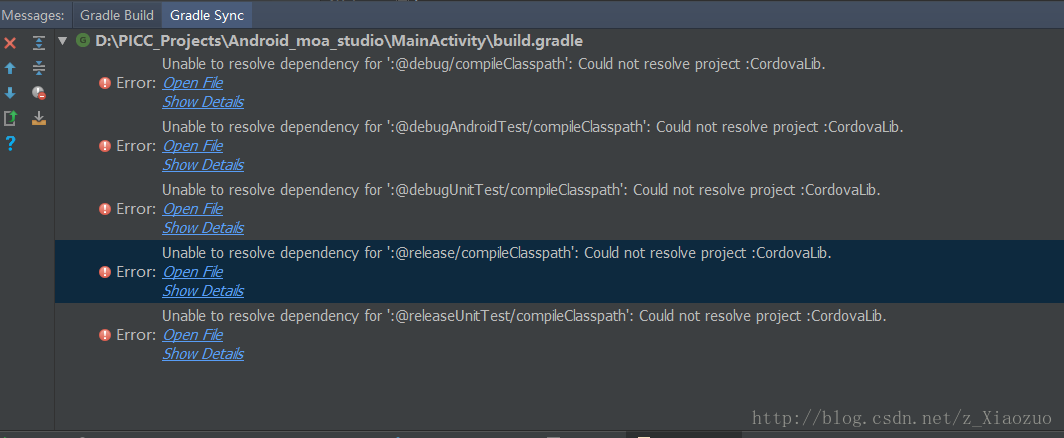
解决方案:
1.android-studio File->Settings->Build, Execution, Deployment->Gradle->Uncheck Offline work option. 不要关闭更新按钮
2.把这种依赖方式
debugCompile project(path: "CordovaLib", configuration: "debug")
releaseCompile project(path: "CordovaLib", configuration: "release") 改成  implementation project(':CordovaLib')


五、![]()

dependencies {
    implementation fileTree(dir: 'libs', include: ['*.jar'])
    implementation 'com.android.support:appcompat-v7:26.1.0'
    implementation 'com.android.support.constraint:constraint-layout:1.1.3'
    testImplementation 'junit:junit:4.12'
    androidTestImplementation 'com.android.support.test:runner:1.0.2'
    androidTestImplementation 'com.android.support.test.espresso:espresso-core:3.0.2'
    androidTestCompile('com.android.support:support-annotations:26.1.0') {
        force = true
    }
}


 浙公网安备 33010602011771号