
SQL语句1.0
数据库A表
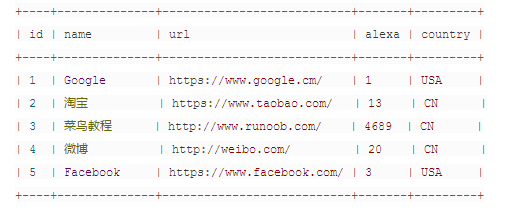
1 查询-select
1.1 select
语句1:select * from A | 打印所有数据
语句2:select name from A | 打印name一列的所有数据
1.2 select distinct
语句:select distinct country from A | 打印country列唯一不同的值,去掉重复值,打印的实际结果为第1、2行
2 条件-where
2.1 where
语句1:select * from A where country='USA' | 打印country为USA的所有数据
语句2:select * from A where id=1 | 打印id为1的所有数据
运算符:=、<>(不等于)、>、<、>=、<=、between...and...(在某个范围内)、like(搜索某个模式)、in(指定针对某个列的多个可能值)
2.2 and & or
2.2.1 and
语句:select * from A where country='CN' and alexa>50 | 打印country为CN并且alexa大于50的数据,打印的实际结果为第3行
2.2.2 or
语句:select * from A where country='CN' or alexa>50 | 打印country为CN或者alexa大于50的数据,打印的实际结果为第2、3、4行
2.2.3 and & or
语句:select * from A where country='CN' and (alexa>50 or alexa>15 ) | 打印country为CN并且alexa大于50或大于15的数据,打印的实际结果为第4、5行
3 排序-order by
3.1 order by
语句:select * from A order by alexa | 打印按alexa列进行正序排序(正序:123456789)
3.2 order by desc
语句:select * from A order by alexa desc | 打印按alexa列进行降序排序(倒序:987654321)
3.3 order by 多列
语句:select * from A order by alexa,country | 打印按alexa列进行降序排序(优先对前面的进行排序,先按alexa排序后再按country)
4 新增-insert into
语句1:insert into A(name, url, alaxe, country) values ('百度', 'https://www.baidu.com/', '4', 'CN') | 新增一条数据,id为自增故不用写入
语句2:insert into A(name, url, country) values ('stackoverflow', 'http://stackoverflow.com/', 'IND') | 新增一条数据,id为自增故不用写入,alexa不写入则为0(数字为0、字符为null)
5 修改-update
语句1:update A set alexa=15, country='USA' where name='百度' | 修改name为百度的数据,修改后alexa为15、country为USA
语句2:update A set alexa=15, country='USA' | 不带条件语句,则将所有的alexa改为15、country改为USA
6 删除-delete
语句1:delete from A where name='百度' | 删除name为百度的所有数据
语句2:delete from A / delete * from A | 删除所有数据
7 选取条数-limit、top、rownum
MySQL语句(limit):select * from A limit 5
SQL Server语句(top):select top 5 from A (top 50 percent/前50%)
Oracle语句(rownum):select * from A where rownum<=5
结果:查询前五条数据
8 包含/不包含模式查询-like
8.1 包含模式
语句1:select * from A where name like '百%' | 查询name以“百”字开头的数据
语句2:select * from A where name like '%百%' | 查询name有“百”字的数据
8.2 不包含模式
语句1:select * from A where name not like '百%' | 查询name不以“百”字开头的数据
语句2:select * from A where name not like '%百%' | 查询name没有“百”字的数据
9 通配符
9.1 %
语句1:select * from A where url like 'http%' | 查询 url 以字母 "https" 开始的所有数据
语句2:select * from A where url like '%oo%' | 查询 url 包含 "oo"的所有数据
9.2 _
语句1:select * from A where name like '_oogle' | 查询name以一个任意字符开始,然后是 "oogle" 的所有数据
语句2:select * from A where name like 'G_o_le' | 查询name以 "G" 开始,然后是一个任意字符,然后是 "o",然后是一个任意字符,然后是 "le" 的所有数据
9.3 [charlist] (MySQL 中使用 REGEXP 或 NOT REGEXP 运算符 (或 RLIKE 和 NOT RLIKE) 来操作正则表达式)
语句1:select * from A where name regexp '^[GFs]' | 查询name 以 "G"、"F" 或 "s" 开始的所有数据
语句2:select * from A where name regexp '^[A-H]' | 查询name 以 A 到 H 字母开头的

 浙公网安备 33010602011771号