

git 使用简书
1.下载,安装git
2.本地配置全局的用户名,邮箱
$ git config --global user.name "Your Name"
$ git config --global user.email "email@example.com"
3.第一步:我们在本地库上使用命令git remote add把它和码云的远程库关联:
git remote add origin +++.git
如果在使用命令git remote add时报错:
![]()

git remote rm origin
git remote add origin +++.git
git remote -v第二步git add .
第三步: git commit -m "wrote a readme file"
第四步: git push -u origin master
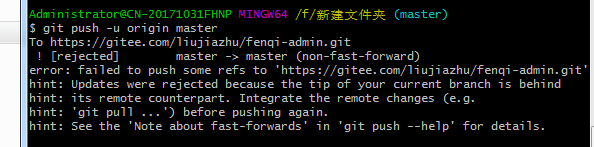
出错原因:
没有先拉取代码再提交,固然导致push不上去
4.第一步:拉取代码:git clone +++.git
第二步:生成公钥 $ ssh-keygen -t rsa -C "+++@qq.com" 一路回车
第三步:在码云上添加你的公钥 标题是随便写 公钥是你 .ssh(进入 cd ~/.ssh 文件夹) 中的 id_rsa.pub (vi 文件名 -- 打开文件) 全部内容
第四步:把修改过得文件上传
git add --all (上传所有文件) , 添加
git commit -m '注释'
git push 推送
git pull 拉取

 浙公网安备 33010602011771号