

通过iPXE安装ubuntu 24.04及无盘启动安装后的ubuntu
一、iPXE安装ubuntu 24 server
1、安装isc dhcpd并配置
1 subnet 10.10.50.0 netmask 255.255.255.0 {
2   interface enp7s0;
3   range 10.10.50.100 10.10.50.200;
4   next-server 10.10.50.1;
5   filename "ipxe.pxe";
6 }
2、安装tftpd-hpa将下载的ipxe.ipxe(自己编译时可以嵌入脚本,官方下载的参考iPXE - 开源启动固件 [howto:dhcpd])放入TFTP_DIRECTORY目录中
3、安装apache2将server.iso挂载到apache2网站目录,如果要复制,不要使用*,里面有隐藏目录复制不出来会引导失败,使用.
<Directory /var/www/>
Options Indexes FollowSymLinks
AllowOverride None
Require all granted
</Directory>
4、参考以下menu.ipxe文件(即3中嵌入的脚本名或自己在dhcp中指定的filename名)中的ubuntuinstall段
#!ipxe
set menu-timeout 16000

:start
  menu iPXE Boot Menu --${platform}--${ip}
  item ubuntuinstall install Ubuntu live
  item nfsubuntu boot Ubuntu by nfs
  item shell enter shell
  choose --timeout ${menu-timeout} --default nfsubuntu option && goto ${option}


:ubuntuinstall
set ubuntu http://10.10.50.1/ubuntu
kernel ${ubuntu}/casper/vmlinuz netboot=nfs nfsroot=10.10.50.1:/var/www/html/ubuntu noprompt showmounts ip=dhcp
initrd ${ubuntu}/casper/initrd
boot

:nfsubuntu
set ubuntu nfs://10.10.50.1/var/www/html/nfsu
kernel ${ubuntu}/boot/vmlinuz root=/dev/nfs  nfsroot=10.10.50.1:/var/www/html/nfsu showmounts ip=10.10.50.150::10.10.50.1:255.255.255.0 rw
initrd ${ubuntu}/boot/initrd.img
boot

:shell
shell
二、iPXE无盘启动一中安装的系统
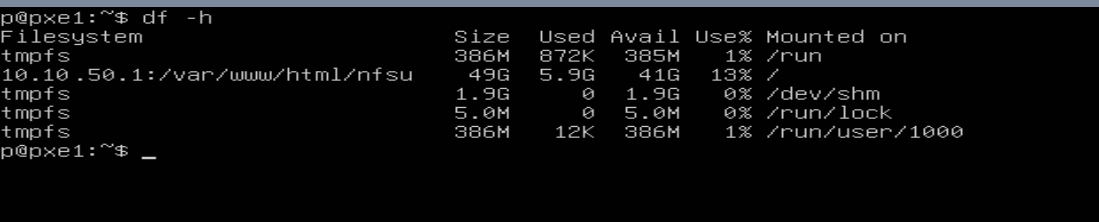
1、安装nfs-kernel-server,将一中安装的硬盘挂载至nfs服务器上,并在/etc/exports中配置
/var/www/html/nfsu 10.232.50.0/24(rw,async,no_subtree_check,no_root_squash)
2、执行exportfs -ar 使配置生效
3、参考一中menu.ipxe文件中的nfsubuntu段
三、效果图


 浙公网安备 33010602011771号