
Vue 快速入门(八)

本节介绍Vue中的ajax方法——Axios
01 - Axios概述
Vue.js 2.0 版本推荐使用 axios 来完成 ajax 请求。
Axios 是一个基于 Promise 的 HTTP 库,可以用在浏览器和 node.js 中。
官方:http://www.axios-js.com/zh-cn/docs/
-
特性
-
从浏览器中创建 XMLHttpRequests
-
从 node.js 创建 http 请求
-
支持 PromiseAPI
-
拦截请求和响应
-
转换请求数据和响应数据
-
取消请求
-
自动转换 JSON 数据
-
客户端支持防御XSRF
02 - 安装和使用
-
安装
1npm i axios
-
使用 CDN:
1<script src="https://unpkg.com/axios/dist/axios.min.js"></script>
或
1<script src="https://cdn.staticfile.org/axios/0.18.0/axios.min.js"></script>
-
GET请求示例
<!DOCTYPE html>
<html lang="en">

<head>
    <meta charset="UTF-8">
    <meta name="viewport" content="width=device-width, initial-scale=1.0">
    <title>Document</title>
</head>

<body>
    <div id="app">
        <ul>
            <li v-for="(item, index) in users">
                {{item}}
            </li>
        </ul>
    </div>
</body>

<script src="./node_modules/vue/dist/vue.js"></script>
<script src="./node_modules/axios/dist/axios.js"></script>

<script>
    //1. 还没有调用getAllUsers方法
    let vm = new Vue({
        el: "#app",
        data() {
            return {
                users:[]
            }
        },
        mounted() {
            this.getAllUsers();
        },
        methods: {
            getAllUsers() {
                axios.get('http://www.weather.com.cn/data/cityinfo/101010100.html'
                    //, {
                    //     params: {
                    //         ID: 12345
                    //     }
                    // }
                    )
                    // 当使用箭头函数  this 指向的是外层
                    .then(response =>{
                        console.log(response.data)
                        this.users=response.data;
                    })
                    .catch(function (error) {
                        console.log(error);
                    });
            }
        },
    })
</script>

</html>
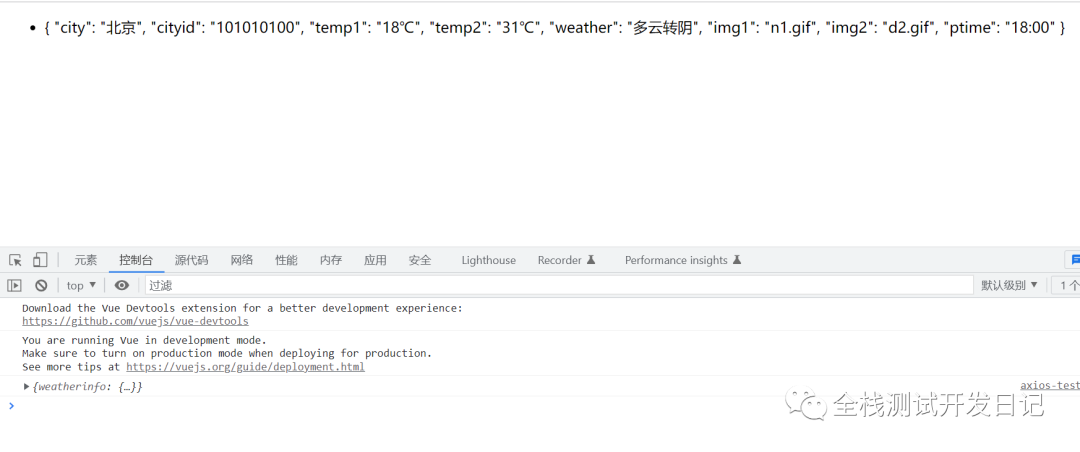
运行结果:
-
POST请求示例
<!DOCTYPE html>
<html lang="en">

<head>
    <meta charset="UTF-8">
    <meta name="viewport" content="width=device-width, initial-scale=1.0">
    <title>Document</title>
</head>

<body>
    <div id="app">
        <ul>
            <li v-for="(item, index) in users">
                {{item}}
            </li>
        </ul>
        <hr>
        <div>这是POST请求</div>
        <ul>
            {{posts}}
        </ul>
    </div>
</body>

<script src="./node_modules/vue/dist/vue.js"></script>
<script src="./node_modules/axios/dist/axios.js"></script>

<script>
    //1. 还没有调用getAllUsers方法
    let vm = new Vue({
        el: "#app",
        data() {
            return {
                users: [],
                posts: null
            }
        },
        mounted() {
            this.getAllUsers();
            this.postAllUsers()
        },
        methods: {
            getAllUsers() {
                axios.get('http://www.weather.com.cn/data/cityinfo/101010100.html'
                    //, {
                    //     params: {
                    //         ID: 12345
                    //     }
                    // }
                )
                    // 当使用箭头函数  this 指向的是外层
                    .then(response => {
                        console.log(response.data)
                        this.users = response.data;
                    })
                    .catch(function (error) {
                        console.log(error);
                    });
            },
            postAllUsers() {
                axios.post('https://httpbin.org/post', {
                    firstName: 'Fred',        // 参数 firstName
                    lastName: 'Flintstone'    // 参数 lastName
                })
                    .then(function (response) {
                        console.log('response' + JSON.stringify(response.data));
                        // 这里使用的是function,所以要用vue实例化变量vm来引用。
                        vm.posts = JSON.stringify(response.data)
                    })
                    .catch(function (error) {
                        console.log(error);
                    });
            }

        },
    })
</script>

</html>
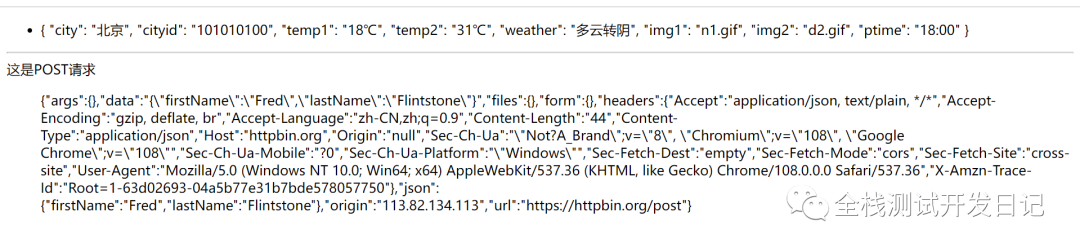
效果如下:
需要注意:
1. 这里需要注意的是变量赋值,如果使用箭头函数=>,则用this.变量。如果使用function函数,则用vm.变量。
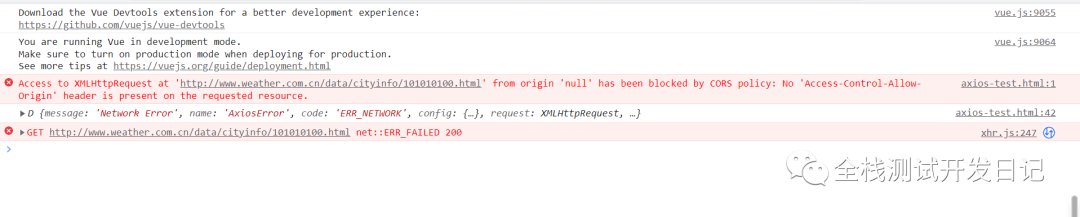
2. 跨域问题,这里调用的是免费的API,而不是本地的后端接口,所以存在跨域问题。我这里使用的是谷歌浏览器的Access-Control-Allow-Origin插件。
没安装插件,请求时的效果,如:
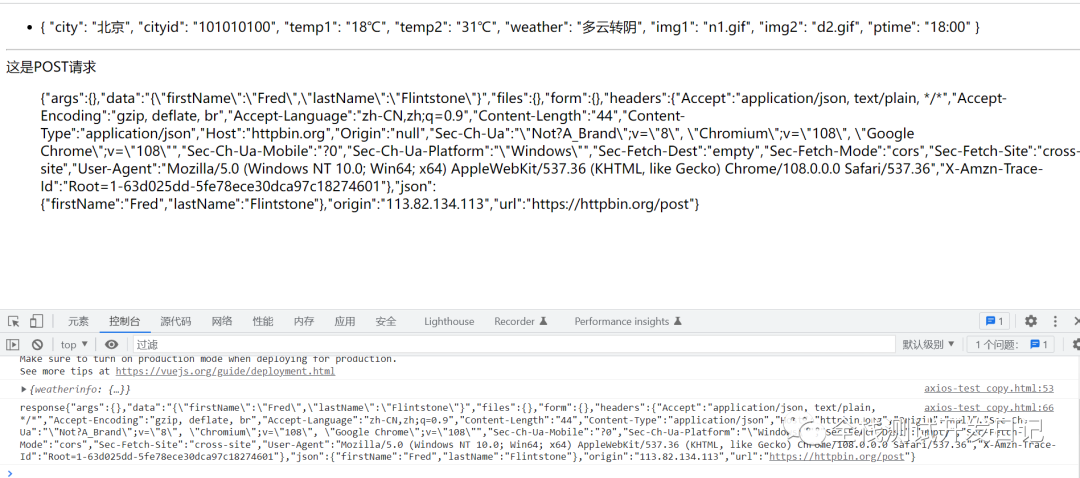
安装Access-Control-Allow-Origin插件后,并设置和启动后的效果,如:
先在Open options page里设置和配置域名,如:
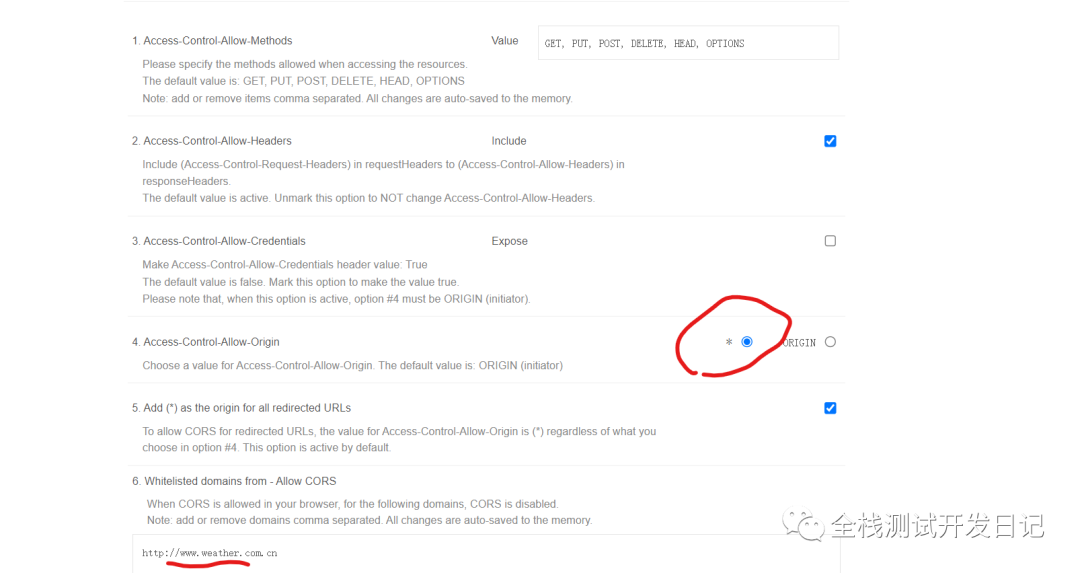
这里开启方法:
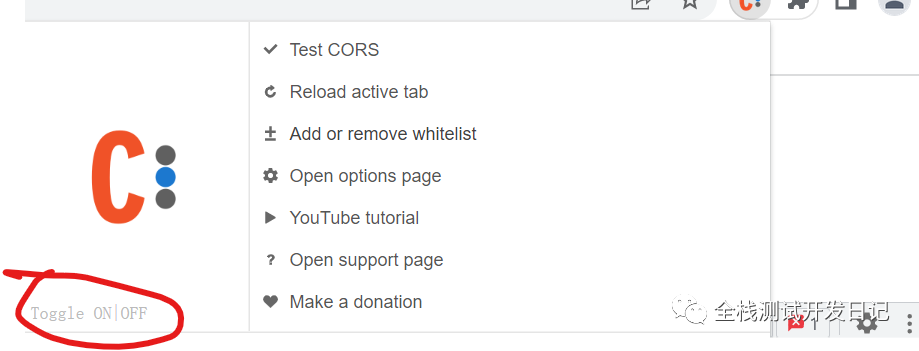
-
多个并发请求示例
function getUserAccount() {
  return axios.get('/user/12345');
}

function getUserPermissions() {
  return axios.get('/user/12345/permissions');
}
axios.all([getUserAccount(), getUserPermissions()])
  .then(axios.spread(function (acct, perms) {
    // 两个请求现在都执行完成
  }));
多个请求可以自己手动试试就明白了。
事慢则圆,言少则贵。
作者:全栈测试开发日记
出处:https://www.cnblogs.com/liudinglong/
csdn:https://blog.csdn.net/liudinglong1989/
微信公众号:全栈测试开发日记
本文版权归作者和博客园共有,欢迎转载,但未经作者同意必须保留此段声明,且在文章页面明显位置给出原文连接,否则保留追究法律责任的权利。

 浙公网安备 33010602011771号