
学习Js-day13
正则表达式
正则表达式的概述
正则表达式(Regular Expression)是一个描述字符模式的对象, 用于对字符串进行匹配, 一般用在有规律的字符串匹配中;常用于表单验证以及相关的字符串匹配。
正则对象的声明
1.使用//来声明(常用的)
var regx = /a/ //表示匹配a
        //字符串支持正则的方法 replace split search match
        var str = 'abcdef'
        console.log(str.match(regx));
        regx = /a/i
        console.log('ABC'.match(regx));
2.使用new关键词来声明
//使用new关键词 参数一是匹配的对应的正则表达式 参数二模式
        //i表示不区分大小写  g表示全局搜索
        var regx1 = new RegExp('a','i')
        var str1 = 'ABC'
        console.log(str1.match(regx1));
模式修饰
g 全局搜索
i 不区分大小写
m 换行模式
//使用换行模式
//m: 换行模式, 换行后又重新开始匹配
// /^表示以数字开头
var pattern = /^\d+/mg;
var str = "1,baidu\n2,google\n3,bing";
console.log(str.replace(pattern, "#"));
正则匹配的元字符
[] 表示里面任意的一个元素
//[a-z] 从a到z其中一个 [A-Z] 从大写A到大写的Z  所有的字母 [A-Za-z] 所有的数字 [0-9]
        //数字字母下划线 [A-Za-z0-9_]
        console.log('abcdef'.match(/^[a-z][a-z]$/));//null
// []表示里面的任意一个元素
        var regx = /[abc]/ //表示a b c 任意一个
        console.log('aaaa'.match(regx));//a
        console.log('bbb'.match(regx));//b
        console.log('ccc'.match(regx));//c
        console.log('dd'.match(regx));//null
^ 表示开头
$ 表示结尾
//^开头 $结尾 全部匹配 没有开始结束的话 只要有就ok
        var regx1 = /^[abc][123]$/ //只匹配 a1 a2 a3 b1 b2 b3 c1 c2 c3
        console.log('abc1'.match(regx1)); //null
{} 表示个数
{n} 表示n个
{n,m} 表示n个到m个
{n,} 表示n个到无穷个
var regx2 = /[a-z]{6}/ //表示6个小写的字母
        regx2 = /[a-z]{0}/ //表示0个字母
        regx2 = /[a-z]{1,3}/ //表示1个到3个
        regx2 = /[a-z]{1,}/ //表示1个到无穷个
+ 表示一个到多个 {1,}
* 表示0个到多个 {0,}
? 表示0个到一个 {0,1}
// + 1个到多个 {1,}
        var regx3 = /^[abc]+$/
        console.log('aabbcce'.match(regx3));//null
        console.log(''.match(regx3));//null至少要一个
        console.log('abbcca'.match(regx3));//匹配 abbcca
        // ? 0个到一个 {0,1}
        regx3 = /^[1234]?[1234]$/
        console.log('1'.match(regx3)); //匹配  1
        console.log('1234'.match(regx3)); //位数超了
        // * 0个到多个 {0,}
        regx3 = /^[123]+[456]*[789]$/
        console.log('123567'.match(regx3));//匹配 123567
        console.log('17867'.match(regx3));//null
        console.log('139'.match(regx3));//匹配 139
        console.log('12345'.match(regx3));//null
. 表示所有的内容(包括中文字符)
//表示所有的内容 .
        var regx4 = /^.$/
        console.log('abc'.match(regx4));//null
        console.log('h'.match(regx4));//匹配 h
        console.log('哈'.match(regx4));//匹配 哈
        regx4 = /^[.]+$/
        console.log('哈'.match(regx4));//null 因为在[]里面的点是识别为.
        console.log('.'.match(regx4));//null 因为在[]里面的点是识别为.
\w 表示对应的字母数字下滑线 \W 就是相反的 不是字母数字下滑线
\d 表示数字 \D表示非数字
\s 表示空白字符串(回车 制表 空格) \S就是相反的 不是空白字符
// \w 表示对应的字母数字下滑线 \W 就是相反的 不是字母数字下滑线
        // \d 表示数字 \D表示非数字
        // \s 表示空白字符串(回车 制表 空格) \S就是相反的 不是空白字符
        var regx5 = /^\w[123]{2}\w+$/
        console.log('abc123123'.match(regx5));//null
        console.log('112233'.match(regx5));//匹配 112233
        console.log('a12345'.match(regx5));//匹配 a12345
        console.log('a123'.match(regx5));//匹配 a123
        console.log('123'.match(regx5));//null
        console.log('1234'.match(regx5));//匹配 1234
() 分组
//() 分组
        var regx6 = /^(\w\d\S){3}[0-9]+([123][456])+$/
        console.log('123123123123123456'.match(regx6));//null
        console.log('1231231231231234'.match(regx6));//'1231231231231234', '123', '34',
        var regx7 = /^[\w]+([123456])+$/
        var regx8 = /^[\w]+(123456)+$/
        console.log('abc1'.match(regx7));//'abc1', '1'
        console.log('abc1'.match(regx8));//a
| 或者
//| 或者
        var regx9 = /^a|b$/
        console.log('a'.match(regx9));//a
        console.log('b'.match(regx9));//b
转义 \
//用转义字符来
        var regx10 = /^\*$/
        console.log('*'.match(regx10));
        var regx10 = /^\.$/
        console.log('.'.match(regx10));
正则的检测方法
test 测试 返回一个boolean类型值(是否匹配)
var regx = /\w/
console.log(regx.test('abc')) //true
exec 执行 返回给你一个对应的匹配的数组(如果有就返回一个数组)
var regx = /\d/
console.log(regx.exec('123')) //[1,2,3]字符串支持正则的4个方法
- split切割
- replace替换
- search查找
- match匹配
练习
1.找出下面字符串中的bag, beg, big, bog, 忽略大小写, 并将其改为bug:
(I am a Big man, I have so much bag, so veryone call me beg man, bog bog bog, I hate you! )
<script>
        //1.设置一个值 接收字符串
        var str ="I am a Big man, I have so much bag, so veryone call me  beg man, bog bog bog, I hate you!"
      //2.正则判断 忽略大小写 ==> i 加上全局的 ==>g
        var reg = /(bag|beg|big|bog)/ig
      //3.设置一个新的 值 接收字符串
      //  用bug替换原来的 bag beg big bog
        var str1 = str.replace(reg,"bug")
        //打印输出
        console.log(str1);
        //I am a bug man, I have so much bug, so veryone call me  bug man, bug bug bug, I hate you!

    </script>
2, 假设有一个多字符的片断重复出现,把"really"、"really really ",以及任意数量连续出现的"really"字符串换成一个简单的"very ”
( Billy tried really hard Sally tried really really hard Timmy tried really really really hard Johnny tried really really really really hard )
//1.设置字符串
        var str = "Billy tried really hard Sally tried really really hard Timmy tried really really really hard Johnny tried really really really really hard"
        //2.正则判断 相同点 "really "  \s ==> 空字符串
        var reg= /(really\s)/ig
        //3.设置新的字符串  接收替换的值 replace ==> 替换
        var str1 = str.replace(reg,"very ")
        //4.输出打印
        console.log(str1);
        //5.结果
        // Billy tried very hard Sally tried very very hard Timmy tried very very very hard Johnny tried very very very very hard
3.
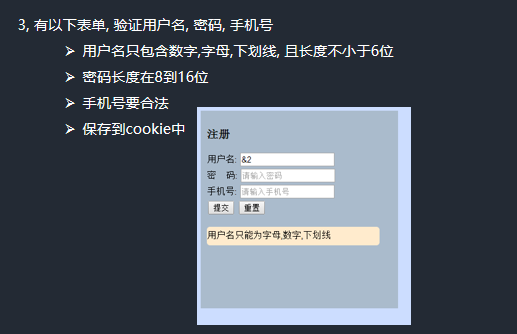
<!DOCTYPE html>
<html lang="en">

<head>
    <meta charset="UTF-8">
    <meta http-equiv="X-UA-Compatible" content="IE=edge">
    <meta name="viewport" content="width=device-width, initial-scale=1.0">
    <title>Document</title>
    <script src="./cookie.js"></script>
    <style>
        .box {
            width: 350px;
            height: 350px;
            background-color: #ccddff;
            margin: auto;
        }

        .boy {
            width: 300px;
            height: 300px;
            background-color: #aabbcc;
            position: relative;
            left: 5px;
            top: 5px;
            padding-top: 10px;
        }

        p {
            font-weight: bold;
            text-indent: 14px;
        }

        span {
            display: inline-block;
            width: 280px;
            height: 30px;
            background-color: #ffebcd;
            position: absolute;
            left: 14px;
            border-radius: 10px;
            display: none;
            text-align: center;
            font-size: 12px;
            line-height: 30px;
        }
    </style>
</head>

<body>

    <div class="box">
        <div class="boy">
            <p>注册</p>
            <form action="">
                  用户名: <input type="text" id="username"> <br> <br>
                  密   码: <input type="password" id="password"><br> <br>
                  手机号: <input type="text" id="phone"><br><br>
                  <button type="submit" id="sub">提交</button>
                  <button type="reset">重置</button>
                <br>
                <span></span>
            </form>

        </div>
    </div>
    <script>

        // 3, 有以下表单, 验证用户名, 密码, 手机号
        // 用户名只包含数字, 字母, 下划线, 且长度不小于6位
        // 密码长度在8到16位
        // 手机号要合法
        // 保存到cookie中


        // 1.获取页面表单元素
        // 2.input 绑定事件监听 失去光标事件
        // 3.用户名只包含数字字母下划线 且长度不能少于六位
        // ==> /\w{6,}/ 满足 用户名合法 否则 用户名只包含数字,字母,下划线,
        // 3.用户名只包含数字字母下划线 且长度不能少于六位
        // ==> /\w{6,}/ 满足 用户名合法 否则 用户名只包含数字,字母,下划线,
        // 4.密码长度在8到16位
        // ==> /\w{8,16}/
        // 5.手机号码要合法
        // ==>/^[1][3-9][0-9]{8}/
        // 6.点击提交时,将获取到的值提保存到cookie中 submit事件


        // 1.获取页面表单元素
        var form = document.forms[0]
        var username = document.getElementById('username')
        var password = document.getElementById('password')
        var phone = document.getElementById('phone')
        var span = document.querySelector("span")
        var nameReg = /\w{6,}/
        var pawReg = /\d{8,16}/
        var telReg = /^[1][3-9][0-9]{8}/
        var flag = false;

        username.onblur = function () {
            if (!nameReg.test(username.value)) {
                // console.log(this.value);
                // console.log((nameReg.test(this.value)));
                flag = false;
                this.focus()
                span.style.display = "block"
                span.innerHTML = `
                用户名只包含数字字母下划线 且长度不能少于六位
                `

            } else {
                flag = true;
                span.style.display = "block"
                span.innerHTML = `
                    用户可注册
                `
            }

        }
        password.onblur = function () {
            // 4.密码长度在8到16位
            // ==> /\w{8,16}/
            if (!pawReg.test(password.value)) {
                span.style.display = "block"
                flag = false;
                this.focus()
                span.innerHTML = `
                密码长度在8到16位
                `

            } else {
                flag = true;
                span.style.display = "none"
            }

        }
        phone.onblur = function () {
            // 5.手机号码要合法
            // ==>/^[1][3-9][0-9]{8}/

            if (!telReg.test(phone.value)) {
                flag = false;
                this.focus()
                span.style.display = "block"
                span.innerHTML = `
                手机号码不合法
                `

            } else {
                flag = true;
                span.style.display = "none"

            }
        }
        document.getElementById('sub').onclick = function () {
            if (flag) {
                //先去获取对应的cookie
                var users = getCookie('users') == '' ? [] : JSON.parse(getCookie('users'))
                //创建一个对象
                var user = { username: username.value, password: password.value, phone: phone.value }
                //将用户添加到cookie中
                users.push(user)
                //存入cookie
                setCookie('users', JSON.stringify(users))
                console.log(getCookie('users'));
            }

        }
    </script>
</body>

</html>

 浙公网安备 33010602011771号