
C#自定义异常处理
Custom exceptions in C#.NET
Serializable]
public class CustomException : Exception
{
    public CustomException()
        : base() { }

    public CustomException(string message)
        : base(message) { }

    public CustomException(string format, params object[] args)
        : base(string.Format(format, args)) { }

    public CustomException(string message, Exception innerException)
        : base(message, innerException) { }

    public CustomException(string format, Exception innerException, params object[] args)
        : base(string.Format(format, args), innerException) { }

    protected CustomException(SerializationInfo info, StreamingContext context)
        : base(info, context) { }
}
Example:

1. Throw exception with out message
 Collapse | Copy Code
throw new CustomException()
2. Throw exception with simple message
 Collapse | Copy Code
throw new CustomException(message)
3. Throw exception with message format and parameters
 Collapse | Copy Code
throw new CustomException("Exception with parameter value '{0}'", param)
4. Throw exception with simple message and inner exception
 Collapse | Copy Code
throw new CustomException(message, innerException)
5. Throw exception with message format and inner exception. Note that, the variable length params are always floating.
 Collapse | Copy Code
throw new CustomException("Exception with parameter value '{0}'", innerException, param)
6. The last flavor of custom exception constructor is used during exception serialization/deserialization.
3.Find your inner exception
public static class ExceptionExtension
{
    public static T FindInnerException<T>(this Exception ex) where T : Exception
    {
        if (!ex.GetType().Equals(typeof(T)))
        {
            Exception inner = ex.InnerException;
            if (inner == null)
            {
                return null;
            }
            else
            {
                if (inner.GetType().Equals(typeof(T)))
                {
                    return (T)inner;
                }
                else
                {
                    return inner.FindInnerException<T>();
                }
            }
        }
        else
        {
            return (T)ex;
        }
    }
}
try
{
    // do something that could throw your custom exception
}
catch (Exception ex)
{
    MyCustomException myEx = ex.FindInnerException<MyCustomException>();
    if (myEx != null)
    {
        // do something with the exception
    }
}
public static class ExceptionExtensions
    {
        public static T FindExceptionType<T>(this Exception ex, bool inherit) where T : Exception
        {
            if (inherit ? (ex is T) : (ex.GetType().Equals(typeof(T))))
                return (T)ex;
            if (ex.InnerException == null)
                return null;
            return ex.InnerException.FindExceptionType<T>(inherit);
        }

        public static T FindExceptionType<T>(this Exception ex) where T : Exception
        {
            return ex.FindExceptionType<T>(false);
        }
    }
Exception Message Box Using C#
  |
Introduction
Exceptions are unavoidable factors in development. Here I explain how to display the exception occurred in a detailed and in the best formatted way.
This displays a message box that can be customized with text, buttons, and symbols to improve the customer experience with a Microsoft Windows .NET Framework.
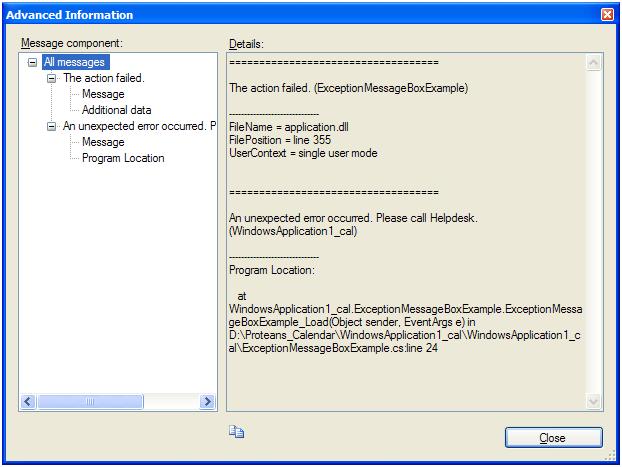
ApplicationExceptionMessagebox helps any developer to display an error message in the best formatted way. The user is given a choice to add up user defined messages as shown in DetailErrorMessage.jpg.ExceptionMessageBox gives the user an option whether to display the same message again and again in the application. Like the usual MessageBox in C#, we have an option to display a button as per the need. In the above example, I have used only Yes and No buttons.
Background
The user is requested to add a .NET reference named ExceptionMessageBox and a namespace usingMicrosoft.SqlServer.MessageBox;
Using the Code
I have created a solution named ExceptionMessageBoxSample. First I added a Windows Form named Form1.cs to my solution. On the form load, I am implicitly throwing an exception which will be caught by my catch block.
STEP 1: Add the .NET Reference ExceptionMessagebox and add the namespace in the code:
 Collapse | Copy Code
//
//using Microsoft.SqlServer.MessageBox;
//
STEP 2: The try-block contains the guarded code block that may cause the exception. The block is executed until an exception is thrown or it is completed successfully. Here I am implicitly throwing an exception.
Collapse | Copy Codetry
{
// Do something that you don't expect to generate an exception.
throw new ApplicationException
("An unexpected error occurred. Please call Helpdesk.");
}
STEP 3: The catch clause can be used without arguments, in which case it catches any type of exception, and is referred to as the general catch clause. It can also take an object argument derived from System.Exception, in which case it handles a specific exception.
Collapse | Copy Codecatch (ApplicationException ex)
{
// Define a new top-level error message.
string str = "Write the reason why the action failed.";
// Add the new top-level message to the handled exception.
ApplicationException exTop = new ApplicationException(str, ex);
exTop.Source = this.Text;
// Information in the Data property of an exception that has a name
// beginning with "HelpLink.Advanced" is shown when the user
// clicks the Advanced Information button of the exception message
// box dialog box.
exTop.Data.Add("AdvancedInformation.FileName",
"ExceptionMessageBoxSample.dll");
exTop.Data.Add("AdvancedInformation.FilePosition", "line 24");
exTop.Data.Add("AdvancedInformation.UserContext",
"a detail message can be given");
// Show the exception message box with additional information that
// is helpful when a user calls technical support.
ExceptionMessageBox box = new ExceptionMessageBox(exTop);
box.Buttons = ExceptionMessageBoxButtons.YesNo;
box.Caption = "Caption";
box.ShowCheckBox = true;
box.ShowToolBar = true;
box.Symbol = ExceptionMessageBoxSymbol.Stop;
box.Show(this);
}
Add the new top-level message to the handled exception ApplicationException. The string variable str is used to display the ApplicationException source.
Now we are all done. Now you can execute the program and see the result.

 浙公网安备 33010602011771号