

模拟B\S服务器
模拟B\S服务器(tomcat原理)
TCP既可以实现B/S也可以实现C/S
模拟网站服务器,使用浏览器访问自己编写的服务端程序,查看网页效果。
原理分析

案例分析
- 准备数据,资料中由一个web文件夹拷贝到模块下面
- 开发服务端(文件上传的案例类似)
注意:
-
获取浏览器访问时,需要解析浏览器所要的资源
会收到浏览器访问的数据: http协议数据 GET /web/index.html HTTP/1.1 .... .... 传过来的第一行数据中存在, 1:请求的方式:GET (POST PUT..) 2:浏览器需要的资源:web/index.html 3:协议的版本:HTTP/1.1 -
将浏览器所需的资源,通过网络输出流输出到网络中,写出数据时,先写协议,浏览器才能够认识。
netOut.write("HTTP/1.1 200 OK\r\n".getBytes()); netOut.write("Content-Type:text/html\r\n".getBytes()); netOut.write("\r\n".getBytes()); //第三行空行 -
访问自己的服务器:
http://127.0.0.1:7788/web/index.html,如果要访问同桌的服务器,直接更换IP地址
没有线程池优化:
package com.liqiliang.demo07_BS案例服务端开发;

import java.io.*;
import java.net.ServerSocket;
import java.net.Socket;

public class Server {
    public static void main(String[] args) throws IOException {
        //1.创建服务端对象,绑定端口
        ServerSocket serverSocket = new ServerSocket(8888);
        while (true) {
            //2.使用accept方法接收浏览器访问
            System.out.println("等待浏览器访问...");
            Socket socket = serverSocket.accept();
            System.out.println("浏览器开始访问...");

            //3.解析浏览器发送过来的协议信息(包含了要请求的文件信息)
            String requestPath = getRequestPath(socket);//获取浏览器请求的路径
            System.out.println("requestPath = " + requestPath);


            //判断文件是否存在
//            File requestFile = new File(requestPath);
            if (requestPath==null||!new File(requestPath).exists()) {
                System.out.println("文件不存在!!");
                socket.close();
                continue;
            }

            //4.知道了浏览器要什么文件,使用网络的输出流将本地的文件发送给浏览器
            OutputStream netOut = socket.getOutputStream();//负责将数据发送给浏览器
            FileInputStream localIn = new FileInputStream(requestPath);

            //发送数据前,需要发送协议
            netOut.write("HTTP/1.1 200 OK\r\n".getBytes());
            netOut.write("Content-Type:text/html\r\n".getBytes());
            netOut.write("\r\n".getBytes());//第三行空行
            //真实的文件数据发送
            byte[] bytes = new byte[1024];
            int len;
            while ((len=localIn.read(bytes))!=-1){
                netOut.write(bytes,0,len);
            }

            //告诉浏览器,文件传输完了
            socket.shutdownOutput();
            socket.close();
        }
    }

    /**
     * 完成HTTP协议中第一行代码的解析
     * @param socket
     * @return
     * @throws IOException
     */
    private static String getRequestPath(Socket socket) throws IOException {
        InputStream netIn = socket.getInputStream();

        /*byte[] bytes = new byte[1024];
        int len = netIn.read(bytes);
        System.out.println(new String(bytes,0,len));*/

        //1.转化为字符流
        InputStreamReader isr = new InputStreamReader(netIn);
        //2.转换为高效字符流
        BufferedReader br = new BufferedReader(isr);
        //3.读取第一行协议信息.解析路径

        String firstLine = br.readLine();
        System.out.println("firstLine = " + firstLine);

        if(firstLine==null){
            return null;
        }

        String requestPath = firstLine.split(" ")[1].substring(1);

        return requestPath;
    }
}
使用线程池优化:
package com.liqiliang.demo07_BS案例服务端开发;

import java.io.*;
import java.net.ServerSocket;
import java.net.Socket;
import java.util.concurrent.ExecutorService;
import java.util.concurrent.Executors;
/*
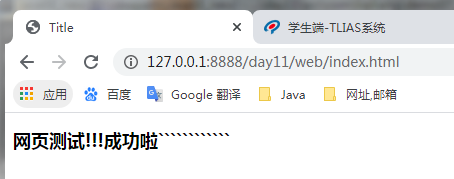
启动后浏览器访问:http://127.0.0.1:8888/day11/web/index.html
web文件夹直接放在day11项目下面,可以直接使用绝对路径访问
 */
public class ServerDemo {
    public static void main(String[] args) throws IOException {
        ExecutorService threadPool = Executors.newFixedThreadPool(10);
        //1.创建服务端对象,绑定端口
        ServerSocket serverSocket = new ServerSocket(8888);
        while (true){
            //2.使用accept方法接收浏览器访问
            System.out.println("等待客户端连接...");
            Socket socket = serverSocket.accept();
            System.out.println("客户端连接成功!!");

            threadPool.submit(new Web(socket));
//            new Thread(new Web(socket)).start();
        }
    }
}

class Web implements Runnable{
    private Socket socket;

    public Web(Socket socket) {
        this.socket = socket;
    }

    @Override
    public void run() {
        try{
            //3.解析浏览器发送过来的协议信息(包含了要请求的文件信息)
            //转换流,阅读浏览器第一行
            BufferedReader br =
                    new BufferedReader(new InputStreamReader(socket.getInputStream()));
            //读取第一行
            String request = br.readLine();

            //取出资源请求路径
            String path = request.split(" ")[1].substring(1);
            System.out.println("path = " + path);

            /*if(path==null||!new File(path).exists()){
                System.out.println("文件不存在");
                socket.close();
                continue;
            }*/

            //4.知道了浏览器要什么文件,使用网络的输出流将本地的文件发送给浏览器
            OutputStream netOut = socket.getOutputStream();//负责将数据发送到服务器
            FileInputStream localInput = new FileInputStream(path);

            //发送数据前,需要发送协议
            netOut.write("HTTP/1.1 200 OK\r\n".getBytes());
            netOut.write("Content-Type:text/html\r\n".getBytes());
            netOut.write("\r\n".getBytes());//第三行空行
            byte[] bytes = new byte[1024];
            int len;
            while ((len=localInput.read(bytes))!=-1){
                netOut.write(bytes,0,len);
            }

            //告知浏览器,文件传输完了
            socket.shutdownOutput();
            socket.close();
        }catch (Exception e){

        }
    }
}
访问成功界面:(自己写的一个HTML界面)
唯有努力,人生没有白走的路,每一步都算数

 浙公网安备 33010602011771号