
Ant && maven && Svn
1.ANT_HOME: D:\MainSoftWare\Ant\apache-ant-1.9.7-bin\apache-ant-1.9.7
希望操作系统能自动识别:在path增加 %ANT_HOME%/bin
安装成功

2.ant -s或-find ant就会到上级目录搜索生出文件,直到文件系统的根路径
ant -f(或file) a.xml 显示指定a.xml作为生出文件
ant -help
2.maven
M2_HOME:D:\MainSoftWare\maven\apache-maven-3.3.9
希望操作系统能自动识别:在path增加 % M2_HOME%/bin
mvn help:system 获取项目
myeclipse svn 直接修改仓库地址:https://my.oschina.net/yongyi/blog/363435
优点:a.统一的版本号,任何一次提交都会对所有文件增加一个版本号
b.原子提交,提交要么全部进入版本库,要么一点改变都不发生
c.可以跟踪整个目录树的修改,SVN创建分支、标签的开销非常小
1.path自动增加:C:\Program Files (x86)\Subversion\bin
2.创建资源存放位置:svnadmin create G:\SvnServerData\WebDemo
3.svnserve.conf 取消注释: 三个参数所在的行,前面不能有空格
anon-access = read
auth-access = write
password-db = passwd
4.passwd新建用户增加:linzx=123456
5.启动服务器:
svnserve -d -r G:\SvnServerData
4.添加本机新的SVN项目
1.右键选择FirstServlet,选择import
然后输入对应的path,然后输入linzx和123456,进行登录
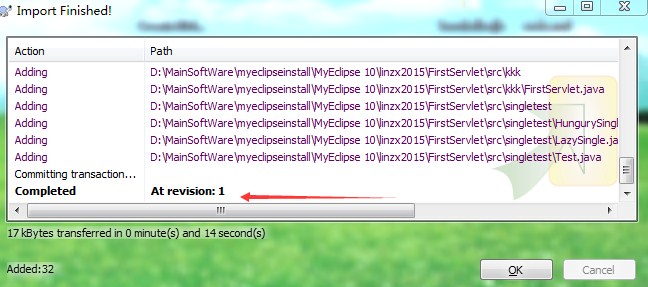
2.增删文件时,右键add(或者delete)之后,还需要再commit才能保证文件真正提交
3.myeclipse10导入svn项目
a.下载好svn-1.6.17.zip解压放在D:\MainSoftWare\myeclipseinstall\MyEclipse 10\dropins
b.重启myeclipse之后,import->svn项目->选择url svn://localhost/WebDemo
5.git https://desktop.github.com/
git: C:\Program Files (x86)\Git
安装未配置初始姓名和邮箱问题:

第一次提交:
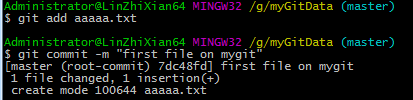
http://blog.csdn.net/djl4104804/article/details/50778717
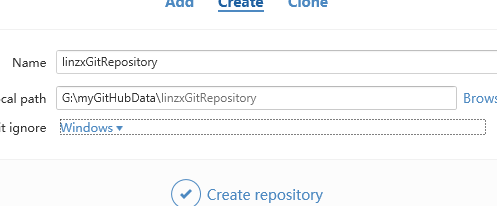
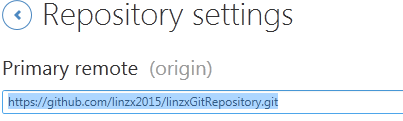
https://github.com/linzx2015/linzxGitRepository.git
第一次提交文件到github:
Administrator@LinZhiXian64 MINGW32 /g/myGitData (master)
$ git init
Reinitialized existing Git repository in G:/myGitData/.git/
Administrator@LinZhiXian64 MINGW32 /g/myGitData (master)
$ git remote add origin https://github.com/linzx2015/linzxGitRepository.git Administrator@LinZhiXian64 MINGW32 /g/myGitData (master)
$ git remote -v
origin https://github.com/linzx2015/linzxGitRepository.git (fetch)
origin https://github.com/linzx2015/linzxGitRepository.git (push)
Administrator@LinZhiXian64 MINGW32 /g/myGitData (master)
$ ls
aaaaa.txt
Administrator@LinZhiXian64 MINGW32 /g/myGitData (master)
$ git push -u origin master
Counting objects: 3, done.
Delta compression using up to 4 threads.
Compressing objects: 100% (2/2), done.
Writing objects: 100% (3/3), 315 bytes | 0 bytes/s, done.
Total 3 (delta 0), reused 0 (delta 0)
To https://github.com/linzx2015/linzxGitRepository.git
1618f4a..e7f0128 master -> master
Branch master set up to track remote branch master from origin.
出现问题:
Administrator@LinZhiXian64 MINGW32 /g/myGitData (master)
$ git push -u origin master
To https://github.com/linzx2015/linzxGitRepository.git
! [rejected] master -> master (fetch first)
error: failed to push some refs to 'https://github.com/linzx2015/linzxGitRepository.git'
hint: Updates were rejected because the remote contains work that you do
hint: not have locally. This is usually caused by another repository pushing
hint: to the same ref. You may want to first integrate the remote changes
hint: (e.g., 'git pull ...') before pushing again.
hint: See the 'Note about fast-forwards' in 'git push --help' for details.
解决办法:
Administrator@LinZhiXian64 MINGW32 /g/myGitData (master)
$ git pull --rebase origin master
warning: no common commits
remote: Counting objects: 3, done.
remote: Compressing objects: 100% (2/2), done.
remote: Total 3 (delta 0), reused 3 (delta 0), pack-reused 0
Unpacking objects: 100% (3/3), done.
From https://github.com/linzx2015/linzxGitRepository
* branch master -> FETCH_HEAD
* [new branch] master -> origin/master
First, rewinding head to replay your work on top of it...
Applying: first file on mygit
第二次更新:

/c/Users/Administrator/.ssh
配置ssh
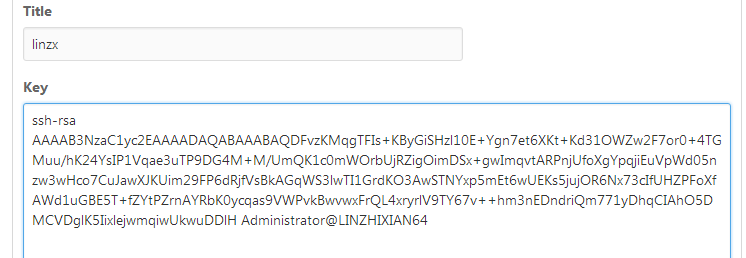

http://blog.itpub.net/25851087/viewspace-1262468/
C:\Users\Administrator\.ssh


posted on 2018-03-06 18:04 xiaojiayu0011 阅读(108) 评论(0) 收藏 举报


 浙公网安备 33010602011771号