

Nginx详解
Nginx详解
nginx的特点
本节主要对Nginx Web服务软件进行介绍,涉及Nginx的基础,特性,配置部署,优化,以及企业中的日常运维管理和应用。
作为HTTP服务软件的后起之秀,Nginx与它的老大哥Apache相比有很多改进之处,比如,在性能上,Nginx占用的系统资源更少,
能支持更多的并发连接(特别是静态小文件场景下),达到更高的访问效率;在功能上,Nginx不但是一个优秀的Web服务软件,
还可以作为反向代理负载均衡及缓存服务使用;在安装配置上,Nginx更为方便,简单,灵活,可以说,Nginx是一个极具发展潜力的Web服务软件。
Nginx是什么?
nginx是一个开源的,支持高性能,高并发的www服务和代理服务软件。
nginx因具有高并发(特别是静态资源),占用系统资源少等特性,且功能丰富而逐渐流行起来。
nginx不但是一个优秀Web服务软件,还具有反向代理负载均衡功能和缓存服务功能,与lvs负载均衡及Haproxy等专业代理软件相比,Nginx部署起来更为简单,方便;在缓存功能方面,它又类似于Squid,vanish等专业的缓存服务软件。
Nginx的重要特性
支持高并发:能支持几万并发连接(特别是静态小文件业务环境)
资源消耗少:在3万并发连接下,开启10哥Nginx线程消耗的内存不到200MB
可以做HTTP反向代理及加速缓存,即负载均衡功能,内置对RS节点服务器健康检查功能,这相当于专业的Haproxy软件或LVS的功能
具备Squid等专业缓存软件等的缓存功能。
支持异步网络I/O事件模型epoll(linux2.6+)。
Nginx软件的主要企业功能应用
(1)作为Web服务软件
Nginx是一个支持高性能,高并发的Web服务软件,它具有很多优秀的特性,作为Web服务器,与Apache相比,Nginx能够支持更多的并发连接访问,但占用的资源更少,效率更高,在功能上也强大了很多,几乎不逊色于Apache。(2)反向代理或负载均衡服务
在反向代理或负载均衡服务方面,Nginx可以作为Web服务,PHP等动态服务及Memcached缓存的代理服务器,它具有类似专业反向代理软件(如Haproxy)的功能,同时也是一个优秀的邮件代理服务软件,但是Nginx的代理功能还是相对简单了些,特别是不支持TCP的代理(Nginx1.9.0版本已经开始支持TCP代理了)(3)前端业务数据缓存服务
在Web缓存服务方面,Nginx可通过自身的proxy_cache模块实现类Squid等专业缓存软件的功能。综上:Nginx的这三大功能(Web服务,反向代理或负载均衡服务,前端业务数据缓存服务)是国内使用Nginx的主要场景,特别是前两个。
为什么Nginx总体性能比Apache高?
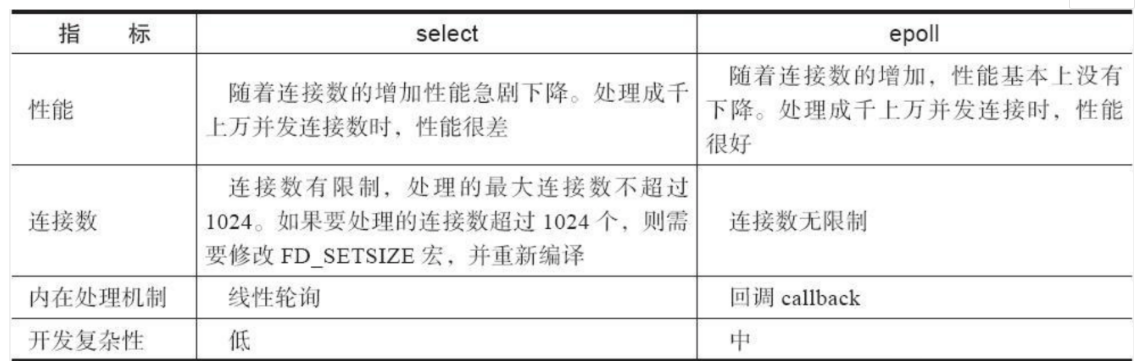
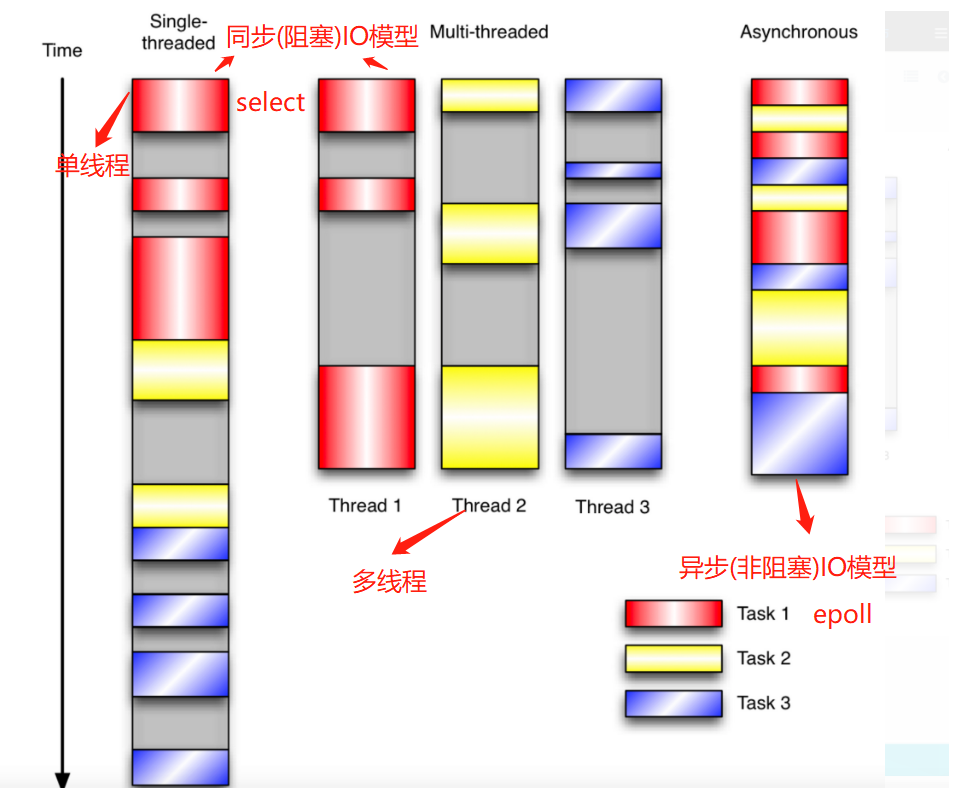
Nginx使用最新的epoll(Linux2.6内核)和kqueue(freebsd)异步网络I/O模型,而Apache使用的是传统的select模型。目前Linux下能够承受高并发访问的Squid,Memcached软件采用的都是epoll模型。
处理大量连接的读写时,Apache所采用的select网络I/O模型比较低效。
同步和异步IO模型
WEB服务器搭建的三种方法
(1)基于不同域名的虚拟网站
(2)基于不同监听端口的虚拟网站
(3)基于不同IP虚拟网站
Nginx服务搭建流程
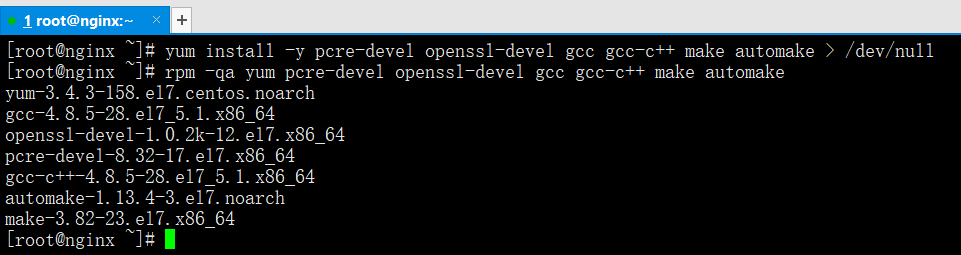
用本地yum仓库安装依赖包
yum install -y pcre-devel openssl-devel gcc gcc-c++ make automake
下载软件源码包
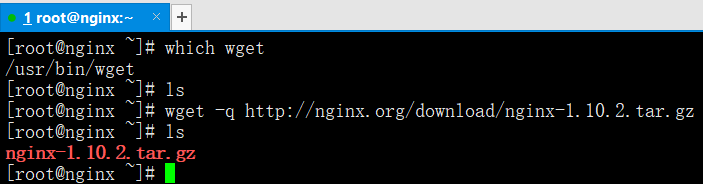
wget -q http://nginx.org/download/nginx-1.10.2.tar.gz
没有wget命令需要手动安装
创建程序用户
useradd -s /sbin/nologin -M nginx
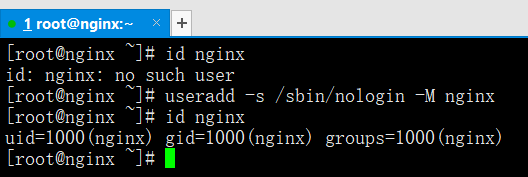
解压缩和预配置,编译和安装
tar xf nginx-1.10.2.tar.gz -C /usr/src/cd /usr/src/nginx-1.10.2.tar.gz./configure --user=nginx --group=nginx --prefix=/usr/local/nginx --with-http_stub_status_module --with-http_ssl_modulemake && make install

目录文件详解
cd /usr/local/nginx/confconf:备份目录 html:网页目录 logs:日志目录 sbin:命令目录nginx.conf --->nginx配置文件mime.types --->媒体类型配置文件

egrep -v "#|^$" nginx.conf.default > nginx.conf
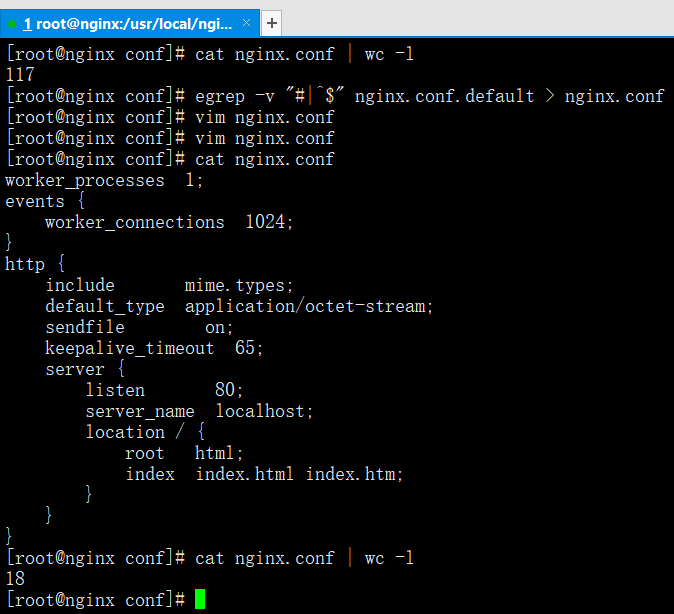
配置文件详解
worker_processes 1; --->nginx工作的进程个数,有几核就写几events {worker_connections 1024;} --->事件函数1024 --->代表进程里的线程数,工作中一般都写它的20倍-----------------------------------------------http {include mime.types;default_type application/octet-stream;sendfile on;keepalive_timeout 65;server {listen 80;server_name localhost;location / {root html;index index.html index.htm;}}} --->Web服务include --->代表把什么文件引入到脚本里sendfile on; --->Nginx文件的高效传输,默认就是开的keepalive_timeout 65; --->连接保持功能持续65秒,连接保持是三次握手的状态,降低对服务器性能的开销-----------------------------------------------server {listen 80;server_name localhost;location / {root html;index index.html index.htm;}}}server --->代表一个虚拟网站,多个server就是多个网站listen 80; --->socket进程的监听端口server_name localhost; --->域名root html; --->网页的根目录路径index index.html index.htm; --->索引,指定网站的首页是哪个网页名
Nginx配置文件的核心框架如下
worker_processes 1;events {worker_connections 1024;}http {include mime.types;default_type application/octet-stream;sendfile on;keepalive_timeout 65;server {listen 80;server_name www.yunjisuan.com;location / {root html;index index.html index.htm;}}}
Linux测试阶段
/usr/local/nginx/sbin/nginx --->启动服务ss -antup | grep 80 --->查看端口ps -ef | grep nginx --->查看进程cd /usr/local/nginx/htmlrm -f *echo "`hostname -I` www.yunjisuan.com" > index.htmlecho "`hostname -I` www.yunjisuan.com" >> /etc/hostscat /etc/hostscurl www.yunjisuan.com --->模拟浏览器访问
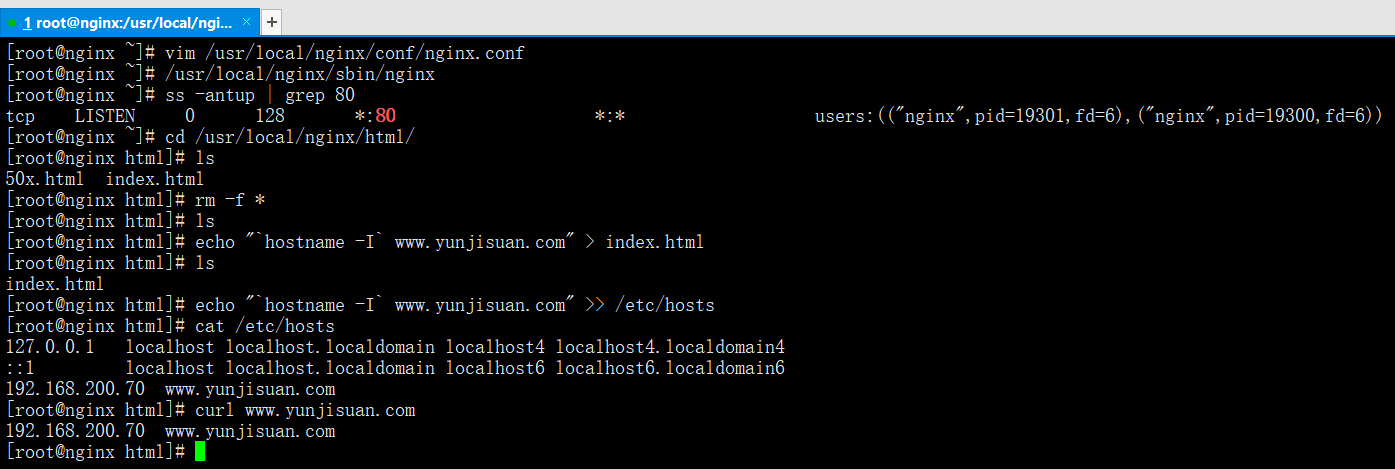
windows测试阶段
C:\Windows\System32\drivers\etc --->windows映射文件位置
把hosts文件拉到桌面上,在文件的末尾添加192.168.200.70 www.yunjisuan.com,在放回windows映射文件位置

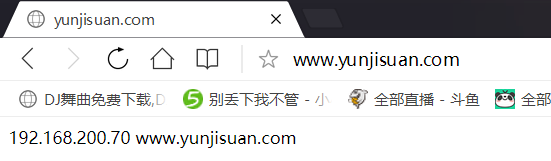
绝对路径服务重启和停止
/usr/local/nginx/sbin/nginx -s reload ---> nginx平滑重启命令
/usr/local/nginx/sbin/nginx -s stop --->nginx停止服务命令
/usr/local/nginx/sbin/nginx -t --->检验配置文件是否正常
不同域名虚拟网站搭建
Nginx不同域名配置文件
vim /usr/local/nginx/conf/nginx.conf
worker_processes 1;events {worker_connections 1024;}http {include mime.types;default_type application/octet-stream;sendfile on;worker_processes 1;events {include mime.types;default_type application/octet-stream;sendfile on;keepalive_timeout 65;server {listen 80;server_name bbs.yunjisuan.com;location / {root html/bbs;index index.html index.htm;}}server {listen 80;server_name www.yunjisuan.com;location / {root html/www;index index.html index.htm;}}server {listen 80;server_name blog.yunjisuan.com;location / {root html/blog;index index.html index.htm;}}}
不同域名测试阶段
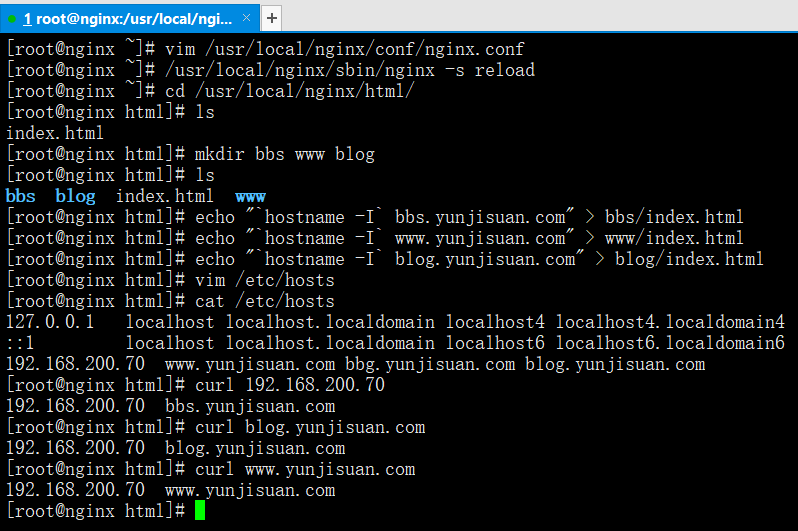
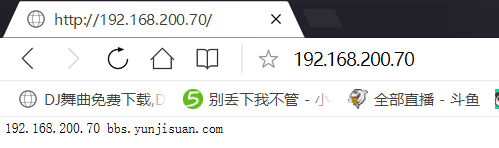
/usr/local/nginx/sbin/nginx -s reload --->修改完配置文件重启服务cd /usr/local/nginx/htmlmkdir bbs www blogecho "`hostname -I` bbs.yunjisuan.com" > bbs/index.htmlecho "`hostname -I` www.yunjisuan.com" > www/index.htmlecho "`hostname -I` blog.yunjisuan.com" > blog/index.htmlvim /etc/hosts --->后追加bbs和blog域名curl 192.168.200.70 --->要是指定IP就只按照配置文件第一个域名显示
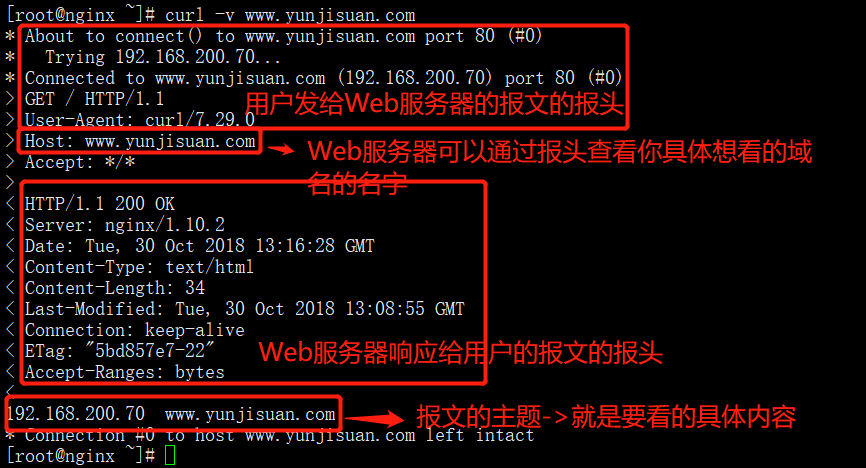
查看报文内容
curl -v www.yunjisuan.com --->查看报文内容
不同端口虚拟网站搭建
vim /usr/local/nginx/conf/nginx.conf
/usr/local/nginx/sbin/nginx -s reload --->修改完配置文件重启服务
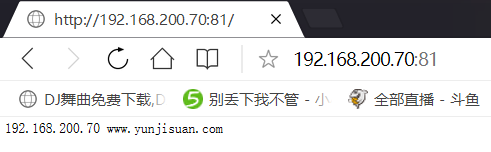
worker_processes 1;events {worker_connections 1024;}http {include mime.types;default_type application/octet-stream;sendfile on;keepalive_timeout 65;server {listen 80;server_name bbs.yunjisuan.com;location / {root html/bbs;index index.html index.htm;}}server {listen 81;server_name www.yunjisuan.com;location / {root html/www;index index.html index.htm;}}server {listen 82;server_name blog.yunjisuan.com;location / {root html/blog;index index.html index.htm;}}}
不同端口测试阶段
不写默认80端口
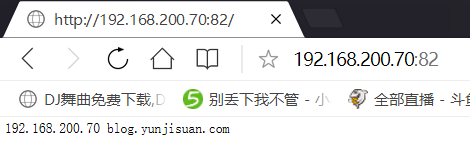
禁止IP访问流程
vim /usr/local/nginx/conf/nginx.conf
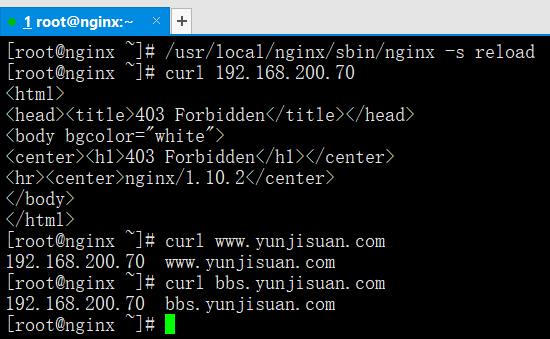
default_server; --->让用IP地址访问的用户强制进入本server
return 403; --->跳出函数报错403
worker_processes 1;events {worker_connections 1024;}http {include mime.types;default_type application/octet-stream;sendfile on;keepalive_timeout 65;server {listen 80;server_name bbs.yunjisuan.com;location / {root html/bbs;index index.html index.htm;}}server {listen 80;server_name www.yunjisuan.com;location / {root html/www;index index.html index.htm;}}server {listen 80 default_server;server_name blog.yunjisuan.com;location / {return 403;}}}
禁止IP访问测试阶段
/usr/local/nginx/sbin/nginx -s reloadcurl 192.168.200.70curl www.yunjisuan.comcurl bbs.yunjisuan.com
include方式访问
cd /usr/local/nginx/confmkdir extra
vim extra/bbs.conf
server {listen 80;server_name bbs.yunjisuan.com;location / {root html/bbs;index index.html index.htm;}}
vim extra/www.conf
server {listen 80;server_name www.yunjisuan.com;location / {root html/www;index index.html index.htm;}}
vim /usr/local/nginx/conf/nginx.conf
worker_processes 1;events {worker_connections 1024;}http {include mime.types;default_type application/octet-stream;sendfile on;keepalive_timeout 65;include extra/bbs.conf;include extra/www.conf;server {listen 80 default_server;server_name blog.yunjisuan.com;location / {return 403;}}}
include测试阶段
/usr/local/nginx/sbin/nginx -s reloadcrul www.yunjisuan.comcrul bbs.yunjisuan.com
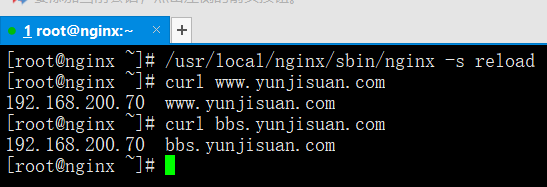
Nginx状态信息访问
vim /usr/local/nginx/conf/extra/status.conf
stub_status on; --->开启状态信息功能
access_log off; --->不记录访问日志
allow 192.168.200.70; --->允许指定IP访问
deny all; --->其他一律拒绝
server {listen 80;server_name status.yunjisuan.com;location / {stub_status on;access_log off;allow 192.168.200.70;deny all;}}
vim //usr/local/nginx/conf/nginx.conf
worker_processes 1;events {worker_connections 1024;}http {include mime.types;default_type application/octet-stream;sendfile on;keepalive_timeout 65;include extra/bbs.conf;include extra/www.conf;include extra/status.conf;server {listen 80 default_server;server_name blog.yunjisuan.com;location / {return 403;}}}
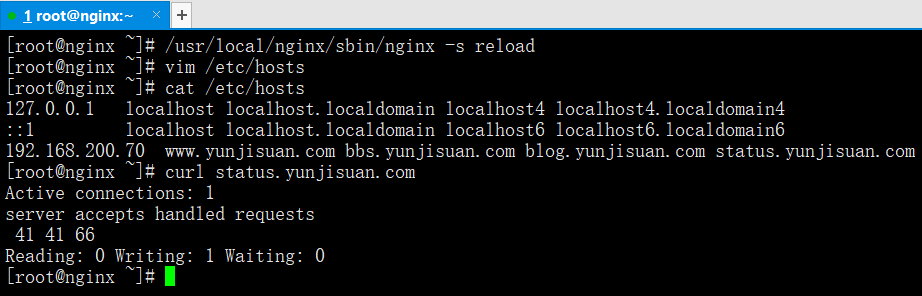
状态信息访问测试阶段
/usr/local/nginx/sbin/nginx -s reload
vim /etc/hosts
cat /etc/hosts
curl status.yunjisuan.com
因为配置文件指定了固定IP访问,所以windows访问自然就会报错403,在这里就不演示windows了
状态信息访问详解
Active connections: 2 #表示Nginx正在处理的活动连接2个第一个server表示Nginx启动到现在2共处理了39个连接第二个accepts表示Nginx启动到现在共成功创建了39次握手请求丢失数=(握手数-连接数),可以看出,本次状态显示没有丢失请求第三个handled requests,表示总共处理了41次请求Reading为Nginx读取到客户端的Header信息数Writing为Nginx返回给客户端的Header信息数Waiting为Nginx已经处理完正在等候下一次请求指令的驻留连接。在开启keep-alive的情况下,这个值等于active - (reading+writing)
增加错误日志
error_log logs/error.log; --->一般增加此行即可,在函数体外面全是全局生效
Nginx访问日志轮询切割
#!/bin/bash#日志切割脚本可挂定时任务,每天00点整执行Dateformat=`date +%Y%m%d`Basedir="/usr/local/nginx"Nginxlogdir="$Basedir/logs"Logname="access"[ -d $Nginxlogdir ] && cd $Nginxlogdir || exit 1[ -f ${Logname}.log ] || exit 1/bin/mv ${Logname}.log ${Dateformat}_${Logname}.log$Basedir/sbin/nginx -s reloadcat >>/var/spool/cron/root << KOF00 00 * * * /bin/bash /server/scripts/cut_nginx_log.sh >/dev/null 2>&1
location使用语句
location是nginx非常重要的过滤函数,可以通过正则表达式来匹配过滤不同URL里得URI部分,匹配到不同的URI进入到不同的location,也就可以进到不同的网页
因此,location如何过滤,过滤的优先级是什么,是我们学习的一个重点
location匹配示例
server {listen 80;server_name www.yunjisuan.com;location / {return 401;}location = / {return 402;}location = /images/ {return 501;}location /documents/ {return 403;}location ^~ /images/ {return 404;}location ~* \.(gif|jpg|jpeg)$ {return 500;}}
location优先顺序
顺序 匹配标识的location 匹配说明1 " location = / { " -精确匹配2 " location ^~ /images/ { " 先进行字符串的前缀匹配,如果匹配到就不做正则匹配检查3 " loction ~* \.(gif | jpg | jpeg)$ { " 正则匹配,*为不区分大小写4 " location /documents/ { " 匹配常规字符串,模糊匹配,如果有正则检查,正则优先5 " location / { " 所有location都不能匹配后的默认匹配原则
Nginx rewrite语法
什么是Nginx rewrite?
和Apache等Web服务软件一样,Nginx rewrite的主要功能也是实现URL地址重写。
Nginx的rewrite规则需要PCRE软件的支持,即通过Perl兼容正则表达式语法进行规则匹配。
默认参数编译时,Nginx就会安装支持rewrite的模块,但是,也必须要有PCRE软件的支持。
rewrite指令语法
指令语法:rewrite regex replacement 【flag】;
语法格式:rewrite ^/(.*) http://www.baidu.com/$1 permanent;
应用位置:server,location,if
rewrite是实现URL重写的关键指令,根据regex(正则表达式)部分的内容,重定向到replacement部分,结尾是flag标记。
flag标记的说明
last --->本条规则匹配完成后,继续向下匹配新的location URI规则
break --->本条规则匹配完成即终止,不再匹配后面的任何规则
redirect ---返回302临时重定向,浏览器地址栏不会显示跳转后的URL地址
permanent -->返回302永久重定向,浏览器地址栏会显示跳转后的URL地址
在以上的flag标记中,last和break用来实现URL重写,浏览器地址栏的URL地址不变,但在服务器端访问的程序及路径发生了变化。redirect和permanent用来实现URL跳转,浏览器地址栏会显示跳转后的URL地址。
last和break标记的实现功能类似,但二者之间有细微的差别,使用alias指令时必须用last标记,使用proxy_pass指令时要使用break标记。last标记在本条rewrite规则执行完毕后,会对其所在的server{...}标签重新发起请求,而break标记则会在本条规则匹配完成后,终止匹配,不再匹配后面的规则。
Nginx rewrite 的企业应用场景
Nginx的rewrite功能在企业里应用非常广泛
可以调整用户浏览的URL,使其看起来更规范,合乎开发及产品人员的需求。
为了让搜索引擎收录网站内容,并让用户体验更好,企业会将动态URL地址伪装成静态地址提供服务
网站换新域名后,让旧域名的访问跳转到新的域名上,例如:让京东的360buy换成了jd.com
根据特殊变量,目录,客户端的信息进行URL跳转等。
Nginx rewrite 301 跳转
以往我们是通过别名方式实现yunjisuan.com和www.yunjisuan.com访问同一个地址的,事实上,除了这个方式外,还可以使用nginx rewrite 301 跳转的方式来实现。实现的配置如下:
server {listen 80;server_name www.yunjisuan.com;root /var/www/html/wwwcom;location / {index index.html index.htm;}location = /images/ {return 501;}location /documents/ {return 403;}location ^~ /images/ {return 404;}location ~* \.(gif|jpg|jpeg)$ {return 500;}}server{listen 80;server_name yunjisuan.com;rewrite ^/(.*) http://www.yunjisuan.com/$1 permanent;#当用户访问yunjisuan.com及下面的任意内容时,都会通过这条rewrite跳转到www.yunjisuan.com对应的地址}
实现不同域名的URL跳转
外部跳转时,使用这种方法可以让浏览器地址变为跳转后的地址,另外,要事先设置http://www.yunjisuan.com/mail/yunjisuan.html有结果输出,不然会出现401等权限错误。
Nginx rewrite规则
server {listen 80;server_name mail.yunjisuan.com;location / {root /var/www/html/mailcom;index index.html index.htm;}if ( $http_host ~* "^(.*)\.yunjisuan\.com$") {set $domain $1;rewrite ^(.*) http://www.yunjisuan.com/$domain/yunjisuan.html break;}}配置详解$http_host --->存放域名的变量set --->设置得意思也就是变量赋值$1取得是(.*)里得值,变量=值
主配置文件方式跳转
vim /usr/local/nginx/conf/nginx.conf
需要在本地windows映射域名和IP
worker_processes 1;events {worker_connections 1024;}http {include mime.types;default_type application/octet-stream;sendfile on;keepalive_timeout 65;server {listen 80;server_name www.benet1.com;location / {root html/benet1;index index.html index.htm;if ( $http_host ~* "^www\.(.*)\.com$") {set $domain $1;rewrite ^(.*) http://www.yunjisuan.com/$domain/index.html break;}}}server {listen 80;server_name www.benet2.com;location / {root html/benet2;index index.html index.htm;if ( $http_host ~* "^www\.(.*)\.com$") {set $domain $1;rewrite ^(.*) http://www.yunjisuan.com/$domain/index.html break;}}}server {listen 80;server_name www.yunjisuan.com;location / {root html/yunjisuan;index index.html index.htm;}}}
include方式跳转
vim /usr/local/nginx/conf/nginx.conf
需要在本地windows映射域名和IP
worker_processes 1;events {worker_connections 1024;}http {include mime.types;default_type application/octet-stream;sendfile on;keepalive_timeout 65;include extra/benet1.conf;include extra/benet2.conf;include extra/yunjisuan.conf;}
vim /usr/local/nginx/conf/extra/benet1.conf
server {listen 80;server_name www.benet1.com;location / {root html/benet1;index index.html index.htm;}if ( $http_host ~* "^www\.(.*)\.com$") {set $domain $1;rewrite ^(.*) http://www.yunjisuan.com/$domain/index.html break;}}
vim /usr/local/nginx/conf/extra/benet2.conf
server {listen 80;server_name www.benet2.com;location / {root html/benet2;index index.html index.htm;}if ( $http_host ~* "^www\.(.*)\.com$") {set $domain $1;rewrite ^(.*) http://www.yunjisuan.com/$domain/index.html break;}}
vim /usr/local/nginx/conf/extra/yunjisuan.conf
server {listen 80;server_name www.yunjisuan.com;location / {root html/yunjisuan;index index.html index.htm;}}
rewrite跳转标记flag使用总结
1,在根location(即location / {...})中或server{...} 标签中编写rewrite规则,建议使用last标记
2,在普通的location(例 location/yunjisuan/{...}或if{}中编写rewrite规则,则建议使用break标记)
Nginx访问认证
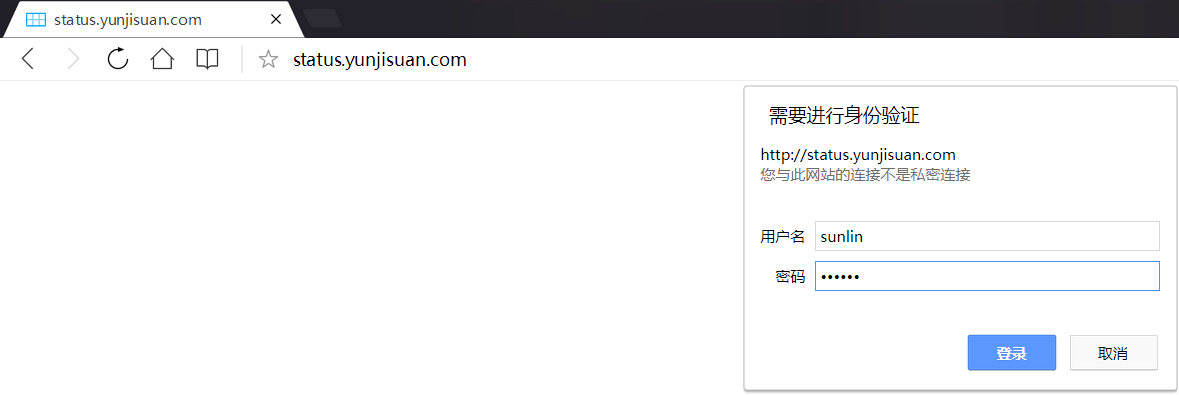
有时,在实际工作中企业要求我们为网站设置访问账号和密码权限,这样操作后,只有拥有账号密码的用户才可以访问网站内容。
这种使用账号密码才可以访问网站的功能主要应用在企业内部人员访问的地址上,例如:企业网站后台,MySQL客户端phpmyadmin,企业内部的CRM,WIKI网站平台。
借用apache的htpasswd软件
yum -y install httpd --->yum安装了httpd就有htpasswd命令which htpasswdhtpasswd -bc /usr/local/nginx/conf/htpasswd sunlin 666666cat /usr/local/nginx/conf/htpasswd --->账号密码是加密得(htpasswd是文件的名字)
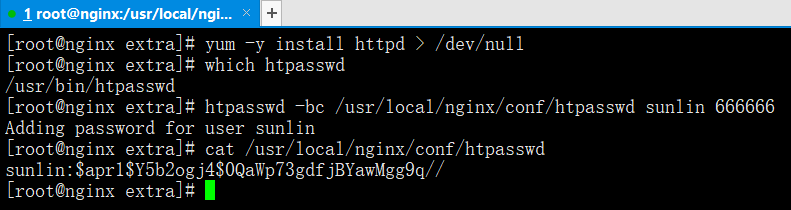
修改虚拟主机配置文件
server {listen 80;server_name status.yunjisuan.com;location / {stub_status on;access_log off;auth_basic "welcome to beijing";auth_basic_user_file /usr/local/nginx/conf/htpasswd;}}配置详解auth_basic --->代表标题auth_basic_user_file --->代表账号密码文件
访问测试阶段
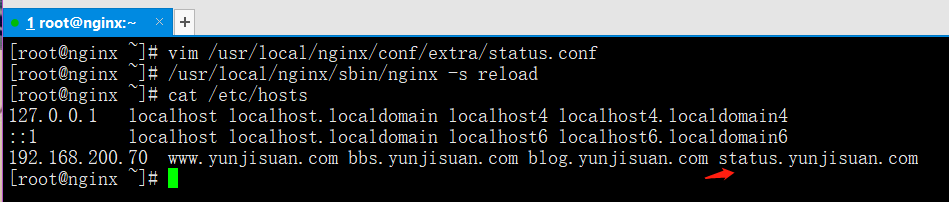
/usr/local/nginx/sbin/nginx -s reload
cat /etc/hosts
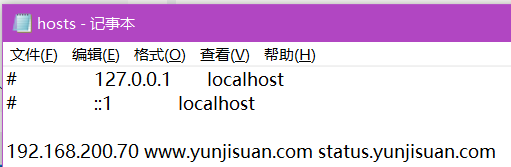
C:\Windows\System32\drivers\etc --->hosts文件里如何没有status.yunjisuan.com域名,需要添加一个
Nginx相关问题解答
Tengine和Nginx是什么关系?
Tengine是淘宝开源Nginx的分支,官方站点为http://tengine.taobao.org/
访问Nginx时出现状态码“403 forbidden”的原因
(1)Nginx配置文件里没有配置默认首页参数,或者首页文件在站点目录下没有这个内容:index index.php index.html index.htm;
(2)站点目录或内部的程序文件没有Nginx用户访问权限 --->在主配置文件添加一句autoindex on;就有访问权限了
(3)Nginx配置文件中设置了allow,deny等权限控制,导致客户端没有访问权限。
(4)如何在站点目录下没有默认文件名,则在主配置文件添加一句autoindex on;就有访问权限了,默认是不开启

 浙公网安备 33010602011771号