
魔改 Markdown Here 让微信公众号支持 Markdown 发文(支持显示行号的代码块)
Markdown Here 是一个浏览器插件,支持 Chrome/Firefox/Edge 浏览器,其插件描述:用Markdown写一封漂亮的电子邮件。
本文仅修改了 Chrome 浏览器的 Markdown Here 插件,其他浏览器可根据文章内容自行修改。
写在开头
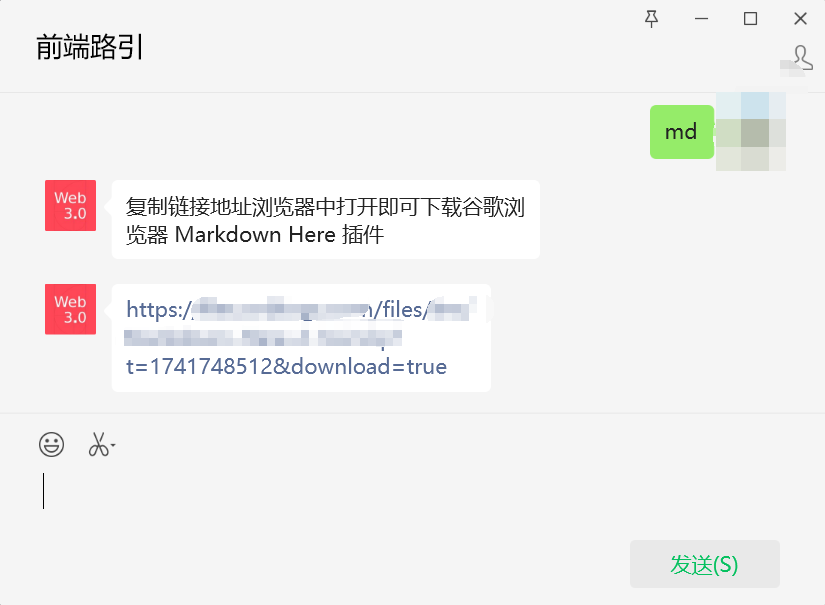
如果你不想看这么多的长篇代码,也不太想动手去魔改,可直接关注微信公众号前端路引,回复 md,即可获取魔改后的插件下载地址,下载后直接解压安装即可,安装方法参考后文中 使用修改后的插件 段落。

关注后直接回复 md 即可获取下载地址:
效果
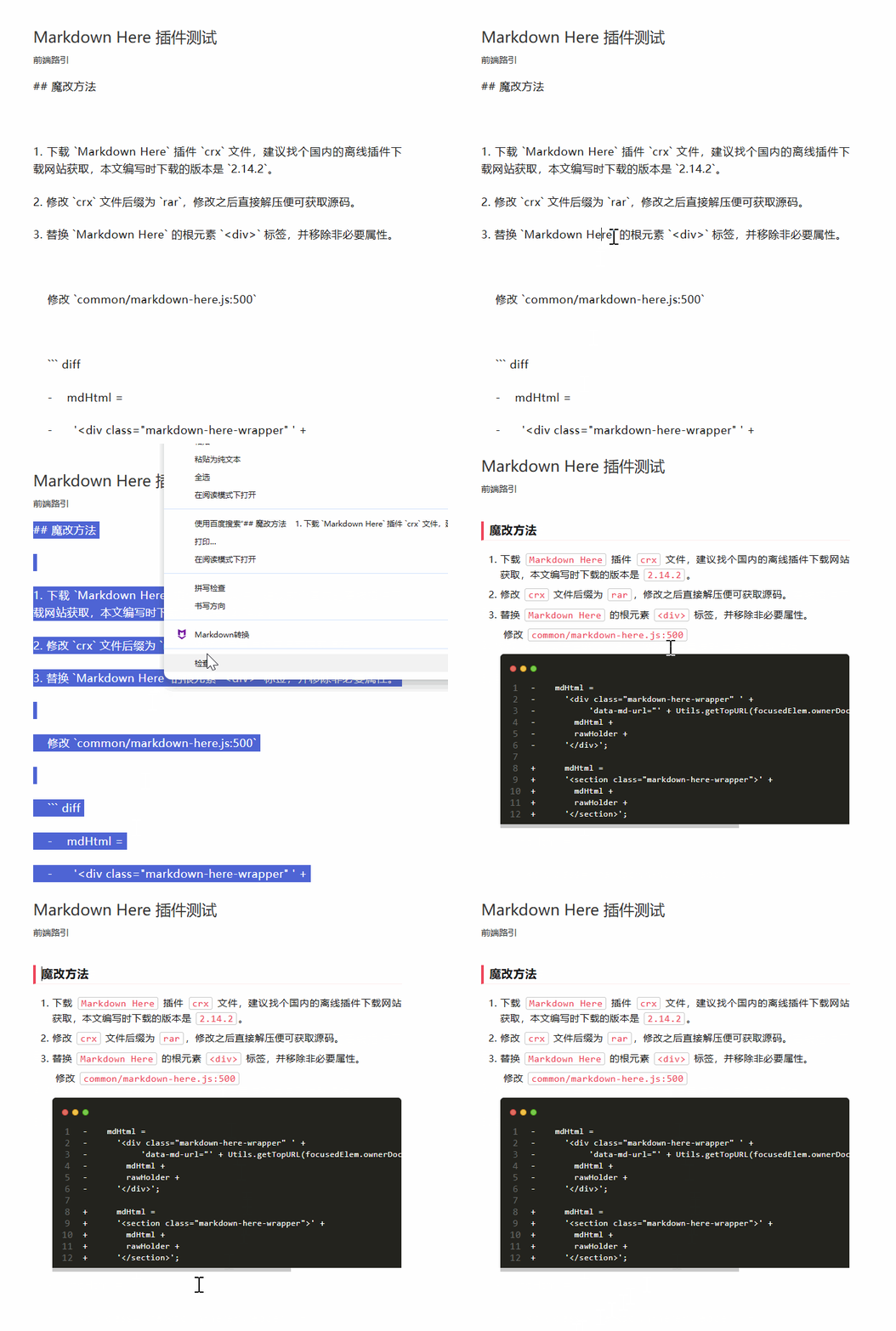
插件直接用于微信公众号问题
Markdown Here 插件主要用途是用来转换 Markdown 文本为电子邮件,用来转换微信公众号嘛,也不是不能用,但是有这么几个问题存在:
- 微信公众号不支持
<div>标签,Markdown Here转换之后生成的<div>标签被移除,导致样式丢失。 Markdown Here转换之后的富文本内容,有部分文本没使用标签包裹,微信公众号会自动使用<p>标签包裹,导致样式错乱。-
对于程序员来说代码区域简直是个重灾区。
- 代码块转换之后看着样式还正常,但是保存之后样式丢失(比代码换行,代码间的空格符等都丢失),导致代码都挤到一起了。
- 代码块不支持行号,个人觉得有行号还是更好看一点。
- 微信公众号对
<code>标签有特殊处理,转换出来的代码有一丢丢问题。
魔改方法
- 下载
Markdown Here插件crx文件,建议找个国内的离线插件下载网站获取,本文编写时下载的版本是2.14.2。 - 修改
crx文件后缀为rar,修改之后直接解压便可获取源码。 -
替换
Markdown Here的根元素<div>标签,并移除非必要属性。修改
common/markdown-here.js:5001 - mdHtml = 2 - '<div class="markdown-here-wrapper" ' + 3 - 'data-md-url="' + Utils.getTopURL(focusedElem.ownerDocument.defaultView, true) + '">' + 4 - mdHtml + 5 - rawHolder + 6 - '</div>'; 7 8 + mdHtml = 9 + '<section class="markdown-here-wrapper">' + 10 + mdHtml + 11 + rawHolder + 12 + '</section>';
-
处理代码块渲染结构
修改
common/marked.js:776![]() View Code
View Code1 - Renderer.prototype.code = function(code, lang, escaped) { 2 - if (this.options.highlight) { 3 - var out = this.options.highlight(code, lang); 4 - if (out != null && out !== code) { 5 - escaped = true; 6 - code = out; 7 - } 8 - } 9 - 10 - if (!lang) { 11 - return '<pre><code>' 12 - + (escaped ? code : escape(code, true)) 13 - + '\n</code></pre>'; 14 - } 15 - 16 - return '<pre><code class="' 17 - + this.options.langPrefix 18 - + escape(lang, true) 19 - + '">' 20 - + (escaped ? code : escape(code, true)) 21 - + '\n</code></pre>\n'; 22 - }; 23 24 25 + Renderer.prototype.code = function(code, lang, escaped) { 26 + if (this.options.highlight) { 27 + var out = this.options.highlight(code, lang); 28 + if (out != null && out !== code) { 29 + escaped = true; 30 + code = out; 31 + } 32 + } 33 + 34 + var escapeCode = (escaped ? code : escape(code, true)).replace(/(^|\n)(\s+)|>(\s+)</g, (match, newline, spaces1, spaces2) => { 35 + // 微信公众号会移除标签之前的空格字符,需要替换为空格实体 ` ` 36 + if (spaces1) { 37 + // 匹配每行开头的空格 38 + return newline + spaces1.replace(/ /g, ' '); 39 + } else if (spaces2) { 40 + // 替换 '> <' 之间的空格字符,有多少就替换为多少个 ` ` 41 + return `>${spaces2.replace(/ /g, ' ')}<`; 42 + } 43 + return match; 44 + }) 45 + // 行号 46 + var lineNumberHTML = '<span class="line-number">' + escapeCode.split('\n').map((item, index) => `<span>${index + 1}</span>`).join('<br>') + '</span>' 47 + var codeRows = escapeCode 48 + // 处理多行注释显示异常问题 49 + .replace(/([^>])\n/g, '$1<br>') 50 + // 使用换行符分隔为数组,方便处理每行数据 51 + .split('\n') 52 + // ​ 表示 ​ 零宽度空格 53 + var codeHTML = codeRows.map((item, index) => `<code>${item ? item : '<br>'}</code>`).join('') 54 + if (!lang) { 55 + return '<pre class="code-snippet_nowrap">' 56 + // mac 风格 57 + + '<span class="mac-dots"><span class="mac-dot-item"></span><span class="mac-dot-item"></span><span class="mac-dot-item"></span></span>' 58 + // 行号 59 + + lineNumberHTML 60 + // + (escaped ? code : escape(code, true)) 61 + + codeHTML 62 + + '</pre>'; 63 + } 64 + 65 + return '<pre class="code-snippet_nowrap ' 66 + + this.options.langPrefix 67 + + escape(lang, true) 68 + + '">' 69 + // mac 风格 70 + + '<span class="mac-dots"><span class="mac-dot-item"></span><span class="mac-dot-item"></span><span class="mac-dot-item"></span></span>' 71 + // 行号 72 + + lineNumberHTML 73 + // + (escaped ? code : escape(code, true)) 74 + // ​ 表示 ​ 零宽度空格 75 + + codeHTML 76 + + '</pre>'; 77 + };
-
处理无序列表和有序列表文本未被标签包裹问题。
修改
common/markdown-here.js:8541 - Renderer.prototype.listitem = function(text) { 2 - return '<li>' + text + '</li>\n'; 3 - }; 4 5 + Renderer.prototype.listitem = function(text) { 6 + // 微信公众号,文本必须放在标签中,否则给自动添加 section 标签 7 + return '<li><section>' + text + '</section></li>\n'; 8 + };
-
修改默认样式,支持微信公众号。
直接替换
common/default.css文件内容。原因:我也不记得改了些啥了,反正就各种适配,最后文件内容如下:![]() View Code
View Code1 /* 2 * NOTE: 3 * - The use of browser-specific styles (-moz-, -webkit-) should be avoided. 4 * If used, they may not render correctly for people reading the email in 5 * a different browser than the one from which the email was sent. 6 * - The use of state-dependent styles (like a:hover) don't work because they 7 * don't match at the time the styles are made explicit. (In email, styles 8 * must be explicitly applied to all elements -- stylesheets get stripped.) 9 */ 10 11 /* This is the overall wrapper, it should be treated as the `body` section. */ 12 .markdown-here-wrapper { 13 font-size: 15px; 14 word-break: break-all; 15 word-wrap: break-word; 16 } 17 18 /* To add site specific rules, you can use the `data-md-url` attribute that we 19 add to the wrapper element. Note that rules like this are used depending 20 on the URL you're *sending* from, not the URL where the recipient views it. 21 */ 22 /* .markdown-here-wrapper[data-md-url*="mail.yahoo."] ul { color: red; } */ 23 24 pre, 25 code { 26 font-family: Consolas, Inconsolata, Courier, monospace; 27 } 28 29 code:not(pre code) { 30 margin: 0 0.15em; 31 padding: 0 0.3em; 32 white-space: pre-wrap; 33 border: 1px solid rgba(128,128,128,0.3); 34 background-color: rgba(128,128,128,0.08); 35 border-radius: 3px; 36 display: inline; /* added to fix Yahoo block display of inline code */ 37 word-break: normal; 38 word-wrap: normal; 39 color: #ff4757; 40 } 41 42 pre { 43 font-size: 1em; 44 line-height: 1.2em; 45 background: #fafafa; 46 padding: 0.5em; 47 border-radius: 6px; 48 } 49 50 pre code { 51 font-size: 0.85em; 52 display: block; 53 } 54 55 pre .mac-dots { 56 display: block; 57 padding: 0.4em 0.5em 0.8em 0.5em; 58 } 59 60 pre .mac-dot-item { 61 display: inline-block; 62 width: 10px; 63 height: 10px; 64 border-radius: 10px; 65 margin-right: 6px; 66 } 67 pre .mac-dot-item:nth-of-type(1) { 68 background-color: rgb(237, 108, 96); 69 border: 1px solid rgb(220, 60, 54); 70 } 71 pre .mac-dot-item:nth-of-type(2) { 72 background-color: rgb(247,193,81); 73 border: 1px solid rgb(218,151,33); 74 } 75 pre .mac-dot-item:nth-of-type(3) { 76 background-color: rgb(100,200,86); 77 border: 1px solid rgb(27,161,37); 78 } 79 80 pre .line-number { 81 display: block; 82 float: left; 83 color: rgba(128,128,128,0.7); 84 padding: 0 0.5em; 85 text-align: center; 86 } 87 88 /* In edit mode, Wordpress uses a `* { font: ...;} rule+style that makes highlighted 89 code look non-monospace. This rule will override it. */ 90 .markdown-here-wrapper[data-md-url*='wordpress.'] code span { 91 font: inherit; 92 } 93 94 /* Wordpress adds a grey background to `pre` elements that doesn't go well with 95 our syntax highlighting. */ 96 .markdown-here-wrapper[data-md-url*='wordpress.'] pre { 97 background-color: transparent; 98 } 99 100 /* This spacing has been tweaked to closely match Gmail+Chrome "paragraph" (two line breaks) spacing. 101 Note that we only use a top margin and not a bottom margin -- this prevents the 102 "blank line" look at the top of the email (issue #243). 103 */ 104 p { 105 /* !important is needed here because Hotmail/Outlook.com uses !important to 106 kill the margin in <p>. We need this to win. */ 107 margin: 1.2em 0; 108 } 109 110 table, 111 pre, 112 dl, 113 blockquote, 114 q, 115 ul, 116 ol { 117 margin: 1.2em 0; 118 } 119 120 ul, 121 ol { 122 padding-left: 2em; 123 } 124 125 li { 126 margin: 0.5em 0; 127 } 128 129 /* Space paragraphs in a list the same as the list itself. */ 130 li p { 131 /* Needs !important to override rule above. */ 132 margin: 0.5em 0 !important; 133 } 134 135 /* Smaller spacing for sub-lists */ 136 ul ul, 137 ul ol, 138 ol ul, 139 ol ol { 140 margin: 0; 141 padding-left: 1em; 142 } 143 144 /* Use Roman numerals for sub-ordered-lists. (Like Github.) */ 145 ol ol, 146 ul ol { 147 list-style-type: lower-roman; 148 } 149 150 /* Use letters for sub-sub-ordered lists. (Like Github.) */ 151 ul ul ol, 152 ul ol ol, 153 ol ul ol, 154 ol ol ol { 155 list-style-type: lower-alpha; 156 } 157 158 dl { 159 padding: 0; 160 } 161 162 dl dt { 163 font-size: 1em; 164 font-weight: bold; 165 font-style: italic; 166 } 167 168 dl dd { 169 margin: 0 0 1em; 170 padding: 0 1em; 171 } 172 173 blockquote, 174 q { 175 border-left: 4px solid #ddd; 176 padding: 0 1em; 177 color: #777; 178 quotes: none; 179 } 180 181 blockquote::before, 182 blockquote::after, 183 q::before, 184 q::after { 185 content: none; 186 } 187 188 h1, 189 h2, 190 h3, 191 h4, 192 h5, 193 h6 { 194 margin: 1.3em 0 1em; 195 padding: 0; 196 font-weight: bold; 197 padding-left: 0.5em; 198 border-width: 0px 0px 0px 4px; 199 border-style: solid; 200 border-left-color: #ff4757; 201 } 202 203 h1 { 204 /* font-size: 1.6em; */ 205 font-size: 20px; 206 border-bottom: 1px solid rgba(255, 71, 87, 0.2); 207 } 208 209 h2 { 210 /* font-size: 1.4em; */ 211 font-size: 18px; 212 border-bottom: 1px solid rgba(255, 71, 87, 0.1); 213 } 214 215 h3 { 216 /* font-size: 1.3em; */ 217 font-size: 16px; 218 } 219 220 h4 { 221 /* font-size: 1.2em; */ 222 font-size: 15px; 223 } 224 225 h5 { 226 /* font-size: 1em; */ 227 font-size: 14px; 228 } 229 230 h6 { 231 /* font-size: 1em; */ 232 font-size: 13px; 233 color: #777; 234 } 235 236 table { 237 padding: 0; 238 border-collapse: collapse; 239 border-spacing: 0; 240 font-size: 1em; 241 font: inherit; 242 border: 0; 243 } 244 245 tbody { 246 margin: 0; 247 padding: 0; 248 border: 0; 249 } 250 251 table tr { 252 border: 0; 253 border-top: 1px solid #ccc; 254 background-color: white; 255 margin: 0; 256 padding: 0; 257 } 258 259 table tr:nth-child(2n) { 260 background-color: #f8f8f8; 261 } 262 263 table tr th, 264 table tr td { 265 font-size: 1em; 266 border: 1px solid #ccc; 267 margin: 0; 268 padding: 0.5em 1em; 269 } 270 271 table tr th { 272 font-weight: bold; 273 background-color: #f0f0f0; 274 }


使用修改后的插件
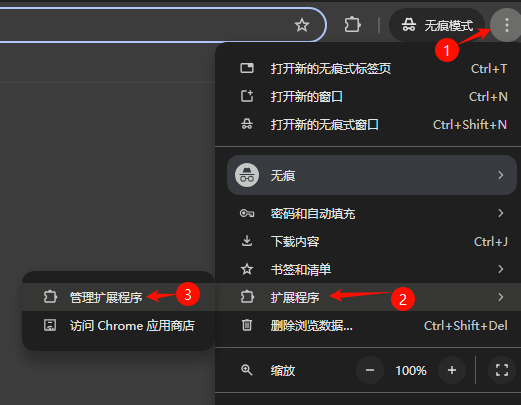
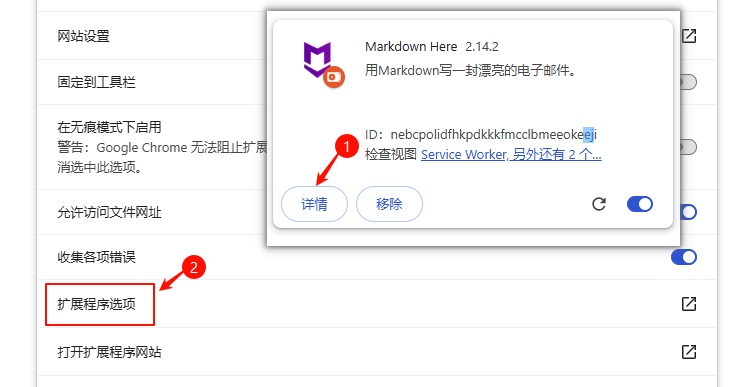
- 进入 Chrome 浏览器的扩展程序管理页面(chrome://extensions/)
![]()
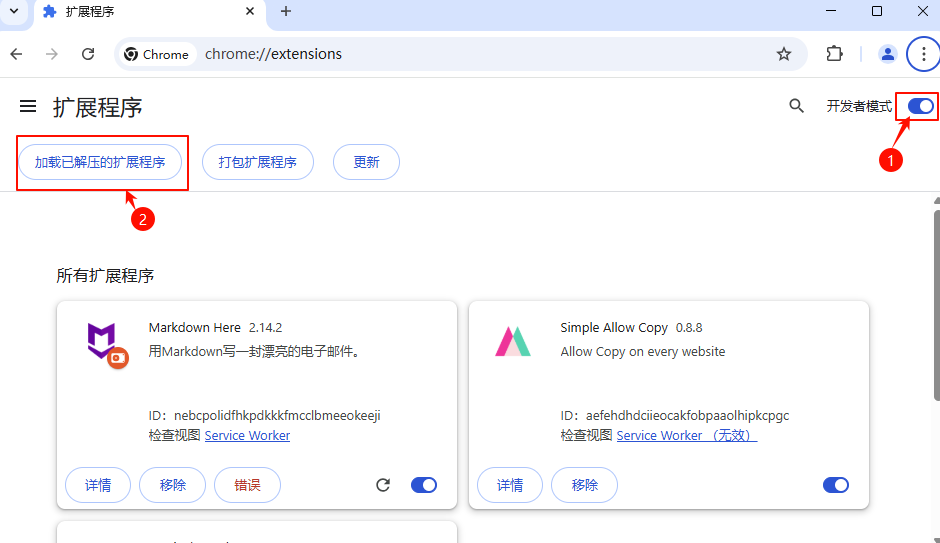
- 打开
开发者模式,加载修改后的插件目录,注意是解压后的根目录,包含manifest.json那个文件夹,不是修改文件那个目录。![]()
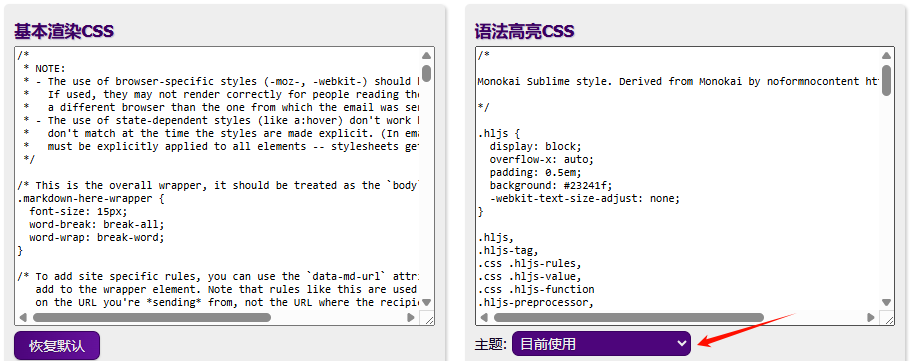
这一步可能会报错'background.page' requires manifest version of 2 or lower.,处理办法是删除 manifest.json 中的background.page这个字段。 - 可在插件选项中修改代码主题让代码显示不同风格,也可修改
基本渲染CSS和语法高亮CSS做出更多炫酷排版。![]()
![]()
-
使用插件
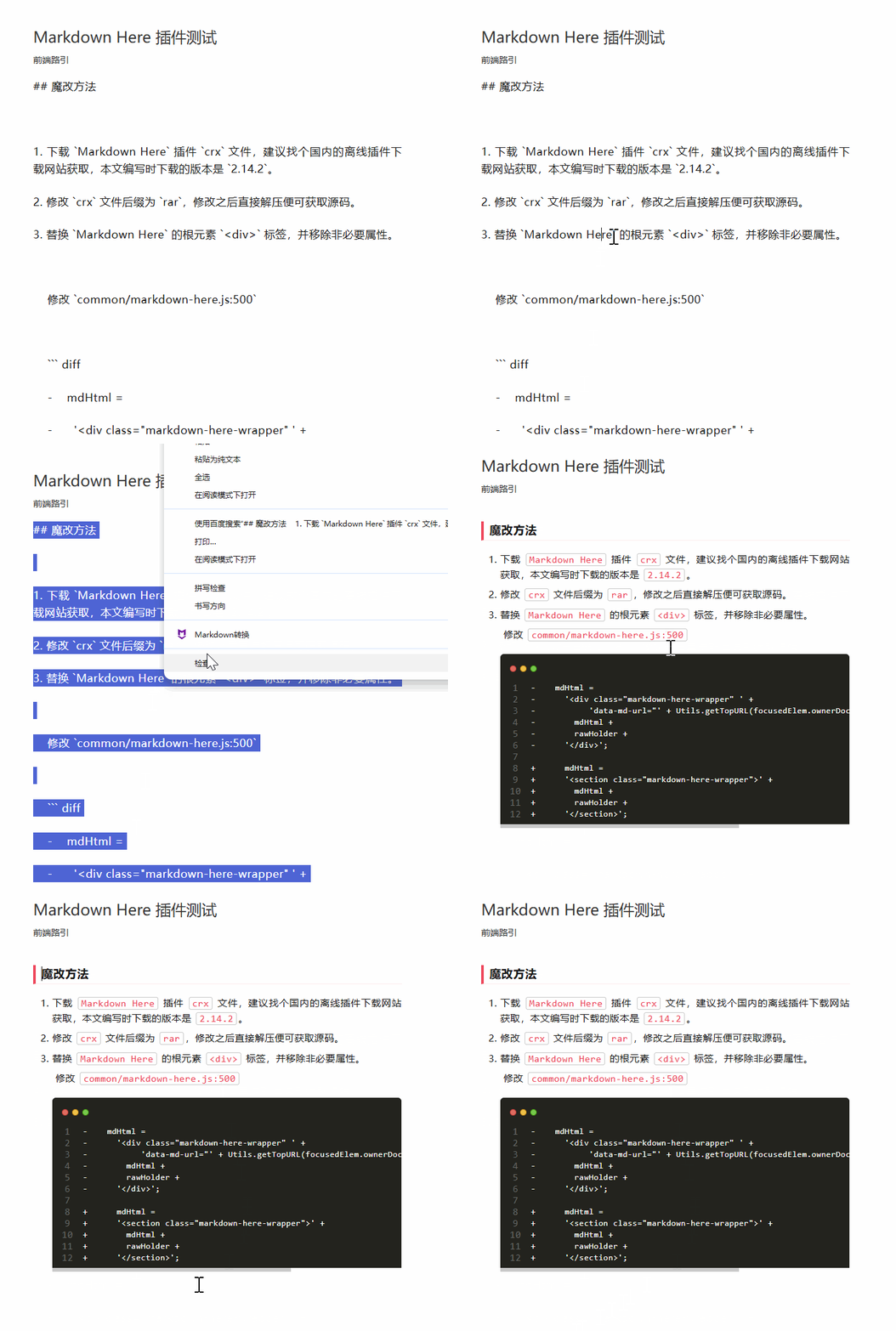
微信公众号的文章编辑区域->选中文本->鼠标右键->Markdown 转换,如图:
总结
插件还有不足之处,比如图片没办法自动同步,不过比手动排版已经好用多了。
随着深入使用,可能会发现其他问题,有问题再做修复处理,目前来看还没发现有排版问题。
如果你有更好的想法,或在安装使用中遇到问题,欢迎留言。


 浙公网安备 33010602011771号