
一、centos7中安装Python3
1)查看系统python版本
[root@jenkens ~]# which python
/usr/bin/python
[root@jenkens ~]# python
Python 2.7.5 (default, Aug  4 2017, 00:39:18)
[GCC 4.8.5 20150623 (Red Hat 4.8.5-16)] on linux2
Type "help", "copyright", "credits" or "license" for more information.
2)安装python3版本
2.1)安装依赖包
yum -y groupinstall "Development tools"
yum -y install zlib-devel bzip2-devel openssl-devel ncurses-devel sqlite-devel readline-devel tk-devel gdbm-devel db4-devel libpcap-devel xz-devel
2.2)下载所要的版本
wget https://www.python.org/ftp/python/3.6.2/Python-3.6.2.tar.xz
2.4)创建python安装的路径,即编译的路径 。
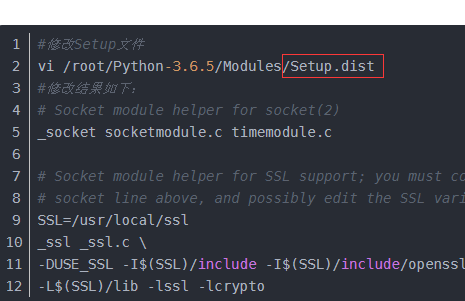
再执行编译安装
tar -xvJf  Python-3.6.2.tar.xz
cd Python-3.6.2
mkdir /usr/local/python3
./configure --prefix=/usr/local/python3
make && make install
2.5)设置软链接
ln -s /usr/local/python3/bin/python3 /usr/bin/python3
ln -s /usr/local/python3/bin/pip3 /usr/bin/pip3
2.6)测试python3和pip3
[root@jenkens Python-3.6.2]# python3
Python 3.6.2 (default, Oct 30 2018, 20:50:05)
[GCC 4.8.5 20150623 (Red Hat 4.8.5-28)] on linux
Type "help", "copyright", "credits" or "license" for more information.
>>> quit()
[root@jenkens Python-3.6.2]# pip3 -V
pip 9.0.1 from /usr/local/python3/lib/python3.6/site-packages (python 3.6)
二、在centos6中python2升级为python3
1)下载默认的依赖包
yum -y install gcc
yum -y install gcc-c++
yum -y install glibc.i686
yum -y install dos2unix
yum -y install vsftpd
yum install -y redhat-lsb
yum -y install zlib*
2)下载需要的版本
wget https://www.python.org/ftp/python/3.6.2/Python-3.6.2.tar.xz
3)编译安装,编译参数
./configure --prefix=/usr/local/python3.6 \
--with-ssl
4)安装
make all
make install
make clean
make distclean
5)查看版本
[root@Jumpserver Python-3.6.2]# /usr/local/python3.6/bin/python3 -V
Python 3.6.2
6)移动原有的python2版本
[root@Jumpserver Python-3.6.2]# mv /usr/bin/python /usr/bin/python2.6.6
7)做python3的软链接
[root@Jumpserver Python-3.6.2]# ln -s /usr/local/python3.6/bin/python3 /usr/bin/python
[root@Jumpserver Python-3.6.2]# python -V
Python 3.6.2
[root@Jumpserver Python-3.6.2]# ln -s /usr/local/python3.6/bin/pip3 /usr/bin/pip
[root@Jumpserver Python-3.6.2]# pip -V
pip 9.0.1 from /usr/local/python3.6/lib/python3.6/site-packages (python 3.6)
8)此时yum源不能用,需要修改。/usr/bin/yum
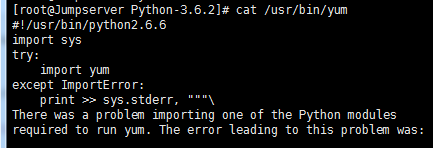
#!/usr/bin/python ===>>  #!/usr/bin/python2.6.6
改成备份的
9)检测python,和pip和yum
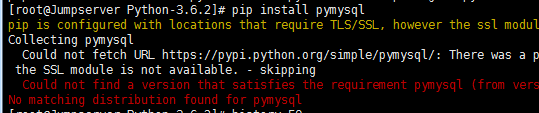
如果出现这个错误,请加上-i 安装
pip install pymysql -i http://pypi.douban.com/simple --trusted-host pypi.douban.com
三、脚本安装python模块
test.txt文件的前提是
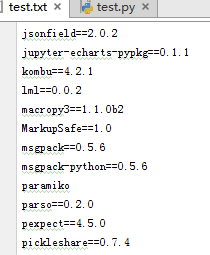
li = []
with open('test.txt',mode='r',encoding='utf-8') as f:
    for line in f:
        line = line.split('\n')
        x = 'pip3 install %s -i http://pypi.douban.com/simple --trusted-host pypi.douban.com'%line[0]
        li.append(x)

import paramiko
ssh = paramiko.SSHClient()
ssh.set_missing_host_key_policy(paramiko.AutoAddPolicy())
ssh.connect(hostname='192.168.10.12', port=22, username='root', password='123456')
for i in li:
    print(i)
    stdin, stdout, stderr = ssh.exec_command(i)
    result = stdout.read()
    print(result.decode('utf-8'))
ssh.close()

 浙公网安备 33010602011771号