
一、 saltstack 的api接口使用
1)检查saltstack的环境


[root@master ~]# salt-key
Accepted Keys:
master
node01
node02
Denied Keys:
Unaccepted Keys:
Rejected Keys:
[root@master ~]# salt '*' test.ping
node02:
    True
master:
    True
node01:
    True
2)salt-api介绍
saltsatck本身就提供了一套算完整的api,使用 CherryPy 来实现 restful 的 api,供外部的程序调用。
3)api安装
3.1)yum安装方式,需要的依赖包cherry也会被安装上
yum -y install salt-api pyOpenSSL
systemctl enable salt-api
3.2)pip安装,首先要确认机器上有没有安装pip模块。
rpm -ivh https://mirrors.aliyun.com/epel/7/x86_64/s/salt-api-2015.5.10-2.el7.noarch.rpm
pip install cherrypy==3.2.3
pip install cherrypy
pip install salt-api
测试使用的yum安装
4)配置证书
4.1)生成的key文件
[root@master ~]# cd /etc/pki/tls/certs/
[root@master certs]# make testcert
Enter pass phrase:    ===>  输入加密短语,这里我使用salt2018
Verifying - Enter pass phrase:    ===>  确认加密短语
umask 77 ; \
/usr/bin/openssl req -utf8 -new -key /etc/pki/tls/private/localhost.key -x509 -days 365 -out /etc/pki/tls/certs/localhost.crt -set_serial 0
Enter pass phrase for /etc/pki/tls/private/localhost.key:    ===>  再次输入相同的加密短语
You are about to be asked to enter information that will be incorporated
into your certificate request.
What you are about to enter is what is called a Distinguished Name or a DN.
There are quite a few fields but you can leave some blank
For some fields there will be a default value,
If you enter '.', the field will be left blank.
-----
Country Name (2 letter code) [XX]:CN
State or Province Name (full name) []:BeiJing
Locality Name (eg, city) [Default City]:BeiJing
Organization Name (eg, company) [Default Company Ltd]:
Organizational Unit Name (eg, section) []:
Common Name (eg, your name or your server's hostname) []:
Email Address []:
[root@master certs]# pwd
/etc/pki/tls/certs
[root@master certs]# cd /etc/pki/tls/private/
[root@master private]# ls
localhost.key            =====> 生成的key文件
4.2)解密证书
[root@master private]# ls
localhost.key
[root@master private]# openssl rsa -in localhost.key -out localhost_nopass.key
Enter pass phrase for localhost.key:            ===>  输入加密短语
writing RSA key
[root@master private]# ls
localhost.key  localhost_nopass.key
4.3)给相关的证书文件授权
chmod 755 /etc/pki/tls/certs/localhost.crt
chmod 755 /etc/pki/tls/private/localhost.key
chmod 755 /etc/pki/tls/private/localhost_nopass.key
5)添加用于api调用的用户
[root@master private]# useradd -M -s /sbin/nologin saltapi
[root@master private]# passwd saltapi
Changing password for user saltapi.
New password:
BAD PASSWORD: The password is shorter than 8 characters
Retype new password:
passwd: all authentication tokens updated successfully.
备注:此处用户名密码一样
6)修改 salt的master配置文件
[root@master private]# sed -i '/#default_include/s/#default/default/g' /etc/salt/master
[root@master private]# mkdir -p /etc/salt/master.d/
[root@master private]# cd /etc/salt/master.d/
[root@master master.d]# touch eauth.conf
[root@master master.d]# touch api.conf
[root@master master.d]# cat api.conf
rest_cherrypy:
  port: 8001
  ssl_crt: /etc/pki/tls/certs/localhost.crt
  ssl_key: /etc/pki/tls/private/localhost_nopass.key
[root@master master.d]# cat eauth.conf
external_auth:
  pam:
    saltapi:
      - .*
==============
备注
saltapi  # 为用户
- .*     # 该配置文件给予saltapi用户所有模块使用权限,出于安全考虑一般只给予特定模块使用权限
7)启动api
systemctl restart salt-master
systemctl start salt-api
ps -ef|grep salt-api
netstat -lnput|grep 8001
8)验证api服务
获得token
[root@master ~]# curl -k https://192.168.1.5:8001/login -H "Accept: application/x-yaml"  -d username='saltapi'  -d password='saltapi'  -d eauth='pam'
return:
- eauth: pam
  expire: 1567273181.979035
  perms:
  - .*
  start: 1567229981.979034
  token: e051574e03848d949650549a2ed859e4d92d8dad
  user: saltapi

调用test.ping
[root@master ~]# curl -k https://192.168.1.5:8001/ -H "Accept: application/x-yaml" -H "X-Auth-Token: e051574e03848d949650549a2ed859e4d92d8dad" -d client='local' -d tgt='*' -d fun='test.ping'
return:
- master: true
  node01: true
  node02: true
二、python代码调用api接口
1)python代码调用接口
#!/usr/bin/env python
# _*_ coding:utf-8 _*_

import requests
import json
try:
    import cookielib
except:
    import http.cookiejar as cookielib

# 使用urllib2请求https出错,做的设置
import ssl
context = ssl._create_unverified_context()

# 使用requests请求https出现警告,做的设置
from requests.packages.urllib3.exceptions import InsecureRequestWarning
requests.packages.urllib3.disable_warnings(InsecureRequestWarning)


salt_api = "https://192.168.1.5:8001/"


class SaltApi:
    """
    定义salt api接口的类
    初始化获得token
    """
    def __init__(self, url):
        self.url = url
        self.username = "saltapi"
        self.password = "saltapi"
        self.headers = {
            "User-Agent": "Mozilla/5.0 (Windows NT 10.0; WOW64) AppleWebKit/537.36 (KHTML, like Gecko) Chrome/50.0.2661.102 Safari/537.36",
            "Content-type": "application/json"
            # "Content-type": "application/x-yaml"
        }
        self.params = {'client': 'local', 'fun': '', 'tgt': ''}
        # self.params = {'client': 'local', 'fun': '', 'tgt': '', 'arg': ''}
        self.login_url = salt_api + "login"
        self.login_params = {'username': self.username, 'password': self.password, 'eauth': 'pam'}
        self.token = self.get_data(self.login_url, self.login_params)['token']
        self.headers['X-Auth-Token'] = self.token

    def get_data(self, url, params):
        send_data = json.dumps(params)
        request = requests.post(url, data=send_data, headers=self.headers, verify=False)
        # response = request.text
        # response = eval(response)     使用x-yaml格式时使用这个命令把回应的内容转换成字典
        # print response
        # print request
        # print type(request)
        response = request.json()
        result = dict(response)
        # print result
        return result['return'][0]

    def salt_command(self, tgt, method, arg=None):
        """远程执行命令,相当于salt 'client1' cmd.run 'free -m'"""
        if arg:
            params = {'client': 'local', 'fun': method, 'tgt': tgt, 'arg': arg}
        else:
            params = {'client': 'local', 'fun': method, 'tgt': tgt}
        print ('命令参数: ', params)
        result = self.get_data(self.url, params)
        return result

def main():
    print ('==================')
    print ('同步执行命令')
    salt = SaltApi(salt_api)
    print (salt.token)
    salt_client = '*'
    salt_test = 'test.ping'
    salt_method = 'cmd.run'
    salt_params = 'free -m'
    # print salt.salt_command(salt_client, salt_method, salt_params)
    # 下面只是为了打印结果好看点
    result1 = salt.salt_command(salt_client, salt_test)
    for i in result1.keys():
        print (i, ': ', result1[i])
    result2 = salt.salt_command(salt_client, salt_method, salt_params)
    for i in result2.keys():
        print(i)
        print(result2[i])


if __name__ == '__main__':
    main()
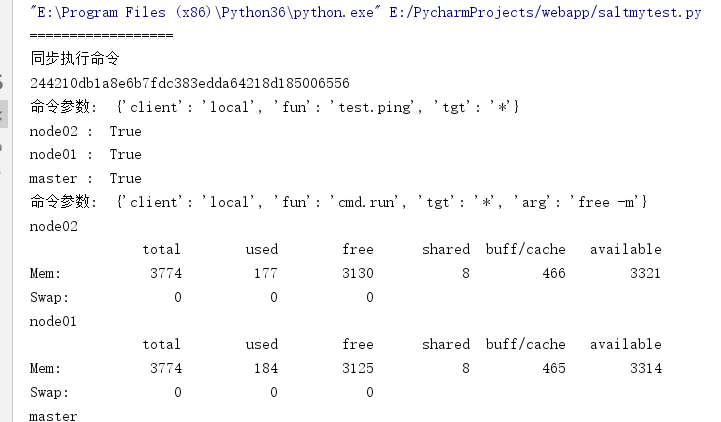
2)异步执行salt命令后的jid结果,首先要修改/etc/salt/master.d/eauth.conf 配置文件,增加权限,然后重启salt-master和salt-api。
[root@master master.d]# cat  eauth.conf
external_auth:
  pam:
    saltapi:
      - .*
      - '@runner'
      - '@wheel'
重启相关服务
python代码调用
#!/usr/bin/env python
# _*_ coding:utf-8 _*_

import requests
import json
try:
    import cookielib
except:
    import http.cookiejar as cookielib

# 使用urllib2请求https出错,做的设置
import ssl
context = ssl._create_unverified_context()

# 使用requests请求https出现警告,做的设置
from requests.packages.urllib3.exceptions import InsecureRequestWarning
requests.packages.urllib3.disable_warnings(InsecureRequestWarning)


salt_api = "https://192.168.1.5:8001/"


class SaltApi:
    """
    定义salt api接口的类
    初始化获得token
    """
    def __init__(self, url):
        self.url = url
        self.username = "saltapi"
        self.password = "saltapi"
        self.headers = {
            "User-Agent": "Mozilla/5.0 (Windows NT 10.0; WOW64) AppleWebKit/537.36 (KHTML, like Gecko) Chrome/50.0.2661.102 Safari/537.36",
            "Content-type": "application/json"
            # "Content-type": "application/x-yaml"
        }
        self.params = {'client': 'local', 'fun': '', 'tgt': ''}
        # self.params = {'client': 'local', 'fun': '', 'tgt': '', 'arg': ''}
        self.login_url = salt_api + "login"
        self.login_params = {'username': self.username, 'password': self.password, 'eauth': 'pam'}
        self.token = self.get_data(self.login_url, self.login_params)['token']
        self.headers['X-Auth-Token'] = self.token

    def get_data(self, url, params):
        send_data = json.dumps(params)
        request = requests.post(url, data=send_data, headers=self.headers, verify=False)
        # response = request.text
        # response = eval(response)     使用x-yaml格式时使用这个命令把回应的内容转换成字典
        # print response
        # print request
        # print type(request)
        response = request.json()
        result = dict(response)
        # print result
        return result['return'][0]


    def salt_command(self, tgt, method, arg=None):
        """远程执行命令,相当于salt 'client1' cmd.run 'free -m'"""
        if arg:
            params = {'client': 'local', 'fun': method, 'tgt': tgt, 'arg': arg}
        else:
            params = {'client': 'local', 'fun': method, 'tgt': tgt}
        print ('命令参数: ', params)
        result = self.get_data(self.url, params)
        return result

    def salt_async_command(self, tgt, method, arg=None):  # 异步执行salt命令,根据jid查看执行结果
        """远程异步执行命令"""
        if arg:
            params = {'client': 'local_async', 'fun': method, 'tgt': tgt, 'arg': arg}
        else:
            params = {'client': 'local_async', 'fun': method, 'tgt': tgt}
        jid = self.get_data(self.url, params)['jid']
        return jid

    def look_jid(self, jid):  # 根据异步执行命令返回的jid查看事件结果
        params = {'client': 'runner', 'fun': 'jobs.lookup_jid', 'jid': jid}
        print(params)
        result = self.get_data(self.url, params)
        return result


def main():
    print ('==================')
    print ('异步执行命令')
    salt1 = SaltApi(salt_api)
    salt_client = '*'
    salt_method = 'cmd.run'
    salt_params = 'df -hT'
    # 下面只是为了打印结果好看点
    salt_test = 'network.arp'
    jid1 = salt1.salt_async_command(salt_client, salt_test)
    result1 = salt1.look_jid(jid1)
    for i in result1.keys():
        print (i, ': ', result1[i])

    jid2 = salt1.salt_async_command(salt_client, salt_method, salt_params)
    result2 = salt1.look_jid(jid2)
    for i in result2.keys():
        print (i)
        print (result2[i])


if __name__ == '__main__':
    main()
3)salt-api二次开发遇到的问题
对salt-api进行了二次开发,通过api控制minion,可能会遇到发送命令线程就进入了等待,然后就是超时。
解决方法:salt.netapi.rest_cherrypy包里面有一个app.py方法,修改'server.thread_pool': self.apiopts.get('thread_pool', 100)为200,修改'server.socket_queue_size': self.apiopts.get('queue_size', 30)为300 。重启salt-api 再次测试,OK。
修改位置
vi /usr/lib/python2.7/site-packages/salt/netapi/rest_cherrypy/app.py
修改下面两行内容
'server.thread_pool': self.apiopts.get('thread_pool', 100),
'server.socket_queue_size': self.apiopts.get('queue_size', 30),
为
'server.thread_pool': self.apiopts.get('thread_pool', 200),
'server.socket_queue_size': self.apiopts.get('queue_size', 300),
重启salt-api 服务 systemctl restart salt-api
原文链接:https://www.jianshu.com/p/012ccdff93cc

 浙公网安备 33010602011771号