


植物大战僵尸
import pygame
import random
import sys
# 初始化pygame
pygame.init()
# 屏幕设置
SCREEN_WIDTH = 800
SCREEN_HEIGHT = 600
screen = pygame.display.set_mode((SCREEN_WIDTH, SCREEN_HEIGHT))
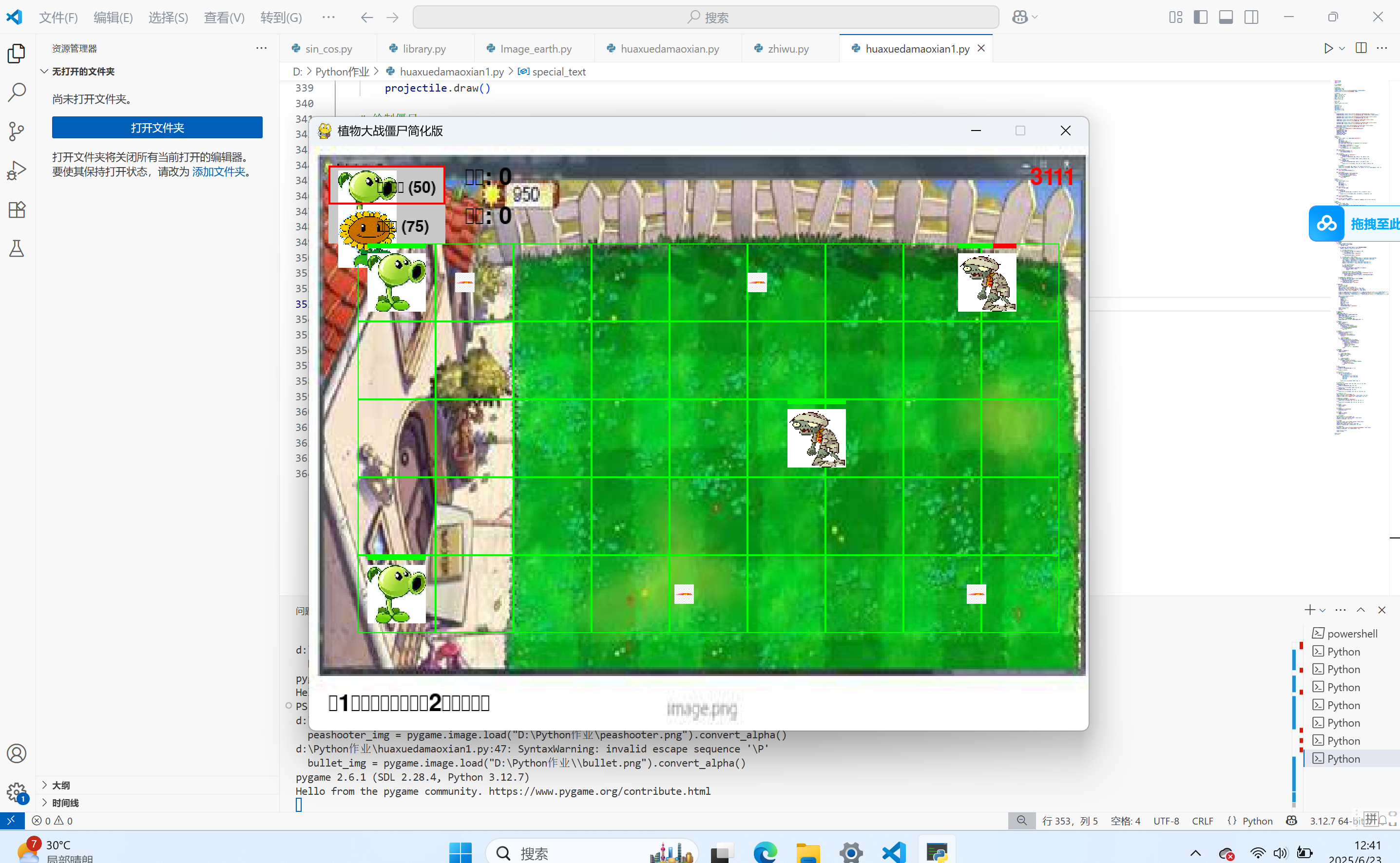
pygame.display.set_caption("植物大战僵尸简化版")
# 颜色定义
WHITE = (255, 255, 255)
GREEN = (0, 255, 0)
BROWN = (139, 69, 19)
BLUE = (0, 0, 255)
RED = (255, 0, 0)
BLACK = (0, 0, 0)
# 游戏参数
FPS = 60
clock = pygame.time.Clock()
# 草坪网格
GRID_SIZE = 80
GRID_COLS = 9
GRID_ROWS = 5
GRID_OFFSET_X = 50
GRID_OFFSET_Y = 100
# 加载图像
try:
background_img = pygame.image.load("D:\\Python作业\\background.jpg").convert()
background_img = pygame.transform.scale(background_img, (SCREEN_WIDTH, SCREEN_HEIGHT))
peashooter_img = pygame.image.load("D:\Python作业\peashooter.png").convert_alpha()
peashooter_img = pygame.transform.scale(peashooter_img, (60, 60))
zombie_img = pygame.image.load("D:\\Python作业\\zombie.png").convert_alpha()
zombie_img = pygame.transform.scale(zombie_img, (60, 60))
sunflower_img = pygame.image.load("D:\\Python作业\\sunflower.png").convert_alpha()
sunflower_img = pygame.transform.scale(sunflower_img, (60, 60))
bullet_img = pygame.image.load("D:\Python作业\\bullet.png").convert_alpha()
bullet_img = pygame.transform.scale(bullet_img, (20, 20))
except FileNotFoundError:
print("无法加载图像文件,请确保图像文件在正确的目录下")
# 使用默认颜色图形
background_img = None
peashooter_img = None
zombie_img = None
sunflower_img = None
bullet_img = None
# 植物类
class Plant:
def __init__(self, x, y, plant_type="peashooter"):
self.x = x
self.y = y
self.health = 100
self.attack_cooldown = 0
self.plant_type = plant_type # "peashooter" 或 "sunflower"
if plant_type == "peashooter":
self.attack_rate = 60 # 攻击间隔帧数
else: # 向日葵
self.attack_rate = 180 # 生产阳光的间隔
def update(self):
if self.attack_cooldown > 0:
self.attack_cooldown -= 1
def draw(self):
if self.plant_type == "peashooter":
if peashooter_img:
screen.blit(peashooter_img, (self.x - 30, self.y - 30))
else:
pygame.draw.circle(screen, GREEN, (self.x, self.y), 30)
else: # 向日葵
if sunflower_img:
screen.blit(sunflower_img, (self.x - 30, self.y - 30))
else:
pygame.draw.circle(screen, (255, 255, 0), (self.x, self.y), 30)
# 绘制生命值
pygame.draw.rect(screen, RED, (self.x - 30, self.y - 40, 60, 5))
pygame.draw.rect(screen, GREEN, (self.x - 30, self.y - 40, 60 * (self.health / 100), 5))
def can_attack(self):
return self.attack_cooldown == 0
def attack(self):
self.attack_cooldown = self.attack_rate
if self.plant_type == "peashooter":
return Projectile(self.x, self.y)
else: # 向日葵生产阳光
return None
# 子弹类
class Projectile:
def __init__(self, x, y):
self.x = x
self.y = y
self.speed = 5
self.damage = 20
def update(self):
self.x += self.speed
def draw(self):
if bullet_img:
screen.blit(bullet_img, (int(self.x - 10), int(self.y - 10)))
else:
pygame.draw.circle(screen, BLUE, (int(self.x), int(self.y)), 10)
def is_off_screen(self):
return self.x > SCREEN_WIDTH
def collides_with(self, zombie):
return (self.x - zombie.x) ** 2 + (self.y - zombie.y) ** 2 <= (20 + 30) ** 2
# 僵尸类
class Zombie:
def __init__(self, row):
self.x = SCREEN_WIDTH
self.y = GRID_OFFSET_Y + row * GRID_SIZE + GRID_SIZE // 2
self.speed = 1
self.health = 100
self.row = row
def update(self):
self.x -= self.speed
def draw(self):
if zombie_img:
screen.blit(zombie_img, (int(self.x - 30), int(self.y - 30)))
else:
pygame.draw.circle(screen, BROWN, (int(self.x), int(self.y)), 30)
# 绘制生命值
pygame.draw.rect(screen, RED, (self.x - 30, self.y - 40, 60, 5))
pygame.draw.rect(screen, GREEN, (self.x - 30, self.y - 40, 60 * (self.health / 100), 5))
def is_off_screen(self):
return self.x < 0
def collides_with(self, plant):
return (self.x - plant.x) ** 2 + (self.y - plant.y) ** 2 <= (30 + 30) ** 2
# 游戏状态
plants = []
zombies = []
projectiles = []
sun = 100 # 阳光资源
game_over = False
score = 0
zombie_spawn_timer = 0
zombie_spawn_rate = 180 # 僵尸生成间隔帧数
selected_plant_type = "peashooter" # 默认选择豌豆射手
# 游戏主循环
running = True
while running:
# 事件处理
for event in pygame.event.get():
if event.type == pygame.QUIT:
running = False
if not game_over and event.type == pygame.MOUSEBUTTONDOWN:
mouse_x, mouse_y = pygame.mouse.get_pos()
# 检查是否点击了植物选择栏
if 20 <= mouse_x < 140 and 20 <= mouse_y < 100:
if 20 <= mouse_y < 60:
selected_plant_type = "peashooter"
else:
selected_plant_type = "sunflower"
# 检查是否点击了网格位置来放置植物
elif GRID_OFFSET_X <= mouse_x < GRID_OFFSET_X + GRID_COLS * GRID_SIZE and \
GRID_OFFSET_Y <= mouse_y < GRID_OFFSET_Y + GRID_ROWS * GRID_SIZE:
col = (mouse_x - GRID_OFFSET_X) // GRID_SIZE
row = (mouse_y - GRID_OFFSET_Y) // GRID_SIZE
plant_x = GRID_OFFSET_X + col * GRID_SIZE + GRID_SIZE // 2
plant_y = GRID_OFFSET_Y + row * GRID_SIZE + GRID_SIZE // 2
# 检查该位置是否已有植物
position_empty = True
for plant in plants:
if plant.x == plant_x and plant.y == plant_y:
position_empty = False
break
# 如果有足够阳光且位置为空,则放置植物
plant_cost = 50 if selected_plant_type == "peashooter" else 75
if position_empty and sun >= plant_cost:
plants.append(Plant(plant_x, plant_y, selected_plant_type))
sun -= plant_cost
# 处理键盘事件 - 切换植物类型
if not game_over and event.type == pygame.KEYDOWN:
if event.key == pygame.K_1:
selected_plant_type = "peashooter"
elif event.key == pygame.K_2:
selected_plant_type = "sunflower"
if game_over:
# 显示游戏结束画面
screen.fill(BLACK)
font = pygame.font.SysFont(None, 72)
game_over_text = font.render("游戏结束!", True, RED)
score_text = font.render(f"得分: {score}", True, WHITE)
restart_text = font.render("按R键重新开始", True, WHITE)
screen.blit(game_over_text, (SCREEN_WIDTH // 2 - game_over_text.get_width() // 2, SCREEN_HEIGHT // 2 - 100))
screen.blit(score_text, (SCREEN_WIDTH // 2 - score_text.get_width() // 2, SCREEN_HEIGHT // 2))
screen.blit(restart_text, (SCREEN_WIDTH // 2 - restart_text.get_width() // 2, SCREEN_HEIGHT // 2 + 100))
keys = pygame.key.get_pressed()
if keys[pygame.K_r]:
# 重置游戏
plants = []
zombies = []
projectiles = []
sun = 100
game_over = False
score = 0
zombie_spawn_timer = 0
selected_plant_type = "peashooter"
pygame.display.flip()
clock.tick(FPS)
continue
# 更新游戏状态
# 生成僵尸
zombie_spawn_timer += 1
if zombie_spawn_timer >= zombie_spawn_rate:
zombie_spawn_timer = 0
row = random.randint(0, GRID_ROWS - 1)
zombies.append(Zombie(row))
# 随着游戏进行,僵尸生成速度加快
zombie_spawn_rate = max(60, zombie_spawn_rate - 5)
# 更新植物
for plant in plants[:]:
plant.update()
if plant.can_attack():
projectile = plant.attack()
if projectile: # 豌豆射手发射子弹
projectiles.append(projectile)
else: # 向日葵生产阳光
sun += 25
# 更新子弹
for projectile in projectiles[:]:
projectile.update()
if projectile.is_off_screen():
projectiles.remove(projectile)
continue
# 检测子弹与僵尸的碰撞
for zombie in zombies[:]:
if projectile.collides_with(zombie):
zombie.health -= projectile.damage
if projectile in projectiles:
projectiles.remove(projectile)
if zombie.health <= 0:
zombies.remove(zombie)
score += 10
sun += 25 # 击杀僵尸获得阳光
break
# 更新僵尸
for zombie in zombies[:]:
zombie.update()
# 检测僵尸是否到达左边界
if zombie.is_off_screen():
game_over = True
break
# 检测僵尸与植物的碰撞
for plant in plants[:]:
if zombie.collides_with(plant):
plant.health -= 0.5 # 僵尸持续伤害植物
if plant.health <= 0:
plants.remove(plant)
break
# 绘制
if background_img:
screen.blit(background_img, (0, 0))
else:
screen.fill(WHITE)
# 绘制草坪网格
for row in range(GRID_ROWS):
for col in range(GRID_COLS):
rect = pygame.Rect(
GRID_OFFSET_X + col * GRID_SIZE,
GRID_OFFSET_Y + row * GRID_SIZE,
GRID_SIZE,
GRID_SIZE
)
pygame.draw.rect(screen, GREEN, rect, 1)
# 绘制植物选择栏
pygame.draw.rect(screen, (200, 200, 200), (20, 20, 120, 80))
if peashooter_img:
screen.blit(peashooter_img, (30, 25))
else:
pygame.draw.circle(screen, GREEN, (60, 50), 25)
if sunflower_img:
screen.blit(sunflower_img, (30, 65))
else:
pygame.draw.circle(screen, (255, 255, 0), (60, 90), 25)
# 显示植物类型和价格
font = pygame.font.SysFont(None, 24)
screen.blit(font.render("豌豆射手 (50)", True, BLACK), (70, 35))
screen.blit(font.render("向日葵 (75)", True, BLACK), (70, 75))
# 高亮显示当前选择的植物
if selected_plant_type == "peashooter":
pygame.draw.rect(screen, RED, (20, 20, 120, 40), 2)
else:
pygame.draw.rect(screen, RED, (20, 60, 120, 40), 2)
# 绘制植物
for plant in plants:
plant.draw()
# 绘制子弹
for projectile in projectiles:
projectile.draw()
# 绘制僵尸
for zombie in zombies:
zombie.draw()
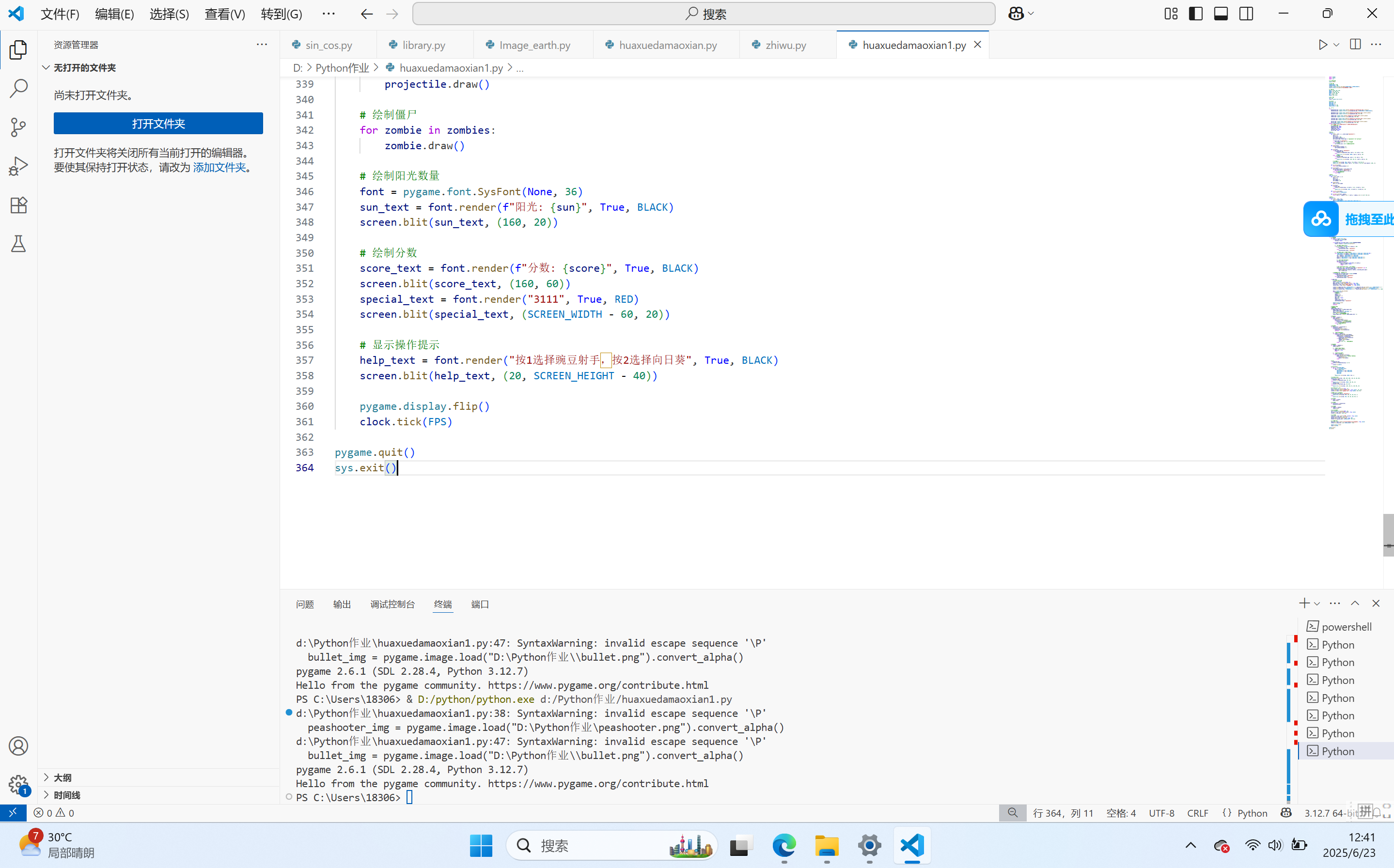
# 绘制阳光数量
font = pygame.font.SysFont(None, 36)
sun_text = font.render(f"阳光: {sun}", True, BLACK)
screen.blit(sun_text, (160, 20))
# 绘制分数
score_text = font.render(f"分数: {score}", True, BLACK)
screen.blit(score_text, (160, 60))
special_text = font.render("3111", True, RED)
screen.blit(special_text, (SCREEN_WIDTH - 60, 20))
# 显示操作提示
help_text = font.render("按1选择豌豆射手,按2选择向日葵", True, BLACK)
screen.blit(help_text, (20, SCREEN_HEIGHT - 40))
pygame.display.flip()
clock.tick(FPS)
pygame.quit()
sys.exit()

 浙公网安备 33010602011771号