
1、动态输出
打开E:\study\openresty\openresty-1.19.9.1-win64 目录下的 conf/nginx.conf 文件
在server中增加一下代码
		location /hello {
			default_type text/html;
			content_by_lua 'ngx.say("<p>hello, world</p>")';
		}
运行后,效果如下图 localhost/hello

2、优化动态输出
上面的代码直接把lua代码写在nginx配置里面了,维护起来不方便。 我们把它拿出来一个单独的文件,放到E:\study\openresty\openresty-1.19.9.1-win64/lua目录下。
新建lua/hello2.lua
ngx.say("<p>hi,world</p>")
配置如下
        location / {
	    default_type text/html;
	    content_by_lua_file  lua/hello2.lua;
        }
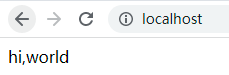
重启nginx nginx -s reload

验证: localhost
上面lua文件是固定的,如何动态指定lua文件名.
1) 增加配置
		location ~ /lua/(.+) {
			default_type text/html;
			content_by_lua_file lua/$1.lua;
		}
2、增加lua/one.lua
ngx.print("<p>hi,one</p>")
增加lua/tow.lua
ngx.print("<p>hi,two</p>")
3、验证
localhost/lua/one

localhost/lua/two

3、接收参数
1 ) lua/req.lua 文件
支持GET、POST两种参数
local _M = {}
-- 获取http get/post 请求参数
function _M.getArgs()
        -- 获取http请求方式 GET or POST
       local request_method = ngx.var.request_method
      -- 这里是一个table,包含所有get请求参数
      local args = ngx.req.get_uri_args()
      -- 如果是post参数获取
      if "POST" == request_method then
           -- 先读取请求体
           ngx.req.read_body()
           -- 这里也是一个table,包含所有post请求参数
           local postArgs = ngx.req.get_post_args()
           if postArgs then
                  for k, v in pairs(postArgs) do
                       args[k] = v
                  end
           end
      end
      return args
end

return _M
2)conf/nginx.conf 添加
http {
	# 这里一定要指定package_path,否则会找不到引入的模块,然后会500
	lua_package_path E:\study\openresty\openresty-1.19.9.1-win64\lua\?.lua;

    server {
        listen       80;
        server_name  localhost;

	location ~ /lua/(.+) {
		default_type text/html;
		content_by_lua_file lua/$1.lua;
	}
}
3) 创建lua/test.lua 文件
-- 引入req模块
local req = require "req"

-- 获取请求参数列表
local args = req.getArgs();
-- 获取key为name的值
local name = args['name']

-- 如果不存在指定默认值
if name == nil or name == "" then
    name = "default name zhang san"
end

-- 输出结果
ngx.say("<p>hello  " .. name .. "!</p>")
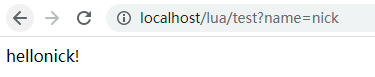
4)验证
http://localhost/lua/test?name=nick
作者:Work Hard Work Smart
出处:http://www.cnblogs.com/linlf03/
欢迎任何形式的转载,未经作者同意,请保留此段声明!

 浙公网安备 33010602011771号