
一、定义
保存一个对象的某个状态,以便在适当的时候恢复对象。
简单理解:"后悔药”
例如游戏存档,开发工具的撤销操作,Word的撤销操作,浏览器中的后腿等。
类型:行为型
二、适用场景
1、保存及恢复数据相关业务场景
2、后悔的时候,即想恢复之前的状态。
三、备忘录模式-优点
1、为用户提供一种可恢复机制
2、存档信息的封装
四、备忘录模式-缺点
1、资源占用
将对象存在内存中,或者将对象持久化
五、备忘录模式-相关设计模式
1、备忘录模式和状态模式
备忘录模式中是用实例保存状态
状态模式:用类来表示状态
六、Coding
场景:在网站上发布手记,有一个暂存功能
1、Article 类
public class Article {
    private String title;
    private String content;

    private String imgs;

    public Article(String title, String content, String imgs) {
        this.title = title;
        this.content = content;
        this.imgs = imgs;
    }

    public String getTitle() {
        return title;
    }

    public void setTitle(String title) {
        this.title = title;
    }

    public String getContent() {
        return content;
    }

    public void setContent(String content) {
        this.content = content;
    }

    public String getImgs() {
        return imgs;
    }

    public void setImgs(String imgs) {
        this.imgs = imgs;
    }

    /**
     * 保存
     * @return
     */
    public ArticleMemento saveToMemento(){
        ArticleMemento articleMemento = new ArticleMemento(this.title, this.content, this.content);
        return  articleMemento;
    }

    public void undoFromMemento(ArticleMemento articleMemento){
        this.title = articleMemento.getTitle();
        this.content = articleMemento.getContent();
        this.imgs = articleMemento.getImgs();
    }

    @Override
    public String toString() {
        return "Article{" +
                "title='" + title + '\'' +
                ", content='" + content + '\'' +
                ", imgs='" + imgs + '\'' +
                '}';
    }
}
2、ArticleMemento 类
/**
 * 手记快照
 */
public class ArticleMemento {
    private String title;
    private String content;

    private String imgs;

    public ArticleMemento(String title, String content, String imgs) {
        this.title = title;
        this.content = content;
        this.imgs = imgs;
    }

    public String getTitle() {
        return title;
    }


    public String getContent() {
        return content;
    }


    public String getImgs() {
        return imgs;
    }

    @Override
    public String toString() {
        return "ArticleMemento{" +
                "title='" + title + '\'' +
                ", content='" + content + '\'' +
                ", imgs='" + imgs + '\'' +
                '}';
    }
}
3、ArticleMementoManger 类
/**
 * 手记快照管理
 */
public class ArticleMementoManger {
    private final Stack<ArticleMemento> articleMementos = new Stack<>();

    public ArticleMemento getArticleMementos() {
        ArticleMemento articleMemento = articleMementos.pop();
        return  articleMemento;
    }

    public void addMemento(ArticleMemento articleMemento){
        this.articleMementos.add(articleMemento);
    }
}
4、测试
public class Test {
    public static void main(String[] args) {
        ArticleMementoManger articleMementoManger = new ArticleMementoManger();
        Article article = new Article("设计模式A","设计模式第一章A","图片A");
        ArticleMemento articleMemento = article.saveToMemento();
        articleMementoManger.addMemento(articleMemento);
        System.out.println("标题:" + article.getTitle() + " 内容:" + article.getContent());
        System.out.println("手记完整信息:" + article);

        System.out.println("修改手记start");
        article.setTitle("设计模式B");
        article.setContent("设计模式第一章B");
        article.setImgs("图片B");
        System.out.println("修改手记end");
        System.out.println("手记完整信息:" + article);
        articleMemento = article.saveToMemento();
        articleMementoManger.addMemento(articleMemento);

        System.out.println("修改手记start");
        article.setTitle("设计模式C");
        article.setContent("设计模式第一章C");
        article.setImgs("图片C");
        System.out.println("修改手记end");

        System.out.println("暂存回退start");

        System.out.println("回退出栈1次");
        articleMemento = articleMementoManger.getMemento();
        article.undoFromMemento(articleMemento);
        System.out.println("回退后手记完整信息:" + article);

        System.out.println("回退出栈2次");
        articleMemento = articleMementoManger.getMemento();
        article.undoFromMemento(articleMemento);
        System.out.println("回退后手记完整信息:" + article);

        System.out.println("暂存回退end");
        //System.out.println("手记完整信息:" + article);


    }
}
输出结果
标题:设计模式A 内容:设计模式第一章A
手记完整信息:Article{title='设计模式A', content='设计模式第一章A', imgs='图片A'}
修改手记start
修改手记end
手记完整信息:Article{title='设计模式B', content='设计模式第一章B', imgs='图片B'}
修改手记start
修改手记end
暂存回退start
回退出栈1次
回退后手记完整信息:Article{title='设计模式B', content='设计模式第一章B', imgs='设计模式第一章B'}
回退出栈2次
回退后手记完整信息:Article{title='设计模式A', content='设计模式第一章A', imgs='设计模式第一章A'}
暂存回退end
5、UML图

七、在源码中的使用
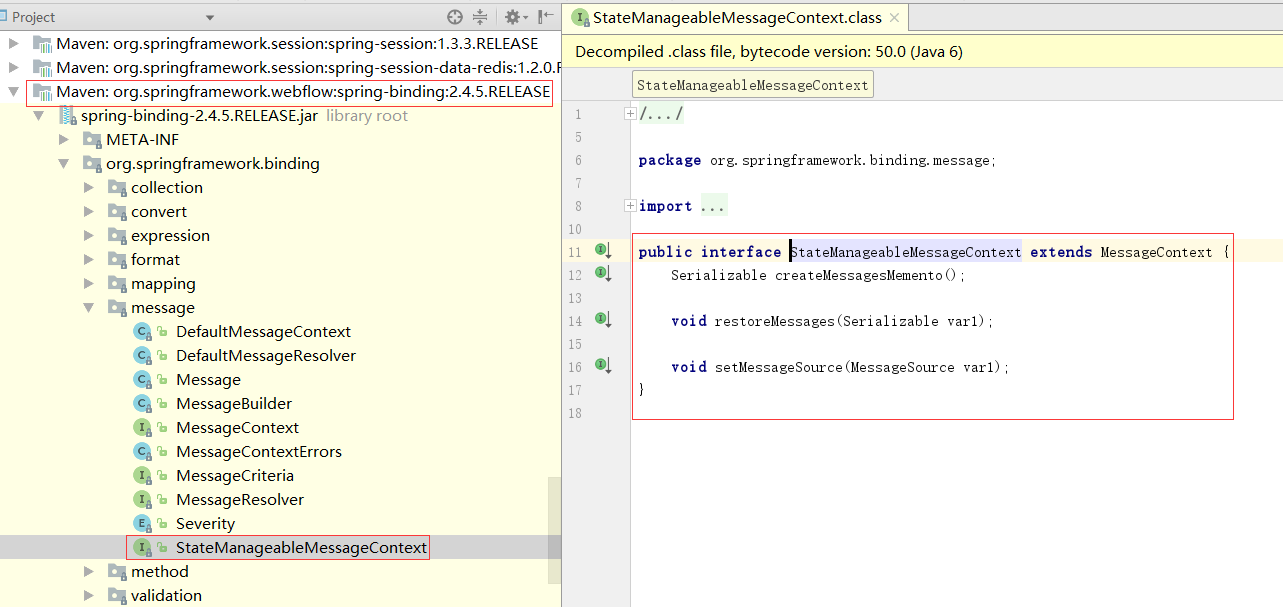
1、Spring中的webflow(要用到工作流的时候)
<dependency>
            <groupId>org.springframework.webflow</groupId>
            <artifactId>spring-webflow</artifactId>
            <version>2.4.5.RELEASE</version>
        </dependency>
找到StateManageableMessageContext接口,里面有一个createMessagesMemento方法。通过方法名称,可知这是一个备忘录模式。
作者:Work Hard Work Smart
出处:http://www.cnblogs.com/linlf03/
欢迎任何形式的转载,未经作者同意,请保留此段声明!

 浙公网安备 33010602011771号