
H3C Switch 简易 Eth-Trunk & QinQ
1. 背景与需求
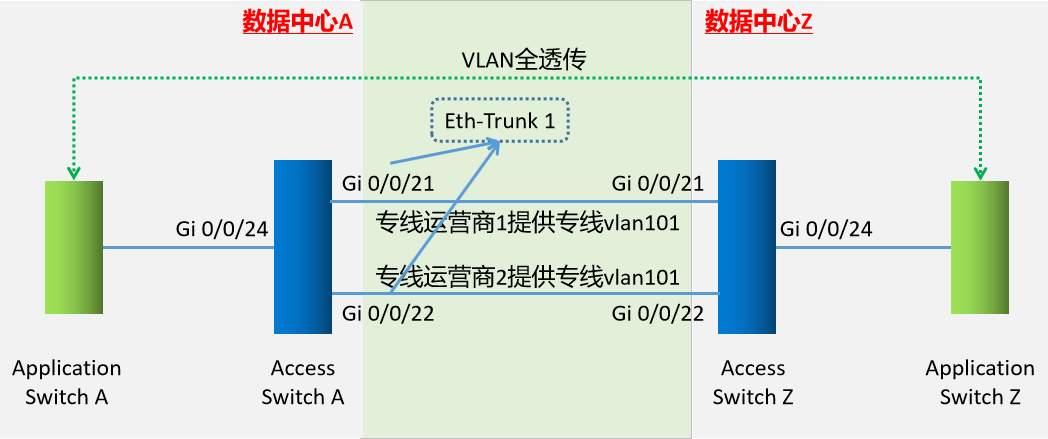
数据中心A、Z两台Application Switch间,需全透传4096个VLAN;
当前数据中心A、Z两台Access Switch间,专线供应商网络可用率低,所以准备了2个不同供应商的单VLAN专线;
当前Access Switch A&Z为: H3C S5560S-28P-EI ;
H3C S5560S-28P-EI 的21、22、23、24均为Combo口,本次均使用光纤互联switch。
2. 启用Combo接口为Fiber
interface GigabitEthernet 0/0/21
  combo-port fiber                 # Combo为SPF光纤口
  undo shutdown                  # 启用接口

interface GigabitEthernet 0/0/22
  combo-port fiber
  undo shutdown

interface GigabitEthernet 0/0/24
  combo-port fiber
  undo shutdown
3. AccessSwitch上连接口配置Eth-Trunk
interface Eth-Trunk 1
  description  upstream-link-to-IDC-Z
  port link-type trunk
  port trunk allow-pass vlan 101     # 供应商提供的链路VLAN为101,如”背景与需求”中描述

interface GigabitEthernet 0/0/21
  Eth-Trunk 1

interface GigabitEthernet 0/0/22
  Eth-Trunk 1
4. AccessSwitch下连接口配置QinQ
interface GigabitEthernet 0/0/24
  duplex full
  port link-type dot1q-tunnel
  port default vlan 101     # 供应商提供的链路VLAN为101,如”背景与需求”中描述
5. AccessSwitch其他配置
# enable snmp service
snmp-agent community read <your-snmp-cummunity-name>
# disable http management
http server disable
http sec disable
# 检查上连光口收发光功率
display transceiver interface GigabitEthernet 0/0/21
display transceiver interface GigabitEthernet 0/0/22
# 创建Local管理用户
rsa local-key-pair create
local-user  < your-loginuser > password cipher < your-loginuser’s-password >
local-user < your-loginuser > service-type telnet
local-user < your-loginuser >
privilege level 3
user-interface vty 0 4
authentication-mode aaa
# 配置管理接口 / VLAN / ACL
<过程略>

 浙公网安备 33010602011771号