

maven-profile
在我们平常的java开发中,会经常使用到很多配制文件(xxx.properties,xxx.xml),而当我们在本地开发(dev),测试环境测试(test),线上生产使用(product)时,需要不停的去修改这些配制文件,次数一多,相当麻烦。现在,利用maven的filter和profile功能,我们可实现在编译阶段简单的指定一个参数就能切换配制,提高效率,还不容易出错.
profile可以让我们定义一系列的配置信息,然后指定其激活条件。这样我们就可以定义多个profile,然后每个profile对应不同的激活条件和配置信息,从而达到不同环境使用不同配置信息的效果
不同环境,工程使用不同端口
pom.xml
<profiles>
      <profile>
          <id>dev</id>
          <properties>
              <port>9105</port>
          </properties>
      </profile>
      <profile>
          <id>pro</id>
          <properties>
              <port>9205</port>
          </properties>
      </profile>
  </profiles>
 <build>
     <plugins>
        <plugin>
        <groupId>org.apache.tomcat.maven</groupId>
        <artifactId>tomcat7-maven-plugin</artifactId>
        <version>2.2</version>
        <configuration>
            <!-- 指定端口 -->
            <port>${port}</port>
            <!-- 请求路径 -->
            <path>/</path>
        </configuration>
    </plugin>
    </plugins>
 </build>
不同环境,使用对应的properties文件
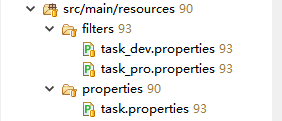
src/main/resources/filters
task_dev.properties
env.text=dev开发环境
task_pro.properties
env.text=pro生产环境
src/main/resources/properties
task.properties
env.text=${env.text}
pom.xml
    <properties><!-- 默认加载 -->
        <env>dev</env>
    </properties>
    <profiles>
        <profile>
            <id>dev</id><!-- clean tomcat7:run -P dev -->
            <properties>
                <env>dev</env>
            </properties>
        </profile>
        <profile>
            <id>pro</id><!-- clean tomcat7:run -P pro -->
            <properties>
                <env>pro</env>
            </properties>
        </profile>
    </profiles>
    <build>
        <filters>
            <filter>src/main/resources/filters/task_${env}.properties</filter>
            <!-- <filter></filter> -->
        </filters>
        <resources>
            <resource>
                <directory>src/main/resources</directory>
                <filtering>true</filtering>
            </resource>
        </resources>
        <plugins>
            <plugin>
                <groupId>org.apache.tomcat.maven</groupId>
                <artifactId>tomcat7-maven-plugin</artifactId>
                <version>2.2</version>
                <configuration>
                    <!-- 指定端口 -->
                    <port>${port}</port>
                    <!-- 请求路径 -->
                    <path>/</path>
                </configuration>
            </plugin>
        </plugins>
    </build>
maven打包命令
// 生产环境
clean tomcat7:run -P pro
// 开发环境(默认)
clean tomcat7:run -P dev
人生在世须尽欢,能鬼混就鬼混---

 浙公网安备 33010602011771号