
13.5.0 头文件
import torch
from d2l import torch as d2l
from matplotlib import pyplot as plt
d2l.set_figsize()
13.5.1 读入图像
img = d2l.plt.imread('../img/catdog.jpg')
h, w = img.shape[:2]
print(h, w)
# 输出:
# 561 728
13.5.2 在图像建立指定行数、指定列数、指定尺寸的锚框进行均匀采样
def display_anchors(fmap_w, fmap_h, s):
    # 输入:
    #       fmap_w:在图像上要绘制锚框的列数
    #       fmap_h:在图像上要绘制锚框的行数
    #       s:缩放比
    # 输出:
    #       无
    # 功能:
    #       在图像上画出指定行数和列数,指定缩放比和宽高比的锚框
    fmap = torch.zeros((1, 10, fmap_h, fmap_w))
    # (锚框个数为fmap_h × fmap_w × (sizes.size() + ratios.size() - 1))
    anchors = d2l.multibox_prior(fmap, sizes=s, ratios=[1, 2, 0.5])
    # 图像尺寸(行数,列数,行数,列数)
    bbox_scale = torch.tensor((w, h, w, h))
    # 在图像上画出锚框或边界框, 不显示文本
    d2l.show_bboxes(d2l.plt.imshow(img).axes, anchors[0] * bbox_scale)
    plt.show()

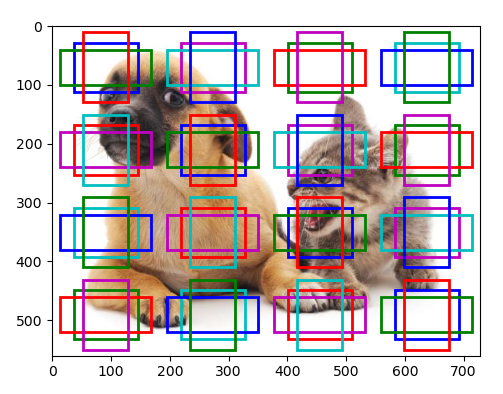
# 在图像上画出四行四列的锚框,锚框大小为15%
display_anchors(fmap_w=4, fmap_h=4, s=[0.15])
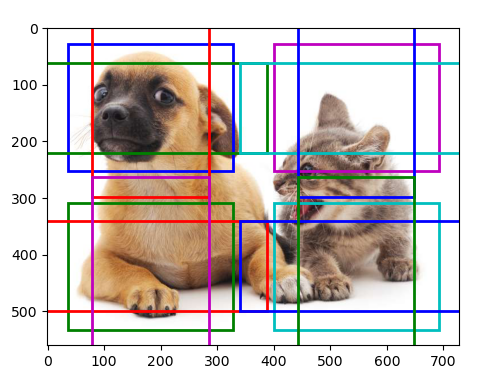
# 在图像上画出两行两列的锚框,锚框大小为40%
display_anchors(fmap_w=2, fmap_h=2, s=[0.4])
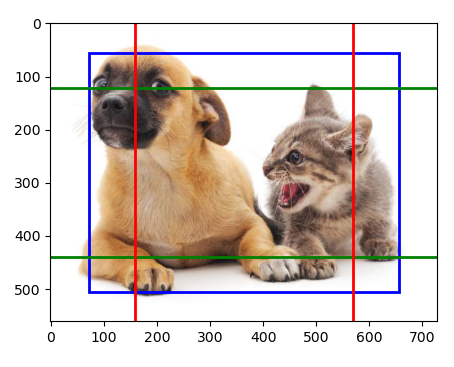
# 在图像上画出一行一列的锚框,锚框大小为80%
display_anchors(fmap_w=1, fmap_h=1, s=[0.8])
本小节完整代码如下
import torch
from d2l import torch as d2l
from matplotlib import pyplot as plt
d2l.set_figsize()

img = d2l.plt.imread('../img/catdog.jpg')
h, w = img.shape[:2]
print(h, w)
# 输出:
# 561 728

# ------------------------------在图像建立指定行数、指定列数、指定尺寸的锚框进行均匀采样------------------------------------

def display_anchors(fmap_w, fmap_h, s):
    # 输入:
    #       fmap_w:在图像上要绘制锚框的列数
    #       fmap_h:在图像上要绘制锚框的行数
    #       s:缩放比
    # 输出:
    #       无
    # 功能:
    #       在图像上画出指定行数和列数,指定缩放比和宽高比的锚框
    fmap = torch.zeros((1, 10, fmap_h, fmap_w))
    # (锚框个数为fmap_h × fmap_w × (sizes.size() + ratios.size() - 1))
    anchors = d2l.multibox_prior(fmap, sizes=s, ratios=[1, 2, 0.5])
    # 图像尺寸(行数,列数,行数,列数)
    bbox_scale = torch.tensor((w, h, w, h))
    # 在图像上画出锚框或边界框, 不显示文本
    d2l.show_bboxes(d2l.plt.imshow(img).axes, anchors[0] * bbox_scale)
    plt.show()

# 在图像上画出四行四列的锚框,锚框大小为15%
display_anchors(fmap_w=4, fmap_h=4, s=[0.15])
# 在图像上画出两行两列的锚框,锚框大小为40%
display_anchors(fmap_w=2, fmap_h=2, s=[0.4])
# 在图像上画出一行一列的锚框,锚框大小为80%
display_anchors(fmap_w=1, fmap_h=1, s=[0.8])

 浙公网安备 33010602011771号