
13.3.0头文件
import torch
from d2l import torch as d2l
from matplotlib import pyplot as plt
d2l.set_figsize()
13.3.1 边界框坐标转换
# 把框框的(左上(x,y),右下(x,y))坐标转换为(中心(x,y),宽x,高y)坐标
def box_corner_to_center(boxes):
    x1, y1, x2, y2 = boxes[:, 0], boxes[:, 1], boxes[:, 2], boxes[:, 3]
    cx = (x1 + x2) / 2
    cy = (y1 + y2) / 2
    w = x2 - x1
    h = y2 - y1
    boxes = torch.stack((cx, cy, w, h), axis=-1)
    return boxes

# 把框框的(中心(x,y),宽x,高y)坐标转换为(左上(x,y),右下(x,y))坐标
def box_center_to_corner(boxes):
    cx, cy, w, h = boxes[:, 0], boxes[:, 1], boxes[:, 2], boxes[:, 3]
    x1 = cx - 0.5 * w
    y1 = cy - 0.5 * h
    x2 = cx + 0.5 * w
    y2 = cy + 0.5 * h
    boxes = torch.stack((x1, y1, x2, y2), axis=-1)
    return boxes

# 把框框的(左上(x,y),右下(x,y))坐标转换为(左上(x,y),宽x,高y)坐标
def bbox_to_rect(bbox, color):
    return d2l.plt.Rectangle(
        xy=(bbox[0], bbox[1]), width=bbox[2]-bbox[0], height=bbox[3]-bbox[1],
        fill=False, edgecolor=color, linewidth=2)
13.3.2 读入图像,并定义边界框
# 从img文件夹中读取dog_cat.png图像
img = d2l.plt.imread('../img/dog_cat.jpg')
# 狗狗框和喵喵框的左上右下坐标
dog_bbox, cat_bbox = [200.0, 200.0, 420.0, 480.0], [430.0, 200.0, 800.0, 550.0]
boxes = torch.tensor((dog_bbox, cat_bbox))
13.3.3 显示图像与边界框
fig = d2l.plt.imshow(img)
# 在图像中画出喵喵框
fig.axes.add_patch(bbox_to_rect(dog_bbox, 'blue'))
# 在图像中画出狗狗框
fig.axes.add_patch(bbox_to_rect(cat_bbox, 'red'));
plt.show()
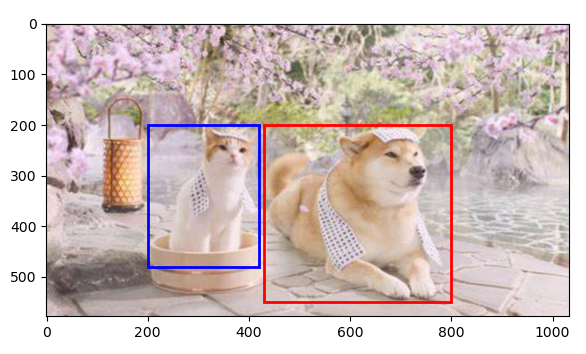
本小节完整代码如下
import torch
from d2l import torch as d2l
from matplotlib import pyplot as plt
d2l.set_figsize()

# ------------------------------边界框坐标转换------------------------------------

# 把框框的(左上(x,y),右下(x,y))坐标转换为(中心(x,y),宽x,高y)坐标
def box_corner_to_center(boxes):
    x1, y1, x2, y2 = boxes[:, 0], boxes[:, 1], boxes[:, 2], boxes[:, 3]
    cx = (x1 + x2) / 2
    cy = (y1 + y2) / 2
    w = x2 - x1
    h = y2 - y1
    boxes = torch.stack((cx, cy, w, h), axis=-1)
    return boxes

# 把框框的(中心(x,y),宽x,高y)坐标转换为(左上(x,y),右下(x,y))坐标
def box_center_to_corner(boxes):
    cx, cy, w, h = boxes[:, 0], boxes[:, 1], boxes[:, 2], boxes[:, 3]
    x1 = cx - 0.5 * w
    y1 = cy - 0.5 * h
    x2 = cx + 0.5 * w
    y2 = cy + 0.5 * h
    boxes = torch.stack((x1, y1, x2, y2), axis=-1)
    return boxes

# 把框框的(左上(x,y),右下(x,y))坐标转换为(左上(x,y),宽x,高y)坐标
def bbox_to_rect(bbox, color):
    return d2l.plt.Rectangle(
        xy=(bbox[0], bbox[1]), width=bbox[2]-bbox[0], height=bbox[3]-bbox[1],
        fill=False, edgecolor=color, linewidth=2)

# ------------------------------读入图像,并定义边界框------------------------------------

# 从img文件夹中读取dog_cat.png图像
img = d2l.plt.imread('../img/dog_cat.jpg')
# 狗狗框和喵喵框的左上右下坐标
dog_bbox, cat_bbox = [200.0, 200.0, 420.0, 480.0], [430.0, 200.0, 800.0, 550.0]
boxes = torch.tensor((dog_bbox, cat_bbox))

# ------------------------------显示图像与边界框------------------------------------

fig = d2l.plt.imshow(img)
# 在图像中画出喵喵框
fig.axes.add_patch(bbox_to_rect(dog_bbox, 'blue'))
# 在图像中画出狗狗框
fig.axes.add_patch(bbox_to_rect(cat_bbox, 'red'));
plt.show()

 浙公网安备 33010602011771号