无缝轮播图
效果图:
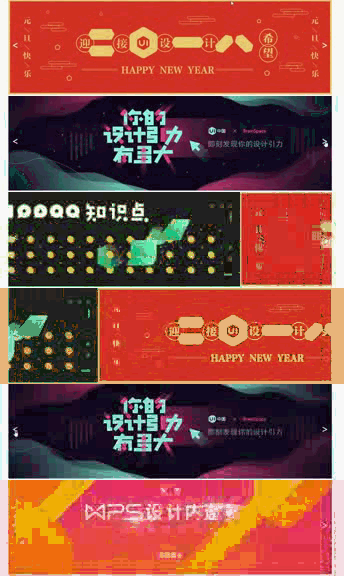
无缝轮播图实现原理:
将一些列大小相同的图片横向排列,利用css语法只显示其中一张图片,其余的图片隐藏。通过改变装图片盒子的lmargin-left值,切换图片。

向左切换,从图片img1切换到img2,改变margin-left的值为:margin-left: -1180px,可视区域显示第二张图片,然后剪切第一张图片追加到图片列末尾。
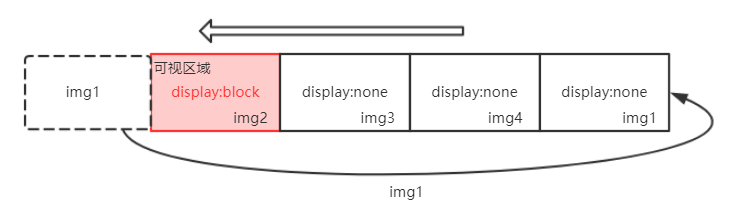
重复此项过程就可以实现图片向左的无缝轮播。反方向也是一样的道理,就图一所言,若我想要将img1切换到img4,则进行以下操作:
首先将img4剪切插入到图片列的头部,然后将margin-left从margin-left:-1180px运动到margin-left:0,实现图片的向右切换。
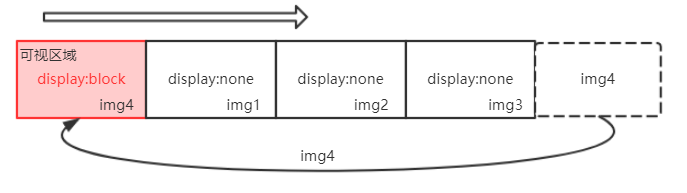
重复此项操作,就实现了图片向右切换。
代码段:
html布局如下:
1 <div class="banner-wrapper"> 2 <ul class="banner-content"> 3 <li class="banner-unit"> 4 <img src="http://img.ui.cn/data/upload/201712/1514545968_297.jpeg" alt="" /> 5 </li> 6 <li class="banner-unit"> 7 <img src="http://img.ui.cn/data/upload/201712/1514200192_680.jpeg" alt="" /> 8 </li> 9 <li class="banner-unit"> 10 <img src="http://img.ui.cn/data/upload/201712/1513652033_127.jpeg" alt="" /> 11 </li> 12 <li class="banner-unit"> 13 <img src="http://img.ui.cn/data/upload/201712/1514169471_728.jpeg" alt="" /> 14 </li> 15 </ul> 16 <a href="javascript:void(0)" class="ear left-ear"><</a> 17 <a href="javascript:void(0)" class="ear right-ear">></a> 18 </div>
css渲染如下:
 1 .banner-wrapper{
 2    width: 1180px;
 3    height: 350px;
 4    margin: 0 auto;
 5    overflow: hidden;
 6    position: relative;
 7 }
 8 .banner-content{
 9    width: 5000px;
10 }
11 .banner-wrapper .banner-unit{
12    width: 1180px;
13    height: 350px;
14    float: left;
15 }
16 .banner-unit img{
17    width: 1180px;
18    height: 350px;
19 }
20 .ear{
21    position: absolute;
22    width: 50px;
23    height: 100%;
24    top: 0;
25    background-color: #3498db;
26    text-align: center;
27    line-height: 332px;
28    font-size: 36px;
29    color: #fff;
30 }
31 .ear.left-ear{
32    left: 0;
33 }
34 .ear.right-ear{
35    right: 0;
36 }
JQuery代码:
 1 var $banner_content = $('.banner-content');
 2 //  右边耳朵下一张
 3 // 1.获取右边耳朵
 4 var $right_ear = $(".right-ear");
 5 // 2.给右边耳朵绑定事件
 6 $right_ear.on('click', function (ev) {
 7    $banner_content.animate({
 8       'margin-left': -1180
 9    },function () {
10       var firstEl = $(this).children().first();
11       $(this).append(firstEl).css({'margin-left': 0});;
12    });
13 });
14
15 ///  获取左边耳朵
16 var $left_ear = $(".left-ear");
17 // 2.给右边耳朵绑定事件
18 $left_ear.on('click', function (ev) {
19    var lastEl = $banner_content.children().last();
20    $banner_content.prepend(lastEl).css({
21       'margin-left': -1180
22    }).animate({
23       'margin-left': 0
24    });;
25 });


 浙公网安备 33010602011771号