第二次作业
一,登录 注册页面及后端功能实现
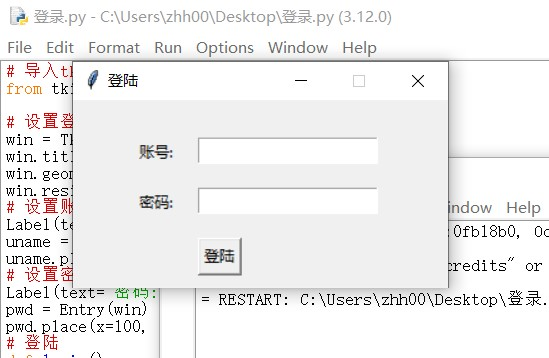
# 导入tkinter库
from tkinter import *
# 设置登录窗口
win = Tk()
win.title('登陆')
win.geometry('300x150')
win.resizable(0, 0)
# 设置账号
Label(text='账号:').place(x=50, y=30)
uname = Entry(win)
uname.place(x=100, y=30)
# 设置密码
Label(text='密码:').place(x=50, y=70)
pwd = Entry(win)
pwd.place(x=100, y=70)
# 登陆
def login():
username = uname.get()
password = pwd.get()
if username == 'abc' and password == '123':
print('登陆成功')
else:
print('账号或者密码错误')
# 登陆按钮
Button(text='登陆', command=login).place(x=100, y=110)
win.mainloop()
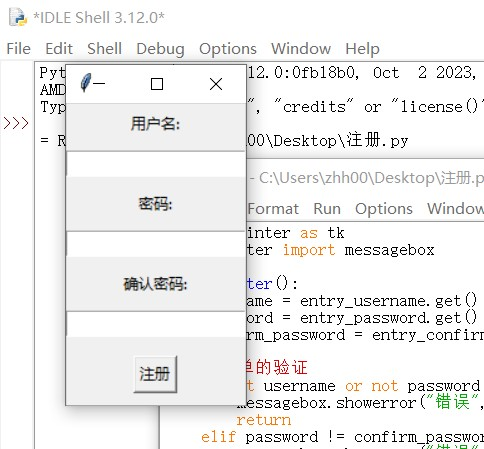
import tkinter as tk
from tkinter import messagebox
def register():
username = entry_username.get()
password = entry_password.get()
confirm_password = entry_confirm_password.get()
# 简单的验证
if not username or not password or not confirm_password:
messagebox.showerror("错误", "所有字段都必须填写")
return
elif password != confirm_password:
messagebox.showerror("错误", "密码和确认密码不匹配")
return
# 在这里可以添加更多的验证逻辑,例如检查用户名是否已经存在等
# 注册成功的消息框
messagebox.showinfo("成功", "注册成功!")
# 创建主窗口
root = tk.Tk()
root.title("注册界面")
# 用户名标签和输入框
label_username = tk.Label(root, text="用户名:")
label_username.pack(pady=5)
entry_username = tk.Entry(root)
entry_username.pack(pady=5)
# 密码标签和输入框
label_password = tk.Label(root, text="密码:")
label_password.pack(pady=5)
entry_password = tk.Entry(root, show="*")
entry_password.pack(pady=5)
# 确认密码标签和输入框
label_confirm_password = tk.Label(root, text="确认密码:")
label_confirm_password.pack(pady=5)
entry_confirm_password = tk.Entry(root, show="*")
entry_confirm_password.pack(pady=5)
# 注册按钮
btn_register = tk.Button(root, text="注册", command=register)
btn_register.pack(pady=10)
# 启动主循环
root.mainloop()
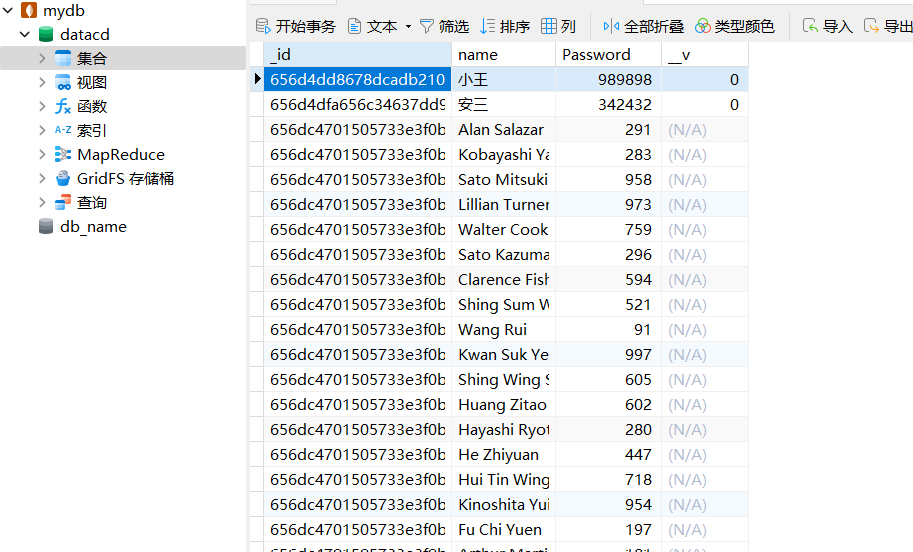
接入数据库
import tkinter as tk
from tkinter import messagebox
import sqlite3
def create_table():
conn = sqlite3.connect('user_database.db')
cursor = conn.cursor()
cursor.execute('''
CREATE TABLE IF NOT EXISTS users (
id INTEGER PRIMARY KEY AUTOINCREMENT,
username TEXT NOT NULL,
password TEXT NOT NULL
)
''')
conn.commit()
conn.close()
def register():
create_table()
username = entry_username.get()
password = entry_password.get()
confirm_password = entry_confirm_password.get()
# 简单的验证
if not username or not password or not confirm_password:
messagebox.showerror("错误", "所有字段都必须填写")
return
elif password != confirm_password:
messagebox.showerror("错误", "密码和确认密码不匹配")
return
# 连接数据库并插入用户信息
conn = sqlite3.connect('user_database.db')
cursor = conn.cursor()
# 检查用户名是否已经存在
cursor.execute('SELECT * FROM users WHERE username = ?', (username,))
if cursor.fetchone():
messagebox.showerror("错误", "用户名已经存在")
conn.close()
return
# 插入用户信息
cursor.execute('INSERT INTO users (username, password) VALUES (?, ?)', (username, password))
conn.commit()
conn.close()
# 注册成功的消息框
messagebox.showinfo("成功", "注册成功!")
# 创建主窗口
root = tk.Tk()
root.title("注册界面")
# 用户名标签和输入框
label_username = tk.Label(root, text="用户名:")
label_username.pack(pady=5)
entry_username = tk.Entry(root)
entry_username.pack(pady=5)
# 密码标签和输入框
label_password = tk.Label(root, text="密码:")
label_password.pack(pady=5)
entry_password = tk.Entry(root, show="*")
entry_password.pack(pady=5)
# 确认密码标签和输入框
label_confirm_password = tk.Label(root, text="确认密码:")
label_confirm_password.pack(pady=5)
entry_confirm_password = tk.Entry(root, show="*")
entry_confirm_password.pack(pady=5)
# 注册按钮
btn_register = tk.Button(root, text="注册", command=register)
btn_register.pack(pady=10)
# 启动主循环
root.mainloop()
、
二,计算器页面设计
<!DOCTYPE html>
<html lang="ch-ZN">
<head>
<meta charset="UTF-8">
<title>计算器</title>
<style>
* {
margin: 0;
padding: 0;
}
.button {
width: 50px;
height: 50px;
font-size: 25px;
margin: 2px;
cursor: pointer;
background: #607d8b;
border: none;
color: white;
}
.button1 {
width: 221px;
height: 50px;
font-size: 25px;
margin: 2px;
cursor: pointer;
background: #607d8b;
border: none;
color: white;
}
.textView {
width: 200px;
margin: 5px;
font-size: 23px;
padding: 5px;
border: thick double #32a1ce;;
}
.main {
position: absolute;
top: 50%;
left: 50%;
transform: translateX(-50%) translateY(-50%);
}
html {
background: linear-gradient(to right, #00f7ff, #d0cd77);
height: 100%;
}
</style>
<script>
let a="1343.43245";
let b=a.indexOf(".");
console.log(b);
let c=a.substring(0,b+3);
console.log(c);
function insert(num) {
// TODO 插入
document.form.textView.value = document.form.textView.value + num;
}
function equal() {
// TODO 计算结果,并且结果保留两位小数
let exp = document.form.textView.value;
if (exp) {
let eval1 = eval(document.form.textView.value);
// eval() 执行括号内的语句 , 记录结果
let number = eval1.toString().indexOf(".");
if (number!==-1){
// 如果是小数,保留两位小数
eval1=eval1.toString().substring(0,number+3);
// 截取
document.form.textView.value=eval1;
}else {
// 如果不是小数,直接赋值
document.form.textView.value=eval1;
}
}
}
function Mclean() {
// TODO 清理输入框的文字
document.form.textView.value = null;
}
function back() {
// TODO 删除文本框的一个字符
let exp = document.form.textView.value;
document.form.textView.value = exp.substring(0, exp.length - 1);
// 截取字符串
}
function sqrt() {
let num = parseFloat(document.form.textView.value);
if (num < 0) {
document.form.textView.value='false';
return;
}
var guess = num / 2; // 初始猜测值为 num / 2
var epsilon = 0.00001; // 定义精度值
var previousGuess; // 用于存储上一次的猜测值
do {
previousGuess = guess; // 保存当前猜测值以便下一次迭代使用
guess = (guess + num / guess) / 2; // 牛顿迭代法更新猜测值
} while (Math.abs(guess - previousGuess) > epsilon); // 当两次猜测值之差小于精度值时停止迭代
document.form.textView.value=guess;
}
</script>
</head>
<body>
<div class="main">
<form name="form">
<input class="textView" name="textView" >
</form>
<table>
<tr>
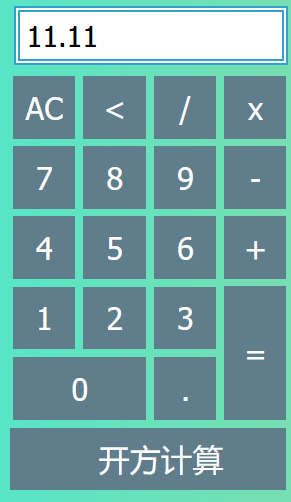
<td><input type="button" class="button" value="C" onclick="Mclean()"></td>
<td><input type="button" class="button" value="<" onclick="back()"></td>
<td><input type="button" class="button" value="/" onclick="insert('/')"></td>
<td><input type="button" class="button" value="x" onclick="insert('*')"></td>
</tr>
<tr>
<td><input type="button" class="button" value="7" onclick="insert(7)"></td>
<td><input type="button" class="button" value="8" onclick="insert(8)"></td>
<td><input type="button" class="button" value="9" onclick="insert(9)"></td>
<td><input type="button" class="button" value="-" onclick="insert('-')"></td>
</tr>
<tr>
<td><input type="button" class="button" value="4" onclick="insert(4)"></td>
<td><input type="button" class="button" value="5" onclick="insert(5)"></td>
<td><input type="button" class="button" value="6" onclick="insert(6)"></td>
<td><input type="button" class="button" value="+" onclick="insert('+')"></td>
</tr>
<tr>
<td><input type="button" class="button" value="1" onclick="insert(1)"></td>
<td><input type="button" class="button" value="2" onclick="insert(2)"></td>
<td><input type="button" class="button" value="3" onclick="insert(3)"></td>
<td rowspan="2"><input style="height: 107px" type="button" class="button" value="=" onclick="equal()"></td>
</tr>
<tr>
<td colspan="2"><input style="width: 107px" type="button" class="button" value="0" onclick="insert(0)"></td>
<td><input type="button" class="button" value="." onclick="insert('.')"></td>
</tr>
</table>
<tr>
<td><input class="button1" value=" 开方计算" onclick="sqrt()"></td>
</tr>
</div>
</body>
</html>

 浙公网安备 33010602011771号