


102302126李坤铭第二次作业
作业①:
– 要求:在中国气象网(http://www.weather.com.cn)给定城市集的7日天气预报,并保存在数据库。
1)代码内容:
点击查看代码
import sqlite3
import urllib.request
from bs4 import BeautifulSoup
from datetime import datetime


def initialize_database():
    """初始化天气数据库表"""
    with sqlite3.connect("beijing_weather.db") as db_connection:
        db_connection.execute('''
            CREATE TABLE IF NOT EXISTS weather_records (
                record_date TEXT PRIMARY KEY,
                weather_condition TEXT,
                temperature_range TEXT
            )
        ''')


def fetch_weather_info():
    """从网络获取北京天气信息"""
    weather_url = "http://www.weather.com.cn/weather/101010100.shtml"

    try:
        # 发起HTTP请求获取网页内容
        with urllib.request.urlopen(weather_url, timeout=10) as response:
            html_content = BeautifulSoup(response.read(), "html.parser")

        daily_weather = []
        # 解析未来7天天气预报
        for day_element in html_content.select("ul.t.clearfix li")[:7]:
            date_info = day_element.select_one('h1').get_text(strip=True)
            condition = day_element.select_one('p.wea').get_text(strip=True)

            # 处理温度数据
            high_temp_elem = day_element.select_one('p.tem span')
            low_temp_elem = day_element.select_one('p.tem i')

            if high_temp_elem:
                temperature = f"{high_temp_elem.text}/{low_temp_elem.text.replace('℃', '')}℃"
            else:
                temperature = low_temp_elem.text

            daily_weather.append((date_info, condition, temperature))
            print(f"{date_info}: {condition} {temperature}")

        return daily_weather
    except Exception as error:
        print(f"天气数据获取失败: {error}")
        return None


def store_weather_data(weather_records):
    """将天气数据存入数据库"""
    with sqlite3.connect("beijing_weather.db") as db_connection:
        for record in weather_records:
            db_connection.execute(
                "INSERT OR REPLACE INTO weather_records VALUES (?, ?, ?)",
                record
            )


def display_weather_forecast():
    """展示数据库中的天气预报"""
    with sqlite3.connect("beijing_weather.db") as db_connection:
        weather_entries = db_connection.execute(
            "SELECT * FROM weather_records ORDER BY record_date"
        ).fetchall()

    print(f"\n{'日期':<12}{'天气状况':<12}{'温度范围':<10}")
    print("-" * 35)
    for entry in weather_entries:
        print(f"{entry[0]:<12}{entry[1]:<12}{entry[2]:<10}")


if __name__ == "__main__":
    print("=== 北京天气数据采集程序 ===")
    initialize_database()

    weather_records = fetch_weather_info()
    if weather_records:
        store_weather_data(weather_records)
        display_weather_forecast()
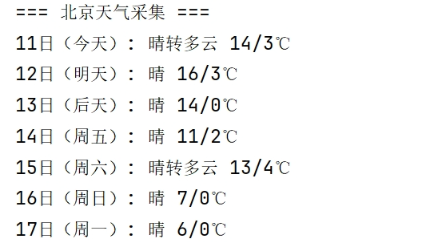
2)心得体会:
要注意数据库里的内容,需在代码运行时对原有的存储数据进行删除。
作业②:
– 要求:用requests和BeautifulSoup库方法定向爬取股票相关信息,并存储在数据库中。
– 网站:东方财富网:https://www.eastmoney.com/
– 技巧:在谷歌浏览器中进入F12调试模式进行抓包,查找股票列表加载使用的url,并分析api返回的值,并根据所要求的参数可适当更改api的请求参数。根据URL可观察请求的参数f1、f2可获取不同的数值,根据情况可删减请求的参数。
1)代码内容:
点击查看代码
import requests
import pandas as pd
import json
import sqlite3
from datetime import datetime


def fetch_stock_market_data():
    """从东方财富API获取股票市场数据"""
    api_url = "https://push2.eastmoney.com/api/qt/clist/get"
    query_params = {
        'cb': 'jQuery371048325911427590795_1761723060607',
        'fid': 'f3', 'po': '1', 'pz': '20', 'pn': '1', 'np': '1',
        'fltt': '2', 'invt': '2', 'ut': 'fa5fd1943c7b386f172d6893dbfba10b',
        'fs': 'm:0 t:6,m:0 t:80,m:1 t:2,m:1 t:23',
        'fields': 'f12,f13,f14,f1,f2,f4,f3,f152,f5,f6,f7,f15,f18,f16,f17,f10,f8,f9,f23',
        '_': '1761723060609'
    }

    try:
        response = requests.get(api_url, params=query_params, timeout=10)
        response.raise_for_status()

        # 解析JSONP格式的响应
        raw_data = response.text
        json_content = raw_data[raw_data.find('(')+1 : raw_data.rfind(')')]
        api_response = json.loads(json_content)

        # 验证响应数据
        if not api_response or api_response.get('rc') != 0 or not api_response.get('data'):
            print("警告: API返回了空数据或错误代码")
            return pd.DataFrame()

        # 处理股票数据
        stock_list = []
        stock_items = api_response['data']['diff']
        if isinstance(stock_items, dict):  # 兼容不同格式的响应
            stock_items = stock_items.values()

        for stock in stock_items:
            stock_info = {
                '代码': stock.get('f12', ''),
                '名称': stock.get('f14', ''),
                '最新价': round(float(stock.get('f2', 0)), 2),
                '涨跌幅': f"{float(stock.get('f3', 0)):.2f}%",
                '涨跌额': round(float(stock.get('f4', 0)), 2),
                '成交量': int(stock.get('f5', 0)),
                '成交额': float(stock.get('f6', 0)),
                '振幅': f"{float(stock.get('f7', 0)):.2f}%",
                '最高价': round(float(stock.get('f15', 0)), 2),
                '最低价': round(float(stock.get('f16', 0)), 2),
                '开盘价': round(float(stock.get('f17', 0)), 2),
                '昨日收盘': round(float(stock.get('f18', 0)), 2)
            }
            stock_list.append(stock_info)

        return pd.DataFrame(stock_list)

    except requests.exceptions.RequestException as req_err:
        print(f"网络请求失败: {req_err}")
    except json.JSONDecodeError as json_err:
        print(f"JSON解析错误: {json_err}")
    except Exception as err:
        print(f"数据处理异常: {err}")

    return pd.DataFrame()


def store_to_database(stock_df, database="stock_market.db"):
    """将股票数据存储到SQLite数据库"""
    if stock_df.empty:
        print("警告: 尝试存储空数据到数据库")
        return False

    try:
        with sqlite3.connect(database) as conn:
            cursor = conn.cursor()

            # 创建表(如果不存在)
            cursor.execute('''
                CREATE TABLE IF NOT EXISTS stock_quotes (
                    record_id INTEGER PRIMARY KEY AUTOINCREMENT,
                    stock_code TEXT,
                    stock_name TEXT,
                    current_price REAL,
                    price_change_pct TEXT,
                    price_change REAL,
                    volume INTEGER,
                    turnover REAL,
                    amplitude_pct TEXT,
                    high_price REAL,
                    low_price REAL,
                    open_price REAL,
                    prev_close REAL,
                    update_time TIMESTAMP DEFAULT CURRENT_TIMESTAMP
                )
            ''')

            # 批量插入数据(使用executemany提高效率)
            records = [tuple(row) for _, row in stock_df.iterrows()]
            cursor.executemany('''
                INSERT INTO stock_quotes
                (stock_code, stock_name, current_price, price_change_pct,
                 price_change, volume, turnover, amplitude_pct,
                 high_price, low_price, open_price, prev_close)
                VALUES (?, ?, ?, ?, ?, ?, ?, ?, ?, ?, ?, ?)
            ''', records)

            conn.commit()
        return True

    except sqlite3.Error as db_err:
        print(f"数据库操作失败: {db_err}")
        return False


def format_volume(volume):
    """格式化成交量显示"""
    if volume > 100000000:  # 超过1亿
        return f"{volume/100000000:.2f}亿手"
    elif volume > 10000:  # 超过1万
        return f"{volume/10000:.2f}万手"
    return f"{volume}手"


def format_turnover(amount):
    """格式化成交额显示"""
    if amount > 100000000:  # 超过1亿
        return f"{amount/100000000:.2f}亿元"
    return f"{amount/10000:.2f}万元"


def display_stock_table():
    """显示格式化后的股票数据表"""
    stock_data = fetch_stock_market_data()

    if stock_data.empty:
        print("错误: 未能获取有效的股票数据")
        return

    # 创建显示用的DataFrame副本
    display_df = stock_data.copy()
    display_df.insert(0, '序号', range(1, len(display_df)+1))

    # 应用格式化
    display_df['成交量'] = display_df['成交量'].apply(format_volume)
    display_df['成交额'] = display_df['成交额'].apply(format_turnover)

    # 配置显示选项
    pd.set_option('display.unicode.east_asian_width', True)
    pd.set_option('display.max_columns', None)
    pd.set_option('display.width', 120)

    # 打印表格
    print("\n实时股票行情")
    print("="*120)
    print(display_df.to_string(index=False))
    print("="*120)
    print(f"数据更新时间: {datetime.now().strftime('%Y-%m-%d %H:%M:%S')}")
    print(f"股票总数: {len(display_df)}")

    # 存储到数据库
    if store_to_database(stock_data):
        print("状态: 数据已成功保存到数据库")
    else:
        print("警告: 数据保存失败")


if __name__ == "__main__":
    print("=== 股票数据采集系统 ===")
    print(f"启动时间: {datetime.now().strftime('%Y-%m-%d %H:%M:%S')}\n")
    display_stock_table()
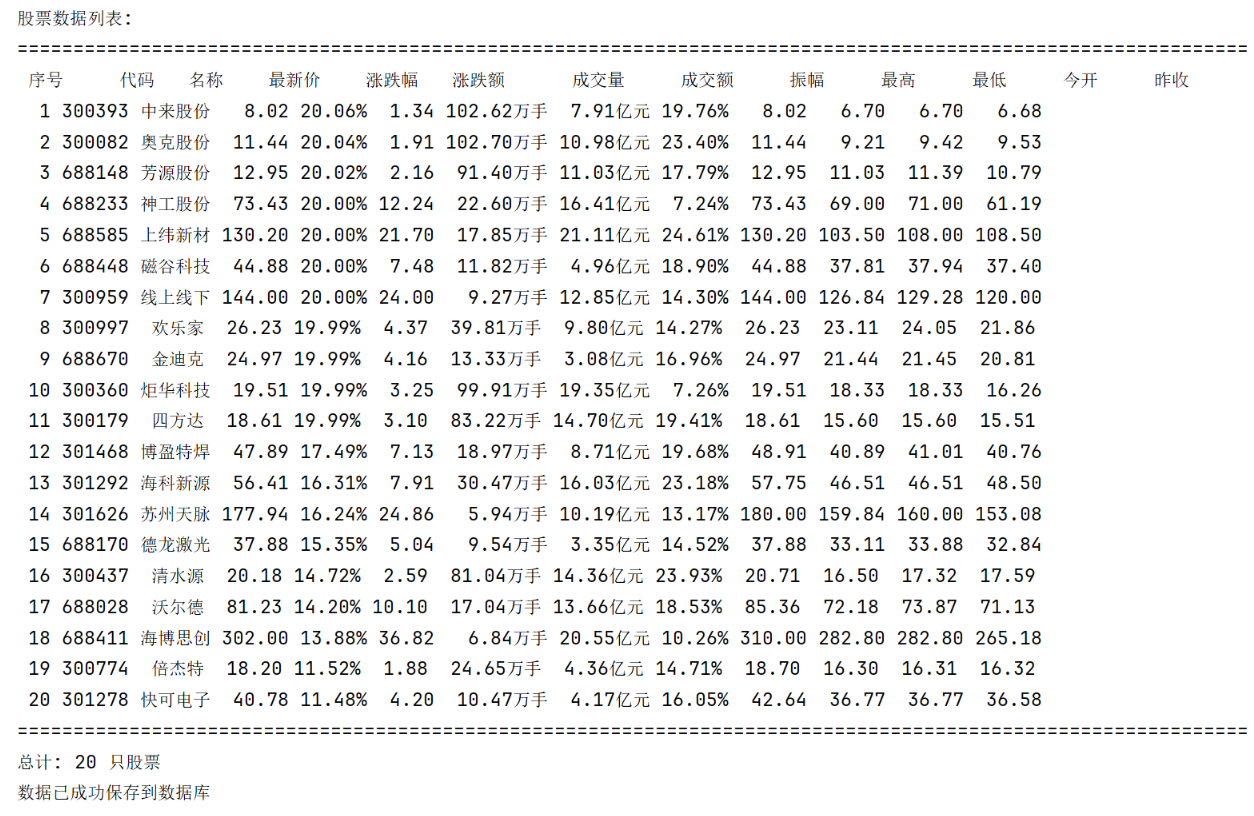
2)心得体会:
可以通过调取api的方式爬取网页中的数据。
作业③:
– 要求:爬取中国大学2021主榜(https://www.shanghairanking.cn/rankings/bcur/2021 )所有院校信息,并存储在数据库中,同时将浏览器F12调试分析的过程录制Gif加入至博客中。
– 技巧:分析该网站的发包情况,分析获取数据的api
1)代码内容:
点击查看代码
import requests
import sqlite3
import os

class UniversityRankingFetcher:
    def __init__(self, ranking_type=11, target_year=2021):
        self.api_endpoint = f"https://www.shanghairanking.cn/api/pub/v1/bcur?bcur_type={ranking_type}&year={target_year}"
        self.request_headers = {
            'User-Agent': 'Mozilla/5.0 (Windows NT 10.0; Win64; x64) AppleWebKit/537.36',
            'Referer': 'https://www.shanghairanking.cn/',
        }
        self.database_file = f"university_rankings_{target_year}.db"
        self.data_table = "university_rankings"

    def fetch_api_data(self):
        """从API接口获取大学排名数据"""
        try:
            response = requests.get(self.api_endpoint, headers=self.request_headers, timeout=10)
            response.raise_for_status()
            return response.json()
        except requests.exceptions.RequestException as e:
            print(f"请求API时出错: {e}")
            return None

    def store_to_db(self, api_data):
        """将API数据保存到SQLite数据库"""
        if not api_data or 'data' not in api_data or 'rankings' not in api_data['data']:
            print("警告: 返回数据格式不符合预期")
            return False

        university_list = api_data['data']['rankings']

        # 删除已存在的数据库文件
        if os.path.exists(self.database_file):
            os.remove(self.database_file)

        connection = None
        try:
            connection = sqlite3.connect(self.database_file)
            cursor = connection.cursor()
            print(f"已创建数据库连接: {self.database_file}")

            # 创建数据表
            cursor.execute(f'''
            CREATE TABLE IF NOT EXISTS {self.data_table} (
                rank_position INTEGER,
                university_name TEXT,
                region TEXT,
                category TEXT,
                total_score REAL
            )
            ''')
            print(f"数据表 {self.data_table} 创建成功")

            # 准备批量插入的数据
            records = [
                (
                    item['rankOverall'],
                    item['univNameCn'],
                    item['province'],
                    item['univCategory'],
                    item['score']
                )
                for item in university_list
            ]

            # 执行批量插入
            cursor.executemany(
                f'''INSERT INTO {self.data_table}
                (rank_position, university_name, region, category, total_score)
                VALUES (?, ?, ?, ?, ?)''',
                records
            )

            connection.commit()
            print(f"成功保存 {len(records)} 条大学排名记录")
            return True

        except sqlite3.Error as db_error:
            print(f"数据库操作异常: {db_error}")
            return False
        finally:
            if connection:
                connection.close()

    def display_from_db(self):
        """从数据库读取并显示排名数据"""
        if not os.path.exists(self.database_file):
            print(f"错误: 数据库文件 {self.database_file} 不存在")
            return

        try:
            with sqlite3.connect(self.database_file) as conn:
                cursor = conn.cursor()
                cursor.execute(f'''
                SELECT rank_position, university_name, region, category, total_score
                FROM {self.data_table}
                ORDER BY rank_position
                ''')

                print(f"\n--- {self.api_endpoint.split('year=')[1]}年大学排名 ---")
                print("{:<6}{:<20}{:<10}{:<10}{:<8}".format(
                    "排名", "学校名称", "地区", "类型", "总分"))
                print("-" * 60)

                for record in cursor.fetchall():
                    rank, name, region, category, score = record
                    score_str = f"{score:.2f}" if score is not None else "N/A"
                    print(f"{rank:<6}{name[:18]:<20}{region:<10}{category:<10}{score_str:<8}")

        except sqlite3.Error as e:
            print(f"读取数据库时发生错误: {e}")

    def execute(self):
        """执行完整流程: 获取数据 -> 存储数据库 -> 显示结果"""
        raw_data = self.fetch_api_data()
        if raw_data:
            if self.store_to_db(raw_data):
                self.display_from_db()

if __name__ == "__main__":
    fetcher = UniversityRankingFetcher()
    fetcher.execute()
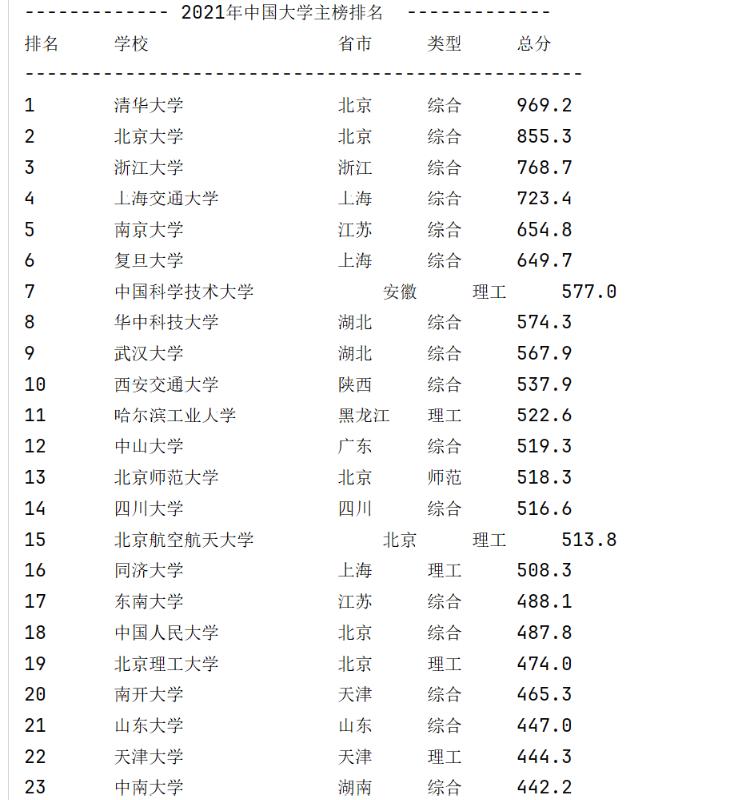
2)心得体会:
静态页面无法进行完整爬取,可借由js文件爬取内容。

 浙公网安备 33010602011771号