


es6学习-day01
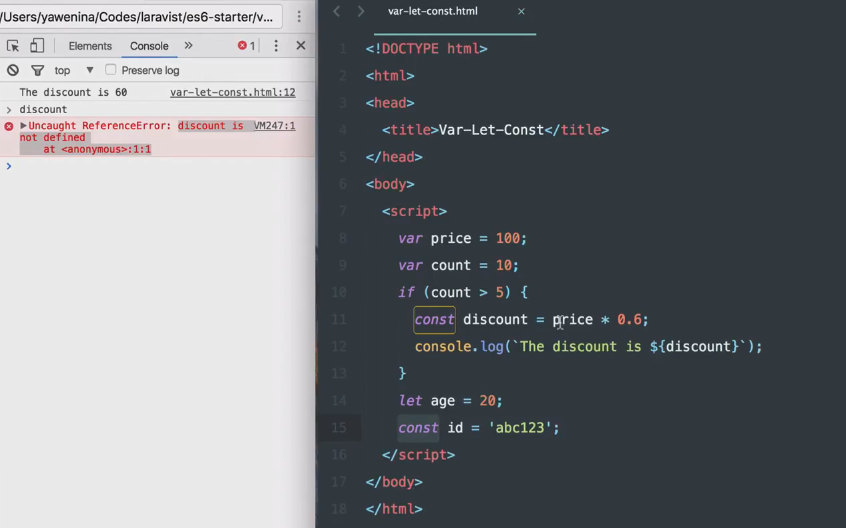
是看了一个关于var,let,const定义变量的代码,很简短,是设置了几个变量然后测试他们在不同块中是否仍然有效,var应该是可以放在全局里的,然后let和const就是用在块里。
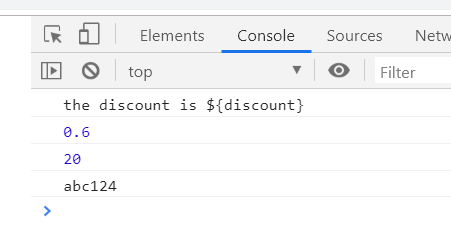
在控制台能显示出来新定义的let和const,但是用了${}想要将定义的变量在控制台输出却没有显示,输出的是一整条语句,然后百度的也还没找到能解决的办法,想着等看多几个视频然后再了解多一些关于${}的用法。
但是我的代码显示的后台却是这样的
我的源码
<!DOCTYPE html>
<html>
<head>
    <title>Var-Let-Const</title>
</head>
<body>
    <script>
        var p = 1;
        var count=18;
        if(count>5){
            let discount = p * 0.6;
            console.log('the discount is ${discount}');
            console.log(discount);
        }
        let age = 20;
        const id = 'abc124';
        console.log(age);
        console.log(id);
    </script>
</body>
</html>
进一步讲了const
<!DOCTYPE html>
<html>
<head>
    <title>let</title>
</head>
<body>
    <script>
        let count = 10;
        let discount = 1;
        // if(const > 5){
        //     console.log(discount);
        // }
        let key = 'abc123';

        const person = {
            name: 'coco',
            age:21
        }

        console.log(person);
    </script>
</body>
</html>
注意里面const定义属性是用逗号隔开的,不是分号,要不会报错的。
IIFE
立即执行函数表达式
终于知道为什么${}显示不出来变量了,因为外面要用左上角那个和波浪线一起的那个小点才可以555 花了好多时间找这个问题··都不知道为啥是这个小点
变量提升
https://developer.mozilla.org/zh-CN/docs/Glossary/Hoisting
箭头函数
es6中的箭头函数
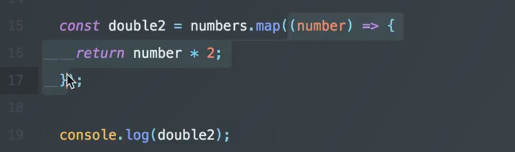
优点:简明扼要的语法,可以隐形返回,不绑定this
<!DOCTYPE html>
<html>
<head>
    <title>arrowFunction</title>
    <meta charset="utf-8">
</head>
<body>
<script type="text/javascript">
    const numbers = [5, 6, 77, 54, 32];

    const double = numbers.map(function(number){
        return number * 2;
    });

    const double1 = numbers.map((number) =>{
        return number * 2;
    });

    // 只有一个参数的话可以不用外面那个括号
    const double2 = numbers.map(number =>{
        return number * 2;
    });

    // 如果是多个参数的话要用逗号隔开
    const double3 = numbers.map((number,i) => {
        return `${i}:${number *2}`
    });

    // 没有参数的话要保留一个括号
    const double4 = numbers.map(() => {
        return "hello";
    });


    // 箭头函数的隐式返回,就是不要return和花括号
    const double5 = numbers.map((number) =>number * 2);

    console.log(double5);

    // 递归和解除信息的时候很有用
    function greet(name){
        alert(`hello ${name}`);
    }
    const greet1 = name => {alert(`hello ${name}`)};
    greet1('lisa');
</script>
</body>
</html>
this是指向父级作用域的,一声明就已经定义好了不会再改变。
不能使用箭头函数的三种情况
<!DOCTYPE html>
<html>
<head>
    <title>no-arrowFunction</title>
    <meta charset="utf-8">
    <link rel="stylesheet" type="text/css" href="no-arrowFunction.css">
</head>
<body>
    <div class="btn">Click Me</div>
<script type="text/javascript">

    // 1.作为构造函数,一个方法需要绑定到对象
    const Person = function(name,points){
        this.name = name;
        this.points = points;
    }
    const Coco = new Person('coco',5);
    Person.prototype.updatePoints = () => {
        console.log(this)
        this.points++;
        console.log(this.poionts)
    }

    // 2.当你真的需要使用this的时候,因为用了箭头函数之后会用到windows里面的this,这时候不再是你想要绑定的那个量,会出错,所以要适当的使用function和箭头函数
    const button = document.querySelector('.btn');
    // 这里要用function才能点击了按钮之后有触发时间
    button.addEventListener('click',function(){
        // 通过更改类名来修改按钮的样式
        this.classList.add('in');
        setTimeout(() => {
            this.classList.remove('in');
        },2000)
    })

    // 3.需要使用arguments对象,在function()里面放argument就会报错
    const sum = function(){
        return Array.from(arguments).reduce((prevSum,value) => prevSum + value,0)
    }
</script>
</body>
</html>
模板字符串
运用了模板字符串就可以在反引号里面不用考虑那么多的层级变量了,并且能直接用${}表示输出变量
<!DOCTYPE html>
<html>
<head>
    <title>template-string</title>
</head>
<body>
<script type="text/javascript">
    const template = `
        <div>
            <p>${hello}</p>
        </div>
    `;
</script>
</body>
</html>

 浙公网安备 33010602011771号