


Powerapps显示照片及缩略图
插入image 框
属性框 正常是 ThisItem.Attachments.value
当附件有多个时会报错,使用First(ThisItem.Attachments).value
但附件如果不是图片,不如pdf时,无法显示
可以使用
“https://xxxx.sharepoint.com/_layouts/15/getpreview.ashx?path=”&First(ThisItem.Attachments).AbsooluteUrl
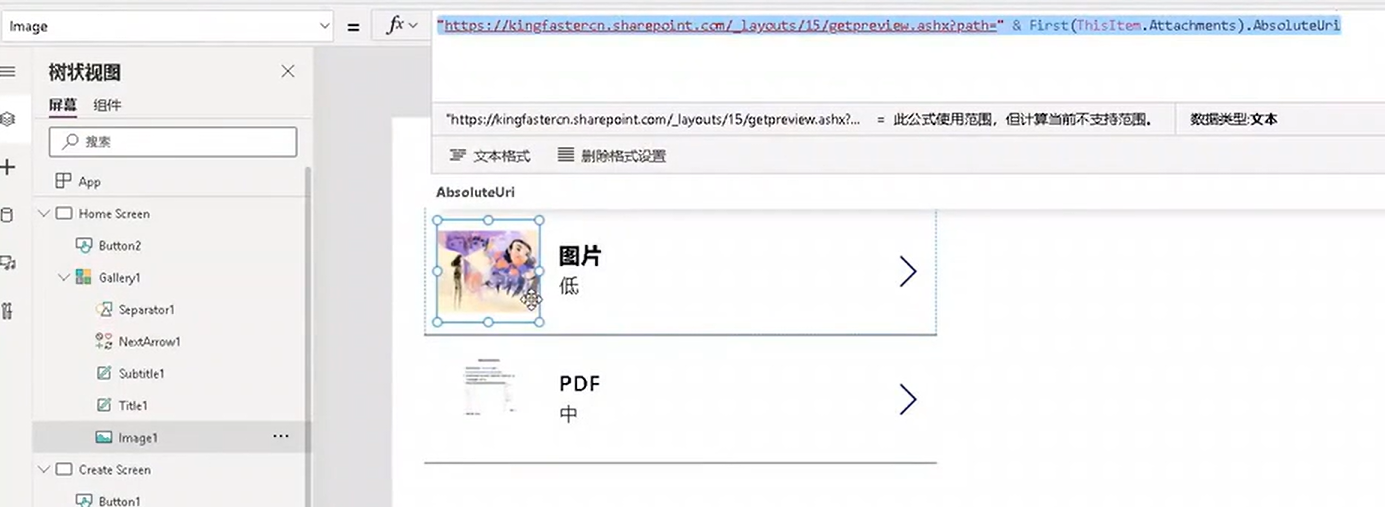
显示多个文件的缩略图
“https://xxxx.sharepoint.com/_layouts/15/getpreview.ashx?path=”&ThisItem.AbsooluteUrl
图片清晰度根据不同设备显示
“https://xxxx.sharepoint.com/_layouts/15/getpreview.ashx?path=”&ThisItem.AbsooluteUrl & “&resolution=6”
级别越高,越清晰

 浙公网安备 33010602011771号