


angular-directive 结构树
html:
<div ng-app="myApp" ng-controller="myController">
    <button class="btn btn-sm btn-primary" ng-click="functionAuthority.clickAll=!functionAuthority.clickAll">{{!functionAuthority.clickAll?'全选':'全不选'}}</button>
    <tree-view tree-data="functionAuthority.tree" text-field="name" can-checked="true" clickall="functionAuthority.clickAll"></tree-view>
</div>
js:
angular.module('myApp', [])
.directive('treeView',[function(){

	return {
		  restrict: 'E',
		  templateUrl: './treeView.html',
		  scope: {
			  treeData: '=',
			  canChecked: '=',
			  textField: '@',
			  clickall: '='
		  },
		  link: function($scope){
			  $scope.$watch('clickall',function(newVal){
					 $scope.treeData.forEach(function(val,i,arr){
						 $scope.updateChildrenChecked(val,newVal);
					 })
				 })
		  },
		 controller:['$scope', function($scope){
			 //点击checkbox
			 $scope.itemClick = function(item,$event){
				 $scope.updateChildrenChecked(item,$event.target.checked);
			 }
			 //下属全选/全不选
			 $scope.updateChildrenChecked = function(item, value){
				 item.$$isChecked=value;
				 if(item.children&&item.children.length>0){
					 item.children.forEach(function(val,i,arr){
						 $scope.updateChildrenChecked(val,value);
						 val.$$isChecked=value
					 })
				 }
			 }
		 }]
	 };
 }]).controller('myController',['$scope',function($scope){
  $scope.functionAuthority={
	clickAll:false,
	tree: [
	       {
	    	      "id":"1",
	    	      "pid":"0",
	    	      "name":"家用电器",
	    	      "children":[
	    	         {
	    	            "id":"4",
	    	            "pid":"1",
	    	            "name":"大家电",
	    	            "children":[
	    	               {
	    	                  "id":"7",
	    	                  "pid":"4",
	    	                  "name":"空调",
	    	                  "children":[
	    	                     {
	    	                        "id":"15",
	    	                        "pid":"7",
	    	                        "name":"海尔空调"
	    	                     },
	    	                     {
	    	                        "id":"16",
	    	                        "pid":"7",
	    	                        "name":"美的空调"
	    	                     }
	    	                  ]
	    	               },
	    	               {
	    	                  "id":"8",
	    	                  "pid":"4",
	    	                  "name":"冰箱"
	    	               },
	    	               {
	    	                  "id":"9",
	    	                  "pid":"4",
	    	                  "name":"洗衣机"
	    	               },
	    	               {
	    	                  "id":"10",
	    	                  "pid":"4",
	    	                  "name":"热水器"
	    	               }
	    	            ]
	    	         },
	    	         {
	    	            "id":"5",
	    	            "pid":"1",
	    	            "name":"生活电器",
	    	            "children":[
	    	               {
	    	                  "id":"19",
	    	                  "pid":"5",
	    	                  "name":"加湿器"
	    	               },
	    	               {
	    	                  "id":"20",
	    	                  "pid":"5",
	    	                  "name":"电熨斗"
	    	               }
	    	            ]
	    	         }
	    	      ]
	    	   },
	    	   {
	    	      "id":"2",
	    	      "pid":"0",
	    	      "name":"服饰",
	    	      "children":[
	    	         {
	    	            "id":"13",
	    	            "pid":"2",
	    	            "name":"男装"
	    	         },
	    	         {
	    	            "id":"14",
	    	            "pid":"2",
	    	            "name":"女装"
	    	         }
	    	      ]
	    	   },
	    	   {
	    	      "id":"3",
	    	      "pid":"0",
	    	      "name":"化妆",
	    	      "children":[
	    	         {
	    	            "id":"11",
	    	            "pid":"3",
	    	            "name":"面部护理"
	    	         },
	    	         {
	    	            "id":"12",
	    	            "pid":"3",
	    	            "name":"口腔护理"
	    	         }
	    	      ]
	    	   }
	    	]
  }
})
treeView.html:
<ul class="tree-view">
	<li ng-repeat="item in treeData" ng-include="'./treeItem.html'" ></li>
</ul>
treeItem.html:
<input type="checkbox" ng-model="item.$$isChecked" class="check-box" ng-if="canChecked" ng-click="itemClick(item,$event)">
<span class="glyphicon" ng-if="item.children" ng-class="!item.$$isShow?'glyphicon-triangle-right':'glyphicon-triangle-bottom'" ng-click="item.$$isShow=!item.$$isShow"></span>
<span class='text-field' ng-click="item.$$isShow=!item.$$isShow">{{item[textField]}}</span>
<ul class="sidebar-menu" ng-show="item.$$isShow">
	<li  ng-repeat="item in item.children" ng-include="'./treeItem.html'" class="treeview ">
	</li>
</ul>
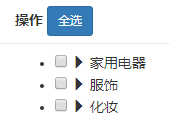
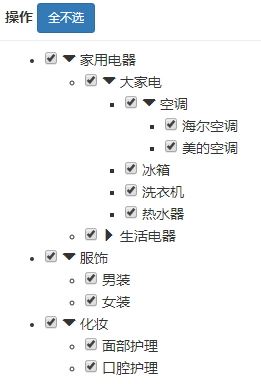
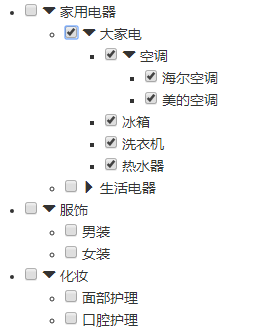
展示:

 浙公网安备 33010602011771号