

gdb调试
1 调试基础
1.1 携带调试信息
- -g: 增加调试信息
- -o0:关闭优化
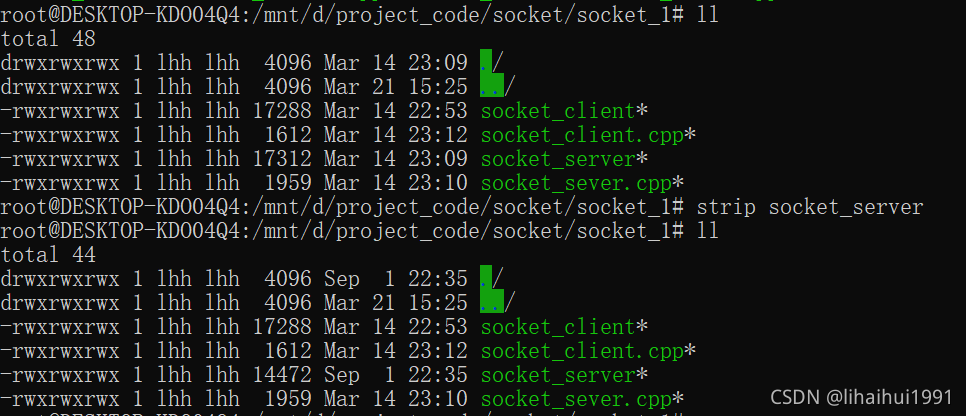
注意生成的应用信息可以通过strip命令 去掉调试信息,具体strip的使用可以通过man strip查询
示例:
![在这里插入图片描述]()
1.2 启动gdb调试
-
直接调试目标程序
gdb socket_server -
attach 到进程
gdb attach 42921 -
调试core文件
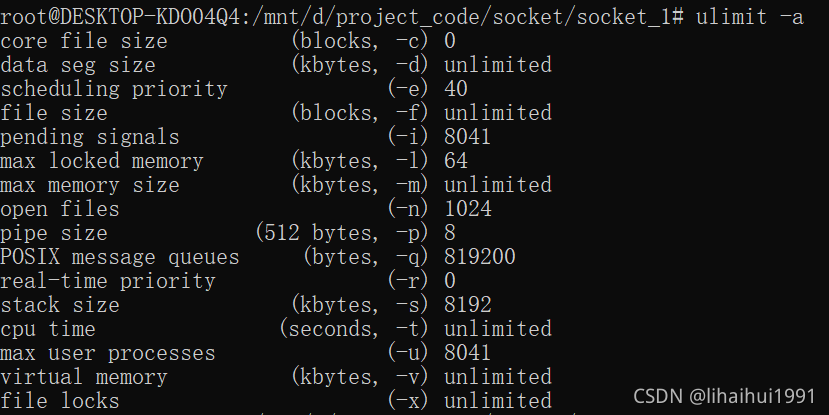
- 检查系统是否开启了core文件功能
ulimit -a![在这里插入图片描述]()
- 修改core文件属性
- 可以通过
ulimit -c unlimited修改,这个只是在当前窗口中使用,关闭后失效 /etc/security/limits.conf中增加一行:#<domain> <type> <item> <value> * soft core unlimited/etc/profile文件增加ulimit -c unlimited
- 可以通过
- 自定义core文件名称和目录
/proc/sys/kernel/core_uses_pid控制core文件名中是否添加PID作为扩展
/proc/sys/kernal/core_pattern格式化core文件的保存位置和文件名,修改格式为:echo "/corefile/core-%e-%p-%t" > /proc/sys/kernel/core_pattern
以下是参数列表:
%p - insert pid into filename 添加pid
%u - insert current uid into filename 添加当前uid
%g - insert current gid into filename 添加当前gid
%s - insert signal that caused the coredump into the filename 添加导致产生core的信号
%t - insert UNIX time that the coredump occurred into filename 添加core文件生成时的unix时间
%h - insert hostname where the coredump happened into filename 添加主机名
%e - insert coredumping executable name into filename 添加命令名
core文件作用、设置及方法
- 检查系统是否开启了core文件功能
-
调试正在运行的程序
gdb exe -p pid
这里类似于attach到对应的进程,然后中止程序的运行
2 常见命令解析
| 命令名称 | 命令缩写 | 命令说明 |
|---|---|---|
| run | r | 运行一个程序 |
| continue | c | 继续执行 |
| next | n | 单步跟踪程序,运行到下一行 |
| step | s | 单步调试如果有函数调用,则进入函数 |
| until | u | 可以运行程序直到退出循环体 |
| until+行号 | u | 运行至某行 |
| finish | fi | 结束当前调用函数,到上一层函数调用处 |
| return | return | 结束当前调用函数并返回指定的值,到上一层函数调用处 |
| call 函数(参数) | call | 调用程序中可见的函数 |
| jump | j | 跳转到指定行或地址 |
| quit | q | 退出gdb |
| --------------- | ------ | ------------------------------------ |
| break | b | 设置断点,条件断点 |
| tbreak | tb | 设置临时断点,启用一次失效 |
| delete | del | 删除第n个断点 |
| disable | dis | 暂停第n个断点 |
| enable | enable | 启动第n个断点 |
| info break | info b | 查看断点 |
| --------------- | ------ | ------------------------------------ |
| list | l | 显示源代码 |
| --------------- | ------ | ------------------------------------ |
| p | 打印函数调用 | |
| display | display | 监视的变量或者内存地址,在程序中断后自动输出监控的变量或内存地址 |
| whatis | whatis | 查询变量或函数 |
| info locals | info locals | 显示当前堆栈页的所有变量 |
| info function | info function | 查询函数 |
| info program | info program | 查看程序 |
| info inferiors | info inferiors | 查看调试的当前线程 |
| inferiors pid | inferiors pid | 切换当前调试的进程 |
| ptype | ptype | 查看变量类型 |
| --------------- | ------ | ------------------------------------ |
| set args | set args | 设置程序启动的命令参数 |
| show args | show args | 查看设置的命令参数 |
| backtrace | bt | 当前运行的堆栈列表 |
| thread | th | 切换到指定的线程 |
| frame | f | 切换到当前调用线程的指定堆栈 |
| disassemble | disassemble | 查看汇编代码 |
| --------------- | ------ | ------------------------------------ |
| layout src | layout src | 显示源代码窗口 |
| layout split | layout split | 显示源代码和反汇编窗口,ctrl+x,再按a退出窗口 |
| dir | dir sourcepath | 重定向源码文件的位置 |
set scheduler-locking on/step/off 多线程调试时锁定当前线程执行
set fellow-fork child/parent 多线程调试fork继续调试子进程还是父进程
set detach-on-fork on/off on调试当前线程,其他线程继续执行 ;off 调试当前线程,其他线程被gdb挂起
thread apply 线程id cmd 指定某线程执行某gdb命令
thread apply all cmd 全部线程执行某gdb命令

 浙公网安备 33010602011771号