

linux进程间的管道通信
1.进程间通信的概述
什么是进程间通信?什么是线程间通信?
进程间通信:在用户空间实现进程间通信是不可能的,通过Linux内核通信。
线程间通信:可以通过用户空间就可以实现,比如通过全局变量通信。
2.Linux使用的进程间通信方式
管道通信:无名管道、有名管道(文件系统中有文件名)
信号通信
IPC(inter-Process Communitcation)通信:共享内存、消息队列、信号灯
套接字(socket)
3.进程通信的思想
进程间通信每一种通信方式都是基于文件IO的思想
Open:功能:创建或打开进程通信对象(函数可能不一样,形式一样)
Write:功能:向进程中心写入内容。(函数可能不一样,形式一样)
Read:功能:从进程通信对象中读取内容。(函数可能不一样,形式一样)
Close:功能:关闭或者删除进程通信对象。(函数可能不一样,形式一样)
4.管道通信
- 管道通信可分为无名管道(pipe)和有名管道(FIFO),无名管道可用于具有亲缘关系进程间的通信;有名管道除具有管道相似的功能外,它还允许无亲缘关系进程使用。
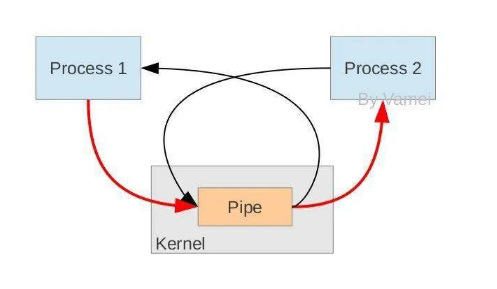
- 管道的结构是个顺序队列。
- 管道中的东西,读完了就删除了,如果管道中没有东西,就会读阻塞。
- 如果管道写满了,也会写阻塞。
- 有名管道文件不占用内存空间,只是一个文件描述符,只有当调用open函数去打开的管道文件的的时候,才会在内核空间开辟一段缓存,进程结束空间会自动释放。
- 无名管道不存在文件节点,只能实现有亲缘关系间进程的通信,无名存在文件节点,但是不占用内存空间。可实现无亲缘关系进程间的通信。
5.管道通信示意图
6.管道的使用
无名管道的创建
|
所需头文件 |
#include<unistd.h> |
|
函数原型 |
int pipe(int fd[2]) |
|
函数参数 |
两个文件描述符,f[0]用来读,f[1]用来写。 |
|
函数返回值 |
成功0,失败-1 |
有名管道的创建
|
所需头文件 |
#include<unistd.h> |
|
函数原型 |
int mkfifo(const char *filename, mode_t mode); |
|
函数参数 |
filename:创建的管道文件名 mod:文件权限 |
|
函数返回值 |
成功0,失败-1 |
管道读写、打开、关闭
可直接调用系统IO函数write()进行写,read()进行,open打开、close关闭
open函数
|
所需头文件 |
#include <fcntl.h> |
|
函数原型 |
int open(const char* pathname, int flags, mode_t mode); |
|
函数参数 |
pathname:文件名 flag: O_RDONLY(只读)、O_WRONLY(只写) O_RDWR(读写) mod:文件权限 |
|
函数返回值 |
成功0,失败-1 |
close函数
|
所需头文件 |
#include <fcntl.h> |
|
函数原型 |
int close(int fd); |
|
函数参数 |
fd:文件描述符 |
|
函数返回值 |
成功0,失败-1 |
read函数
|
所需头文件 |
#include <fcntl.h> |
|
函数原型 |
ssize_t read(int fd, void * buf, size_t count); |
|
函数参数 |
fd:文件描述符 buf:读到哪 count:读多少个字节 |
|
函数返回值 |
返回值为实际读取到的字节数, 如果返回0, 表示已到达文件尾或是无可读取的数据 |
write函数
|
所需头文件 |
#include <fcntl.h> |
|
函数原型 |
ssize_t write (int fd, const void * buf, size_t count); |
|
函数参数 |
fd:文件描述符 buf:写数据 count:写多少个字节 |
|
函数返回值 |
如果顺利write()会返回实际写入的字节数(len)。当有错误发生时则返回-1,错误代码存入errno中 |
7.无名管道程序示例
无名管道代码运行预期结果是父进程先打印,在到子进程打印。
 1 #include"stdio.h"
 2 #include"unistd.h"
 3 #include"sys/types.h"
 4 #include"fcntl.h"
 5 int main()
 6 {
 7     int pid;
 8     int i;
 9     int fd[2];
10     int flag = 0;
11     if (pipe(fd) < 0)
12     {
13         printf("creat pipe fail\n");
14     }
15
16     pid = fork();
17     if (pid > 0)
18     {
19         for(i=0;i<5;i++)
20         {
21             printf("this is father process\n");
22             usleep(100);
23         }
24
25         flag = 1;
26         write(fd[1], &flag, 1);
27         sleep(1);
28     }
29
30     if (pid == 0)
31     {
32         read(fd[0], &flag, 1);
33         while(flag == 0);
34         for(i=0;i<5;i++)
35         {
36             printf("this is child process\n");
37             usleep(100);
38         }
39     }
40 }
8.有名管道程序示例
改程序有两个.c文件,fifoB.c是读端程序,fifiA.c是写端程序,此外还需要在当前目录创建一个myfifo的管道文件,编译完先运行读端程序,然后在运行写端程序,程序运行的结果写端先打印,读端后打印。
 1 //fifoA.c 写端代码
 2
 3 #include"stdio.h"
 4 #include"unistd.h"
 5 #include"fcntl.h"
 6 int main()
 7 {
 8     int i;
 9     char flag = 0;
10     int fd;
11     fd = open("./myfifo", O_RDWR);
12     if (fd < 0)
13     {
14         printf("open faild\n");
15         return -1;
16     }
17
18     for(i = 0; i < 5; i++)
19     {
20         printf("this is A process\n");
21         sleep(1);
22     }
23     flag = 1;
24     write(fd, &flag, 1);
25     while(1);
26
27 }
 1 //fifoB.c 读端代码
 2
 3 #include"stdio.h"
 4 #include"unistd.h"
 5 #include"fcntl.h"
 6 int main()
 7 {
 8     int i;
 9     char flag = 0;
10     int fd;
11     fd = open("./myfifo", O_RDWR);
12
13     if (fd < 0)
14     {
15         printf("open falid\n");
16         return -1;
17     }
18     read(fd, &flag, 1);
19     while(flag = 0);
20     for(i = 0; i < 5; i++)
21     {
22         printf("this is B process\n");
23         sleep(1);
24     }
25
26 }

 浙公网安备 33010602011771号