
Micro Frontends extending the microservice idea to frontend development
Micro Frontends
SINGLE SPA
https://github.com/single-spa/single-spa
https://github.com/fanqingsong/coexisting-angular-microfrontends
MODULE FEDERATION
https://dev.to/mayur_kulkarni_126/step-by-step-guide-to-angular-microfrontends-with-nx-and-dynamic-module-federation-2e04
https://github.com/fanqingsong/dynamic-module-federation-nx
WEB COMPONENT
https://github.com/fanqingsong/angular-microfrontend
extending the microservice idea to frontend development
https://micro-frontends.org/
Techniques, strategies and recipes for building a modern web app with multiple teams that can ship features independently.
What are Micro Frontends?
The term Micro Frontends first came up in ThoughtWorks Technology Radar at the end of 2016. It extends the concepts of micro services to the frontend world. The current trend is to build a feature-rich and powerful browser application, aka single page app, which sits on top of a micro service architecture. Over time the frontend layer, often developed by a separate team, grows and gets more difficult to maintain. That’s what we call a Frontend Monolith.
The idea behind Micro Frontends is to think about a website or web app as a composition of features which are owned by independent teams. Each team has a distinct area of business or mission it cares about and specialises in. A team is cross functional and develops its features end-to-end, from database to user interface.
However, this idea is not new. It has a lot in common with the Self-contained Systems concept. In the past approaches like this went by the name of Frontend Integration for Verticalised Systems. But Micro Frontends is clearly a more friendly and less bulky term.
Monolithic Frontends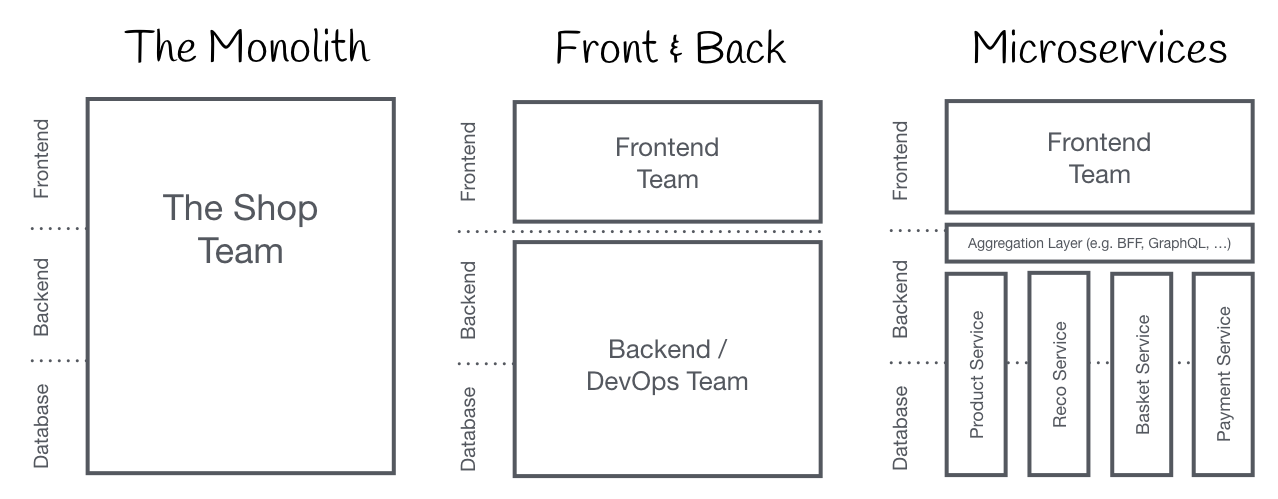
Organisation in Verticals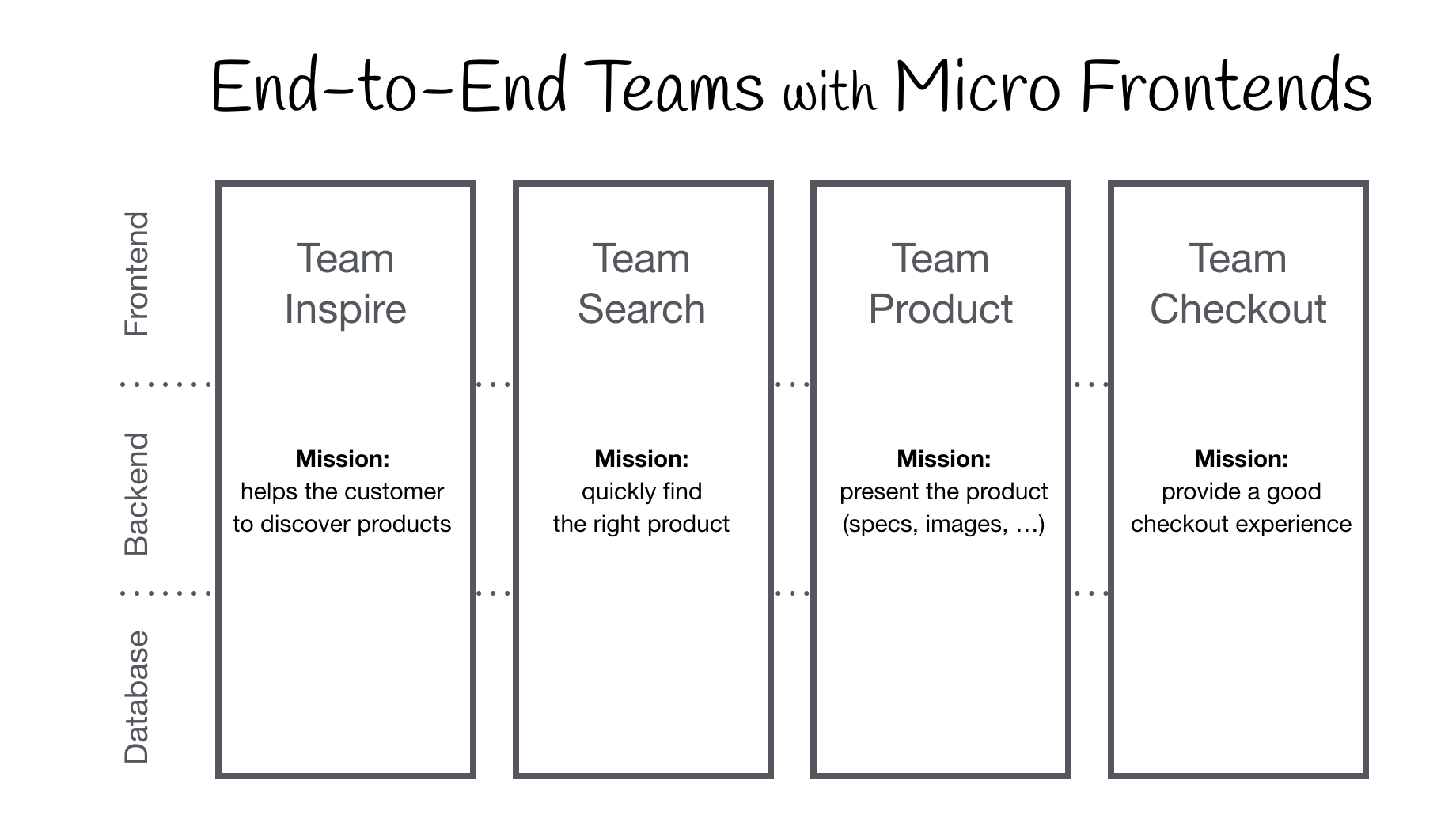
Core Ideas behind Micro Frontends
- Be Technology Agnostic
Each team should be able to choose and upgrade their stack without having to coordinate with other teams. Custom Elements are a great way to hide implementation details while providing a neutral interface to others. - Isolate Team Code
Don’t share a runtime, even if all teams use the same framework. Build independent apps that are self contained. Don’t rely on shared state or global variables. - Establish Team Prefixes
Agree on naming conventions where isolation is not possible yet. Namespace CSS, Events, Local Storage and Cookies to avoid collisions and clarify ownership. - Favor Native Browser Features over Custom APIs
Use Browser Events for communication instead of building a global PubSub system. If you really have to build a cross-team API, try keeping it as simple as possible. - Build a Resilient Site
Your feature should be useful, even if JavaScript failed or hasn’t executed yet. Use Universal Rendering and Progressive Enhancement to improve perceived performance.
The DOM is the API
Custom Elements, the interoperability aspect from the Web Components Spec, are a good primitive for integration in the browser. Each team builds their component using their web technology of choice and wraps it inside a Custom Element (e.g. <order-minicart></order-minicart>). The DOM specification of this particular element (tag-name, attributes & events) acts as the contract or public API for other teams. The advantage is that they can use the component and its functionality without having to know the implementation. They just have to be able to interact with the DOM.
But Custom Elements alone are not the solution to all our needs. To address progressive enhancement, universal rendering or routing we need additional pieces of software.
This page is divided into two main areas. First we will discuss Page Composition - how to assemble a page out of components owned by different teams. After that we’ll show examples for implementing client-side Page Transition.
How to Create a Custom Element?
Lets take the buy button as an example. Team Product includes the button simply adding <blue-buy sku="t_porsche"></blue-buy> to the desired position in the markup. For this to work, Team Checkout has to register the element blue-buy on the page.
class BlueBuy extends HTMLElement {
  connectedCallback() {
    this.attachShadow({ mode: 'open' });
    this.shadowRoot = `<button type="button">buy for 66,00 €</button>`;
  }

  disconnectedCallback() { ... }
}
window.customElements.define('blue-buy', BlueBuy);
Browser Support
The above example uses the Custom Element Spec which is supported by all modern browsers. No polyfills or hacks are needed. The same is true for Shadow DOM, which is used to encapsulate the Custom Element’s markup and styles.
Framework Compatibility
Because Custom Elements are a web standard, all major JavaScript frameworks like React, Vue, Angular, Svelte or Preact support them. They allow you to embed a Custom Element in your application just like a native HTML tag, and they also provide ways to publish your framework-specific application as a Custom Element.
Avoid Framework Anarchy
Using Custom Elements is a great way to achieve a high amount of decoupling between the fragments of the individual teams. This way, each team is free to pick the frontend framework of their choice. But just because you can does not mean that it’s a wise idea to mix different technologies. Try to avoid Micro Frontends Anarchy and create a reasonable level of alignment between the various teams. This way, teams can share learning and best practices with each other. It will also make your life easier when you want to establish a central pattern library. That said, the capability of mixing technologies can be handy when you’re working with a legacy application and want to migrate to a new tech stack.
Server-side Rendering / Universal Rendering
Custom Elements are great for integrating components inside the browser. But when building a site that is accessible on the web, chances are that initial load performance matters and users will see a white screen until all js frameworks are downloaded and executed. Additionally, it’s good to think about what happens to the site if the JavaScript fails or is blocked. Jeremy Keith explains the importance in his ebook/podcast Resilient Web Design. Therefore the ability to render the core content on the server is key. Sadly the web component spec does not talk about server rendering at all. No JavaScript, no Custom Elements :(
经过梳理与合并,当前主流的微前端框架及方案可以清晰地划分为以下四大类:
一、 运行时加载型(主流微前端框架)
- Qiankun(乾坤)
- 背景:阿里开源,基于 single-spa 封装。
- 特点:国内使用最广泛,社区成熟,文档齐全。通过动态加载 HTML/JS/CSS 并结合 Proxy 沙箱实现隔离,支持 Vue/React/Angular 等多种技术栈。
- 适用场景:中后台平台快速接入,尤其是 Vue 3 项目。
- 局限:运行时加载导致首屏性能相对较弱,CSS 严格隔离可能引发部分样式问题。
- Wujie(无界)
- 背景:腾讯开源。
- 特点:基于 WebComponent 容器和 iframe 沙箱。隔离能力极强,性能优异(比 qiankun 快约 10 倍),且支持子应用保活(keep-alive)。
- 适用场景:大规模 B 端场景,对隔离和性能要求极高的项目。
- 局限:社区规模相比乾坤略小。
- Micro-app
- 背景:京东开源。
- 特点:基于 WebComponent 加载子应用,复用 qiankun 沙箱机制。API 设计优雅,子应用改造成本低,同样支持子应用保活。
- 局限:路由存在依赖,不支持 WebComponent 的老旧浏览器无降级处理。
- ICE MicroApp(飞冰微前端)
- 背景:阿里开源。
- 特点:基于 WebComponent 实现沙箱隔离。API 极简,文档清晰,易用性极高。
- 适用场景:React/Vue 企业级后台的快速集成。
二、 构建时模块共享型
- Module Federation(模块联邦)
- 背景:Webpack 5 官方提供的机制。
- 特点:允许应用间动态加载模块和组件,实现真正的“跨应用共享组件库”。性能最好,无需 iframe 或沙箱。
- 适用场景:Webpack 工程体系,跨团队需要共享组件库的场景。
- 局限:对 Webpack 有强依赖,架构复杂度较高,对老旧项目不友好。
- EMP(微模块化)
- 背景:基于 Webpack 5 Module Federation 的工程化套件。
- 特点:保证子应用依赖解耦,支持应用间去中心化调用和远程 TS 模块支持。
- 局限:同样对 Webpack 有强依赖。
三、 底层基础型(需高度定制)
- single-spa
- 特点:微前端的“鼻祖”和最原始方案。仅提供子应用注册和生命周期管理,自由度最高。
- 局限:路由、加载、基座等所有机制都需要开发者自行实现,除非有高度定制化的需求,否则不推荐直接使用。
四、 原生标准化自研型
- Web Components 自研方案
- 特点:完全跨技术栈、不依赖任何第三方框架,是最轻量、最标准化的方案。
- 局限:工作量极大,需要自行搭建沙箱和通信机制。
- 适用场景:超大型平台(如京东后台体系),通常由大厂基础架构团队主导。

 浙公网安备 33010602011771号