
ResearchSphere: End-to-End Document Research
ResearchSphere: End-to-End Document Research
https://github.com/SaiPranaviJeedigunta/Multi-Agent-RAG-Application/tree/main
Build an end-to-end research tool using an Airflow pipeline for document processing, vector storage with Pinecone, and a multi-agent research system powered by LangGraph. The system enables efficient document-based research, query answering, and exportable findings.
Research often involves parsing through extensive documents, retrieving relevant data, and synthesizing actionable insights. Current methods are time-consuming and inefficient, relying heavily on manual work. This project addresses the need for automation and intelligence in research workflows by building a pipeline to process documents, store vectors for similarity search, and create a multi-agent system for enhanced research capabilities.
This project automates the ingestion, processing, and retrieval of publication data using advanced technologies. Key features include:
- Airflow Pipeline: Automates document parsing using Docling and stores vectors in Pinecone for similarity search.
- Multi-Agent System: Utilizes LangGraph to orchestrate research tasks, including document selection, Arxiv-based research, web search, and answering queries with Retrieval-Augmented Generation (RAG).
- User Interaction: Provides an interface using Streamlit for users to ask questions, save research sessions, and export results in professional formats.








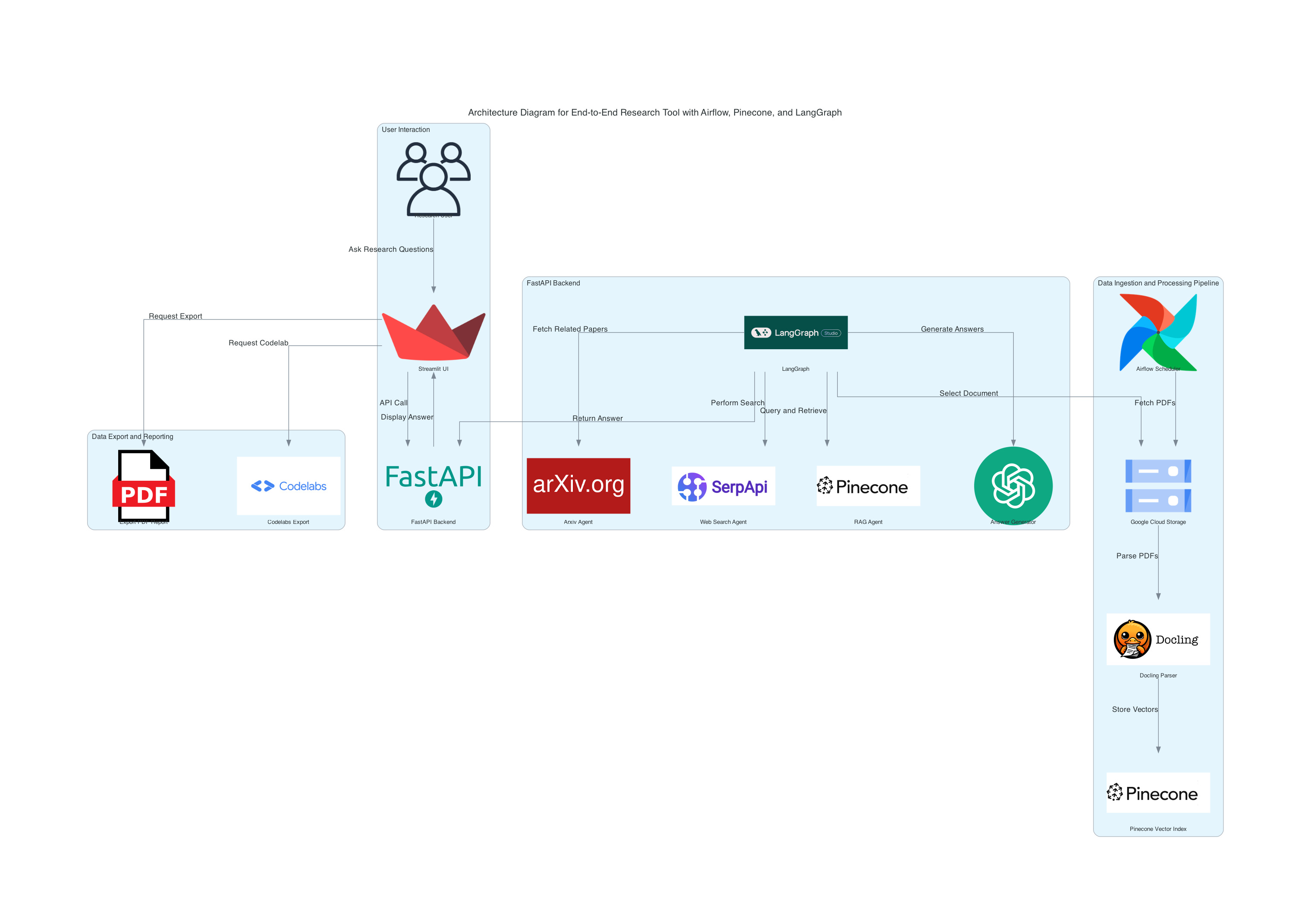

- Airflow Pipeline:
- Uses Docling to parse documents, extracting structured text from PDFs.
- Stores document vectors in Pinecone for efficient similarity search.
- Automates the end-to-end pipeline using Apache Airflow.
- Technologies:
- Docling for document parsing.
- Pinecone for vector-based storage and retrieval.
- Airflow for automation and orchestration.
-
Research Agents:
- Document Selector: Enables selection of documents processed in Part 1.
- Arxiv Agent: Searches for related research papers on Arxiv.
- Web Search Agent: Performs broader online research for context.
- RAG Agent: Uses Retrieval-Augmented Generation (RAG) to answer questions based on the document's content.
- Answer Generator: Provides concise answers or summaries using OpenAI or similar APIs.
-
Workflow:
- Agents are orchestrated by LangGraph, interacting with Pinecone for vector retrieval and external APIs for additional insights.
- Pinecone facilitates fast similarity search, enhancing query efficiency.
- User Interface:
- Built using Streamlit to allow users to:
- Ask 5-6 questions per document.
- View structured answers or summaries.
- Save research session results.
- Built using Streamlit to allow users to:
- Export Results:
- PDF Export: Generates professional reports summarizing findings.
- Codelabs Export: Structures findings for instructional use.
- Document Processing:
- Automates document ingestion, parsing, and vector storage.
- Multi-Agent System:
- Offers advanced research capabilities through document selection, Arxiv search, web search, and RAG-based Q/A.
- User-Friendly Interface:
- Simple yet powerful interface for research interaction and result export.
DATA INGESTIONN
https://github.com/SaiPranaviJeedigunta/Multi-Agent-RAG-Application/blob/main/airflow/dags/datapipeline.py
from google.cloud import storage
from dotenv import load_dotenv
import os
from google.oauth2 import service_account
from google.cloud import storage
from airflow import DAG
from airflow.operators.python_operator import PythonOperator
from datetime import datetime


load_dotenv()

# Get the path to the credentials file from environment variable
credentials_path = os.getenv("GOOGLE_APPLICATION_CREDENTIALS")

# Create credentials and client
if credentials_path:
    credentials = service_account.Credentials.from_service_account_file(credentials_path)
    client = storage.Client(credentials=credentials)
else:
    raise ValueError("GOOGLE_APPLICATION_CREDENTIALS environment variable not set")

def download_files_from_gcs():

    # Fetch bucket name from environment variable
    bucket_name = os.getenv("GCS_BUCKET_NAME")

    # Check if bucket name is loaded correctly
    if not bucket_name:
        raise ValueError("Bucket name not found. Ensure GCS_BUCKET_NAME is set in .env file.")

    print("Bucket name:", bucket_name)

    # Initialize the Google Cloud Storage client
    client = storage.Client()
    bucket = client.bucket(bucket_name)

    # List of specific files to download
    file_paths = [
        "cfai_publications/The Economics of Private Equity: A Critical Review/The Economics of Private Equity: A Critical Review.pdf",
        "cfai_publications/Investment Horizon, Serial Correlation, and Better (Retirement) Portfolios/Investment Horizon, Serial Correlation, and Better (Retirement) Portfolios.pdf",
        "cfai_publications/An Introduction to Alternative Credit/An Introduction to Alternative Credit.pdf"
    ]

    # Set the current directory as the destination for downloads
    current_directory = os.getcwd()

    # Download each file
    for file_path in file_paths:
        blob = bucket.blob(file_path)
        local_file_path = os.path.join(current_directory, os.path.basename(file_path))
        blob.download_to_filename(local_file_path)
        print(f"Downloaded {file_path} to {local_file_path}")

def process_and_save_pdfs():

    import logging
    import time
    from pathlib import Path
    import pandas as pd
    import json
    from docling.datamodel.base_models import InputFormat
    from docling.datamodel.pipeline_options import PdfPipelineOptions
    from docling.document_converter import DocumentConverter, PdfFormatOption
    from docling_core.types.doc import ImageRefMode, PictureItem, TableItem
    from docling_core.transforms.chunker import HierarchicalChunker

    # Configure logging
    logging.basicConfig(level=logging.INFO)
    _log = logging.getLogger(__name__)

    # Define the resolution scale for images
    IMAGE_RESOLUTION_SCALE = 2.0

    # Paths to local PDF files
    file_paths = [
        "The Economics of Private Equity: A Critical Review.pdf",
        "Investment Horizon, Serial Correlation, and Better (Retirement) Portfolios.pdf",
        "An Introduction to Alternative Credit.pdf"
    ]

    # Output directory
    output_dir = Path("parsed_content")  # Replace with your desired output directory path
    output_dir.mkdir(parents=True, exist_ok=True)

    # Function to process PDF files
    def process_pdf(file_path):
        pipeline_options = PdfPipelineOptions()
        pipeline_options.images_scale = IMAGE_RESOLUTION_SCALE
        pipeline_options.generate_page_images = True
        pipeline_options.generate_table_images = True
        pipeline_options.generate_picture_images = True

        doc_converter = DocumentConverter(
            format_options={
                InputFormat.PDF: PdfFormatOption(pipeline_options=pipeline_options)
            }
        )

        start_time = time.time()
        conv_res = doc_converter.convert(file_path)
        doc_filename = Path(file_path).stem

        # Save page images
        for page_no, page in conv_res.document.pages.items():
            page_image_filename = output_dir / f"{doc_filename}-page-{page_no}.png"
            with page_image_filename.open("wb") as fp:
                page.image.pil_image.save(fp, format="PNG")
            _log.info(f"Saved page image: {page_image_filename}")

        # Save images of figures and tables
        table_counter = 0
        picture_counter = 0
        for element, _level in conv_res.document.iterate_items():
            if isinstance(element, TableItem):
                table_counter += 1
                table_image_filename = output_dir / f"{doc_filename}-table-{table_counter}.png"
                with page_image_filename.open("wb") as fp:
                    element.image.pil_image.save(fp, "PNG")
                _log.info(f"Saved table image: {table_image_filename}")

                # Save the table as CSV and HTML
                table_df: pd.DataFrame = element.export_to_dataframe()
                table_csv_filename = output_dir / f"{doc_filename}-table-{table_counter}.csv"
                table_df.to_csv(table_csv_filename)
                table_html_filename = output_dir / f"{doc_filename}-table-{table_counter}.html"
                with table_html_filename.open("w") as fp:
                    fp.write(element.export_to_html())
                _log.info(f"Saved table CSV: {table_csv_filename} and HTML: {table_html_filename}")

            if isinstance(element, PictureItem):
                picture_counter += 1
                picture_image_filename = output_dir / f"{doc_filename}-picture-{picture_counter}.png"
                with picture_image_filename.open("wb") as fp:
                    element.image.pil_image.save(fp, "PNG")
                _log.info(f"Saved picture image: {picture_image_filename}")

        # Apply hierarchy-aware chunking for further processing
        chunks = list(HierarchicalChunker(min_chunk_length=500, max_chunk_length=1500, split_by='paragraph', overlap=50).chunk(conv_res.document))

        # Prepare to save chunk data
        chunk_data = []

        # Process each chunk and display metadata
        for i, chunk in enumerate(chunks):
            text_content = chunk.text  # Directly access 'text' attribute
            # Convert meta information to a dictionary, or extract relevant fields to avoid serialization issues
            meta_info = chunk.meta.dict() if hasattr(chunk.meta, "dict") else str(chunk.meta)

            # Store each chunk's content and metadata for further use
            chunk_metadata = {
                "document": doc_filename,
                "chunk_id": i,
                "text": text_content,
                "meta": meta_info
            }
            chunk_data.append(chunk_metadata)
            print(f"Chunk {i}: {chunk_metadata['text'][:100]}...")  # Preview the first 100 characters

        # Save chunks data to a JSON file for each document
        chunks_json_filename = output_dir / f"{doc_filename}_chunks.json"
        with chunks_json_filename.open("w") as json_fp:
            json.dump(chunk_data, json_fp, indent=4)
        _log.info(f"Chunks saved to JSON file: {chunks_json_filename}")

        # Export markdown with embedded images for content
        content_md = conv_res.document.export_to_markdown(image_mode=ImageRefMode.EMBEDDED)
        md_filename = output_dir / f"{doc_filename}-with-images.md"
        with md_filename.open("w") as fp:
            fp.write(content_md)
        _log.info(f"Markdown with images saved: {md_filename}")

        end_time = time.time() - start_time
        _log.info(f"{doc_filename} converted and figures exported in {end_time:.2f} seconds.")

    # Process each file in the list
    for file_path in file_paths:
        process_pdf(file_path)

def process_and_upload_to_pinecone():
    import os
    import json
    import glob
    import logging
    import pandas as pd
    from dotenv import load_dotenv
    from pathlib import Path
    from pinecone import Pinecone, ServerlessSpec
    from sentence_transformers import SentenceTransformer
    from transformers import CLIPProcessor, CLIPModel
    from PIL import Image
    import pytesseract
    import torch
    import platform


    os.environ["TOKENIZERS_PARALLELISM"] = "false"

    # Set the Tesseract path from the environment variable
    tesseract_path = os.getenv("TESSERACT_PATH")
    if tesseract_path:
        pytesseract.pytesseract.tesseract_cmd = tesseract_path
    else:
        raise EnvironmentError("TESSERACT_PATH is not set in .env")

    # Set up logging
    logging.basicConfig(level=logging.INFO, format='%(asctime)s - %(levelname)s - %(message)s')

    # Load environment variables
    load_dotenv()

    # Initialize Pinecone with environment variables
    pinecone_api_key = os.getenv("PINECONE_API_KEY")
    pinecone_env = "us-east-1"
    pc = Pinecone(api_key=pinecone_api_key)

    # Define Pinecone index parameters
    index_name = "research-publications-index"
    embedding_model = SentenceTransformer('all-MiniLM-L6-v2')
    embedding_dimension = embedding_model.get_sentence_embedding_dimension()

    # Initialize CLIP model and processor for image embeddings
    clip_model = CLIPModel.from_pretrained("openai/clip-vit-base-patch32")
    clip_processor = CLIPProcessor.from_pretrained("openai/clip-vit-base-patch32")
    clip_embedding_dim = clip_model.config.projection_dim

    # Check if index exists, delete if it does
    if index_name in pc.list_indexes().names():
        logging.info(f"Index '{index_name}' already exists. Deleting the existing index.")
        pc.delete_index(index_name)

    # Create the Pinecone index
    logging.info(f"Creating Pinecone index: {index_name}")
    pc.create_index(
        name=index_name,
        dimension=embedding_dimension,
        metric='cosine',
        spec=ServerlessSpec(cloud='aws', region=pinecone_env)
    )

    # Connect to the index
    index = pc.Index(index_name)
    logging.info(f"Connected to Pinecone index: {index_name}")

    # Path to the directory with parsed content
    parsed_content_dir = "parsed_content"

    # Function to chunk text into smaller parts if it exceeds max token length
    def chunk_text(text, max_length=512):
        return [text[i:i+max_length] for i in range(0, len(text), max_length)]

    # Step 1: Process each JSON file containing chunked text data
    for json_file_path in glob.glob(os.path.join(parsed_content_dir, "*_chunks.json")):
        with open(json_file_path, 'r') as f:
            chunks = json.load(f)

            for chunk in chunks:
                try:
                    # Extract text and metadata
                    text_content = chunk['text']
                    pdf_filename = chunk['meta']['origin']['filename']
                    page_no = chunk['meta']['doc_items'][0]['prov'][0].get("page_no")

                    # Chunk large text content
                    for text_chunk in chunk_text(text_content):
                        embedding = embedding_model.encode(text_chunk).tolist()

                        # Metadata for each chunk
                        metadata = {
                            "document": chunk['document'],
                            "chunk_id": chunk['chunk_id'],
                            "page_no": page_no,
                            "type": "text_chunk",
                            "pdf_filename": pdf_filename
                        }

                        # Upload the chunk to Pinecone
                        index.upsert([(f"{chunk['document']}_{chunk['chunk_id']}", embedding, metadata)])
                        logging.info(f"Uploaded text chunk {chunk['chunk_id']} from document '{chunk['document']}'")

                except Exception as e:
                    logging.error(f"Failed to process text chunk in {json_file_path}: {e}")

    # Step 2: Embed and upload each table row with pdf_filename reference
    for table_csv_path in glob.glob(os.path.join(parsed_content_dir, "*-table-*.csv")):
        try:
            doc_filename = Path(table_csv_path).stem.split('-table')[0]

            # Read the table data
            table_data = pd.read_csv(table_csv_path)

            # Iterate over each row in the table
            for row_idx, row in table_data.iterrows():
                row_data = row.to_string()
                row_embedding = embedding_model.encode(row_data).tolist()

                # Metadata for each row
                row_metadata = {
                    "document": doc_filename,
                    "type": "table_row",
                    "row_index": row_idx,
                    "filename": os.path.basename(table_csv_path),
                    "pdf_filename": f"{doc_filename}.pdf"
                }

                # Upsert row data into Pinecone
                index.upsert([(f"{doc_filename}_table_row_{row_idx}", row_embedding, row_metadata)])
                logging.info(f"Uploaded row {row_idx} of table from '{table_csv_path}'")

        except Exception as e:
            logging.error(f"Failed to process table file {table_csv_path}: {e}")

    # Step 3: Extract text from images, embed, and upload to Pinecone
    for image_path in glob.glob(os.path.join(parsed_content_dir, "*-page-*.png")) + glob.glob(os.path.join(parsed_content_dir, "*-picture-*.png")):
        try:
            doc_filename = Path(image_path).stem.split('-page')[0].split('-picture')[0]

            # Load and preprocess image for CLIP
            image = Image.open(image_path)

            # Extract text from image using OCR
            extracted_text = pytesseract.image_to_string(image)
            logging.info(f"Extracted text from image '{image_path}': {extracted_text[:100]}...")

            # Embed extracted text using the embedding model
            if extracted_text.strip():
                text_embedding = embedding_model.encode(extracted_text).tolist()
                text_metadata = {
                    "document": doc_filename,
                    "type": "image_text",
                    "filename": os.path.basename(image_path),
                    "pdf_filename": f"{doc_filename}.pdf"
                }
                # Upload extracted text embedding to Pinecone
                index.upsert([(f"{doc_filename}_{Path(image_path).stem}_text", text_embedding, text_metadata)])
                logging.info(f"Uploaded extracted text from image '{image_path}'")

            # Create image embedding with CLIP
            inputs = clip_processor(images=image, return_tensors="pt")
            with torch.no_grad():
                image_embedding = clip_model.get_image_features(**inputs).squeeze().tolist()

            # Truncate the image embedding to match text embedding dimension
            truncated_image_embedding = image_embedding[:embedding_dimension]

            # Image metadata
            image_metadata = {
                "document": doc_filename,
                "type": "image",
                "filename": os.path.basename(image_path),
                "pdf_filename": f"{doc_filename}.pdf"
            }

            # Upload image data into Pinecone
            index.upsert([(f"{doc_filename}_{Path(image_path).stem}", truncated_image_embedding, image_metadata)])
            logging.info(f"Uploaded image data for '{image_path}'")

        except Exception as e:
            logging.error(f"Failed to process image file {image_path}: {e}")

    logging.info("Data successfully embedded and uploaded to Pinecone.")

# Define the DAG
with DAG(
    dag_id='parse_and_pinecone_upload',
    schedule_interval='@daily',  # Set the desired schedule interval
    start_date=datetime(2024, 11, 12),  # Change to your desired start date
    catchup=False,
    tags=['parsing', 'pineconeupload']
) as dag:

    download_publications = PythonOperator(
        task_id='download_publications',
        python_callable=download_files_from_gcs
    )

    parse_task = PythonOperator(
        task_id='parse_task',
        python_callable=process_and_save_pdfs
    )

    pineconeupload_task = PythonOperator(
        task_id='pineconeupload_task',
        python_callable=process_and_upload_to_pinecone
    )
    # Set task dependencies
    download_publications >> parse_task >> pineconeupload_task
DAG映射
x-airflow-common:
  &airflow-common
  # In order to add custom dependencies or upgrade provider packages you can use your extended image.
  # Comment the image line, place your Dockerfile in the directory where you placed the docker-compose.yaml
  # and uncomment the "build" line below, Then run `docker-compose build` to build the images.
  image: ${AIRFLOW_IMAGE_NAME:-apache/airflow:2.10.3}
  # build: .
  environment:
    &airflow-common-env
    AIRFLOW__CORE__EXECUTOR: CeleryExecutor
    AIRFLOW__DATABASE__SQL_ALCHEMY_CONN: postgresql+psycopg2://airflow:airflow@postgres/airflow
    AIRFLOW__CELERY__RESULT_BACKEND: db+postgresql://airflow:airflow@postgres/airflow
    AIRFLOW__CELERY__BROKER_URL: redis://:@redis:6379/0
    AIRFLOW__CORE__FERNET_KEY: ''
    AIRFLOW__CORE__DAGS_ARE_PAUSED_AT_CREATION: 'true'
    AIRFLOW__CORE__LOAD_EXAMPLES: 'false'
    AIRFLOW__API__AUTH_BACKENDS: 'airflow.api.auth.backend.basic_auth,airflow.api.auth.backend.session'
    # yamllint disable rule:line-length
    # Use simple http server on scheduler for health checks
    # See https://airflow.apache.org/docs/apache-airflow/stable/administration-and-deployment/logging-monitoring/check-health.html#scheduler-health-check-server
    # yamllint enable rule:line-length
    AIRFLOW__SCHEDULER__ENABLE_HEALTH_CHECK: 'true'
    # WARNING: Use _PIP_ADDITIONAL_REQUIREMENTS option ONLY for a quick checks
    # for other purpose (development, test and especially production usage) build/extend Airflow image.
    _PIP_ADDITIONAL_REQUIREMENTS: ${_PIP_ADDITIONAL_REQUIREMENTS:- docling pinecone-client sentence-transformers python-dotenv google-cloud-storage apache-airflow}
    # The following line can be used to set a custom config file, stored in the local config folder
    # If you want to use it, outcomment it and replace airflow.cfg with the name of your config file
    # AIRFLOW_CONFIG: '/opt/airflow/config/airflow.cfg'
  volumes:
    - ${AIRFLOW_PROJ_DIR:-.}/dags:/opt/airflow/dags
    - ${AIRFLOW_PROJ_DIR:-.}/logs:/opt/airflow/logs
    - ${AIRFLOW_PROJ_DIR:-.}/config:/opt/airflow/config
    - ${AIRFLOW_PROJ_DIR:-.}/plugins:/opt/airflow/plugins
    - /Users/pranavijs/Desktop/BD4/.env:/opt/airflow/.env
    - /Users/pranavijs/Desktop/BD4/project3-439417-441ae24dff81.json:/opt/airflow/project3-439417-441ae24dff81.json
  user: "${AIRFLOW_UID:-50000}:0"
  depends_on:
    &airflow-common-depends-on
    redis:
      condition: service_healthy
    postgres:
      condition: service_healthy

 浙公网安备 33010602011771号