
Human-in-the-loop
Human-in-the-loop
https://langchain-ai.github.io/langgraph/concepts/v0-human-in-the-loop/
Human-in-the-loop (or "on-the-loop") enhances agent capabilities through several common user interaction patterns.
Common interaction patterns include:
(1)
Approval- We can interrupt our agent, surface the current state to a user, and allow the user to accept an action.(2)
Editing- We can interrupt our agent, surface the current state to a user, and allow the user to edit the agent state.(3)
Input- We can explicitly create a graph node to collect human input and pass that input directly to the agent state.Use-cases for these interaction patterns include:
(1)
Reviewing tool calls- We can interrupt an agent to review and edit the results of tool calls.(2)
Time Travel- We can manually re-play and / or fork past actions of an agent.
How to add breakpoints
https://langchain-ai.github.io/langgraph/how-tos/human_in_the_loop/breakpoints/#simple-usage
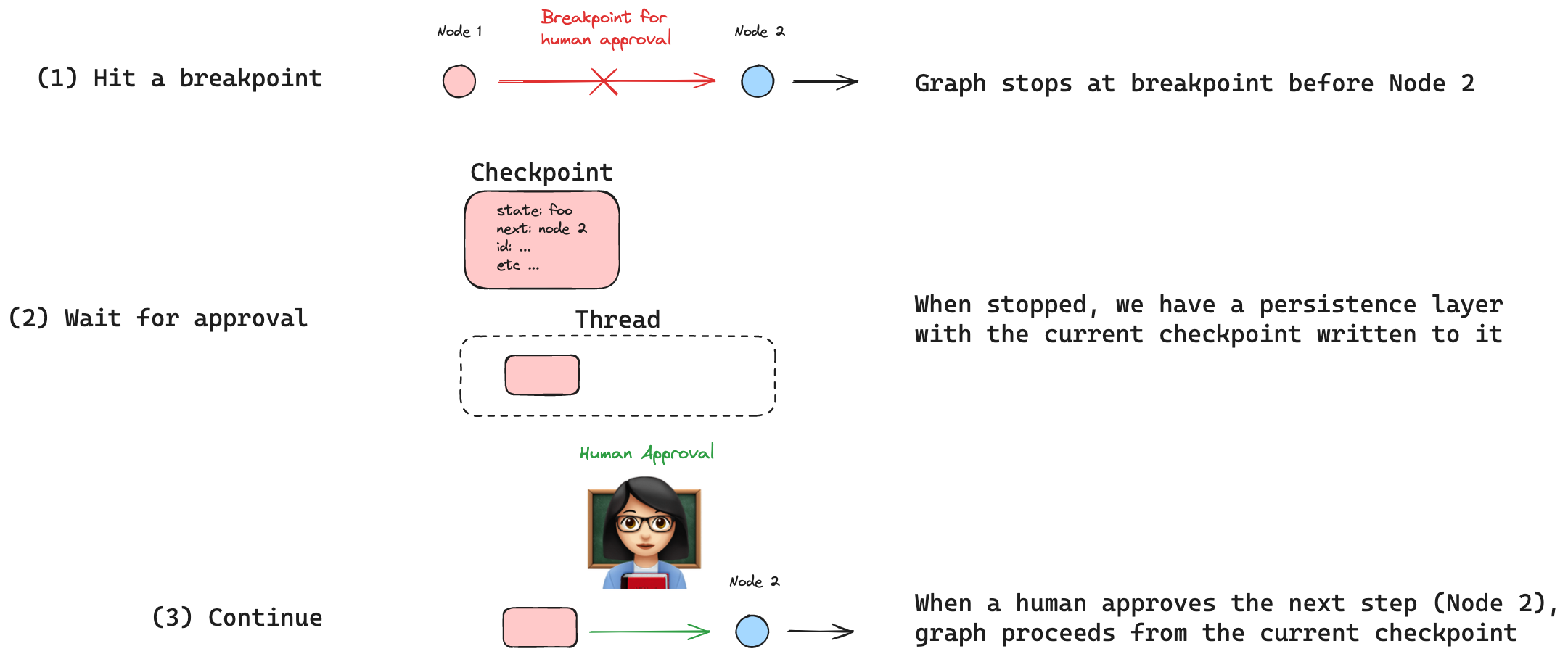
Human-in-the-loop (HIL) interactions are crucial for agentic systems. Breakpoints are a common HIL interaction pattern, allowing the graph to stop at specific steps and seek human approval before proceeding (e.g., for sensitive actions).
Breakpoints are built on top of LangGraph checkpoints, which save the graph's state after each node execution. Checkpoints are saved in threads that preserve graph state and can be accessed after a graph has finished execution. This allows for graph execution to pause at specific points, await human approval, and then resume execution from the last checkpoint.
# Set up the tool
from langchain_anthropic import ChatAnthropic
from langchain_core.tools import tool
from langgraph.graph import MessagesState, START
from langgraph.prebuilt import ToolNode
from langgraph.graph import END, StateGraph
from langgraph.checkpoint.memory import MemorySaver


@tool
def search(query: str):
    """Call to surf the web."""
    # This is a placeholder for the actual implementation
    # Don't let the LLM know this though 😊
    return [
        "It's sunny in San Francisco, but you better look out if you're a Gemini 😈."
    ]


tools = [search]
tool_node = ToolNode(tools)

# Set up the model

model = ChatAnthropic(model="claude-3-5-sonnet-20240620")
model = model.bind_tools(tools)


# Define nodes and conditional edges


# Define the function that determines whether to continue or not
def should_continue(state):
    messages = state["messages"]
    last_message = messages[-1]
    # If there is no function call, then we finish
    if not last_message.tool_calls:
        return "end"
    # Otherwise if there is, we continue
    else:
        return "continue"


# Define the function that calls the model
def call_model(state):
    messages = state["messages"]
    response = model.invoke(messages)
    # We return a list, because this will get added to the existing list
    return {"messages": [response]}


# Define a new graph
workflow = StateGraph(MessagesState)

# Define the two nodes we will cycle between
workflow.add_node("agent", call_model)
workflow.add_node("action", tool_node)

# Set the entrypoint as `agent`
# This means that this node is the first one called
workflow.add_edge(START, "agent")

# We now add a conditional edge
workflow.add_conditional_edges(
    # First, we define the start node. We use `agent`.
    # This means these are the edges taken after the `agent` node is called.
    "agent",
    # Next, we pass in the function that will determine which node is called next.
    should_continue,
    # Finally we pass in a mapping.
    # The keys are strings, and the values are other nodes.
    # END is a special node marking that the graph should finish.
    # What will happen is we will call `should_continue`, and then the output of that
    # will be matched against the keys in this mapping.
    # Based on which one it matches, that node will then be called.
    {
        # If `tools`, then we call the tool node.
        "continue": "action",
        # Otherwise we finish.
        "end": END,
    },
)

# We now add a normal edge from `tools` to `agent`.
# This means that after `tools` is called, `agent` node is called next.
workflow.add_edge("action", "agent")

# Set up memory
memory = MemorySaver()

# Finally, we compile it!
# This compiles it into a LangChain Runnable,
# meaning you can use it as you would any other runnable

# We add in `interrupt_before=["action"]`
# This will add a breakpoint before the `action` node is called
app = workflow.compile(checkpointer=memory, interrupt_before=["action"])

display(Image(app.get_graph().draw_mermaid_png()))
from langchain_core.messages import HumanMessage

thread = {"configurable": {"thread_id": "3"}}
inputs = [HumanMessage(content="search for the weather in sf now")]
for event in app.stream({"messages": inputs}, thread, stream_mode="values"):
    event["messages"][-1].pretty_print()
How to wait for user input using interrupt
https://langchain-ai.github.io/langgraph/how-tos/human_in_the_loop/wait-user-input/
Human-in-the-loop (HIL) interactions are crucial for agentic systems. Waiting for human input is a common HIL interaction pattern, allowing the agent to ask the user clarifying questions and await input before proceeding.
We can implement this in LangGraph using the
interrupt()function.interruptallows us to stop graph execution to collect input from a user and continue execution with collected input.
# Set up the state
from langgraph.graph import MessagesState, START

# Set up the tool
# We will have one real tool - a search tool
# We'll also have one "fake" tool - a "ask_human" tool
# Here we define any ACTUAL tools
from langchain_core.tools import tool
from langgraph.prebuilt import ToolNode


@tool
def search(query: str):
    """Call to surf the web."""
    # This is a placeholder for the actual implementation
    # Don't let the LLM know this though 😊
    return f"I looked up: {query}. Result: It's sunny in San Francisco, but you better look out if you're a Gemini 😈."


tools = [search]
tool_node = ToolNode(tools)

# Set up the model
from langchain_anthropic import ChatAnthropic

model = ChatAnthropic(model="claude-3-5-sonnet-latest")

from pydantic import BaseModel


# We are going "bind" all tools to the model
# We have the ACTUAL tools from above, but we also need a mock tool to ask a human
# Since `bind_tools` takes in tools but also just tool definitions,
# We can define a tool definition for `ask_human`
class AskHuman(BaseModel):
    """Ask the human a question"""

    question: str


model = model.bind_tools(tools + [AskHuman])

# Define nodes and conditional edges


# Define the function that determines whether to continue or not
def should_continue(state):
    messages = state["messages"]
    last_message = messages[-1]
    # If there is no function call, then we finish
    if not last_message.tool_calls:
        return END
    # If tool call is asking Human, we return that node
    # You could also add logic here to let some system know that there's something that requires Human input
    # For example, send a slack message, etc
    elif last_message.tool_calls[0]["name"] == "AskHuman":
        return "ask_human"
    # Otherwise if there is, we continue
    else:
        return "action"


# Define the function that calls the model
def call_model(state):
    messages = state["messages"]
    response = model.invoke(messages)
    # We return a list, because this will get added to the existing list
    return {"messages": [response]}


# We define a fake node to ask the human
def ask_human(state):
    tool_call_id = state["messages"][-1].tool_calls[0]["id"]
    ask = AskHuman.model_validate(state["messages"][-1].tool_calls[0]["args"])
    location = interrupt(ask.question)
    tool_message = [{"tool_call_id": tool_call_id, "type": "tool", "content": location}]
    return {"messages": tool_message}


# Build the graph

from langgraph.graph import END, StateGraph

# Define a new graph
workflow = StateGraph(MessagesState)

# Define the three nodes we will cycle between
workflow.add_node("agent", call_model)
workflow.add_node("action", tool_node)
workflow.add_node("ask_human", ask_human)

# Set the entrypoint as `agent`
# This means that this node is the first one called
workflow.add_edge(START, "agent")

# We now add a conditional edge
workflow.add_conditional_edges(
    # First, we define the start node. We use `agent`.
    # This means these are the edges taken after the `agent` node is called.
    "agent",
    # Next, we pass in the function that will determine which node is called next.
    should_continue,
)

# We now add a normal edge from `tools` to `agent`.
# This means that after `tools` is called, `agent` node is called next.
workflow.add_edge("action", "agent")

# After we get back the human response, we go back to the agent
workflow.add_edge("ask_human", "agent")

# Set up memory
from langgraph.checkpoint.memory import MemorySaver

memory = MemorySaver()

# Finally, we compile it!
# This compiles it into a LangChain Runnable,
# meaning you can use it as you would any other runnable
# We add a breakpoint BEFORE the `ask_human` node so it never executes
app = workflow.compile(checkpointer=memory)

display(Image(app.get_graph().draw_mermaid_png()))
config = {"configurable": {"thread_id": "2"}}
for event in app.stream(
    {
        "messages": [
            (
                "user",
                "Ask the user where they are, then look up the weather there",
            )
        ]
    },
    config,
    stream_mode="values",
):
    event["messages"][-1].pretty_print()
for event in app.stream(Command(resume="san francisco"), config, stream_mode="values"):
    event["messages"][-1].pretty_print()
How to add human-in-the-loop processes to the prebuilt ReAct agent
https://langchain-ai.github.io/langgraph/how-tos/create-react-agent-hitl/#usage
This guide will show how to add human-in-the-loop processes to the prebuilt ReAct agent. Please see this tutorial for how to get started with the prebuilt ReAct agent
You can add a a breakpoint before tools are called by passing
interrupt_before=["tools"]tocreate_react_agent. Note that you need to be using a checkpointer for this to work.
# First we initialize the model we want to use.
from langchain_openai import ChatOpenAI

model = ChatOpenAI(model="gpt-4o", temperature=0)


# For this tutorial we will use custom tool that returns pre-defined values for weather in two cities (NYC & SF)
from typing import Literal

from langchain_core.tools import tool


@tool
def get_weather(location: str):
    """Use this to get weather information from a given location."""
    if location.lower() in ["nyc", "new york"]:
        return "It might be cloudy in nyc"
    elif location.lower() in ["sf", "san francisco"]:
        return "It's always sunny in sf"
    else:
        raise AssertionError("Unknown Location")


tools = [get_weather]

# We need a checkpointer to enable human-in-the-loop patterns
from langgraph.checkpoint.memory import MemorySaver

memory = MemorySaver()

# Define the graph

from langgraph.prebuilt import create_react_agent

graph = create_react_agent(
    model, tools=tools, interrupt_before=["tools"], checkpointer=memory
)
Human-in-the-loop
https://github.com/langchain-ai/langgraph/blob/main/docs/docs/concepts/human_in_the_loop.md

 浙公网安备 33010602011771号