
docker compose fullstack example -- keycloak web grant-type: authorization_code
fastapi-keycloak-angular-sso
https://github.com/fanqingsong/fastapi-keycloak-angular-sso
Keycloak likes to speak SSL, so this sandbox application uses self-signed SSL certificates signed for the domain
proxy. Unfortunately, we have to use a name different fromlocalhostdue to the Docker setup, sincelocalhostwithin a Docker container refers to the container itself. So in order to have the different Docker containers communicate properly, we have to use something other thanlocalhost.To run the stack (Keycloak with a preconfigured realm, FastAPI and Angular), do the following:
- Add the hostname
proxyto your/etc/hostsfile, i.e. ensure that this file has a line similar to e.g.127.0.0.1 localhost proxy- Start the application from the root folder of this project with
and give the stack a few moments to fire up. You can follow the logs with$ docker-compose up -d --build$ docker-compose logs -f- Open a browser and navigate to
https://proxy/something-cool. The browser will throw some warnings due to the self-signed certificate, but you can safely accept these.
https://whiteboard-online.org/boards/if-6yZd5KprLJusDNG5fC-Rk7CEGNZzEqJyNimquN7M-#0,0,1.0
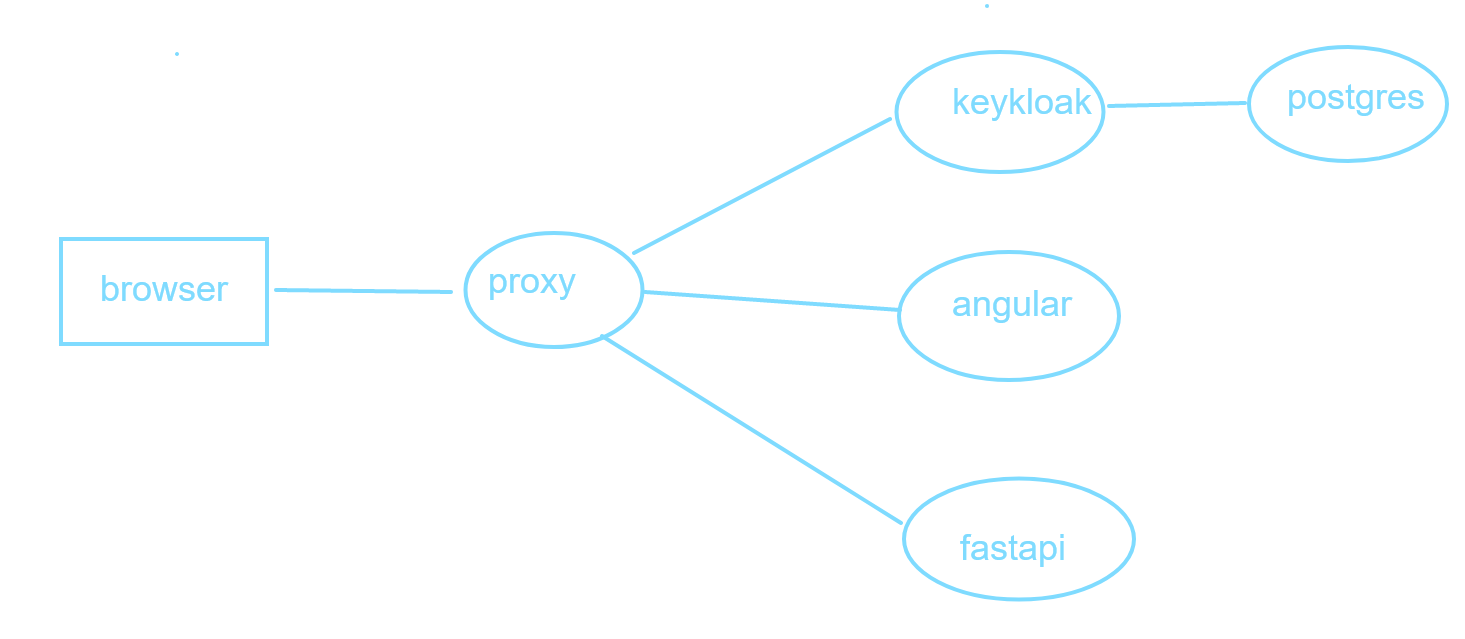
docker compose file
version: '3.5'
services:
  postgres:
    image: postgres
    environment:
      POSTGRES_DB: keycloak
      POSTGRES_USER: keycloak
      POSTGRES_PASSWORD: keycloak
    volumes:
      - type: volume
        source: postgres-volume
        target: /var/lib/postgresql/data
  keycloak:
    depends_on:
      - postgres
    image: jboss/keycloak:11.0.3
    command: [ "-Dkeycloak.migration.strategy=IGNORE_EXISTING" ]
    ports:
      - 8080:8080
    user: root
    environment:
      KEYCLOAK_USER: admin
      KEYCLOAK_PASSWORD: admin
      KEYCLOAK_IMPORT: /tmp/my-realm.json
      # KEYCLOAK_LOGLEVEL: DEBUG
      PROXY_ADDRESS_FORWARDING: 'true'
      KEYCLOAK_FRONTEND_URL: https://proxy/auth
      DB_USER: keycloak
      DB_PASSWORD: keycloak
      DB_ADDR: postgres
    volumes:
      - type: volume
        source: keycloak-volume
        target: /opt/jboss/keycloak/standalone/data
      - type: bind
        source: ./keycloak/my-realm.json
        target: /tmp/my-realm.json
  fastapi:
    image: test/fastapi-app:dev
    build:
      dockerfile: docker/Dockerfile.fastapi
      context: .
    environment:
      PORT: 8080
    ports:
      - 8081:8080
  angular:
    image: test/angular-app:dev
    build:
      dockerfile: docker/Dockerfile.angular
      context: .
    ports:
      - 8082:8080
    # user: root
  proxy:
    image: nginx:alpine
    depends_on:
      - keycloak
      - fastapi
      - angular
    ports:
      - 443:443
    volumes:
      - type: bind
        source: ./proxy/nginx-proxy.conf
        target: /etc/nginx/conf.d/proxy.conf
      - type: bind
        source: ./proxy/app.crt
        target: /etc/ssl/certs/app.crt
      - type: bind
        source: ./proxy/app.key
        target: /etc/ssl/private/app.key
volumes:
  keycloak-volume:
  postgres-volume:
出处:http://www.cnblogs.com/lightsong/
本文版权归作者和博客园共有,欢迎转载,但未经作者同意必须保留此段声明,且在文章页面明显位置给出原文连接。

 浙公网安备 33010602011771号