
2、Mybatis-Plus
1、使用
1.1、导入依赖
<parent>
    <groupId>org.springframework.boot</groupId>
    <artifactId>spring-boot-starter-parent</artifactId>
    <version>2.5.7</version>
    <relativePath/>
</parent>

<dependencies>
    <!--mybatis-plus 启动器-->
    <dependency>
        <groupId>com.baomidou</groupId>
        <artifactId>mybatis-plus-boot-starter</artifactId>
        <version>3.4.3.4</version>
    </dependency>
    <!--lombok 插件-->
    <dependency>
        <groupId>org.projectlombok</groupId>
        <artifactId>lombok</artifactId>
        <scope>provided</scope>
    </dependency>
    <!--mysql 驱动-->
    <dependency>
        <groupId>mysql</groupId>
        <artifactId>mysql-connector-java</artifactId>
        <scope>runtime</scope>
    </dependency>

    <dependency>
        <groupId>org.springframework.boot</groupId>
        <artifactId>spring-boot-starter-test</artifactId>
        <scope>test</scope>
    </dependency>
</dependencies>
1.2、配置
spring:
  datasource:
    driver-class-name: com.mysql.cj.jdbc.Driver
    url: jdbc:mysql://127.0.0.1:3306/mp?serverTimezone=UTC
    username: root
    password: root

mybatis-plus:
  mapper-locations: classpath:mapper/*.xml       # Mapper 所对应的 XML 文件位置
  type-aliases-package: com.zzw.pojo             # MyBaits 别名包扫描路径
  type-enums-package: com.zzw.enums              # 配置扫描通用枚举
  config-location: classpath:mybatis-config.xml  # MyBatis 配置文件位置
  configuration:
    # 此属性在 MyBatis 中原默认值为 false, 在 MyBatis-Plus 中默认为 true, 该参数不能和 mybatis-plus.config-location 同时存在
    map-underscore-to-camel-case: false          # 关闭自动驼峰映射
    cache-enabled: false                         # 全局地开启或关闭配置文件中的所有映射器已经配置的任何缓存, 默认为 true(二级缓存)
    log-impl: org.apache.ibatis.logging.stdout.StdOutImpl # sql 日志
  global-config:
    db-config:
      id-type: auto                              # 全局默认主键类型, 设置后, 即可省略实体对象中的 @TableId(type = IdType.AUTO) 配置
      table-prefix: tb_                          # 表名前缀, 全局配置后可省略 @TableName() 配置
2、注解
2.1、@TableName
表名注解
| 属性 | 类型 | 必须指定 | 默认值 | 描述 |
|---|---|---|---|---|
| value | String | 否 | "" | 表名 |
2.2、@TableId
主键注解
| 属性 | 类型 | 必须指定 | 默认值 | 描述 |
|---|---|---|---|---|
| value | String | 否 | "" | 主键字段名 |
| type | Enum | 否 | IdType.NONE | 主键类型 |
* 主键生成策略
* Mybatis 支持的数据增长策略
  - `AUTO(0)`         数据库 ID 自增, 使用数据库的自增策略, 注意: 该类型请确保数据库设置了 id 自增, 否则无效
  - `NONE(1)`         未设置主键类型
  - `INPUT(2)`        用户输入 ID
  - `ASSIGN_ID(3)`    雪花算法生成 ID,唯一 Long 数据
  - `ASSIGN_UUID(4)`  UUID 算法生成 ID,唯一字符串
2.3、@TableField
字段注解(非主键)
| 属性 | 类型 | 必须指定 | 默认值 | 描述 |
|---|---|---|---|---|
| value | String | 否 | "" | 数据库字段名 |
| exist | boolean | 否 | true | 是否为数据库表字段 |
| select | boolean | 否 | true | 是否进行 select 查询 |
2.4、@TableLogic
表字段逻辑处理注解(逻辑删除),使用场景:可以进行数据恢复
| 属性 | 类型 | 必须指定 | 默认值 | 描述 |
|---|---|---|---|---|
| value | String | 否 | "" | 逻辑未删除值 |
| delval | String | 否 | "" | 逻辑删除值 |
2.5、@DS
切换数据源,@DS 可以注解在方法上或类上,同时存在就近原则,方法上注解优先于类上注解
| 注解 | 结果 |
|---|---|
| 没有 @DS | 默认数据源 |
| @DS("dsName") | dsName 可以为组名也可以为具体某个库的名称 |
2.6、示例
Pojo 继承 Model<Pojo>
PojoMapper 继承 BaseMapper<Pojo>
PojoService 继承 IService<Pojo>
PojoServiceImpl 继承 ServiceImpl<PojoMapper, Pojo>
@TableName("tb_user"):指定对应数据库的表名
@TableId(type = IdType.AUTO):这个字段为主键,且自增回填
@TableField(value = "user_name"):这个字段在数据库中的名称
@TableField("exist = false"):该字段在数据库表中不存在
@TableField("select = false"):大字段或敏感字段可设置为 false,不加入 select 查询范围
// 枚举类: 主键自增策略
public enum IdType {
    AUTO(0),
    NONE(1),
    INPUT(2),
    ASSIGN_ID(3),
    ASSIGN_UUID(4);
}
@Data
@NoArgsConstructor
@AllArgsConstructor
@TableName("tb_user")
public class User {

    @TableId(type = IdType.AUTO)
    private Integer id;

    @TableField(value = "user_name")
    private String username;

    @TableField(select = false)
    private String password;

    private String name;
    private Integer age;
    private String email;

    @Version
    private Integer version;
}
@Mapper
public interface UserMapper extends BaseMapper<User> {
}
3、Mapper 方法
PojoMapper 接口直接调用
3.1、插入操作
@Test
void testInsert() {
    User user = new User(null, "lili", "123456", "丽丽", 17, "test6@qq.com");
    int count = userMapper.insert(user);
    System.out.println("影响行数: " + count);
    System.out.println("id: " + user.getId()); // 主键自增回填, 会默认基于雪花算法的策略生成 id
}
3.2、更新操作
1、根据 Id 最新
@Test
void testUpdateById() {
    User user = new User();
    user.setId(1);             // 更新的条件
    user.setAge(21);           // 更新的字段
    user.setPassword("666");   // 更新的字段
    int count = userMapper.updateById(user);
    System.out.println("影响行数: " + count);
}
2、根据条件更新
// QueryWrapper<User>
@Test
void  testUpdate1() {
    User user = new User();
    user.setAge(17);           // 更新的字段
    user.setPassword("777");   // 更新的字段

    QueryWrapper<User> wrapper = new QueryWrapper<>(); // 更新的条件
    wrapper.eq("user_name", "zhangsan");               // column 是数据库的字段名, 不是 Pojo 属性名

    int count = userMapper.update(user, wrapper); // 主键回填
    System.out.println("影响行数: " + count);
}
// UpdateWrapper<User>
@Test
void  testUpdate2() {
    UpdateWrapper<User> wrapper = new UpdateWrapper<>();
    wrapper
        .set("age", 27)                      // 更新的字段
        .set("password", "999")              // 更新的字段
        .eq("user_name", "zhangsan");        // 更新的条件

    int count = userMapper.update(null, wrapper);
    System.out.println("影响行数: " + count);
}
3.3、删除操作
1、根据 Id 删除
@Test
void deleteById1() {
    User user = new User();
    user.setId(11);   // 删除的条件
    int count = userMapper.deleteById(user);
    System.out.println("影响行数: " + count);
}
@Test
void deleteById2() {
    int count = userMapper.deleteById(11);
    System.out.println("影响行数: " + count);
}
2、根据 Id 批量删除
@Test
void deleteBatchIds() {
    int count = userMapper.deleteBatchIds(Arrays.asList(11, 12, 13));
    System.out.println("影响行数: " + count);
}
3、根据条件删除
// Map<String, Object>
@Test
void deleteByMap() {
    Map<String, Object> map = new HashMap<>();
    map.put("user_name", "lili");   // 删除的条件
    map.put("age", 17);             // 删除的条件
    int count = userMapper.deleteByMap(map);
    System.out.println("影响行数: " + count);
}
// QueryWrapper<User>
@Test
void delete1() {
    QueryWrapper<User> wrapper = new QueryWrapper<>();
    wrapper.eq("name", "丽丽");           // 删除的条件
    wrapper.eq("email", "test6@qq.com"); // 删除的条件
    int count = userMapper.delete(wrapper);
    System.out.println("影响行数: " + count);
}
// User
@Test
void delete2() {
    User user = new User();
    user.setName("丽丽");            // 删除的条件
    user.setEmail("test6@qq.com");  // 删除的条件
    QueryWrapper<User> wrapper = new QueryWrapper<>(user);
    int count = userMapper.delete(wrapper);
    System.out.println("影响行数: " + count);
}
3.4、查询操作
1、根据 Id 查询
@Test
void selectById() {
    User user = userMapper.selectById(11);
    System.out.println(user);
}
2、根据 Id 批量查询
@Test
void selectBatchIds() {
    List<User> users = userMapper.selectBatchIds(Arrays.asList(1, 2, 3));
    users.forEach(System.out::println);
}
3、通过 Map 条件查询全部记录
@Test
public void testSelectByMap() {
    Map<String, Object> map = new HashMap<>();
    map.put("age", 22);
    map.put("name", "admin");
    List<User> list = userMapper.selectByMap(map);
    list.forEach(System.out::println);
}
4、根据 Wrapper 条件,查询一条记录
@Test
void selectOne() {
    QueryWrapper<User> wrapper = new QueryWrapper<>();
    wrapper.eq("name", "张三").eq("password", "999"); // 查询条件
    User user = userMapper.selectOne(wrapper); // 根据条件查询一条数据, 如果结果超过一条会报错
    System.out.println(user);
}
5、根据 Wrapper 条件,查询总记录数
@Test
void selectCount() {
    QueryWrapper<User> wrapper = new QueryWrapper<>();
    wrapper.gt("age", "15"); // 查询条件
    Long count = userMapper.selectCount(wrapper); // 根据条件查询数据条数
    System.out.println("查询结果记录数: " + count);
}
6、根据 Wrapper 条件,查询全部记录
@Test
void selectList() {
    QueryWrapper<User> wrapper = new QueryWrapper<>();
    wrapper.gt("age", "15"); // 查询条件
    List<User> users = userMapper.selectList(wrapper); // 根据条件查询全部记录
    users.forEach(System.out::println);
}
3.5、分页查询
1、根据 Wrapper 条件
@Configuration
public class MybatisPlusConfig {

    // 配置分页插件
    @Bean
    public MybatisPlusInterceptor mybatisPlusInterceptor() {
        MybatisPlusInterceptor interceptor = new MybatisPlusInterceptor();
        interceptor.addInnerInterceptor(new PaginationInnerInterceptor(DbType.MYSQL));
        return interceptor;
    }
}
@Test
void selectPage() {
    Page<User> page = new Page<>(1, 2); // 当前页是 1, 页大小是 2
    QueryWrapper<User> wrapper = new QueryWrapper<>();
    wrapper.gt("age", "15");   // 查询条件

    IPage<User> iPage = userMapper.selectPage(page, wrapper); // 根据条件查询全部记录并分页(这里的 ipage == page)

    System.out.println("数据总条数: " + iPage.getTotal());
    System.out.println("数据总页数: " + iPage.getPages());
    System.out.println("当前页码数: " + iPage.getCurrent());
    System.out.println("页大小: " + iPage.getSize());
    System.out.println("是否有上一页: " + page.hasPrevious()); // 直接用 page 获取, page == ipage
    System.out.println("是否有下一页: " + page.hasNext());     // 直接用 page 获取, page == ipage

    List<User> records = iPage.getRecords();
    records.forEach(System.out::println);
}
2、根据 xml 自定义分页
// UserMapper 中定义接口方法

/**
 * 根据年龄查询用户列表, 分页显示
 * @param page 分页对象, xml 中可以从里面进行取值, 传递参数 Page 即自动分页, 必须放在第一位
 * @param age  年龄
 * @return
 */
IPage<User> selectPageVo(@Param("page") Page<User> page, @Param("age") Integer age);
<!--UserMapper.xml-->

<!--SQL 片段, 记录基础字段-->
<sql id="BaseColumns">id, username, age, email</sql>

<!--IPage<User> selectPageVo(Page<User> page, Integer age);-->
<select id="selectPageVo" resultType="User">
    select <include refid="BaseColumns"/>
    from t_user
    where age > #{age}
</select>
4、条件构造器和常用接口
4.1、wapper 介绍
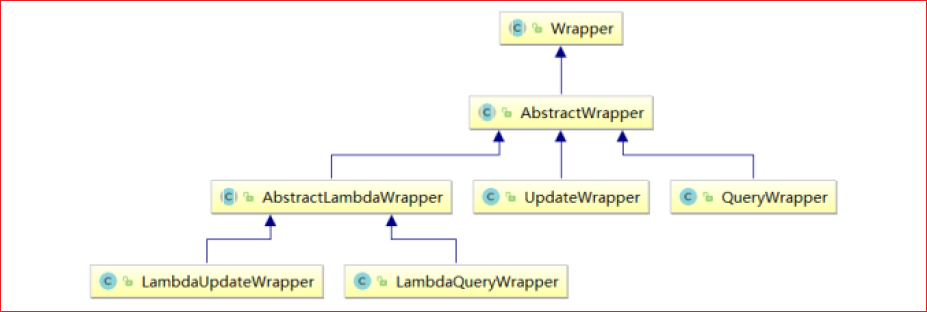
* Wrapper: 条件构造抽象类, 最顶端父类

    - AbstractWrapper: 用于查询条件封装, 生成 sql 的 where 条件

    - QueryWrapper          : 查询条件封装
    - UpdateWrapper         : Update 条件封装
    - AbstractLambdaWrapper : 使用 Lambda 语法

    - LambdaQueryWrapper  : 用于 Lambda 语法使用的查询 Wrapper
    - LambdaUpdateWrapper : Lambda 更新封装 Wrapper
4.2、UpdateWrapper
@Test
public void test07() {
    // 将 (年龄大于 20 或邮箱为 null) 并且 (用户名中包含有 a 的) 用户信息修改
    // 组装 set 子句以及修改条件
    UpdateWrapper<User> updateWrapper = new UpdateWrapper<>();

    // lambda 表达式内的逻辑优先运算
    // UPDATE t_user SET age= ?, email= ? WHERE (username LIKE ? AND (age > ? OR email IS NULL))
    updateWrapper
        .set("age", 18)
        .set("email", "user@atguigu.com")
        .like("username", "a")
        .and(i -> i.gt("age", 20).or().isNull("email"));

    User user = new User();
    user.setName("张三");

    // 这里必须要创建 User 对象, 否则无法应用自动填充; 如果没有自动填充, 可以设置为 null
    // int result = userMapper.update(user, updateWrapper);
    // UPDATE t_user SET username = ?, age = ?, email = ? WHERE (username LIKE ? AND (age > ? OR email IS NULL))

    int result = userMapper.update(null, updateWrapper);

    System.out.println(result);
}
4.3、LambdaQueryWrapper
@Test
public void test09() {
    // 定义查询条件, 有可能为 null(用户未输入)
    String username = "a";
    Integer ageBegin = 10;
    Integer ageEnd = 24;
    LambdaQueryWrapper<User> queryWrapper = new LambdaQueryWrapper<>();

    // 避免使用字符串表示字段, 防止运行时错误
    queryWrapper
        .like(StringUtils.isNotBlank(username), User::getName, username)
        .ge(ageBegin != null, User::getAge, ageBegin)
        .le(ageEnd != null, User::getAge, ageEnd);

    List<User> users = userMapper.selectList(queryWrapper);
    users.forEach(System.out::println);
}
4.4、LambdaUpdateWrapper
@Test
public void test10() {
    // 组装 set 子句
    LambdaUpdateWrapper<User> updateWrapper = new LambdaUpdateWrapper<>();
    updateWrapper
        .set(User::getAge, 18)
        .set(User::getEmail, "user@atguigu.com")
        .like(User::getName, "a")
        .and(i -> i.lt(User::getAge, 24).or().isNull(User::getEmail)); // lambda 表达式内的逻辑优先运算

    User user = new User(); // 为了主键回填
    int result = userMapper.update(user, updateWrapper);
    System.out.println("受影响的行数: " + result);
}
5、QueryWrapper
方法的第一个参数都是 condition,用来实现动态 SQL
5.1、allEq
allEq(Map<R, V> params);
allEq(Map<R, V> params, boolean null2IsNull);
allEq(boolean condition, Map<R, V> params, boolean null2IsNull);
* `condition`  : 执行条件
* `params`     : key 为数据库字段名, value 为字段值
* `null2IsNull`: 为 true 则在 map 的 value 为 null 时调用 isNull 方法; 为 false 时则忽略 value 为 null 的


`params = {"id": 1, "name": "老王", "age": null}`

* `allEq(params)`
    - `id = 1 and name = "老王" and age is null`

* `allEq(params, false)`
    - `id = 1 and name = "老王"`
allEq(BiPredicate<R, V> filter, Map<R, V> params);
allEq(BiPredicate<R, V> filter, Map<R, V> params, boolean null2IsNull);
allEq(boolean condition, BiPredicate<R, V> filter, Map<R, V> params, boolean null2IsNull);
* `filter`: 过滤函数, 是否允许字段传入比对条件中

`params = {"id": 1, "name": "老王", "age": null, "password": "123456"}`

* `allEq((k, v) -> !k.equals("password"), params)`
    - `id = 1 and name = "老王" and age is null`

* `allEq((k, v) -> !k.equals("password"), params, false)`
    - `id = 1 and name = "老王"`
5.2、条件查询
- eq:=
- ne:!=
- gt:>
- ge:>=
- lt:<
- le:<=
- between:BETWEEN 值 1 AND 值 2
- notBetween:NOT BETWEEN 值 1 AND 值 2
- in
- notIn
- isNull
- isNotNull
5.3、模糊查询
- like:like("name", "王") ---> name like "%王%"
- notLike:notLike("name", "王") ---> name not like "%王%"
- likeLeft:likeLeft("name", "王") ---> name like "%王"
- likeRight:likeRight("name", "王") ---> name like "王%"
like(boolean condition, R column, Object val);
5.4、排序条件
- orderBy:orderBy(true, true, "id", "name") ---> order by id ASC, name ASC
- orderByAsc:orderByAsc("id", "name") ---> order by id ASC, name ASC
- orderByDesc:orderByDesc("id", "name") ---> order by id DESC, name DES
orderBy(boolean condition, boolean isAsc, List<R> columns);
5.5、逻辑查询
-
or:拼接 OR,主动调用 or 表示紧接着下一个方法不是用 and 连接!(不调用 or 则默认为使用 and 连接)
wrapper.eq("name", "李四").or().eq("age", 24); ---> name = "李四" OR age = 24 -
and:默认就是 and 连接,所以此处的 and 用于嵌套
and(i -> i.eq("name", "李白").ne("status", "活着")) ---> and (name = "李白" and status != "活着")
5.6、select 子句
在 MP 查询中,默认查询所有的字段,如果有需要也可以通过 select 方法进行指定字段
wrapper.eq("name", "李四").or().eq("age", 24).select("id", "name", "age");
5.7、子查询
@Test
public void test06() {
    // 查询 id 小于等于 3 的用户信息
    // SELECT * FROM t_user WHERE (id IN (select id from t_user where id <= 3))

    QueryWrapper<User> queryWrapper = new QueryWrapper<>();
    queryWrapper.inSql("id", "select id from t_user where id <= 3");

    List<User> list = userMapper.selectList(queryWrapper);
    list.forEach(System.out::println);
}
5.8、groupBy、having
6、IService<Pojo>
6.1、插入
| 方法名 | 说明 |
|---|---|
| boolean save(T entity) | 插入一条记录 |
| boolean saveBatch(Collection<T> entityList) | 插入(批量) |
| boolean saveBatch(Collection<T> entityList, int batchSize) | 插入(批量)插入批次数量 |
| boolean saveOrUpdate(T entity) | TableId 注解存在更新记录,否插入一条记录 |
| boolean saveOrUpdateBatch(Collection<T> entityList) | 批量修改插入 |
| boolean saveOrUpdateBatch(Collection<T> entityList, int batchSize) | 批量修改插入(每次的数量) |
6.2、删除
| 方法名 | 说明 |
|---|---|
| boolean removeById(Serializable id) | 根据 ID 删除 |
| boolean removeById(T entity) | 根据实体(ID)删除 |
| boolean removeByIds(Collection<? extends Serializable> idList) | 删除(根据 ID 批量删除) |
| boolean remove(Wrapper<T> queryWrapper) | 根据 entity 条件,删除记录 |
6.3、修改
| 方法名 | 说明 |
|---|---|
| boolean updateById(T entity) | 根据 ID 选择修改 |
| updateBatchById(Collection<T> entityList) | 根据 ID 批量更新 |
| updateBatchById(Collection<T> entityList, int batchSize) | 根据 ID 批量更新(更新批次数量) |
| boolean update(Wrapper<T> updateWrapper) | 根据 UpdateWrapper 条件,更新记录 |
| boolean update(T entity, Wrapper<T> updateWrapper) | 根据 whereEntity 条件,更新记录 |
6.4、查询
| 方法名 | 说明 |
|---|---|
| long count() | 查询总记录数 |
| long count(Wrapper<T> queryWrapper) | 根据 Wrapper 条件,查询总记录数 |
| T getById(Serializable id) | 根据 ID 查询 |
| List<T> listByIds(Collection<? extends Serializable> idList) | 查询(根据 ID 批量查询) |
| T getOne(Wrapper<T> queryWrapper) | 根据 Wrapper,查询一条记录 |
| List<T> list() | 查询所有 |
| List<T> list(Wrapper<T> queryWrapper) | 查询列表 |
| E page(E page) | 无条件翻页查询 |
| E page(E page, Wrapper<T> queryWrapper) | 翻页查询 |
本文来自博客园,作者:lidongdongdong~,转载请注明原文链接:https://www.cnblogs.com/lidong422339/p/17609265.html

 浙公网安备 33010602011771号