第一模块 第8章 基本数据类型及内置方法
day08:基本数据类型及其内置方法(全为重点)
1.数字
int
float
2.字符串
3.列表
4.元祖
5.字典
6.集合
https://zhuanlan.zhihu.com/p/108793771
8.1 数字类型
1. int类型
x = 10相当于x = int(10),int这一功能执行后返回结果,赋值给x
print('xxx')执行打印功能,但是不返回结果
info = input('xxx')执行输入功能,返回结果,并将结果赋值给前面的变量名
2. 类型转换
int()除了可以造本类型外,还可以进行数据转换。
2.1 将纯数字的字符串转成int
print(int('1235'))
# 1235
注意:带小数点的不算纯数字
int类型的数据没有可以调用的方法
2.2 进制之间的转换(了解)
二进制:0 1
八进制:0 1 2 3 4 5 6 7
十进制:0 1 2 3 4 5 6 7 8 9
十六进制:0 1 2 3 4 5 6 7 8 9 a b c d e f
2.2.1 十进制转成其他进制:
# 十进制转二进制
print(bin(123))
# 0b1111011  0b代表二进制

# 十进制转八进制
print(oct(13))
# 0o15  0o代表八进制

# 十进制转十六进制
print(hex(11))
# 0xb  0x代表十六进制
2.2.2 其他进制转成十进制
# 二进制转十进制
print(int('0b10111', 2))
# 23

# 八进制转十进制
print(int('0o123', 8))
# 83

# 十六进制转十进制
print(int('0xb', 16))
# 11
总结:综上可知,int具有两种功能,一种是将纯数字类型的字符串转化为整型数字,另一种是将二进制、八进制和十六进制的数据转化为十进制。
3. float类型
salary = 3.1实际上执行的是 salary = float(3.1)
3.1 float()可以将纯小数的字符串转化为float类型
print(float('123.45'))
# 123.45
总结:int和float没有需要掌握的内置方法,它们的使用就是数学运算和比较运算。
4. 补充(了解)
4.1 复数/complex
x = 1+2j
4.2 长整型/long(python2中有,python3中无)
x = 10L
4.3 位运算
https://zhuanlan.zhihu.com/p/110407440
8.2 字符串
8.2.1 定义
作用:记录描述性质的状态
定义:
# 定义:在单引号\双引号\三引号内包含一串字符
name1 = 'jason'  # 本质:name = str('任意形式内容')
name2 = "lili"  # 本质:name = str("任意形式内容")
name3 = """ricky"""  # 本质:name = str("""任意形式内容""")
8.2.2 类型转换
# str()可以将任意数据类型转换为字符串
print(type(str(123)))
# <class 'str'>
print(type(str(123.234)))
# <class 'str'>
print(type(str([1, 2, 'aaa'])))
# <class 'str'>
print(type(str({'name': 'egon', 'gender': '男'})))
# <class 'str'>
print(type(str((1, 2, 3, 'bbb'))))
# <class 'str'>
print(type(str({1, '3'})))
# <class 'str'>
8.2.3 使用(内置方法)
8.2.3.1 优先掌握
8.2.3.1.1 按索引取值
# 1. 按索引取值
str1 = 'hello python'
# 1.1 正向取值(从左往右取)
print(str1[3])
# l

# 1.2 反向取值(负数表示从右往左取)
print(str1[-2])
# o

# 1.3 对于str来说,只能按照索引取值,不能修改
# str1[0] = 'H'
# TypeError: 'str' object does not support item assignment
8.2.3.1.2 切片
'''
切片:索引的扩展应用
索引是取出一个,切片是从源字符串中copy出一个子字符串,申请新的内存空间,保存取出的新字符串。
顾头不顾尾,还可以设置步长。
注意:索引和range的语法存在一定的区别:
1. 索引用[],range用()
2. 索引中数字之间用:分隔,range()中数字用逗号分隔
'''
# 正向步长
str2 = 'hello python'
res1 = str2[1:6:2]
print(res1)
# 反向步长(了解,面试可能问到)
res2 = str2[0:3:-1]  # 这样写是不对的,啥也取不到
print(res2)
# 空
res3 = str2[3:0:-1]
print(res3)  # 这种写法正确
# lle

# 需求1:将字符串完整地copy一份
str3 = str2[::]  # 默认从0开始到结尾,步长为1
print(str3)
# hello python

# 需求2:字符串翻转过来copy一份
str4 = str2[::-1]
print(str4)
# nohtyp olleh
8.2.3.1.3 长度
# 长度len()
# 获取字符串的长度,即字符的个数,但凡存在于引号内的都算作字符
print(len('hello python '))
# 13
8.2.3.1.4 成员运算(in和not in)
# 成员运算 in 与 not in
# 判断一个子字符串是否存在于一个大字符串中
print('alex' in 'alex good boy')
# True
print('alex' not in 'alex good boy')
# False
# 不要采用以下写法:
# not 'alex' in 'alex a good boy'
8.2.3.1.5 移出空白(strip)
'''
strip:
移除字符串首尾指定的字符
1. 括号内不指定字符,默认移除首尾空白字符(空格、\n、\t)
2. 括号内指定字符,移除首尾指定的字符
注意:strip只去两边,不去中间
'''
msg1 = '    *hello apple*    '
res4 = msg1.strip()
print(res4)
# *hello apple*
msg2 = '***你好&&&'
res5 = msg2.strip('*') # 注意,此操作不会改变原值,是产生新的值
print(res5)
# 你好&&&
msg3 = '$%^***egon**&^%'
res6 = msg3.strip('$%^*&')
print(res6)
# egon
# 应用:去除用户输入时可能输入的空格
inp_username = input('your name:').strip()
inp_pwd = input('your password:').strip()
if inp_username == 'egon' and inp_pwd == '123':
    print('登录成功')
else:
    print('登录失败')
8.2.3.1.6 切分(split)
'''
split:切分
注意:切分不是切片,切分得到的是列表,切片得到的是新的字符串
1. 括号内不指定字符,默认以空格作为切分符号
2. 括号内指定分隔字符,则按照括号内指定的字符切割字符串
3. 除了可以指定分隔符,还可以指定分隔次数
注意:split切割得到的结果是列表数据类型
'''
# 不指定分隔符,则默认以空格切割
info = 'hello python'
res7 = info.split()
print(res7)
# ['hello', 'python']

# 指定分隔符切割
info1 = 'python_a_good_language'
res8 = info1.split('_')
print(res8)
# ['python', 'a', 'good', 'language']

# 指定分隔次数
info2 = 'python_a_good_language'
res9 = info1.split('_', 1)
print(res9)
# ['python', 'a_good_language']
8.2.3.1.7 循环
# 循环
mesg = 'hello python'
for i in mesg:
    print(i)
8.2.3.2 需要掌握的操作
8.2.3.2.1 strip lstrip rstrip
'''
strip lstrip rstrip
strip去除左右两侧
lstrip去除左侧
rstrip去除右侧

'''
msg = '***hello python***'
res1 = msg.strip('*')
print(res1)
# hello python
res2 = msg.lstrip('*')
print(res2)
# hello python***
res3 = msg.rstrip('*')
print(res3)
# ***hello python
8.2.3.2.2 lower upper
'''
lower() upper()
lower():将英文字符串全部变小写
upper():将英文字符串全部变大写
'''
str1 = 'hello python'
res1 = str1.upper()
print(res1)
# HELLO PYTHON
str2 = 'HELLO PYTHON'
res2 = str2.lower()
print(res2)
# hello python
8.2.3.2.3 startswith endswith
'''
startswith  endswith
startswith()判断字符串是否以括号内指定的字符开头,结果为布尔值True或False
endswith()判断字符串是否以括号内指定的字符结尾,结果为布尔值True或False
'''
str = 'hello python'
print(str.startswith('hello'))
# True
print(str.endswith('hello'))
# False
print(str.endswith('python'))
# True
8.2.3.2.4 format
8.2.3.2.5 split rsplit
'''
split  rsplit:将字符串切成列表
split会按照从左到右的顺序对字符串进行切分,可以指定切割次数
rsplit刚好与split相反,从右往左切割,可以指定切割次数
'''
str = 'hello,hi,good,bad'
res1 = str.split(',', 2)
print(res1)
# ['hello', 'hi', 'good,bad']
res2 = str.rsplit(',', 2)
print(res2)
# ['hello,hi', 'good', 'bad']
8.2.3.2.6 join
'''
join
从可迭代对象中取出多个字符串,然后按照指定的分隔符进行拼接,拼接的结果为字符串
例如:将列表拼接成字符串
注意:列表中的元素必须全部为字符串
'''
res1 = '%'.join('hello') # 从字符串'hello'中取出多个字符串,然后按照%作为分隔符号进行拼接
print(res1)
# 'h%e%l%l%o'
res2 = '|'.join(['tony','18','read'])  # 从列表中取出多个字符串,然后按照*作为分隔符号进行拼接
print(res2)
# 'tony|18|read'
lst = ['a','b','c']
res3 = lst[0] + ':' + lst[1] + ':' + lst[2]
print(res3)
# a:b:c
8.2.3.2.7 replace
'''
replace
用新的字符替换字符串中旧的字符,可以指定修改的个数,默认替换所有符合的元素
语法:replace('旧内容', '新内容')
如果不包含旧内容, 则不替换, 且不会报错.
'''
str = 'my age is 18!'
str1 = str.replace('18', '73')
print(str1)
# my age is 73!
info = 'my name is tony, my age is 18!'
str2 = info.replace('my', 'MY',1) # 只把一个my改为MY
print(str2)
# MY name is tony, my age is 18!
8.2.3.2.8 isdigit
# isdigit 判断字符串是否是纯数字组成,返回结果为True或False
print('1245'.isdigit())
# True
print('1245.345'.isdigit())
# False
print('1245a455b'.isdigit())
# False
# 示例:isdigit()用于防止用户输入的不是数字
age = input('请输入年龄:').strip()
if age.isdigit():
    age = int(age)
    if age < 18:
        print('猜小了')
    elif age > 18:
        print('猜大了')
    else:
        print('猜对了')
else:
    print('请输入数字')
8.2.3.3 了解操作
8.2.3.3.1 find rfind index rindex count
'''
1. find rfind index rindex count
1.1 find:从指定范围内查找子字符串的起始索引,找到返回起始索引,找不到返回-1
1.2 index:同find,但在找不到时会报错
1.3 rfind与rindex:略
'''
msg = 'hello python'
res1 = msg.find('e',1,3)
print(res1)
# 1
res2 = msg.find('python')
print(res2)
# 6
res3 = msg.find('python',1,3)
print(res3)
# -1
res4 = msg.index('e',1,3)
print(res4)
# 1
res5 = msg.index('python')
print(res5)
# 6
# res6 = msg.index('python',1,3)
# print(res6)
# 找不到,报错
'''
count:统计字符串在大字符串中出现的次数
还可以加索引范围:统计字符串在索引范围内出现的次数
'''
str = 'hello python'
res6 = str.count('o')
print(res6)
# 2
res7 = str.count('l',1,5)
print(res7)
# 2
8.2.3.3.2 center,ljust,rjust,zfill
'''
center, ljust, rjust, zfill
用于控制字符串的显示
'''
name='tony'
res1 = name.center(30,'-')  # 总宽度为30,字符串居中显示,不够用-填充
print(res1)
# -------------tony-------------
res2 = name.ljust(30,'*')  # 总宽度为30,字符串左对齐显示,不够用*填充
print(res2)
# tony**************************
res3 = name.rjust(30,'*')  # 总宽度为30,字符串右对齐显示,不够用*填充
print(res3)
# **************************tony
res4 = name.zfill(30)  # 总宽度为30,字符串右对齐显示,不够用0填充
print(res4)
# 00000000000000000000000000tony
8.2.3.3.3 expandtabs
'''
expandtabs
'''
name = 'tony\thello'  # \t表示制表符(tab键),在不同的平台tab键代表的空格数不同
print(name)
# tony    hello
res = name.expandtabs(1)  # 修改\t制表符代表的空格数
print(res)
# tony hello
8.2.3.3.4 captalize,swapcase,title
'''
captalize,swapcase,title
大小写转换
'''
# 1. captalize:首字母大写
msg1 = 'hello everyone nice to meet you!'
res1 = msg1.capitalize()
print(res1)
# Hello everyone nice to meet you!
# 2. swapcase:大小写翻转
msg2 = 'Hi girl, I want make friends with you!'
res2 = msg2.swapcase()
print(res2)
# hI GIRL, i WANT MAKE FRIENDS WITH YOU!
# 3. title:每个单词的首字母大写
msg3 = 'dear my friend i miss you very much'
res3 = msg3.title()
print(res3)
# Dear My Friend I Miss You Very Much
8.2.3.3.5 is数字系列
'''
is数字系列
在python3中
num1 = b'4' #bytes
num2 = u'4' #unicode, python3中无需加u就是unicode
num3 = '四' #中文数字
num4 = 'Ⅳ' #罗马数字
总结:
    最常用的是isdigit,可以判断bytes和unicode类型,这也是最常见的数字应用场景,
    如果要判断中文数字或罗马数字,则需要用到isnumeric,
    isdecimal基本不用
'''
num1 = b'4' #bytes
num2 = u'4' #unicode, python3中无需加u就是unicode
num3 = '四' #中文数字
num4 = 'Ⅳ' #罗马数字

# isdigit只能识别 bytes、unicode
res1 = num1.isdigit()
print(res1)
# True
res2 = num2.isdigit()
print(res2)
# True
res3 = num3.isdigit()
print(res3)
# False
res4 = num4.isdigit()
print(res4)
# False

# isdecimal:uncicode(bytes类型无isdecimal方法)
res5 = num2.isdecimal()
print(res5)
# True
res6 = num3.isdecimal()
print(res6)
# False
res7 = num4.isdecimal()
print(res7)
# False

#isnumberic:unicode、中文数字、罗马数字(bytes类型无isnumberic方法)
res8 = num2.isnumeric()
print(res8)
# True
res9 = num3.isnumeric()
print(res9)
# True
res10 = num4.isnumeric()
print(res10)
# True

# 三者不能判断浮点数
num5 = '4.3'
res11 = num5.isdigit()
print(res11)
# False
res12 = num5.isdecimal()
print(res12)
# False
res13 = num5.isnumeric()
print(res13)
# False
8.2.3.3.6 is其他
'''
is其他
'''
name = 'tony123'
res1 = name.isalnum() #字符串由字母或数字组成
print(res1)
# True
res2 = name.isalpha() #字符串中只包含字母
print(res2)
# False
res3 = name.isidentifier() # 判断标识符是否合法,包括自定义的和内置的,
# 如自定义的变量名是否符合规范,内置的如print、input等
# 内置的全是合法的,自定义的要符合定义规范
print('input'.isidentifier())
# True
print(res3)
# True
res4 = name.islower()  # 字符串是否是纯小写
print(res4)
# True
res5 = name.isupper()  # 字符串是否是纯大写
print(res5)
# False
res6 = name.isspace()  # 字符串是否全是空格
print(res6)
# False
res7 = name.istitle()  # 字符串中的单词首字母是否都是大写
print(res7)
# False
8.3 列表
8.3.1 定义
作用:按位置存放多个值
# 定义:在[]内,用逗号分隔开多个任意数据类型的值
l1 = [1,'a',[1,2]]  # 本质:l1 = list([1,'a',[1,2]])
8.3.2 类型转换
'''
但凡能被for循环遍历的数据类型都可以传给list()转换成列表类型,
list()会跟for循环一样遍历出数据类型中包含的每一个元素然后放到列表中
'''
print(list('wdad'))
# 结果:['w', 'd', 'a', 'd']
print(list([1, 2, 3]))
# 结果:[1, 2, 3]
print(list({"name": "jason", "age": 18}))
# 结果:['name', 'age']
print(list((1, 2, 3)))
# 结果:[1, 2, 3]
print(list({1, 2, 3, 4}))
# 结果:[1, 2, 3, 4]
8.3.3 内置方法
8.3.3.1 优先掌握的操作
8.3.3.1.1 按索引取值
# 1.按索引存取值(正向存取+反向存取):即可存也可以改
# 1.1 正向取(从左往右)
my_friends = ['tony','jason','tom',4,5]
print(my_friends[0])
# 结果: tony

# 1.2 反向取(负号表示从右往左)
print(my_friends[-1])
# 结果: 5

'''
1.3 对于list来说,既可以按照索引取值,
又可以按照索引修改指定位置的值,
但如果索引不存在则报错
'''
my_friends = ['tony','jack','jason',4,5]
my_friends[1] = 'martthow'
print(my_friends)
# 结果: ['tony', 'martthow', 'jason', 4, 5]
8.3.3.1.2 切片
# 2.切片(顾头不顾尾,步长)
# 注意: 切片相当于copy行为, 并不会改变原来的列表.
# 2.1 顾头不顾尾:取出索引为0到3的元素
my_friends = ['tony', 'jason', 'tom', 4, 5]
print(my_friends[0:4])
# 结果: ['tony', 'jason', 'tom', 4]
# 2.2 步长:0:4:2,第三个参数2代表步长,会从0开始,每次累加一个2即可,所以会取出索引0、2的元素
print(my_friends[0:4:2])
# 结果: ['tony', 'tom']
# 2.3 以下通过切片实现的copy是浅copy
lst = my_friends[:]
8.3.3.1.3 统计长度
# len()
lst = [1, 2, 'a', 'b']
print(len(lst))
# 结果: 4
8.3.3.1.4 成员运算
# 成员运算in和not in
my_friends = ['tony', 'jason', 'tom', 4, 5]
print('tony' in my_friends)
# 结果: True
print('xxx' not in my_friends)
# 结果: True
8.3.3.1.5 增(添加)
1. 在末尾追加一个
2. 在末尾追加多个
3. 在指定位置插入
# 5.1 append(): 列表尾部追加一个元素   append(self, __object)
l1 = ['a','b','c']
l1.append('d')
print(l1)
# 结果: ['a', 'b', 'c', 'd']

# 5.2 extend(): 一次性在列表尾部添加多个元素    extend(self, __iterable)

l1.extend(['a','b','c'])
print(l1)
# 结果: ['a', 'b', 'c', 'd', 'a', 'b', 'c']

# 5.3 insert(): 在指定位置插入元素      insert(self, __index, __object)
l1.insert(0,"first")  # 0表示按索引位置插值
print(l1)
# 结果: ['first', 'a', 'b', 'c', 'd', 'a', 'b', 'c']
8.3.3.1.6 删
'''
6.1 del:
一种通用的删除方法, 只是单纯地删除,
不支持赋值语法, 没有返回值
'''
l = [11, 22, 33, 44]
del l[2]  # 删除索引为2的元素
print(l)
# 结果: [11,22,44]

'''
6.2 pop(): pop(self, index)
根据索引删除,
如果不指定索引, 则默认删除最后一个元素,
并将删除的值返回
'''
l = [11, 22, 33, 22, 44]
res = l.pop()
print(res)
# 结果: 44
res = l.pop(1)
print(res)
# 结果: 22

'''
6.3 remove(): remove(self, __value)
根据元素删除,
支持赋值操作, 但是没有返回值
'''
l = [11, 22, 33, 22, 44]
res = l.remove(22)  # 从左往右查找第一个需要删除的元素
print(res)
# 结果: None
8.3.3.1.7 for循环
# for循环
# 循环遍历my_friends列表里面的值
my_friends = ['tony', 'jason', 'tom', 4, 5]
for line in my_friends:
    print(line)
# 结果:
# 'tony'
# 'jack'
# 'jason'
# 4
# 5
for x,y,z in ['abc','def', [1,2,3]]:
    print(x,y,z)
'''
结果:
a b c
d e f
1 2 3
'''
8.3.3.2 需要掌握的操作
l = [1, 2, 'a', 'b', 'c', 'a']
# 1. count统计元素在列表中出现的次数
print(l.count('a'))
# 结果: 2

# 2. index查找某一元素第一次出现的索引, 找不到就报错
print(l.index('a'))
# 结果: 2

# 3. clear()清空列表
l = [1, 2, 3, 'a']
l.clear()
print(l)
# 结果: []

# 4. reverse将列表翻转
l = [1, 2, 'a', 'b']
l.reverse()
print(l)
# 结果: ['b', 'a', 2, 1]

'''
5. sort排序
默认从小到大排, reverse = False, 可以通过reverse = True设置为降序
列表内元素是同种类型才可以排序, int和float可以排序
'''
l = [1, 2, -1, 5.1]
l.sort()
print(l)
# 结果: [-1, 1, 2, 5.1]
# 1. 字符串可以比大小: 按照ASCII码表的先后顺序区别字符的大小,
# 按照对应位置的字符依次比较, 在表中位置越靠后越大, 第一个分出大小后就不会比较后面的了
l1 = ['boy', 'egon', 'apple']
l1.sort()
print(l1)
# 结果: ['apple', 'boy', 'egon']

# 2. 列表之间也可以比大小, 原理同字符串一样, 但是对应位置的元素必须是同种类型的
# 1 < 10直接决定l2 > l1
l2 = [1, 2, 'a']
l3 = [10, 0, 1, 'b']
print(l2 < l3)
# 结果: True
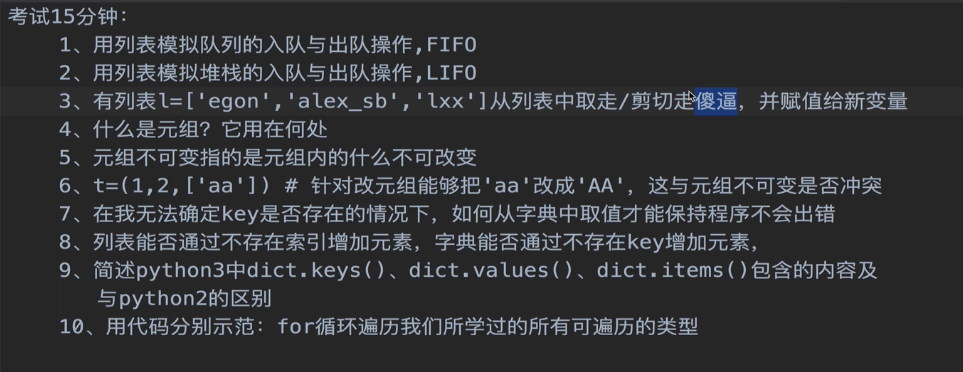
8.3.4 队列与堆栈
# 队列和堆栈是两种数据结构, 都是用于存值和取值的
# 列表相当于一种容器, 可以通过append和pop来模拟存值和取值的过程
# 队列: 先进先出(first in first out)
lst1 = []
lst1.append('first')
lst1.append('second')
lst1.append('third')
print(lst1.pop(0))
print(lst1.pop(0))
print(lst1.pop(0))
# 结果: first second third

# 堆栈: 后进先出(last in first out)
lst2 = []
lst2.append('first')
lst2.append('second')
lst2.append('third')
print(lst2.pop())
print(lst2.pop())
print(lst2.pop())
# 结果: third second first
8.4 元祖
8.4.1 作用
作用: 按照索引/位置存放多个值, 只用于读, 不用于改.
元组与列表类似,也是可以存多个任意类型的元素,不同之处在于元组的元素不能修改,即元组相当于不可变的列表,用于记录多个固定不允许修改的值,单纯用于取
注意: 元祖不可改变, 指的是元祖中的索引和内存地址的对应关系不可变, 但是如果元祖中包含可变类型的数据, 如列表, 则子列表中的数据可以改变.
如果存储只供读的多个数据, 适合选择元祖, 而不是列表, 因为数据量相同的情况下, 元祖更省空间.
8.4.2 定义
# 在()内用逗号分隔开多个任意类型的值
countries = ("中国","美国","英国")  # 本质:countries = tuple("中国","美国","英国")
# 强调:如果元组内只有一个值,则必须加一个逗号,否则()就只是包含的意思而非定义元组
countries = ("中国",)  # 本质:countries = tuple("中国")
8.4.3 类型转换
# 但凡能被for循环的遍历的数据类型都可以传给tuple()转换成元组类型
print(tuple('wdad')) # 结果:('w', 'd', 'a', 'd')
print(tuple([1,2,3])) # 结果:(1, 2, 3)
print(tuple({"name":"jason","age":18})) # 结果:('name', 'age')
print(tuple((1,2,3))) # 结果:(1, 2, 3)
print(tuple({1,2,3,4})) # 结果:(1, 2, 3, 4)
# tuple()会跟for循环一样遍历出数据类型中包含的每一个元素然后放到元组中
8.4.4 内置方法
tuple1 = (1, 'hhaha', 15000.00, 11, 22, 33)
# 1、按索引取值(正向取+反向取):只能取,不能改否则报错!
print(tuple1[0])
# 结果: 1
print(tuple1[-2])
# 结果: 22
# tuple1[0] = 'hehe'  # 报错:TypeError:

# 2、切片(顾头不顾尾,步长)
print(tuple1[0:6:2])
# 结果: (1, 15000.0, 22)

# 3、长度
print(len(tuple1))
# 结果: 6

# 4、成员运算 in 和 not in
print('hhaha' in tuple1)
# 结果: True
print('hhaha' not in tuple1)
# 结果: False

# 5、循环
for line in tuple1:
    print(line)
'''
结果:
1
hhaha
15000.0
11
22
33
'''


# 6. index  index(self, __value, __start, __stop)
t = (1, 2, 33, 55)
print(t.index(33))
# 结果: 2
print(t.index(2, 0, 3))
# 结果: 1


# 7. count  count(self, __value)
t = (1, 2, 3, 'a', 'b', 1)
print(t.count(1))
# 结果: 2
8.5 字典
8.5.1 定义
# 定义:在{}内用逗号分隔开多元素,每一个元素都是key:value的形式,其中value可以是任意类型,而key则必须是不可变类型,其不可重复
通常key应该是str类型,因为str类型会对value有描述性的功能
info={'name':'tony','age':18,'sex':'male'} #本质info=dict({....})
# 也可以这么定义字典
info=dict(name='tony',age=18,sex='male') # info={'age': 18, 'sex': 'male', 'name': 'tony'}
# 注意: dic = {}默认定义一个空字典
8.5.2 类型转换
# 转换1:
info = dict([['name','tony'],('age',18)])
print(info)
# 结果: {'age': 18, 'name': 'tony'}

# 转换2:fromkeys会从可迭代对象中取出每个值当做key,然后与None组成key:value放到字典中
dic = {}.fromkeys(('name','age','sex'),None)  # 后者通常放None, 也可以放其他不可变类型的数据,
# 如果放了可变类型的数据, 由于前面的几个key指向同一内存地址, 则以后一个key对应的value改变,其他key对应的value也会变.
print(dic)
# 结果: {'age': None, 'sex': None, 'name': None}
8.5.3 内置方法
8.5.3.1 优先掌握的操作
# 1、按key存取值:可存可取
# 1.1 取
dic1 = {
        'name': 'xxx',
        'age': 18,
        'hobbies': ['play game', 'basketball']
        }
print(dic1['name'])
# 结果: 'xxx'
print(dic1['hobbies'][1])
# 结果: 'basketball'

# 1.2 对于赋值操作,如果key原先不存在于字典,则会新增key:value
dic1['gender'] = 'male'
print(dic1)
# 结果: {'name': 'tony', 'age': 18, 'hobbies': ['play game', 'basketball'],'gender':'male'}

# 1.3 对于赋值操作,如果key原先存在于字典,则会修改对应value的值
dic1['name'] = 'tony'
print(dic1)
# 结果: {'name': 'tony', 'age': 18, 'hobbies': ['play game', 'basketball']}

# 2、长度len
dic2 = {
        'name': 'xxx',
        'age': 18,
        'hobbies': ['play game', 'basketball']
        }
print(len(dic2))
# 结果: 3

# 3、成员运算in和not in
dic3 = {
        'name': 'xxx',
        'age': 18,
        'hobbies': ['play game', 'basketball']
        }
print('name' in dic3) # 判断某个值是否是字典的key
# 结果: True


# 4、删除
# 4.1 pop: 通过指定字典的key来删除字典的键值对
dic4 = {
        'name': 'xxx',
        'age': 18,
        'hobbies': ['play game', 'basketball']
        }
res1 = dic4.pop('name')
print(res1) # 结果: xxx, 即返回删除的key对应的value
print(dic4)
# 结果: {'age': 18, 'hobbies': ['play game', 'basketball']}

# 4.2 popitem: 随机删除
dic5 = {
        'name': 'xxx',
        'age': 18,
        'hobbies': ['play game', 'basketball']
        }
res2 = dic5.popitem()
print(res2)  # 结果: ('hobbies', ['play game', 'basketball']), 返回删除的key以及对应的value
print(dic5) # 结果: {'name': 'xxx', 'age': 18}

# 4.3 del
dic6 = {
        'name': 'xxx',
        'age': 18,
        'hobbies': ['play game', 'basketball']
        }
del dic6['name']
print(dic6)
# 结果: {'age': 18, 'hobbies': ['play game', 'basketball']}

# 5、键keys(),值values(),键值对items(), 在python2中拿到的是列表, 在python3中进行了优化, 拿到的不是列表, 是会下蛋的老母鸡
dic = {'age': 18, 'hobbies': ['play game', 'basketball'], 'name': 'xxx'}
# 获取字典所有的key
print(dic.keys())
# 结果: dict_keys(['name', 'age', 'hobbies'])

# 获取字典所有的value
print(dic.values())
# 结果: dict_values(['xxx', 18, ['play game', 'basketball']])

# 获取字典所有的键值对
print(dic.items())
# 结果: dict_items([('name', 'xxx'), ('age', 18), ('hobbies', ['play game', 'basketball'])])

# 6、循环
# 6.1 默认遍历的是字典的key
for key in dic:
    print(key)
'''
结果:
age
hobbies
name
'''

# 6.2 只遍历key
for key in dic.keys():
    print(key)
'''
结果:
age
hobbies
# name
# '''
# 注意
注意: 可以通过list()将生成的结果转化为列表
# 6.3 只遍历value
for key in dic.values():
    print(key)
'''
结果:
18
['play game', 'basketball']
xxx
'''

# 6.4 遍历key与value
#方式1:
for item in dic.items():
    print(item)
'''
结果:
('age', 18)
('hobbies', ['play game', 'basketball'])
('name', 'xxx')
'''
# 方式2:
for k,v in dic.items():
    print(k,v)
'''
结果:
age 18
hobbies ['play game', 'basketball']
name xxx
'''
8.5.3.2 需要掌握的操作
# 需要掌握的操作
# 1. clear: 清空字典
dic = {'age': 18, 'hobbies': ['play game', 'basketball'], 'name': 'xxx'}
dic.clear()
print(dic)
# 结果: {}

# 2. copy: 浅copy

# 3. update: 用新字典更新老字典(有就更改, 没有就添加)
dic = {'age': 18, 'hobbies': ['play game', 'basketball'], 'name': 'xxx'}
dic.update({'gender': 'male', 'age': 30})
print(dic)
# 结果: {'age': 30, 'hobbies': ['play game', 'basketball'], 'name': 'xxx', 'gender': 'male'}

# 4. get(重要):
# 此方法容错性好
# 按照key取值, 如果key存在则返回value, 如果key不存在则返回None. 如果直接用[key]取值, key不存在会报错.
dic = {'age': 18, 'hobbies': ['play game', 'basketball'], 'name': 'xxx'}
res1 = dic.get('age')
print(res1)
# 结果: 18
res2 = dic.get('age1')
print(res2)
# 结果: None
# print(dic['age2'])  # KeyError: 'age2'
res3 = dic.get('age1', '没有值')  # 当取不到值时, 会返回后面的值, 取到则返回取到的值
print(res3)
# 结果: 没有值


# 5. setdefault: key存在则返回value, 不存在就添加并返回新增的value
dic = {'age': 18, 'hobbies': ['play game', 'basketball'], 'name': 'xxx'}
res1 = dic.setdefault('age', 20)
print(dic)
# 结果: {'age': 18, 'hobbies': ['play game', 'basketball'], 'name': 'xxx'}
print(res1)
# 结果: 18
res2 = dic.setdefault('gender', 'male')
print(dic)
# 结果: {'age': 18, 'hobbies': ['play game', 'basketball'], 'name': 'xxx', 'gender': 'male'}
print(res2)
# 结果: male
8.6 集合
8.6.1 作用
集合、list、tuple、dict一样都可以存放多个值,但是集合主要用于:去重、关系运算
8.6.2 定义
"""
定义:在{}内用逗号分隔开多个元素,集合具备以下三个特点:
     1:每个元素必须是不可变类型
     2:集合内没有重复的元素
     3:集合内元素无序
"""
s = {1,2,3,4}  # 本质 s = set({1,2,3,4})

# 注意1:列表类型是索引对应值,字典是key对应值,均可以取得单个指定的值,而集合类型既没有索引也没有key与值对应,所以无法取得单个的值,而且对于集合来说,主要用于去重与关系元素,根本没有取出单个指定值这种需求。

# 注意2:{}既可以用于定义dict,也可以用于定义集合,但是字典内的元素必须是key:value的格式,现在我们想定义一个空字典和空集合,该如何准确去定义两者?
d = {} # 默认是空字典
s = set() # 这才是定义空集合
8.6.3 类型转换
# 但凡能被for循环的遍历的数据类型(强调:遍历出的每一个值都必须为不可变类型)都可以传给set()转换成集合类型
>>> s = set([1,2,3,4])
>>> s1 = set((1,2,3,4))
>>> s2 = set({'name':'jason',})
>>> s3 = set('egoneee')
>>> s,s1,s2,s3
{1, 2, 3, 4} {1, 2, 3, 4} {'name'} {'e', 'o', 'g', 'n'}
8.6.4 内置方法
8.6.4.1 关系运算
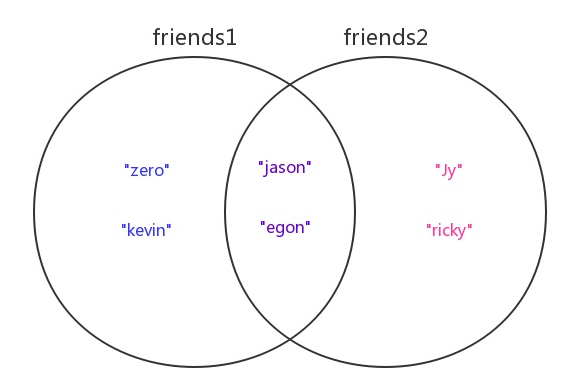
我们定义两个集合friends与friends2来分别存放两个人的好友名字,然后以这两个集合为例讲解集合的关系运算
friends1 = {"zero","kevin","jason","egon"} # 用户1的好友们
friends2 = {"Jy","ricky","jason","egon"}   # 用户2的好友们
两个集合的关系如下图所示
# 1.合集/并集(|):求两个用户所有的好友(重复好友只留一个)
>>> friends1 | friends2
{'kevin', 'ricky', 'zero', 'jason', 'Jy', 'egon'}
# 内置方法: friends1.union(friends2)

# 2.交集(&):求两个用户的共同好友
>>> friends1 & friends2
{'jason', 'egon'}
# 内置方法: friends1.intersection(friends2)

# 3.差集(-):
# 求用户1独有的好友
 >>> friends1 - friends2
 {'kevin', 'zero'}
# 内置方法: friends1.difference(friends2)
# 求用户2独有的好友
>>> friends2 - friends1
 {'ricky', 'Jy'}
# 内置方法: friends2.difference(friends1)
# 4.对称差集(^)
# 求两个用户独有的好友们(即去掉共有的好友)
 >>> friends1 ^ friends2
{'kevin', 'zero', 'ricky', 'Jy'}
# 内置方法: friends1.symmetric_difference(friends2)

# 5.值是否相等(==)
>>> friends1 == friends2 False

# 6.父集:一个集合是否包含另外一个集合, 当集合s1>=集合s2时, s1是s2的父集, 当集合s1>=集合s2时, s1和s2互为父子集
# 6.1 包含则返回True
>>> {1,2,3} > {1,2}
True
>>> {1,2,3} >= {1,2}
True
# 内置方法: s1.issuperset(s2)
# 6.2 不存在包含关系,则返回False
>>> {1,2,3} > {1,3,4,5}
False
>>> {1,2,3} >= {1,3,4,5}
False

# 7.子集
>>> {1,2} < {1,2,3}
 True
>>> {1,2} <= {1,2,3}
True
# 内置方法: s1.issubset(s2)
8.6.4.2 去重
集合去重有局限性
1. 只能针对不可变类型
2. 集合本身是无序的, 去重之后无法保留原来的顺序
所以, 通常并不会使用集合进行去重.
示例:
>>> l=['a','b',1,'a','a']
>>> s=set(l)
>>> s # 将列表转成了集合
{'b', 'a', 1}
>>> l_new=list(s) # 再将集合转回列表
>>> l_new
['b', 'a', 1] # 去除了重复,但是打乱了顺序

# 针对不可变类型,并且保证顺序则需要我们自己写代码实现,例如
l=[
    {'name':'lili','age':18,'sex':'male'},
    {'name':'jack','age':73,'sex':'male'},
    {'name':'tom','age':20,'sex':'female'},
    {'name':'lili','age':18,'sex':'male'},
    {'name':'lili','age':18,'sex':'male'},
]

new_l=[]

for dic in l:
    if dic not in new_l:
        new_l.append(dic)

print(new_l)
# 结果:既去除了重复,又保证了顺序,而且是针对不可变类型的去重
[
    {'age': 18, 'sex': 'male', 'name': 'lili'},
    {'age': 73, 'sex': 'male', 'name': 'jack'},
    {'age': 20, 'sex': 'female', 'name': 'tom'}
]
8.6.4.3 其他操作
# 1.长度
>>> s={'a','b','c'}
>>> len(s)
3

# 2.成员运算
>>> 'c' in s
True

# 3.循环
>>> for item in s:
...     print(item)
...
c
a
b
# 以下内容需要掌握: discard  update  pop  add, 其他了解即可
# 4. discard
s = {1, 2, 3}
s.discard(4)
print(s)
# 结果: {1, 2, 3}
s.discard(2)
print(s)
# 结果: {1, 3}
# 删除元素不存在则do nothing

# 5. remove
s = {4, 5, 6}
s.remove(6)
print(s)
# 结果: {4, 5}
# 删除元素不存在就报错

# 6. update: 用新集合更新旧集合, 有则替换, 无则添加
s = {1, 2, 3}
s.update({3, 4, 5})
print(s)
# 结果: {1, 2, 3, 4, 5}

# 7. difference_update: 求新集合与旧集合之间的差值, 并用差值覆盖旧集合
s = {1, 2, 3}
s.difference_update({3, 4, 5})
print(s)
# 结果: {1, 2}
# 还有与此类似的一些方法, 用法都相似

# 8. pop: 随机删除
s = {1, 2, 3}
print(s.pop())
# 结果: 1

# 9. copy

# 10. add: 单独添加某一个元素
s = {1, 2, 3}
s.add(5)
print(s)
# 结果: {1, 2, 3, 5}

# 11. isdisjion: 如果两个集合没有交集就返回True, 如果有交集就返回False
s1 = {1, 2, 3}
s2 = {4, 5, 6}
print(s1.isdisjoint(s2))
# True
8.7 数据类型总结与分类
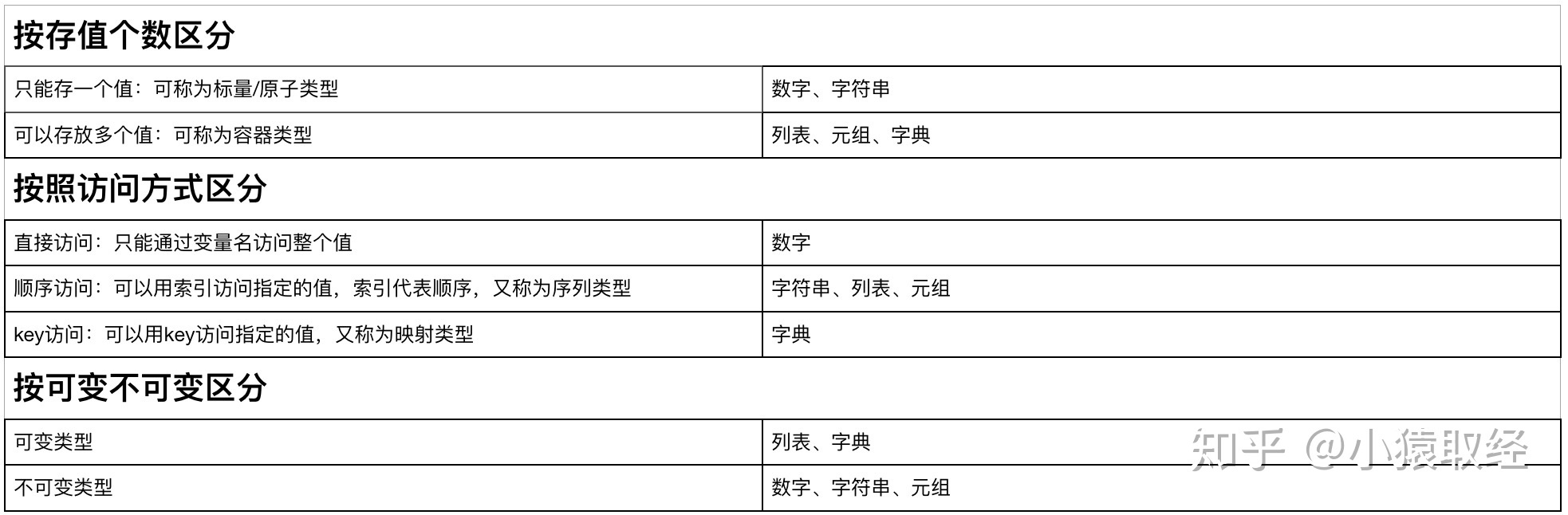
总结:
1. 有序/无序
有索引的有序, 无索引的无序
有序: 列表 元祖
无序: 字典
2. 容器类型
容器类型: 列表 元祖 字典
3. 可变不可变类型
可变类型: 列表 字典
不可变类型: 元祖

 浙公网安备 33010602011771号