
1.Kubernetes基础-Docker安装
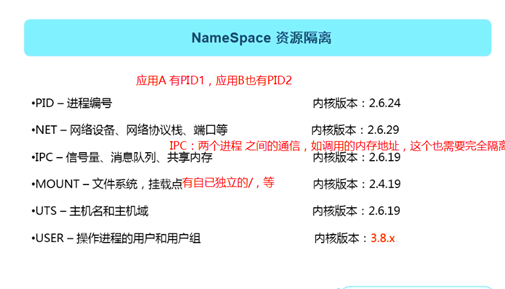
一、资源的隔离
两个应用之前只有实现了以下六个维度(NameSpace)的隔离,才能说A与B之间是完全隔离的。
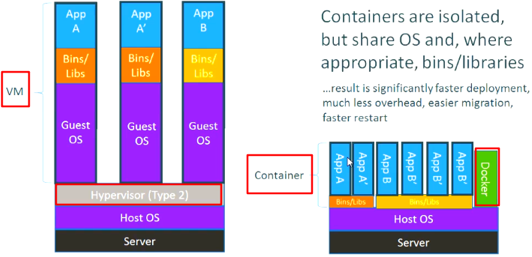
二、Docker与VM对比
三、安装Docker引擎
1.设置yum源
安装Base源
curl -o /etc/yum.repos.d/CentOS-Base.repo http://mirrors.aliyun.com/repo/Centos-7.repo
安装epel源
curl -o /etc/yum.repos.d/epel.repo http://mirrors.aliyun.com/repo/epel-7.repo
或
yum install epel-release -y
查看yum源是否有docker相关的包
yum list docker --show-duplicates
2.安装docker-ce
yum install yum-utils -y
yum-config-manager --add-repo http://mirrors.aliyun.com/docker-ce/linux/centos/docker-ce.repo ###把aliyun的docker-ce源添加到仓库
yum list docker --show-duplicates
yum install docker-ce (yum remove docker*)
yum install docker-ce-ci containerd.io ##命令行及docker运行环境。
3.配置加速
配置一个阿里加速器:https://cr.console.aliyun.com/cn-hangzhou/instances/mirrors
登录---搜索 “容器镜像服务”---管理控制台 -> 右侧镜像工具 -> 镜像加速器 -> 复制加速器地址
mkdir -p /data/docker
vim /etc/docker/daemon.json
{ "registry-mirrors": ["https://9bme5yhc.mirror.aliyuncs.com"] }
systemctl start docker
systemctl daemon-reload
systemctl enable docker
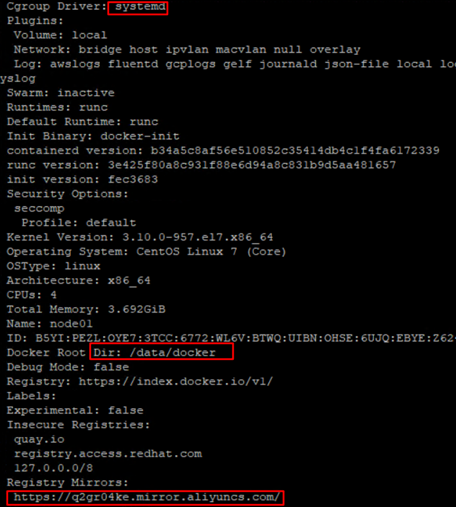
docker info
4.启动第一个docker容器
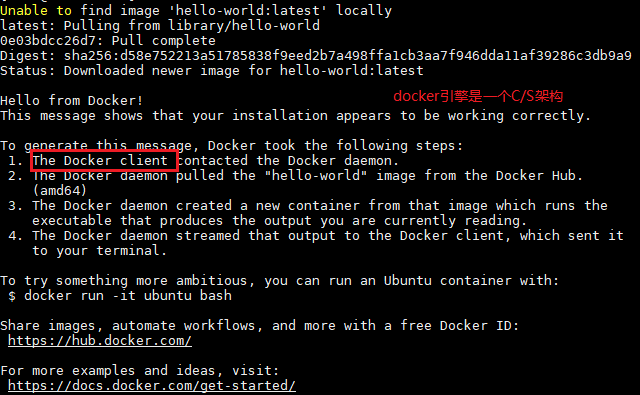
docker run hello-world

 浙公网安备 33010602011771号