![]()
  1 /*
  2  * To change this license header, choose License Headers in Project Properties.
  3  * To change this template file, choose Tools | Templates
  4  * and open the template in the editor.
  5  */
  6 package newpackage;
  7
  8 import java.awt.*;
  9 import java.applet.*;
 10 import java.util.Random;
 11
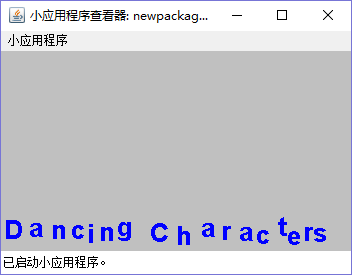
 12 //跳动文字
 13
 14 public class JumpTextApplet extends Applet implements Runnable{
 15    String message;  //待显示的文本信息
 16    Thread jumpThread;  //实现跳动文字的线程
 17    int fontHeight,speed,baseline; //字体高度,跳动速度和基线
 18    Color textColor,bgColor; //文字颜色与背景颜色
 19    Image jumpImage;  //实现跳动的Image对象
 20    Graphics jumpGraphics;  //实现跳动的Graphics对象
 21    boolean normal; //文字是否跳动的标志
 22    Font font; //显示字体
 23    FontMetrics fontMetric; //显示字体的FontMetrics对象
 24    Color randomColors[]; //随机生成颜色
 25    boolean randomColor;  //是否是随机颜色
 26
 27    public void init(){ //初始化
 28         Graphics graphics = getGraphics(); //得到graphics对象
 29        Dimension dim=getSize(); //得到尺寸
 30        fontHeight=dim.height-10; //根据Applet尺寸设置文字高度
 31        jumpImage=createImage(dim.width,dim.height); //创建Image对象
 32        jumpGraphics = jumpImage.getGraphics(); //得到Graphics对象
 33        message=getParameter("text"); //得到显示文字
 34        if (message==null){
 35              message="Dancing Characters";    //设置默认文字
 36        }
 37
 38        int textWidth=dim.width-(message.length() + 1)*5-10; //设置文字宽度
 39        do{
 40            graphics.setFont(new Font("TimesRoman", 1, fontHeight)); //设置显示字体
 41           fontMetric = graphics.getFontMetrics(); //得到FontMetric对象
 42           if(fontMetric.stringWidth(message)>textWidth) //根据文字宽度调整其高度
 43              fontHeight--;
 44        }
 45        while(fontMetric.stringWidth(message) > textWidth);{
 46            baseline = getSize().height - fontMetric.getMaxDescent(); //调整显示基线位置
 47        }
 48        font = new Font("TimesRoman", 1, fontHeight); //得到字体实例
 49
 50        String param; //参数字符串
 51        if((param = getParameter("TEXTCOLOR")) == null) //得到文本颜色
 52            textColor = Color.blue; //设置默认文本颜色
 53        else
 54           textColor = new Color(Integer.parseInt(param));  //设置文本颜色
 55        if((param = getParameter("BGCOLOR")) == null)  //得到背景颜色
 56            bgColor = Color.lightGray;  //设置默认背景颜色
 57        else
 58            bgColor = new Color(Integer.parseInt(param));
 59        setBackground(bgColor); //设置背景颜色
 60        if((param = getParameter("SPEED")) != null) //得到跳动速度
 61            speed = Integer.valueOf(param).intValue();
 62        if(speed == 0)
 63            speed = 100;  //设置默认跳动速度
 64        if((param = getParameter("RANDOMCOLOR")) != null) //得到是否是随机颜色参数
 65            randomColor = (Integer.valueOf(param).intValue()!=0); //参数值不为零,则为随机颜色
 66        if((param = getParameter("NORMAL")) != null) //得到是否是随机颜色参数
 67            normal = (Integer.valueOf(param).intValue()!=0); //参数值不为零,则为随机颜色
 68         if (randomColor){ //初始化随机颜色数组
 69            Random random=new Random(); //实例化Random对象
 70            int r,g,b; //颜色的RGB值
 71            for (int i=0;i<10;i++){
 72                   r=random.nextInt(255);  //得到0到255之间的随机值
 73                   g=random.nextInt(255);
 74                   b=random.nextInt(255);
 75                Color randomc=new Color(r,g,b);    //生成颜色实例
 76                randomColors[i]=randomc; //设置数组值
 77            }
 78        }
 79          jumpThread = new Thread(this); //实例化跳动文字线程
 80     }
 81
 82     public void start(){ //开始运行线程
 83         if(jumpThread == null) {
 84                 jumpThread = new Thread(this);
 85         }
 86         jumpThread.start();
 87     }
 88
 89     public void run(){  //线程运行主体
 90         while(jumpThread!=null) {
 91             try{
 92                 Thread.sleep(speed); //线程休眠,即跳动间隔时间
 93             }
 94             catch(InterruptedException ex) {}
 95             repaint();  //重绘屏幕
 96         }
 97         System.exit(0);  //退出程序
 98     }
 99
100
101     public void paint(Graphics g) {  //绘制Applet
102         if(normal) {  //如果是静态文本
103             g.setColor(bgColor);  //设置当前颜色
104             g.fillRect(0, 0, getSize().width, getSize().height);  //绘制填充矩形
105             g.setColor(textColor); //设置当前颜色
106             g.setFont(font); //设置当前字体
107             g.drawString(message, (getSize().width - fontMetric.stringWidth(message)) / 2, baseline); //绘出字符串
108         }
109     }
110
111     public void update(Graphics g){  //更新Applet
112         jumpGraphics.setColor(bgColor); //设置当前颜色
113         jumpGraphics.fillRect(0, 0, getSize().width, getSize().height); //绘制填充矩形
114         jumpGraphics.setColor(textColor); //设置当前颜色
115         jumpGraphics.setFont(font); //设置字体
116         if(!normal){ //如果是跳动文字
117             int xpoint = 0;
118             for(int j = 0; j < message.length(); j++){
119                 if(randomColor){
120                     Color color;
121                     while(bgColor == (color = randomColors[Math.min(9, (int)(Math.random()*10))])); //得到颜色数组中与背景色不同的一个随机颜色
122                     jumpGraphics.setColor(color);  //设置当前颜色
123                 }
124                 xpoint += (int)(Math.random() * 10); //单个字符的X坐标
125                 int ypoint = baseline - (int)(Math.random() * 10); //单个字符的Y坐标
126                 String s1 = message.substring(j, j + 1);
127                 jumpGraphics.drawString(s1, xpoint, ypoint);
128                 xpoint += fontMetric.stringWidth(s1);
129             }
130         }
131         else {  //如果是静态文本
132             jumpGraphics.drawString(message, (getSize().width - fontMetric.stringWidth(message)) / 2, baseline); //绘制字符串
133         }
134         g.drawImage(jumpImage, 0, 0, this); //绘制Image
135     }
136
137     public JumpTextApplet() {  //构造函数
138         speed = 300;  //初始速度
139         normal = false; //初始时为动态文本
140         randomColors = new Color[10]; //初始化随机颜色数组
141         randomColor = false;
142     }
143 }




 浙公网安备 33010602011771号