
四、计时器(JS时间戳和New Data()使用)
一、效果图
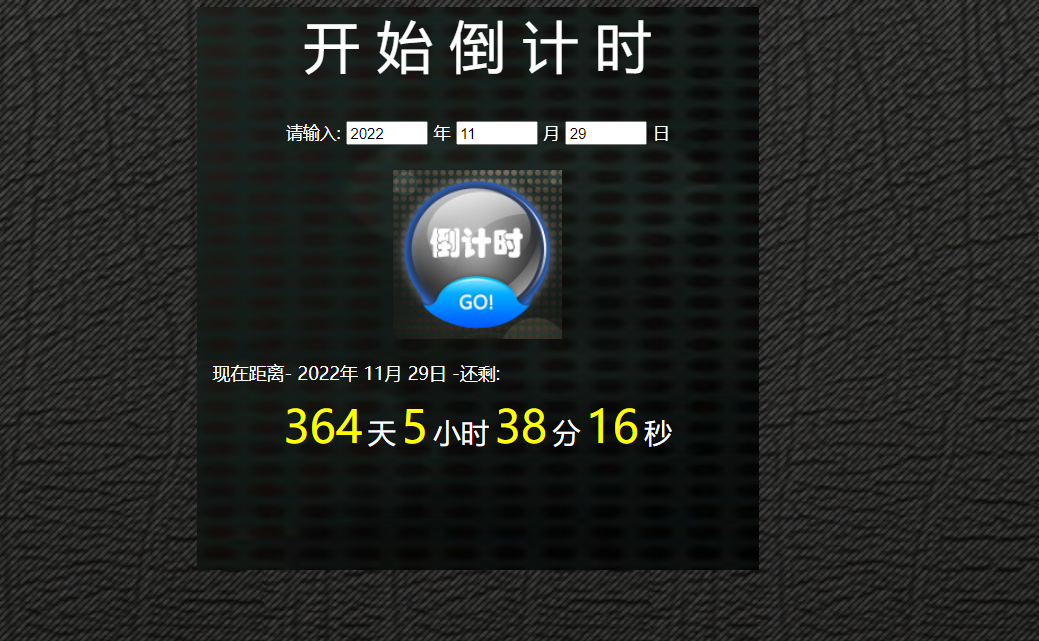
二、代码
JS
    //用法
    $(function(){
    //获取当前日期
            var dateTime = new Date();
            var Newyear=dateTime.getFullYear();//年
            var Newmonth=dateTime.getMonth();//月
            Newmonth=Newmonth+1;//0到11月
            var Newday=dateTime.getDate();//日
            var hour = dateTime.getHours();//时
            var min = dateTime.getMinutes();//分
            var sec = dateTime.getSeconds();//秒
            //更新距离日期
            document.getElementById('Newyear').innerHTML=Newyear+"年";
            document.getElementById('Newmonth').innerHTML=Newmonth+"月";
            document.getElementById('Newday').innerHTML=Newday+"日";

    //获取表单的值


    $("#go").click(function(){

        setInterval(function(){

            //获取输入时间
            var Inputyear=document.getElementById("Inputyear").value;
            var Inputmonth=document.getElementById("Inputmonth").value;
            var Inputday=document.getElementById("Inputday").value;

            //更新距离日期
            document.getElementById('Newyear').innerHTML=Inputyear+"年";
            document.getElementById('Newmonth').innerHTML=Inputmonth+"月";
            document.getElementById('Newday').innerHTML=Inputday+"日";


            var dateTime = new Date(); //当前时间对象

            var hour = dateTime.getHours();
            var min = dateTime.getMinutes();
            var sec = dateTime.getSeconds();


            //起始时间戳
            var Starttime=new Date("1970-01-01 8:0:0")
            var Starttimestamp=Date.parse(Starttime); //转化为时间戳

            //当前时间戳
            var Newtimestamp = Date.parse(new Date());

            //输入时间戳"2021-11-30 0:0:0"
            var Inp=Inputyear+"-"+Inputmonth+"-"+Inputday+" "+"0:0:0"
            var Inputdate=new Date(Inp)
            var Inputtimestamp=Date.parse(Inputdate);


            //距离时间戳=当前时间戳-输入时间戳 (然后再减起始时间戳为1970-01-01 8:0:0)
            var Biffer=Inputtimestamp-Newtimestamp;
            var a=new Date(Biffer).toLocaleString();

            //求相距天数
            diffDate = Math.abs(Biffer) // 取相差毫秒数的绝对值
            totalDays = Math.floor(diffDate / (1000 * 3600 * 24)) // 向下取整
            console.log(totalDays)

            //求相距时间
            var Bifferhour=new Date(Biffer).getHours();
            // 小时出现负数,则需要天数补够 如28号12点和29号10点相差又不到一天
            // 计算时Bifferday为1,Bifferhour负2,则需要减去一天用小时计时
            Bifferhour=Bifferhour-8;
            if(Bifferhour<0){
                Bifferhour=24+Bifferhour;
                // Bifferday=Bifferday-1;
            }
            //求相距分钟和秒数
            var Biffermin=new Date(Biffer).getMinutes();
            var Biffersec=new Date(Biffer).getSeconds();

            //观察规律
            console.log(a)
            console.log(Bifferhour)
            console.log(Biffermin)
            console.log(Biffersec)

            // 更新距离时间 >
            document.getElementById('Timeday').innerHTML=totalDays;
            document.getElementById('Timehose').innerHTML=Bifferhour;
            document.getElementById('Timemin').innerHTML=Biffermin;
            document.getElementById('Timesec').innerHTML=Biffersec;


     },0)
    })

    })
Html
<!DOCTYPE html>
<html>
<head>
<meta charset="utf-8">
<title>计时器</title>
<link rel="stylesheet" href="Practice/css/Timing.css" />
<script charset="UTF-8" type="text/javascript" src="Practice/js/jquery-3.3.1.min.js"></script>
<script charset="UTF-8" type="text/javascript" src="Practice/js/Timing.js"></script>
</head>
<body>
<div class="Timing">
<img src="Practice/bg.png" style="width: 100%; height: 100%;z-index: 0;">
<div class="Title">
<span style="color: white; font-size: 50px">
开 始 倒 计 时</span>
</div>
<!-- 要计算的时间输入 -->
<div class="Print">
<span >请输入:</span>
<input class="time" id="Inputyear" />
<span>年</span>
<input class="time" id="Inputmonth"/>
<span>月</span>
<input class="time" id="Inputday" />
<span>日</span>
</div>
<div class="img" id="go" style="text-align: center;">
<img src="Practice/btn_hover.jpg">
</div>
<!-- 距离日期 -->
<div class="Tip" >
<span> </span>
<span>现在距离-</span>
<span id="Newyear"></span>
<span id="Newmonth"></span>
<span id="Newday"></span>
<span>-还剩:</span>
</div>
<!-- 距离时间 -->
<div class="Countdown">
<span class="Number" id="Timeday">000</span>
<span class="Word">天</span>
<span class="Number" id="Timehose">00</span>
<span class="Word">小时</span>
<span class="Number" id="Timemin">00</span>
<span class="Word">分</span>
<span class="Number" id="Timesec">00</span>
<span class="Word">秒</span>
</div>
</div>
</body>
</html>
CS
body{
	width: 100%;
	height: 100%;
	background-image: url(../body.gif);
	position: relative;
}
.Timing{
	width: 500px;
	height: 500px;
	position: absolute;
	left: 620px;

}
.Title{
	width: 100%;
	height: 100px;
	top: 0px;
	position: absolute;
	text-align: center;
}

.Print{
	width: 100%;
	height: 45px;
	position: absolute;
	top: 100px;
	text-align: center;
}
.Print span{

	color: white;
	font-size: 15px;
	}
.time{
	width: 65px;
}
.img{
	width: 100%;
	height: 150px;
	position: absolute;
	top: 145px;
}
.Tip{
     width: 100%;
	 height: 30px;
	 position: absolute;
	 top: 295px;
	 margin-top: 20px;

}
.Tip{
	color: white;
}
.Countdown{
	width: 100%;
	height: 155px;
	position: absolute;
	bottom: 0px;
	text-align: center;

}
.Number{
	font-size: 40px;
	color: yellow;
}
.Word{
	font-size: 25px;
	color: white;
}
 bg.png
  body.png
  btn_hover.png

 浙公网安备 33010602011771号