
.Net MVC 下的图片轮播、图片上传、图片裁剪上传
所用到的工具:layui、cropper.js
一、轮播上传
公司要求做一个主页轮播配置,这个很好做,主要就是建一个图片表用来存图片的信息,然后所使用的就是主页根据所选图片的路径实现图片轮播。
先来看成品图,然后我会从前端到后台再到后台来分解我的项目。
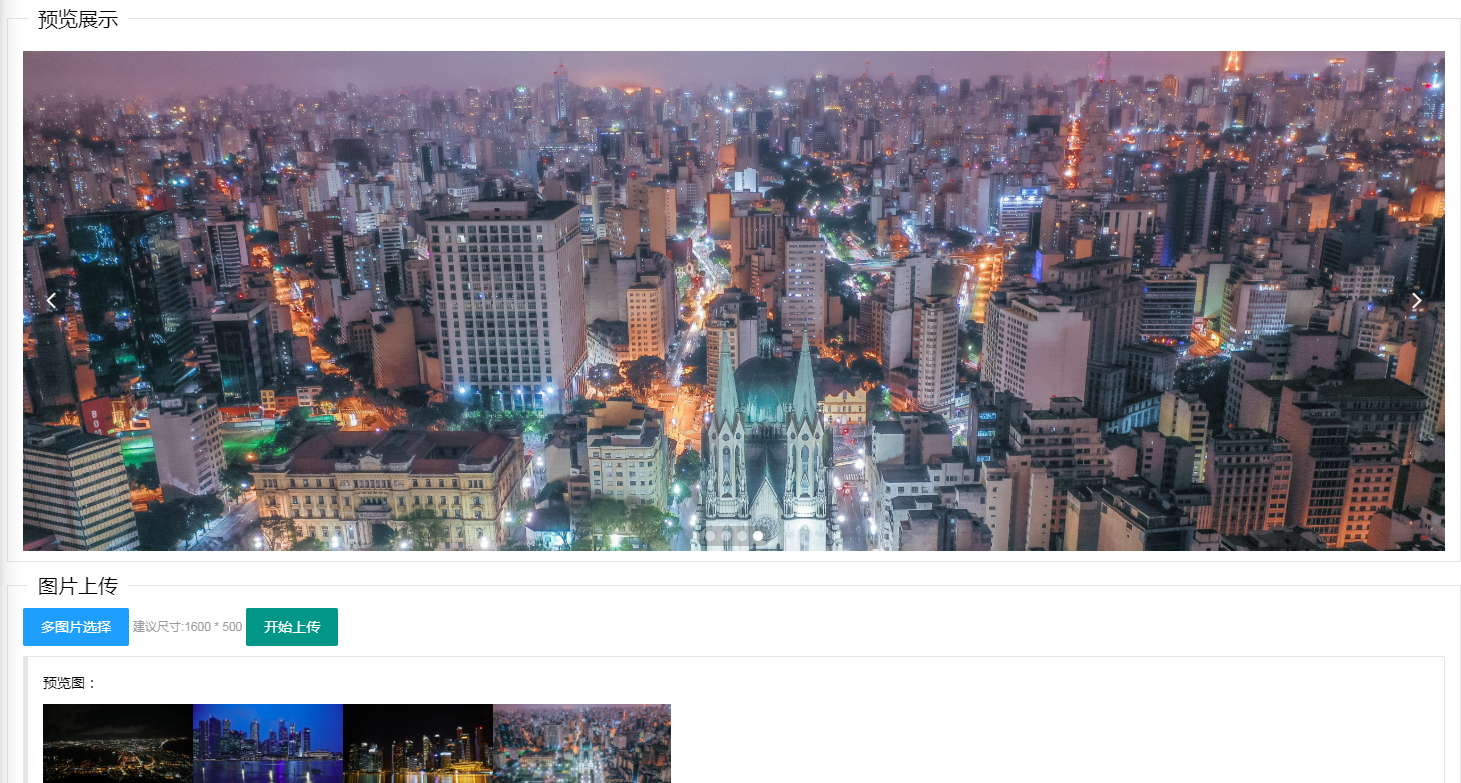
图1 轮播上传
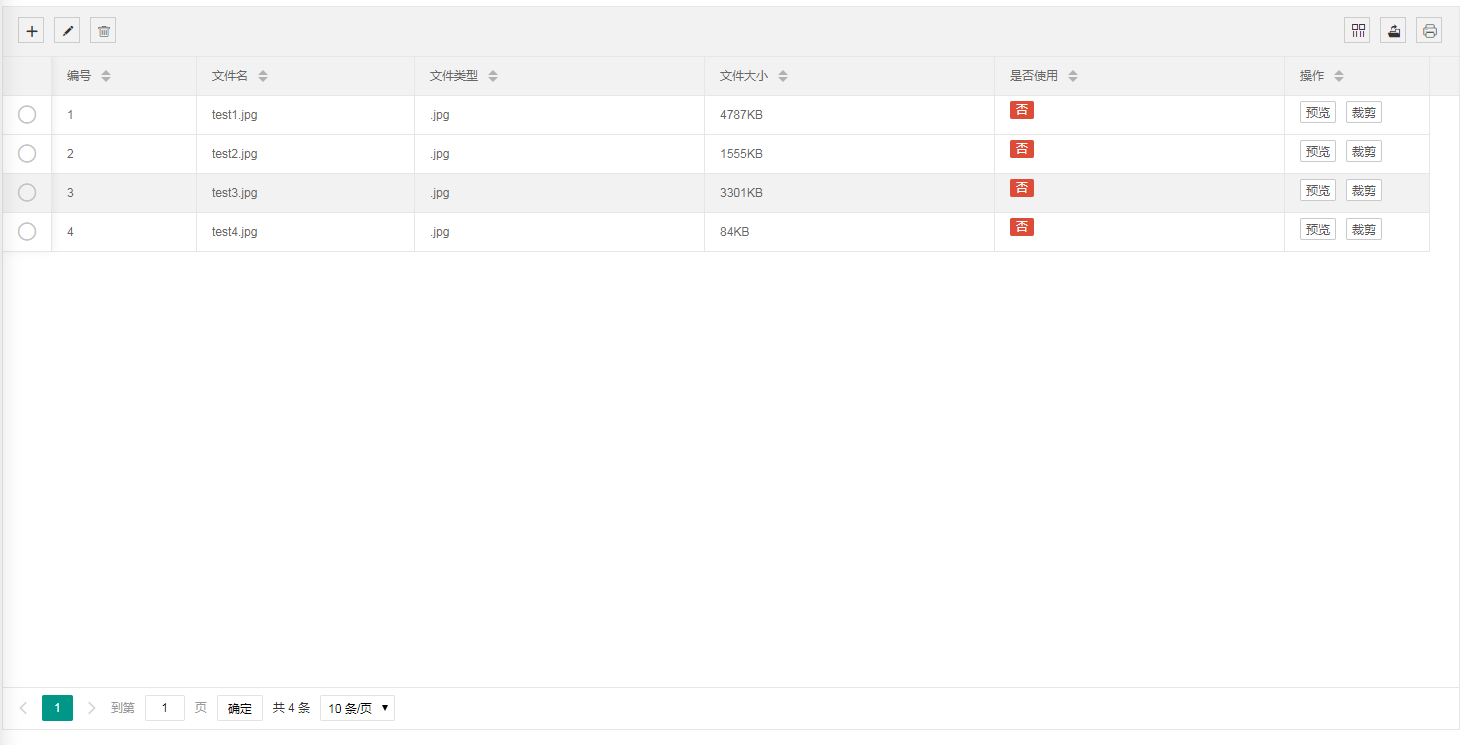 图2 轮播设置

图3 轮播显示
先从数据库设计开始说吧,数据库设计为下图所示:
| 字段名称 | 类型 | 是否为空 | 备注 |
| ID | int | 否 | 文件编号 |
| FileName | varchar(50) | 否 | 文件名称 |
| FileFormat | varchar(10) | 否 | 文件格式 |
| FilePath | varchar(100) | 否 | 文件地址 |
| FileSize | float | 否 | 文件大小 |
| IsUse | int | 是 | 是否使用 |
然后是文件上传处前端实现,前端用的是laiyui,可以到https://www.layui.com/学习使用,这里就不讲了,主要的逻辑就是,前端显示样式,先点击“多图片选择”,选择你想要选的图片,选择完成后,实现轮播图的渲染显示,然后点击“上传”按钮时,将图片上传到后台,因为layui的多图片上传实际就是单图片上传的循环,所以在controller层接收的时候,直接就接收文件对象就行了。
前端代码:
运用了layui的“多图片上传”、“轮播图”加一展示,就是普通的页面渲染。
@{
    ViewBag.Title = "CarouselPoster";
}
<link rel="stylesheet" href="~/Content/NewMainPage/layui/css/layui.css" />
<body>
    <fieldset class="layui-elem-field">
        <legend>预览展示</legend>
        <div class="layui-field-box">
            <div class="layui-carousel" id="CarouselPoster" lay-filter="CarouselPosterFilter">
                <div carousel-item="" id="CarouselPosterItem" class="layui-upload-list"></div>
            </div>
        </div>
    </fieldset>
    <fieldset class="layui-elem-field">
        <legend>图片上传</legend>
        <div class="layui-field-box">
            <div class="layui-upload">
                <button type="button" class="layui-btn layui-btn-normal" id="ImgSelect">多图片选择</button>
                <span style="color:#999999;font-size:12px">建议尺寸:1600 * 500</span>
                <button type="button" class="layui-btn" id="upload">开始上传</button>
                <blockquote class="layui-elem-quote layui-quote-nm" style="margin-top: 10px;">
                    预览图:
                    <div class="layui-upload-list" id="ImgShow"></div>
                </blockquote>
            </div>
        </div>
    </fieldset>
    <script src="~/Scripts/jquery-1.11.1.min.js"></script>
    <script src="~/Content/NewMainPage/layui/layui.js"></script>
    <script>
        layui.use(['carousel', 'form','upload'], function(){
            var carousel = layui.carousel
            ,form = layui.form;
            var $ = layui.jquery
            ,upload = layui.upload;
            var options = {
                elem: '#CarouselPoster'
                ,width: '100%'   //轮播层宽度
                ,height: '500px' //轮播层高度
                ,interval: 1000  //时间间隔
            };
            var ins = carousel.render(options);


            upload.render({
                elem: '#ImgSelect'
                ,url: '../File/UploadImg'   //上传url
                ,multiple: true
                ,auto: false
                ,bindAction: '#upload'
                ,choose: function(obj){
                    obj.preview(function(index, file, result){
                        $('#ImgShow').append('<img src="'+ result +'" alt="'+ file.name +'" style="height:100px;" class="layui-upload-img">')   #上传预览的图片
                        $('#CarouselPosterItem').append('<div><img src="'+ result +'" alt="'+ file.name +'" style="width:100%" class="layui-upload-img"><div>');   #轮播图预览
                        ins.reload(options);
                    });
                }
                ,before: function(obj){
                    layer.load(2);
                }
                ,done: function(res,index,upload){
                    layer.closeAll('loading');
                    if(res.Success || res.flag === "true"){
                        layer.msg("上传成功!");
                    }else{
                        layer.msg("上传失败!");
                    }
                }
                ,error:function(index,upload){
                    layer.closeAll('loading');
                }
          });
        });
    </script>
</body>
controller层
就是普通的图片存取,和数据存取。
[HttpPost]
        public ActionResult UploadImg(HttpPostedFileBase file)
        {

            if (file != null)
            {
                var path = "/uploads/";
                var uploadpath = Server.MapPath(path);
                if (!Directory.Exists(uploadpath))
                {
                    Directory.CreateDirectory(uploadpath);
                }
                string fileName = Path.GetFileName(file.FileName);// 原始文件名称
                string fileExtension = Path.GetExtension(fileName); // 文件扩展名
                string saveName = Guid.NewGuid() + fileExtension; // 保存文件名称
                float size = file.ContentLength / 1000;
                try
                {
                    file.SaveAs(uploadpath + saveName);
                }
                catch(Exception e)
                {
                    return Json(new { Success = false, Message = "文件上传失败!"}, JsonRequestBehavior.AllowGet);
                }

                FileItem fileItem = new FileItem
                {
                    FileName = fileName,
                    FileFormat = fileExtension,
                    FilePath = path + saveName,
                    FileSize = size
                };

                DataBLL _BLL_Data = new DataBLL();

                string flag = _BLL_Data.UploadImgToTable(fileItem);

                return Json(new { Success = true, Message = flag });
            }
            return Json(new { Success = false, Message = "请选择要上传的文件!"}, JsonRequestBehavior.AllowGet);

        }
文件信息类 FileItem
namespace InternetDataMine.Models.domain
{
    public class FileItem
    {
     //文件名
        public string FileName { get; set; }
        //文件格式
        public string FileFormat { get; set; }
        //文件路径
        public string FilePath { get; set; }
        //文件大小
        public float FileSize { get; set; }
        //是否使用
        public int IsUse { get; set; }

        public string toString() {
            return "filename: " + FileName +
                " fileformat: " + FileFormat +
                " filepath: " + FilePath +
                " filesize: " + FileSize +
                " isUse: " + IsUse;
        }
    }
}
Model层
就是普通插表操作
/// <summary>
        /// 文件上传
        /// </summary>
        /// <param name="fileItem">文件对象</param>
        /// <returns></returns>
        public string UploadImgToTable(FileItem fileItem)
        {
            string sql = "insert into [ShineView_Data].[dbo].[RYFile] values('" + fileItem.FileName + "','" + fileItem.FileFormat + "','" + fileItem.FilePath + "','" + fileItem.FileSize + "','" + fileItem.IsUse + "')";
            if (dal.ExcuteSql(sql))
            {
                return "true";
            }
            return "false";
        }
二、轮播设置
轮播设置主要就是,图片表的删除和修改操作。目前还支持图片的预览和裁剪功能。
2.1 图片表的删除和修改
就是对上面存到表格里面,图片信息的修改和删除操作
前端代码:
图片表格页面:
@{
    ViewBag.Title = "PosterSetting";
}
<link rel="stylesheet" href="~/Content/layui/css/layui.css" />
<body>
    <table class="layui-hide" id="test" lay-filter="test"></table>
    <script src="~/Content/layui/layui.js"></script>
    <script src="~/Scripts/jquery-1.11.1.min.js"></script>
    <script src="~/Scripts/jquery.cookie.js"></script>
    <script src="~/Content/NewMainPage/table_his.js"></script>
    <script>
        renderTable();
        function renderTable(){
            layui.use('table', function () {
                var table = layui.table;
                $.ajax({
                    url: '../File/GetPosterInfo',         #图片表格信息获取
                    dataType: 'json',
                    type: 'post',
                    success: function (result) {
                        table.render({
                                elem: '#test'
                              , data: result.rows
                              , toolbar: 'default'
                              , page: true
                              , height: document.body.clientHeight - 55
                              , cols:  [[
                                    {type: 'radio', fixed: 'left'}
                                    , { field: 'TmpID', width: '10%', title: '编号', sort: true }
                                    , { field: 'FileName', width: '15%', title: '文件名', sort: true}
                                    , { field: 'FileFormat', width: '20%', title: '文件类型', sort: true }
                                    , { field: 'ID', width: '20%', title: 'ID', sort: true ,hide:true}
                                    , { field: 'FilePath', width: '20%', title: '文件路径', sort: true ,hide:true}
                                    , { field: 'FileSize', width: '20%', title: '文件大小', sort: true , templet: FileSize}
                                    , { field: 'IsUse', width: '20%', title: '是否使用', sort: true , templet: IsUse}
                                    , { field: 'Operate', width: '10%', title: '操作', sort: true , templet: Operate}
                                ]]
                            });
                        //监听头工具栏事件
                          table.on('toolbar(test)', function(obj){
                            var checkStatus = table.checkStatus(obj.config.id)
                            ,data = checkStatus.data; //获取选中的数据
                            switch(obj.event){
                              case 'add':
                                layer.msg('添加操作请在"轮播海报上传"处操作,这里不支持');
                              break;
                              case 'update':
                                if(data.length === 0){
                                  layer.msg('请选择一行');
                                } else if(data.length > 1){
                                  layer.msg('只能同时编辑一个');
                                } else {
                                  editlayer(checkStatus.data[0]);
                                }
                              break;
                              case 'delete':
                                if(data.length === 0){
                                  layer.msg('请选择一行');
                                } else {
                                    layer.msg('是否确定删除?', {
                                        time: 20000, //20s后自动关闭
                                        btn: ['确定', '取消'],
                                        yes: function () {
                                            removelayer(checkStatus.data[0]);
                                        }
                                    });

                                }
                              break;
                            };
                          });
                    }
                })
            });
        }
        function editlayer(row){
            var url = encodeURI('/File/PosterEdit?IsUse=' + row.IsUse);        #编辑页面url
            layui.use('layer', function(){
              var $ = layui.jquery, layer = layui.layer;
              var that = this;
              var index = layer.open({
                    type: 2
                    ,title: '<h4>编辑菜单</h4>'
                    ,area: ['550px', '450px']
                    ,shade: 0
                    ,offset: [
                      $(window).height()/2-225
                      ,$(window).width()/2-275
                    ]
                    ,content: url
                    ,btn: ['确定', '取消']
                    ,yes: function (index, layero){
                        var data = $(layero).find("iframe").contents().find("#add_form").serialize();
                        $.ajax({
                            cache: false,
                            method: 'POST',
                            datatype: 'json',
                            url:  "../File/editPosterInfo?MineCode=" + row.ID + "&"+data,            #修改图片表格信息
                            success: function (data) {
                                if(data === "true"){
                                    layer.close(index);
                                    window.location.reload();
                                }
                            },
                        });
                    }
                    ,btn2: function(){
                      layer.close();
                    }
                    ,zIndex: layer.zIndex
                  });
            });
        }
        function removelayer(row){
            $.ajax({
                cache: false,
                method: 'POST',
                datatype: 'json',
                url:  "../File/deletePosterInfo&MineCode=" + row.ID,                    #删除图片表格信息
                success: function (data) {
                    if(data === "true"){
                        $.ajax({
                            cache: false,
                            method: 'POST',
                            datatype: 'json',
                            url:  "../File/RemoveImg?FilePath=" + row.FilePath,    #删除图片
                            success: function (data) {
                                if(data.Success){
                                    window.location.reload();
                                }else{
                                    layer.msg(data.Message);
                                }

                            }
                        });

                    }
                },
            });
        }

        function FileSize(data){
            return  data.FileSize.toString() + "KB";
        }
        function IsUse(data){
            var isUse = data.IsUse.toString();
            if(isUse === "1"){
                return '<span class="layui-badge layui-bg-green">是</span>';
            }else{
                return '<span class="layui-badge layui-bg-red">否</span>';
            }
        }
        function Operate(data){
            var FilePath = data.FilePath.toString();
            var ID = data.ID.toString();
            var FileFormat =data.FileFormat.toString();
            var str = '<button type="button" class="layui-btn layui-btn-primary layui-btn-xs" onclick="preview(\'' + FilePath + '\')">预览</button>'
        + '<button type="button" class="layui-btn layui-btn-primary layui-btn-xs" onclick="cropper(\'' + FilePath + '\',\'' + ID + '\',\'' + FileFormat + '\')">裁剪</button>';
            return str;
        }

        function preview(FilePath){
            layui.use('layer', function(){
              var $ = layui.jquery, layer = layui.layer;
              var that = this;
              var index = layer.open({
                    type: 1
                    ,title: '<h4>图片预览</h4>'
                    ,area: ['800px', '500px']
                    ,shade: 0
                    ,offset: [
                      $(window).height()/2-250
                      ,$(window).width()/2-400
                    ]
                    ,content: '<img src="' + FilePath + '" style="width:800px">'
                    ,zIndex: layer.zIndex
                  });
            });
        }
        function cropper(FilePath,ID,FileFormat){
            var url = encodeURI('/File/ImgCropper?FilePath=' + FilePath + '&ID=' + ID + '&FileFormat=' + FileFormat);
            layui.use('layer', function(){
              var $ = layui.jquery, layer = layui.layer;
              var that = this;
              var index = layer.open({
                    type: 2
                    ,title: '<h4>裁剪图片</h4>'
                    ,area: ['1300px', '650px']
                    ,shade: 0
                    ,offset: [
                      $(window).height()/2-325
                      ,$(window).width()/2-600
                    ]
                    ,content: url
                    ,zIndex: layer.zIndex
                    ,cancel: function () {
                        window.location.reload();
                    }
              });
            });
        }
    </script>
</body>
编辑页面:
@{
    ViewBag.Title = "PosterEdit";
}
<link rel="stylesheet" href="~/Content/layui/css/layui.css" />
<body>
    <form id="add_form">
        <div class="layui-form" style="margin-top:20px;padding-right:15px">
            <div class="layui-form-item">
                <label class="layui-form-label">是否使用:</label>
                <div class="layui-input-block">
                    <select id="IsUse" name="IsUse" lay-search="" lay-filter="IsUsefilter">
                        <option value="0">否</option>
                        <option value="1">是</option>
                    </select>
                </div>
            </div>
        </div>
    </form>
    <script src="~/Content/layui/layui.js"></script>
    <script src="~/Scripts/jquery-1.11.1.min.js"></script>
    <script>

        $(function (){
            RenderSelect();
            $('#IsUse').val(getQueryString("IsUse")); #获取是否使用,0-否,1-是
        });

        //获取url的参数
        function getQueryString(name) {
            var reg = new RegExp("(^|&)" + name + "=([^&]*)(&|$)", "i");
            var r = window.location.search.substr(1).match(reg);
            if (r != null) return decodeURI(r[2]); return null;
        }

        function RenderSelect(){
            layui.use(['form', 'upload', 'layer'], function () {
                var form = layui.form;
                form.render("select");
            });
        }
    </script>
</body>
controller层(只显示图片删除,数据的增删改查,我想大家都会的)
[HttpPost]
     #filepath从前端获取的图片路径
        public ActionResult RemoveImg(string filepath)
        {
            if (filepath != null) {
                var path = "..";
                var uploadpath = Server.MapPath(path);
                try
                {
                    System.IO.File.Delete(uploadpath + filepath.Replace(@"/", @"\"));
                }
                catch (Exception e) {
                    return Json(new { Success = false, Message = "文件删除失败!" }, JsonRequestBehavior.AllowGet);
                }
                return Json(new { Success = true, Message = "文件删除成功!" }, JsonRequestBehavior.AllowGet);

            }
            return Json(new { Success = false, Message = "无法获取要删除的文件路径!" }, JsonRequestBehavior.AllowGet);
        }
图片裁剪
前端代码:
@{
    ViewBag.Title = "ImgCropper";
}
<head>
    <link rel="stylesheet" href="~/Content/NewMainPage/plugins/cropper/css/cropper.css">
    <link rel="stylesheet" href="~/Content/bootstrap/css/bootstrap.min.css">
    <link rel="stylesheet" href="~/Content/layui/css/layui.css"/>
    <link rel="stylesheet" href="~/Content/NewMainPage/plugins/cropper/css/main.css"/>
</head>
<body>
    <!-- Content -->
    <div class="container">
        <div class="row">
            <div class="col-md-9">
                <!-- <h3>Demo:</h3> -->
                <div class="img-container">
                    <img id="image" src="#" alt="Picture">
                </div>
            </div>
            <div class="col-md-3">
                <!-- <h3>Preview:</h3> -->
                <div class="docs-preview clearfix">
                    <div class="img-preview preview-lg"></div>
                    <div class="img-preview preview-md"></div>
                    <div class="img-preview preview-sm"></div>
                    <div class="img-preview preview-xs"></div>
                </div>
            </div>
        </div>
        <div class="row">
            <div class="col-md-9 button-container">
                <div class="layui-inline">
                    <label class="layui-form-label">裁剪框高度:</label>
                    <div class="layui-input-inline">
                        <input id="input_height" type="tel" name="height" class="layui-input">
                    </div>
                </div>
                <div class="layui-inline">
                    <label class="layui-form-label">裁剪框宽度:</label>
                    <div class="layui-input-inline">
                        <input id="input_width" type="text" name="width" class="layui-input">
                    </div>
                    <span style="color:#808080;font-size:12px">(填比例)</span>
                </div>
                <div class="layui-inline">
                    <button id="CropBoxSet" type="button" class="layui-btn">设置裁剪框</button>
                </div>
                <div class="layui-inline">
                    <button id="submit" type="button" class="layui-btn layui-btn-normal">保存</button>
                </div>
            </div>
        </div>
    </div>
    <div></div>
    <script src="~/Scripts/jquery-1.11.1.min.js"></script>
    <script src="~/Content/NewMainPage/plugins/cropper/js/cropper.js"></script>
    <script src="~/Content/bootstrap/js/bootstrap.min.js"></script>
    <script src="~/Content/layui/layui.js"></script>
    <script>
        var FilePath = getQueryString("FilePath");
        $("#image").attr("src",FilePath);
        var ID = getQueryString("ID");
        var FileFormat = getQueryString("FileFormat");

        if (!HTMLCanvasElement.prototype.toBlob) {
          Object.defineProperty(HTMLCanvasElement.prototype, 'toBlob', {
            value: function (callback, type, quality) {
              var canvas = this;
              setTimeout(function() {
                var binStr = atob( canvas.toDataURL(type, quality).split(',')[1] );
                var len = binStr.length;
                var arr = new Uint8Array(len);

                for (var i = 0; i < len; i++) {
                  arr[i] = binStr.charCodeAt(i);
                }

                callback(new Blob([arr], { type: type || 'image/png' }));
              });
            }
          });
        }
        //获取url的参数
        function getQueryString(name) {
            var reg = new RegExp("(^|&)" + name + "=([^&]*)(&|$)", "i");
            var r = window.location.search.substr(1).match(reg);
            if (r != null) return decodeURI(r[2]); return null;
        }


        $('#image').cropper({
            viewMode:1,
            preview: '.img-preview',
        });
        $("#CropBoxSet").on("click", function () {
            var b_height = parseInt($("#input_height").val());
            var b_width =  parseInt($("#input_width").val());
            var width;
            var height;
            if(b_height > b_width){
                var height =  parseInt($('#image').cropper('getCanvasData').height);
                var width = height * b_width / b_height;
            }else{
                var width =  parseInt($('#image').cropper('getCanvasData').width);
                var height = width * b_height / b_width;
            }
            $('#image').cropper('setCropBoxData',{width:width,height:height});
        })
     # 上传主要分为两步,第一步,文件上传只能传文件,所以就需要两个请求,第一个请求将blob文件传到后台保存,返回文件信息,第二请求就是根据返回信息,修改数据库操作。
        $("#submit").on("click", function () {
            showMsg("上传中....请不要操作");
            $('#image').cropper('getCroppedCanvas').toBlob(function (blob) {
                  var formData = new FormData();
                  formData.append('file', blob);
                  $.ajax('/File/PosterCropper', {
                        method: "POST",
                        data: formData,
                        processData: false,
                        contentType: false,
                        success: function (data) {
                            if(data.Success){
                                n_filename = data.Message;
                                $.ajax({
                                        url:'/File/UpdatePosterTable?ID=' + ID + '&FilePath=' + FilePath + '&FileFormat=' + FileFormat + '&n_FileName=' + n_filename + '&FileSize=' + data.Size,
                                        method: "POST",
                                        dataType: "json",
                                        success: function (data) {
                                            if(data.Success){
                                                showMsg("保存成功");
                                            }else{
                                                showMsg("保存失败");
                                            }
                                        },
                                        error: function (data) {
                                            showMsg("保存失败");
                                        }
                                  });
                            }else{
                                showMsg("保存失败");
                            }
                        },
                        error: function (data) {
                            showMsg("保存失败");
                        }
                  });
            });
        })
        function showMsg(msg){
            layui.use('layer', function(){
                var $ = layui.jquery, layer = layui.layer;
                layer.msg(msg);
            });
        }
    </script>
</body>
后台代码:
controller层:
[HttpPost]
        public ActionResult PosterCropper(HttpPostedFileBase file) {
            if (file != null)
            {
                var path = "/uploads/";
                var uploadpath = Server.MapPath(path);
                if (!Directory.Exists(uploadpath))
                {
                    Directory.CreateDirectory(uploadpath);
                }
                string fileName = Path.GetFileName(file.FileName);// 原始文件名称
                string fileExtension = ".jpg"; // 文件扩展名
                string saveName = Guid.NewGuid() + fileExtension; // 保存文件名称
                float size = file.ContentLength / 1000;
                try
                {
                    file.SaveAs(uploadpath + saveName);
                }
                catch (Exception e)
                {
                    return Json(new { Success = false, Message = "文件上传失败!" }, JsonRequestBehavior.AllowGet);
                }
                return Json(new { Success = true, Message = saveName , Size = size});
            }
            return Json(new { Success = false, Message = "请选择要上传的文件!" }, JsonRequestBehavior.AllowGet);
        }

        public ActionResult UpdatePosterTable(string ID,string FilePath,string FileFormat, string n_FileName, string FileSize) {
            var d_path = "..";
            var d_uploadpath = Server.MapPath(d_path);
            try
            {
                System.IO.File.Delete(d_uploadpath + FilePath.Replace(@"/", @"\"));
            }
            catch (Exception e)
            {
                return Json(new { Success = false, Message = "文件删除失败!" }, JsonRequestBehavior.AllowGet);
            }
            FileItem fileItem = new FileItem
            {
                FilePath = "/uploads/" + n_FileName,
                FileSize = int.Parse(FileSize) / 1000
            };

            DataBLL _BLL_Data = new DataBLL();

            string flag = _BLL_Data.editImgToTable(fileItem, ID);
            return Json(new { Success = true, Message = "文件上传成功!" }, JsonRequestBehavior.AllowGet);
        }
model层:
/// <summary>
        /// 修改海报信息
        /// </summary>
        /// <param name="MineCode">编号</param>
        /// <param name="isUse">是否使用</param>
        /// <returns></returns>
        public string editPosterInfo(string MineCode, string isUse)
        {
            string sql = "update [ShineView_Data].[dbo].[RYFile] set IsUse = '" + isUse + "' where ID = '" + MineCode + "'";
            if (dal.ExcuteSql(sql))
            {
                return "true";
            }
            return "false";
        }
        /// <summary>
        /// 删除海报信息
        /// </summary>
        /// <param name="MineCode">编号</param>
        /// <returns></returns>
        public string deletePosterInfo(string MineCode)
        {
            string sql = "delete from [ShineView_Data].[dbo].[RYFile] where ID = '" + MineCode + "'";
            if (dal.ExcuteSql(sql))
            {
                return "true";
            }
            return "false";
        }
昨天刚写的代码(前端会出现冗余的情况,还没来的及优化),只提供一个思路给大家。

 浙公网安备 33010602011771号