
RestAssured基础篇(1)- 总论
概述
REST Assured支持发起POST,GET,PUT,DELETE,OPTIONS,PATCH和HEAD请求,并且可以获取和验证请求的响应信息
本系列文章主要是要构建一个 基于 Rest Assured + TestNG 的自动化测试框架
功能
- 使用RestAssured进行接口测试
- 使用RestAssured封装底层接口驱动
优点
- 使用given when then 等关键字描述测试,java语言写接口测试用例和groovy语言一样的简单
- 相比较httpClient,没有繁琐的入参处理,报文格式简单,使用简明
- 使用map 和 json String 非常方便的处理请求报文
官网
Maven依赖
//Rest-assured
        <dependency>
            <groupId>io.rest-assured</groupId>
            <artifactId>rest-assured</artifactId>
            <version>4.2.0</version>
        </dependency>
//Stand-alone XmlPath (included if you depend on the rest-assured artifact). Makes it easy to parse XML documents.
        <dependency>
            <groupId>io.rest-assured</groupId>
            <artifactId>xml-path</artifactId>
            <version>4.2.0</version>
        </dependency>

//Standalone JsonPath (included if you depend on the rest-assured artifact). Makes it easy to parse JSON documents.
        <dependency>
            <groupId>io.rest-assured</groupId>
            <artifactId>json-path</artifactId>
            <version>4.2.0</version>
        </dependency>

//If you're using Spring Mvc you can now unit test your controllers using the RestAssuredMockMvc API in the spring-mock-mvc module. For this to work you need to depend on the spring-mock-mvc module:
        <dependency>
              <groupId>io.rest-assured</groupId>
              <artifactId>spring-mock-mvc</artifactId>
              <version>4.2.0</version>
        </dependency>

//If you're using Spring Webflux you can now unit test your reactive controllers using the RestAssuredWebTestClient API in the spring-mock-mvc module. For this to work you need to depend on the spring-web-test-client module:

        <dependency>
              <groupId>io.rest-assured</groupId>
              <artifactId>spring-web-test-client</artifactId>
              <version>4.3.3</version>
              <scope>test</scope>
        </dependency>
//json schema
        <dependency>
            <groupId>io.rest-assured</groupId>
            <artifactId>json-schema-validator</artifactId>
            <version>4.2.0</version>
        </dependency>
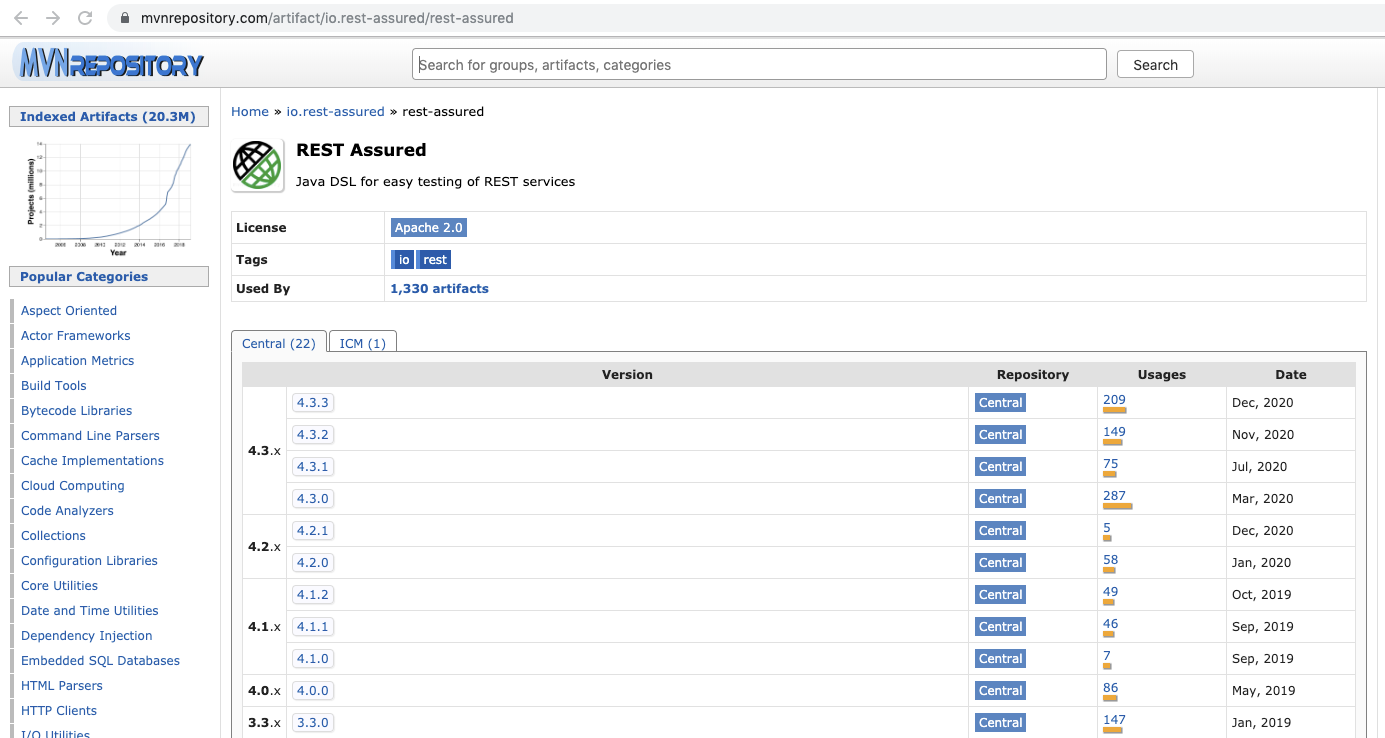
mvnRepository上的版本
getStart简单实例
推荐使用静态导入:直接使用里面的静态方法
import static io.restassured.RestAssured.*;
import io.restassured.RestAssured;
import io.restassured.response.Response;
import io.restassured.specification.RequestSpecification;
import org.testng.Assert;
import org.testng.annotations.Test;
import static io.restassured.RestAssured.*;

public class RAssuredDemo {

    /**
     *  重要的东西全都在 RestAssured, RequestSpecification, Response
     *  given() 解释: 返回一个 RequestSpecification
     *
     *      public static RequestSpecification given() {
     *         return createTestSpecification().getRequestSpecification();
     *     }
     *
     *     public static RequestSender when() {
     *         return createTestSpecification().getRequestSpecification();
     *     }
     *
     *         public static Response get(String path, Object... pathParams) {
     *         return (Response)given().get(path, pathParams);
     *     }
     *
     *     public static Response get(String path, Map<String, ?> pathParams) {
     *         return (Response)given().get(path, pathParams);
     *     }
     *
     *     public static Response post(String path, Object... pathParams) {
     *         return (Response)given().post(path, pathParams);
     *     }
     *
     *     public static Response post(String path, Map<String, ?> pathParams) {
     *         return (Response)given().post(path, pathParams);
     *     }
     */

    //java style,写起来比较繁琐
    @Test
    public void demoJava(){
        RestAssured restAssured = new RestAssured();
        RequestSpecification rs = restAssured.given();
        Response resp = rs.get("http://www.oklink.com");
        Assert.assertTrue(resp.getStatusCode() == 200, "status code is error");
    }


    // rest Assured style, 一路.几下就完事了
    @Test
    public void demo1(){
        given().
                get("http://www.oklink.com").
        then().
                statusCode(200);
    }

    @Test
    public void demoParams(){
        //注意不需要拼接?字符串
        Map<String, String > params = new HashMap<String, String>();
        params.put("offset","0");
        params.put("limit","20");
        params.put("blockHeight","2187588");

        Map<String, String> headers = new HashMap<String, String>();
        headers.put("accept-encoding","gzip");

        //查询某个区块高度的交易数据
        given().
                params(params).
                headers(headers).
        when().
                get("https://www.oklink.com/api/explorer/v1/okexchain/transactionsNoRestrict").
        then().
                statusCode(200).log().all();
    }

    @Test
    public void demoRes(){
        //注意不需要拼接?字符串
        Map<String, String > params = new HashMap<String, String>();
        params.put("offset","0");
        params.put("limit","20");
        params.put("blockHeight","2187588");

        Map<String, String> headers = new HashMap<String, String>();
        headers.put("accept-encoding","gzip");

        //查询某个区块高度的交易数据
        Response resp =
        given().
                params(params).
                headers(headers).
        when().
                get("https://www.oklink.com/api/explorer/v1/okexchain/transactionsNoRestrict");

        String strResp = resp.getBody().prettyPrint();

        //然后再用 fastJson 来处理数据

    }

}
参考
https://github.com/rest-assured/rest-assured/wiki/GettingStarted
版权所有,本文为原创文章,转载请注明出处

 浙公网安备 33010602011771号