

oracle审计

一.默认是否开启?
10g:
SQL> show parameter audit
NAME TYPE VALUE
------------------------------------ ----------- ------------------------------
audit_file_dest string /u01/app/oracle/admin/orcl/adump
audit_sys_operations boolean FALSE
audit_syslog_level string
audit_trail string NONE
SQL>
11g:
SQL> show parameter audit
NAME TYPE VALUE
------------------------------------ ----------- ------------------------------
audit_file_dest string /u01/app/oracle/admin/orcl11/a
dump
audit_sys_operations boolean FALSE
audit_syslog_level string
audit_trail string DB
SQL>
19c:(通过dbca创建的数据库默认为DB,否则为NONE)
DB
二.关于审计的参数以及取值
2.1.10g(10.2)
2.1.1. AUDIT_FILE_DEST
|
Property |
Description |
|
Parameter type |
String |
|
Syntax |
AUDIT_FILE_DEST = 'directory' |
|
Default value |
The first default value is: ORACLE_BASE/admin/DB_UNIQUE_NAME/adump The second default value is: ORACLE_HOME/rdbms/audit |
|
Modifiable |
ALTER SYSTEM ... DEFERRED |
|
Basic |
No |
AUDIT_FILE_DEST specifies the operating system directory into which the audit trail is written when the AUDIT_TRAIL initialization parameter is set to os, xml, or xml,extended. The audit records will be written in XML format if the AUDIT_TRAIL initialization parameter is set to XML. It is also the location to which mandatory auditing information is written and, if so specified by the AUDIT_SYS_OPERATIONS initialization parameter, audit records for user SYS.
2.1.2. AUDIT_SYS_OPERATIONS
|
Property |
Description |
|
Parameter type |
Boolean |
|
Default value |
false |
|
Modifiable |
No |
|
Range of values |
true | false |
|
Basic |
No |
AUDIT_SYS_OPERATIONS enables or disables the auditing of operations issued by user SYS, and users connecting with SYSDBA or SYSOPER privileges. The audit records are written to the operating system's audit trail. The audit records will be written in XML format if the AUDIT_TRAIL initialization parameter is set to XML.
2.1.3.AUDIT_SYSLOG_LEVEL
|
Property |
Description |
|
Parameter type |
String |
|
Syntax |
AUDIT_SYSLOG_LEVEL = facility.level |
|
Default value |
none |
|
Modifiable |
No |
|
Basic |
No |
AUDIT_SYSLOG_LEVEL enables OS audit logs to be written to the system via the SYSLOG utility if the AUDIT_TRAIL parameter is set to os.
The value of facility can be any of the following: USER, LOCAL0-LOCAL7, SYSLOG, DAEMON, KERN, MAIL, AUTH, LPR, NEWS, UUCP or CRON.
The value of level can be any of the following: NOTICE, INFO, DEBUG, WARNING, ERR, CRIT, ALERT, EMERG .
If you use this parameter, it is best to assign a file corresponding to every facility.level combination (especially kern.emerg) in syslog.conf . Sometimes these are assigned to print to the console in the default syslog.conf file. This can become annoying and will be useless as audit logs.Also, if you use this parameter, it is best to set the maximum length of syslog messages in the system to 512 bytes.
2.1.4. AUDIT_TRAIL
|
Property |
Description |
|
Parameter type |
String |
|
Syntax |
AUDIT_TRAIL = { none | os | db | db,extended | xml | xml,extended } |
|
Default value |
none |
|
Modifiable |
No |
|
Basic |
No |
AUDIT_TRAIL enables or disables database auditing.
Values:
- none
Disables database auditing.
- os
Enables database auditing and directs all audit records to the operating system's audit trail.
- db
Enables database auditing and directs all audit records to the database audit trail (the SYS.AUD$ table).
- db,extended
Enables database auditing and directs all audit records to the database audit trail (the SYS.AUD$ table). In addition, populates the SQLBIND and SQLTEXT CLOB columns of the SYS.AUD$ table.
- xml
Enables database auditing and writes all audit records to XML format OS files.
- xml,extended
Enables database auditing and prints all columns of the audit trail, including SqlText and SqlBind values.
You can use the SQL statement AUDIT to set auditing options regardless of the setting of this parameter.
2.2.11g(11.2)
2.2.1. AUDIT_FILE_DEST
|
Property |
Description |
|
Parameter type |
String |
|
Syntax |
AUDIT_FILE_DEST = 'directory' |
|
Default value |
The first default value is: ORACLE_BASE/admin/ORACLE_SID/adump The second default value, which is used if the first default value does not exist or is unusable, is: ORACLE_HOME/rdbms/audit Both of these default values are for Unix systems. Other platforms may have different defaults. |
|
Modifiable |
ALTER SYSTEM ... DEFERRED |
|
Basic |
No |
AUDIT_FILE_DEST specifies the operating system directory into which the audit trail is written when the AUDIT_TRAIL initialization parameter is set to os, xml, or xml,extended. The audit records will be written in XML format if the AUDIT_TRAIL initialization parameter is set to xml or xml, extended. It is also the location to which mandatory auditing information is written and, if so specified by the AUDIT_SYS_OPERATIONS initialization parameter, audit records for user SYS.
2.2.2. AUDIT_SYS_OPERATIONS
|
Property |
Description |
|
Parameter type |
Boolean |
|
Default value |
false |
|
Modifiable |
No |
|
Range of values |
true | false |
|
Basic |
No |
AUDIT_SYS_OPERATIONS enables or disables the auditing of top-level operations, which are SQL statements directly issued by users when connecting with SYSDBA or SYSOPER privileges. (SQL statements run from within PL/SQL procedures or functions are not considered top-level.) The audit records are written to the operating system's audit trail. The audit records will be written in XML format if the AUDIT_TRAIL initialization parameter is set to xml or xml, extended.
On UNIX platforms, if the AUDIT_SYSLOG_LEVEL parameter has also been set, then it overrides the AUDIT_TRAIL parameter and SYS audit records are written to the system audit log using the SYSLOG utility.
2.2.3. AUDIT_SYSLOG_LEVEL
|
Property |
Description |
|
Parameter type |
String |
|
Syntax |
AUDIT_SYSLOG_LEVEL = 'facility_clause.priority_clause' |
|
|
facility_clause::= { USER | LOCAL[0 | 1 | 2 | 3 | 4 | 5 | 6 | 7] | SYSLOG | DAEMON | KERN | MAIL | AUTH | LPR | NEWS | UUCP | CRON } |
|
|
priority_clause::= { NOTICE | INFO | DEBUG | WARNING | ERR | CRIT | ALERT | EMERG } |
|
Default value |
There is no default value. |
|
Modifiable |
No |
|
Basic |
No |
|
Examples |
AUDIT_SYSLOG_LEVEL = 'KERN.EMERG'; AUDIT_SYSLOG_LEVEL = 'LOCAL1.WARNING'; |
AUDIT_SYSLOG_LEVEL allows SYS and standard OS audit records to be written to the system audit log using the SYSLOG utility.
If you use this parameter, it is best to assign a file corresponding to every combination of facility and priority (especially KERN.EMERG) in syslog.conf . Sometimes these are assigned to print to the console in the default syslog.conf file. This can become annoying and will be useless as audit logs. Also, if you use this parameter, it is best to set the maximum length of syslog messages in the system to 512 bytes.
If AUDIT_SYSLOG_LEVEL is set and SYS auditing is enabled (AUDIT_SYS_OPERATIONS = TRUE), then SYS audit records are written to the system audit log.If AUDIT_SYSLOG_LEVEL is set and standard audit records are being sent to the operating system (AUDIT_TRAIL = os), then standard audit records are written to the system audit log.
2.2.4. AUDIT_TRAIL
|
Property |
Description |
|
Parameter type |
String |
|
Syntax |
AUDIT_TRAIL = { none | os | db [, extended] | xml [, extended] } |
|
Default value |
none |
|
Modifiable |
No |
|
Basic |
No |
AUDIT_TRAIL enables or disables database auditing.
Values:
none
Disables standard auditing. This value is the default if the AUDIT_TRAIL parameter was not set in the initialization parameter file or if you created the database using a method other than Database Configuration Assistant. If you created the database using Database Configuration Assistant, then the default is db.
os
Directs all audit records to an operating system file. Oracle recommends that you use the os setting, particularly if you are using an ultra-secure database configuration.
db
Directs audit records to the database audit trail (the SYS.AUD$ table), except for records that are always written to the operating system audit trail. Use this setting for a general database for manageability.
If the database was started in read-only mode with AUDIT_TRAIL set to db, then Oracle Database internally sets AUDIT_TRAIL to os. Check the alert log for details.
db, extended
Performs all actions of AUDIT_TRAIL=db, and also populates the SQL bind and SQL text CLOB-type columns of the SYS.AUD$ table, when available. These two columns are populated only when this parameter is specified.
If the database was started in read-only mode with AUDIT_TRAIL set to db, extended, then Oracle Database internally sets AUDIT_TRAIL to os. Check the alert log for details.
xml
Writes to the operating system audit record file in XML format. Records all elements of the AuditRecord node except Sql_Text and Sql_Bind to the operating system XML audit file.
xml, extended
Performs all actions of AUDIT_TRAIL=xml, and includes SQL text and SQL bind information in the audit trail.
You can use the SQL AUDIT statement to set auditing options regardless of the setting of this parameter.
Examples
The following statement sets the db, extended value for the AUDIT_TRAIL parameter. The new value takes effect after the database is restarted.
SQL> alter system set AUDIT_TRAIL=db, extended scope=spfile;
System altered.
SQL>
The following statement sets the xml, extended value for the AUDIT_TRAIL parameter. The new value takes effect after the database is restarted.
SQL> alter system set AUDIT_TRAIL=xml, extended scope=spfile;
System altered.
SQL>
The following statement sets the db value for the AUDIT_TRAIL parameter. The new value takes effect after the database is restarted.
SQL> alter system set AUDIT_TRAIL=db scope=spfile;
System altered.
SQL>
2.3.19c
2.3.1. AUDIT_FILE_DEST
AUDIT_FILE_DEST specifies the operating system directory into which the audit trail is written when the AUDIT_TRAIL initialization parameter is set to os, xml, or xml,extended.
|
Property |
Description |
|
Parameter type |
String |
|
Syntax |
AUDIT_FILE_DEST = 'directory' |
|
Default value |
The first default value is: ORACLE_BASE/admin/ORACLE_SID/adump The second default value, which is used if the first default value does not exist or is unusable, is: ORACLE_HOME/rdbms/audit Both of these default values are for UNIX systems. Other platforms may have different defaults. In a multitenant container database (CDB), both of these default values will be appended with the GUID of the pluggable database (PDB) to store audit records that belong to the PDB. For example, if the PDB's GUID is 03E1F908EE04252CE053B280E80AAAA3, the first default directory will be: ORACLE_BASE/admin/ORACLE_SID/adump/03E1F908EE04252CE053B280E80AAAA3 You can use the V$CONTAINERS view to query a PDB's GUID. |
|
Modifiable |
ALTER SYSTEM ... DEFERRED |
|
Modifiable in a PDB |
No |
|
Basic |
No |
The audit records will be written in XML format if the AUDIT_TRAIL initialization parameter is set to xml or xml, extended. It is also the location to which mandatory auditing information is written and, if so specified by the AUDIT_SYS_OPERATIONS initialization parameter, audit records for user SYS.
In a multitenant container database (CDB), the scope of the settings for this initialization parameter is the CDB. Although the audit trail is provided per pluggable database (PDB) in a CDB, this initialization parameter cannot be configured for individual PDBs.
2.3.2. AUDIT_SYS_OPERATIONS
AUDIT_SYS_OPERATIONS enables or disables the auditing of directly issued user SQL statements with SYS authorization. These include SQL statements directly issued by users when connected with the SYSASM, SYSBACKUP, SYSDBA, SYSDG, SYSKM, or SYSOPER privileges, as well as SQL statements that have been executed with SYS authorization using the PL/SQL package DBMS_SYS_SQL.
|
Property |
Description |
|
Parameter type |
Boolean |
|
Default value |
TRUE |
|
Modifiable |
No |
|
Modifiable in a PDB |
No |
|
Range of values |
TRUE | FALSE |
|
Basic |
No |
The audit records are written to the operating system's audit trail. The audit records will be written in XML format if the AUDIT_TRAIL initialization parameter is set to xml or xml, extended
On UNIX platforms, if the AUDIT_SYSLOG_LEVEL parameter has also been set, then it overrides the AUDIT_TRAIL parameter and SYS audit records are written to the system audit log using the SYSLOG utility.
In a CDB, the scope of the settings for this initialization parameter is the CDB. Although the audit trail is provided per PDB in a CDB, this initialization parameter cannot be configured for individual PDBs.
2.3.3. AUDIT_SYSLOG_LEVEL
AUDIT_SYSLOG_LEVEL allows SYS and standard OS audit records to be written to the system audit log using the SYSLOG utility.
|
Property |
Description |
|
Parameter type |
String |
|
Syntax |
AUDIT_SYSLOG_LEVEL = 'facility_clause.priority_clause' |
|
Syntax |
facility_clause::= { USER | LOCAL[0 | 1 | 2 | 3 | 4 | 5 | 6 | 7] | SYSLOG | DAEMON | KERN | MAIL | AUTH | LPR | NEWS | UUCP | CRON } |
|
Syntax |
priority_clause::= { NOTICE | INFO | DEBUG | WARNING | ERR | CRIT | ALERT | EMERG } |
|
Default value |
There is no default value. |
|
Modifiable |
No |
|
Modifiable in a PDB |
No |
|
Basic |
No |
|
Examples |
AUDIT_SYSLOG_LEVEL = 'KERN.EMERG'; AUDIT_SYSLOG_LEVEL = 'LOCAL1.WARNING'; |
If you use this parameter, it is best to assign a file corresponding to every combination of facility and priority (especially KERN.EMERG) in syslog.conf . Sometimes these are assigned to print to the console in the default syslog.conf file. This can become annoying and will be useless as audit logs. Also, if you use this parameter, it is best to set the maximum length of syslog messages in the system to 512 bytes.
If AUDIT_SYSLOG_LEVEL is set and SYS auditing is enabled (AUDIT_SYS_OPERATIONS = TRUE), then SYS audit records are written to the system audit log. If AUDIT_SYSLOG_LEVEL is set and standard audit records are being sent to the operating system (AUDIT_TRAIL = os), then standard audit records are written to the system audit log.
In a CDB, the scope of the settings for this initialization parameter is the CDB. Although the audit trail is provided per PDB in a CDB, this initialization parameter cannot be configured for individual PDBs.
2.3.4. AUDIT_TRAIL
AUDIT_TRAIL enables or disables database auditing.
|
Property |
Description |
|
Parameter type |
String |
|
Syntax |
AUDIT_TRAIL = { none | os | db [, extended] | xml [, extended] } |
|
Default value |
none |
|
Modifiable |
No |
|
Modifiable in a PDB |
No |
|
Basic |
No |
Values
none
Disables standard auditing. This value is the default if the AUDIT_TRAIL parameter was not set in the initialization parameter file or if you created the database using a method other than Database Configuration Assistant. If you created the database using Database Configuration Assistant, then the default is db.
os
Directs all audit records to an operating system file. Oracle recommends that you use the os setting, particularly if you are using an ultra-secure database configuration.
db
Directs audit records to the database audit trail (the SYS.AUD$ table), except for records that are always written to the operating system audit trail. Use this setting for a general database for manageability.
If the database was started in read-only mode with AUDIT_TRAIL set to db, then Oracle Database internally sets AUDIT_TRAIL to os. Check the alert log for details.
db, extended
Performs all actions of AUDIT_TRAIL=db, and also populates the SQL bind and SQL text CLOB-type columns of the SYS.AUD$ table, when available. These two columns are populated only when this parameter is specified. When standard auditing is used with DB, EXTENDED, then virtual private database (VPD) predicates and policy names are also populated in the SYS.AUD$ table.
If the database was started in read-only mode with AUDIT_TRAIL set to db, extended, then Oracle Database internally sets AUDIT_TRAIL to os. Check the alert log for details.
xml
Writes to the operating system audit record file in XML format. Records all elements of the AuditRecord node except Sql_Text and Sql_Bind to the operating system XML audit file.
xml, extended
Performs all actions of AUDIT_TRAIL=xml, and includes SQL text and SQL bind information in the audit trail.
You can use the SQL AUDIT statement to set auditing options regardless of the setting of this parameter.
In a CDB, the scope of the settings for this initialization parameter is the CDB. Although the audit trail is provided per PDB in a CDB, this initialization parameter cannot be configured for individual PDBs.
Examples
The following statement sets the db, extended value for the AUDIT_TRAIL parameter. The new value takes effect after the database is restarted.
Copy
SQL> alter system set AUDIT_TRAIL=db, extended scope=spfile;
System altered.
SQL>
The following statement sets the xml, extended value for the AUDIT_TRAIL parameter. The new value takes effect after the database is restarted.
Copy
SQL> alter system set AUDIT_TRAIL=xml, extended scope=spfile;
System altered.
SQL>
The following statement sets the db value for the AUDIT_TRAIL parameter. The new value takes effect after the database is restarted.
Copy
SQL> alter system set AUDIT_TRAIL=db scope=spfile;
System altered.
SQL>
三.测试
关于审计,数据库由四个参数,AUDIT_FILE_DEST、AUDIT_SYS_OPERATIONS、AUDIT_SYSLOG_LEVEL、AUDIT_TRAIL。 前面3个参数平时使用的不多,这里就不做测试。
我们重点测试AUDIT_TRAIL设置不同的值的时候审计记录是怎样记录的。
测试我们以11.2.0.4为测试库。后续测试19c数据库。
3.1.OS
alter system set AUDIT_TRAIL=OS scope=spfile;
SQL> show parameter audit
NAME TYPE VALUE
------------------------------------ ----------- ------------------------------
audit_file_dest string /u01/app/oracle/admin/orcl11/a
dump
audit_sys_operations boolean FALSE
audit_syslog_level string
audit_trail string DB
SQL> alter system set AUDIT_TRAIL=OS scope=spfile;
System altered.
SQL> shutdown immediate;
Database closed.
Database dismounted.
ORACLE instance shut down.
SQL> startup
ORACLE instance started.
Total System Global Area 776646656 bytes
Fixed Size 2257272 bytes
Variable Size 494931592 bytes
Database Buffers 276824064 bytes
Redo Buffers 2633728 bytes
Database mounted.
Database opened.
SQL> show parameter audit
NAME TYPE VALUE
------------------------------------ -----------
audit_file_dest string /u01/app/oracle/admin/orcl11/adump
audit_sys_operations boolean FALSE
audit_syslog_level string
audit_trail string OS
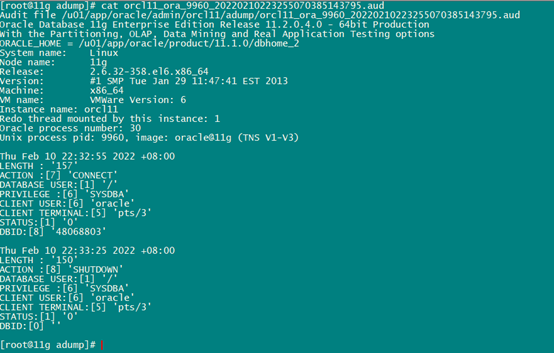
可以看到,当设置为OS之后,会生成audit_file_dest string目录下生成大量.aud文件,内容如下:
3.2. DB
清理audit_file_dest目录,并清空sys.aud$.
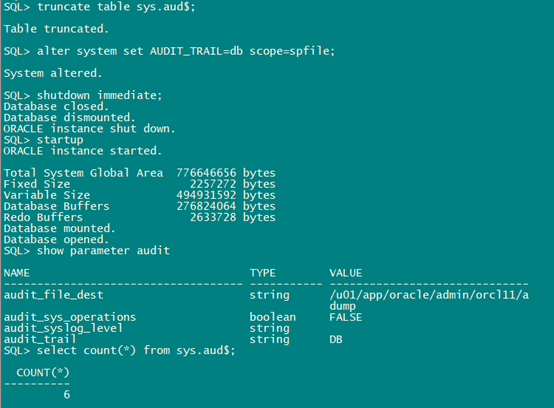
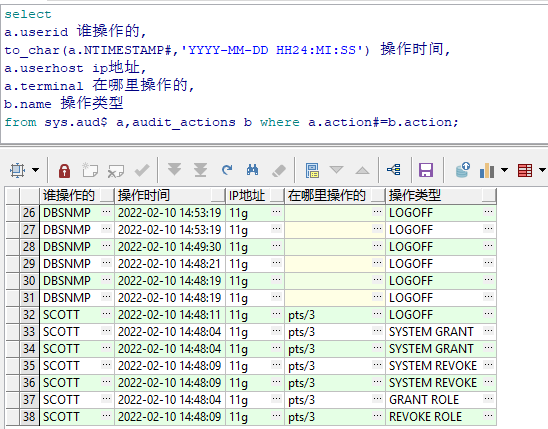
select a.userid,to_char(a.NTIMESTAMP#,'YYYY-MM-DD HH24:MI:SS'),a.userhost,a.terminal,b.name from sys.aud$ a,audit_actions b where a.action#=b.action;
当设置为DB之后,我们可以看到什么人在什么时间做了什么操作,但是看不到具体的操作语句。
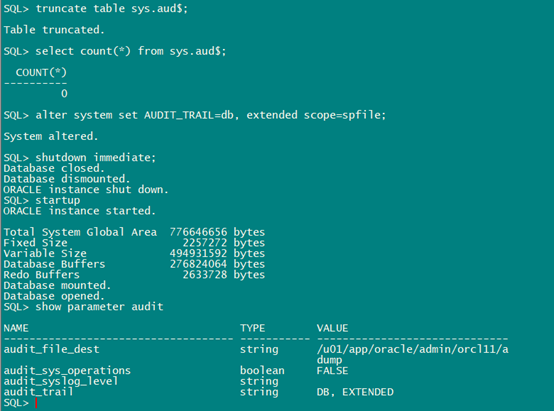
3.3. DB,EXTENDED
set line 32767
col 谁操作的 for a15
col 操作时间 for a20
col ip地址 for a5
col 在哪里操作的 for a10
col 操作类型 for a20
col 操作语句 for a500
set long 99999
set pages 9000
select
a.userid 谁操作的,
to_char(a.NTIMESTAMP#,'YYYY-MM-DD HH24:MI:SS') 操作时间,
a.userhost ip地址,
a.terminal 在哪里操作的,
b.name 操作类型,
a.sqltext 操作语句
from sys.aud$ a,audit_actions b
where a.action#=b.action and a.userid='SCOTT';
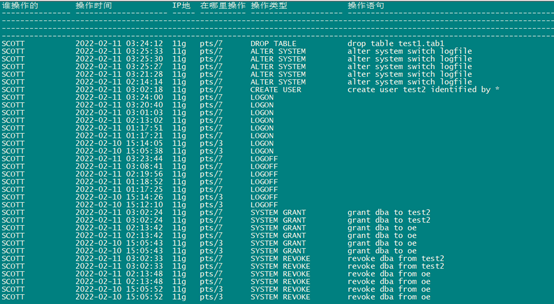
在这期间,我用scott用户除了执行上面的操作外,还执行了delete、select、create table、drop table(drop scott所属的表)等操作,但是这些操作没有审计到。
Drop不是scott自己的表的操作会被记录下来,delete自己的表或者delete其他用户的表都没有被审计到。
四.相关视图
DBA_STMT_AUDIT_OPTS
五.audit语句和noaudit语句
AUDIT
Purpose
Use the AUDIT statement to:
- · Track the issuance of SQL statements in subsequent user sessions. You can track the issuance of a specific SQL statement or of all SQL statements authorized by a particular system privilege. Auditing operations on SQL statements apply only to subsequent sessions, not to current sessions.
- · Track operations on a specific schema object. Auditing operations on schema objects apply to current sessions as well as to subsequent sessions.
audit::=
Description of the illustration
''audit_schema_object_clause.gif''
Semantics
audit_operation_clause
Use the audit_operation_clause to audit specified operations, regardless of the schema objects affected by the operations.
Example:
Auditing SQL Statements Relating to Roles: Example To choose auditing for every SQL statement that creates, alters, drops, or sets a role, regardless of whether the statement completes successfully, issue the following statement:
AUDIT ROLE;
To choose auditing for any statement that queries or updates any table, issue the following statement:
AUDIT SELECT TABLE, UPDATE TABLE;
To choose auditing for statements issued by the users hr and oe that query or update a table or view, issue the following statement
AUDIT SELECT TABLE, UPDATE TABLE
BY hr, oe;
To choose auditing for statements issued using the DELETE ANY TABLE system privilege, issue the following statement:
AUDIT DELETE ANY TABLE;
To choose auditing for statements issued using the CREATE ANY DIRECTORY system privilege, issue the following statement:
AUDIT CREATE ANY DIRECTORY;
To choose auditing for CREATE DIRECTORY (and DROP DIRECTORY) statements that do not use the CREATE ANY DIRECTORY system privilege, issue the following statement:
AUDIT DIRECTORY;
To choose auditing for every statement that reads files from the bfile_dir directory, issue the following statement:
AUDIT READ ON DIRECTORY bfile_dir;
To choose auditing for every SQL statement that queries the employees table in the schema hr, issue the following statement:
AUDIT SELECT
ON hr.employees;
The following statement specifies default auditing options for objects created in the future:
AUDIT ALTER, GRANT, INSERT, UPDATE, DELETE
ON DEFAULT;
NOAUDIT
Purpose
Use the NOAUDIT statement
to stop auditing operations previously enabled by the AUDIT statement.
The NOAUDIT statement
must have the same syntax as the previous AUDIT statement.
Further, it reverses the effects only of that particular statement. For
example, suppose one AUDIT statement
A enables auditing for a specific user. A second statement B enables auditing
for all users. A NOAUDIT statement
C to disable auditing for all users reverses statement B. However, statement C
leaves statement A in effect and continues to audit the user that statement A
specified.
To stop auditing of SQL statements, you must have the AUDIT SYSTEM system privilege.
To stop auditing of schema objects, you must be the owner of the object on which you stop auditing or you must have the AUDIT ANY system privilege. In addition, if the object you chose for auditing is a directory, then even if you created it, you must have the AUDIT ANY system privilege.
Examples
Stop Auditing of SQL Statements Related to Roles: Example If you have chosen auditing for every SQL statement that creates or drops a role, then you can stop auditing of such statements by issuing the following statement:
NOAUDIT ROLE;
Stop Auditing of Updates or Queries on Objects Owned by a Particular User: Example If you have chosen auditing for any statement that queries or updates any table issued by the users hr and oe, then you can stop auditing for queries by hr by issuing the following statement:
NOAUDIT SELECT TABLE BY hr;
The preceding statement stops auditing only queries by hr, so the database continues to audit queries and updates by oe as well as updates by hr.
Stop Auditing of Statements Authorized by a Particular Object Privilege: Example To stop auditing on all statements that are authorized by DELETE ANY TABLE system privilege, issue the following statement:
NOAUDIT DELETE ANY TABLE;
Stop Auditing of Queries on a Particular Object: Example If you have chosen auditing for every SQL statement that queries the employees table in the schema hr, then you can stop auditing for such queries by issuing the following statement:
NOAUDIT SELECT
ON hr.employees;
Stop Auditing of Queries that Complete Successfully: Example You can stop auditing for queries that complete successfully by issuing the following statement:
NOAUDIT SELECT
ON hr.employees
WHENEVER SUCCESSFUL;
This statement stops auditing only for successful queries. Oracle Database continues to audit queries resulting in Oracle Database errors
六. DBMS_FGA
https://docs.oracle.com/cd/E11882_01/appdev.112/e40758/d_fga.htm#ARPLS015
上面介绍的标准审计可以审计谁访问了哪些对象,但无法知道访问了哪些行或者列。
细粒度审计(FGA:Fine Grained Auditing)可以解决这个问题。
细粒度审计与标准审计的差异:
参数:标准审计必须用参数AUDIT_TRAIL在数据库级启用。这个参数不是动态的,必须重启数据库来使其生效。相比而言,FGA 不需要任何参数修改
启用:标准审计一旦被设置在一个对象上,标准审计将保持在那里。要解除它,必须用 NOAUDIT 命令删除审计选项。
类型:FGA只能够处理四种类型的语句:SELECT、INSERT、UPDATE 和 DELETE。而常规审计可以处理其它许多语句和权限,包括会话连接和断开
存储:标准审计可以写数据库表或 OS 文件,而FGA 日志仅写到数据库表 FGA_LOG$ 中
Summary of DBMS_FGA Subprograms
Table 66-1 DBMS_FGA Package Subprograms
|
Subprogram |
Description |
|
Creates an audit policy using the supplied predicate as the audit condition |
|
|
Disables an audit policy |
|
|
Drops an audit policy |
|
|
Enables an audit policy |
ADD_POLICY Procedure
This procedure creates an audit policy using the supplied predicate as the audit condition. The maximum number of FGA policies on any table or view object is 256.
Syntax
DBMS_FGA.ADD_POLICY(
object_schema VARCHAR2,
object_name VARCHAR2,
policy_name VARCHAR2,
audit_condition VARCHAR2,
audit_column VARCHAR2,
handler_schema VARCHAR2,
handler_module VARCHAR2,
enable BOOLEAN,
statement_types VARCHAR2,
audit_trail BINARY_INTEGER IN DEFAULT,
audit_column_opts BINARY_INTEGER IN DEFAULT);
Parameters
Table 66-2 ADD_POLICY Procedure Parameters
|
Parameter |
Description |
Default Value |
|
|
The schema of the object to be audited.
|
|
|
|
The name of the object to be audited. |
- |
|
|
The unique name of the policy. |
- |
|
|
A condition in a row that indicates a monitoring condition. |
|
|
|
The columns to be checked for access. These can include OLS hidden columns or object type columns. The default, |
|
|
|
The schema that contains the event handler. The default, |
|
|
|
The function name of the event handler; includes the package name if necessary. This function is invoked only after the first row that matches the audit condition in the query is processed. If the procedure fails with an exception, the user SQL statement will fail as well. |
|
|
|
Enables the policy if TRUE, which is the default. |
|
|
|
The SQL statement types to which this policy is applicable: |
|
|
|
Destination (DB or XML) of fine grained audit records. Also specifies whether to populate |
|
|
|
Establishes whether a statement is audited when the query references any column specified in the audit_column parameter or only when all such columns are referenced. Examples DBMS_FGA.ADD_POLICY ( object_schema => 'scott', object_name => 'emp', policy_name => 'mypolicy1', audit_condition => 'sal < 100', audit_column => 'comm,sal', handler_schema => NULL, handler_module => NULL, enable => TRUE, statement_types => 'INSERT, UPDATE', audit_trail => DBMS_FGA.XML + DBMS_FGA.EXTENDED, audit_column_opts => DBMS_FGA.ANY_COLUMNS); |
DISABLE_POLICY Procedure
This procedure disables an audit policy.
Syntax
DBMS_FGA.DISABLE_POLICY(
object_schema VARCHAR2,
object_name VARCHAR2,
policy_name VARCHAR2 );
Parameters
Table 66-4 DISABLE_POLICY Procedure Parameters
|
Parameter |
Description |
|
|
The schema of the object to be audited. (If |
|
|
The name of the object to be audited. |
|
|
The unique name of the policy. |
The default value for object_schema is NULL. (If NULL, the current log-on user schema is assumed.)
Examples
DBMS_FGA.DISABLE_POLICY (
object_schema => 'scott',
object_name => 'emp',
policy_name => 'mypolicy1');
DROP_POLICY Procedure
This procedure drops an audit policy.
Syntax
DBMS_FGA.DROP_POLICY(
object_schema VARCHAR2,
object_name VARCHAR2,
policy_name VARCHAR2 );
Parameters
Table 66-5 DROP_POLICY Procedure Parameters
|
Parameter |
Description |
|
|
The schema of the object to be audited. (If |
|
|
The name of the object to be audited. |
|
|
The unique name of the policy. |
Examples
DBMS_FGA.DROP_POLICY (
object_schema => 'scott',
object_name => 'emp',
policy_name => 'mypolicy1');
