

Part I Routing Basics
 CCIE PROFESSION DAVELOPMENT VOLUME I : A detailed examination of interior routing protocols
CCIE PROFESSION DAVELOPMENT VOLUME I : A detailed examination of interior routing protocols
Introduction
Objectives
This book's objective is to make CCIES,not to make people who can pass the CCIE lab.
Audience
The beginners,the intermediate-level networking professinal and highly exsperiend networking expert are all suitable to read this book.
Organizations
The foureen charpters of the book are divided into three parts.
Part I(chaopter one to chaopter four) examine the basic of networks and routing.
Part II(charpter five to charpter ten) covers the TCP/IP Interior Gateway Protocols.
Part III(charpter eleven to charpter fourteen) examines the tools avaliable for creating and managing interoperability with multiple routing protocols,as well as such tools as default routers and router filtering.
Foreword
Due to different traffic patterns and the equality of serice required by each type of information,solid hands-on experience is imperative for managing,desiging,and troubleshooting these networks.
The author highly recommends that you use these books as a hands-on learning tool by duplicating the examples and case studies using Cisco producys.
Part I Routing Basics
Charpter 1 Basic Concepts:Internetworks,Routers,and Address
Bicycles with Motors
A LAN is like a bike with a motor,and we don't make Mopeds!
Physically, a LAN accomplishes resource pooling among a group of devices by connecting them to a common, shared medium, or date link.
The MAC(Medium Access Control) , as the name implies, dictates how each machine will access and share a given medium.
So far, a LAN has been defined as bing a cummunity of devices such as PCs, printers, and servers coexisting on a commun communications medium and following a common protocol that regulates how they access the medium.
Data Link Address
Because two individuals cannot be uniquely identified, date is occasionally deliverd incorrectly and a process must be implemented to correct the error.
When data is delievered on a LAN, it is encapsulated with an entity called frame, a kind of binary envelop. Think of data encapsulation as being the digital equivalent of placing a letter inside an envolep. A destination address and a return(source) address are written on the outside of the envelop.
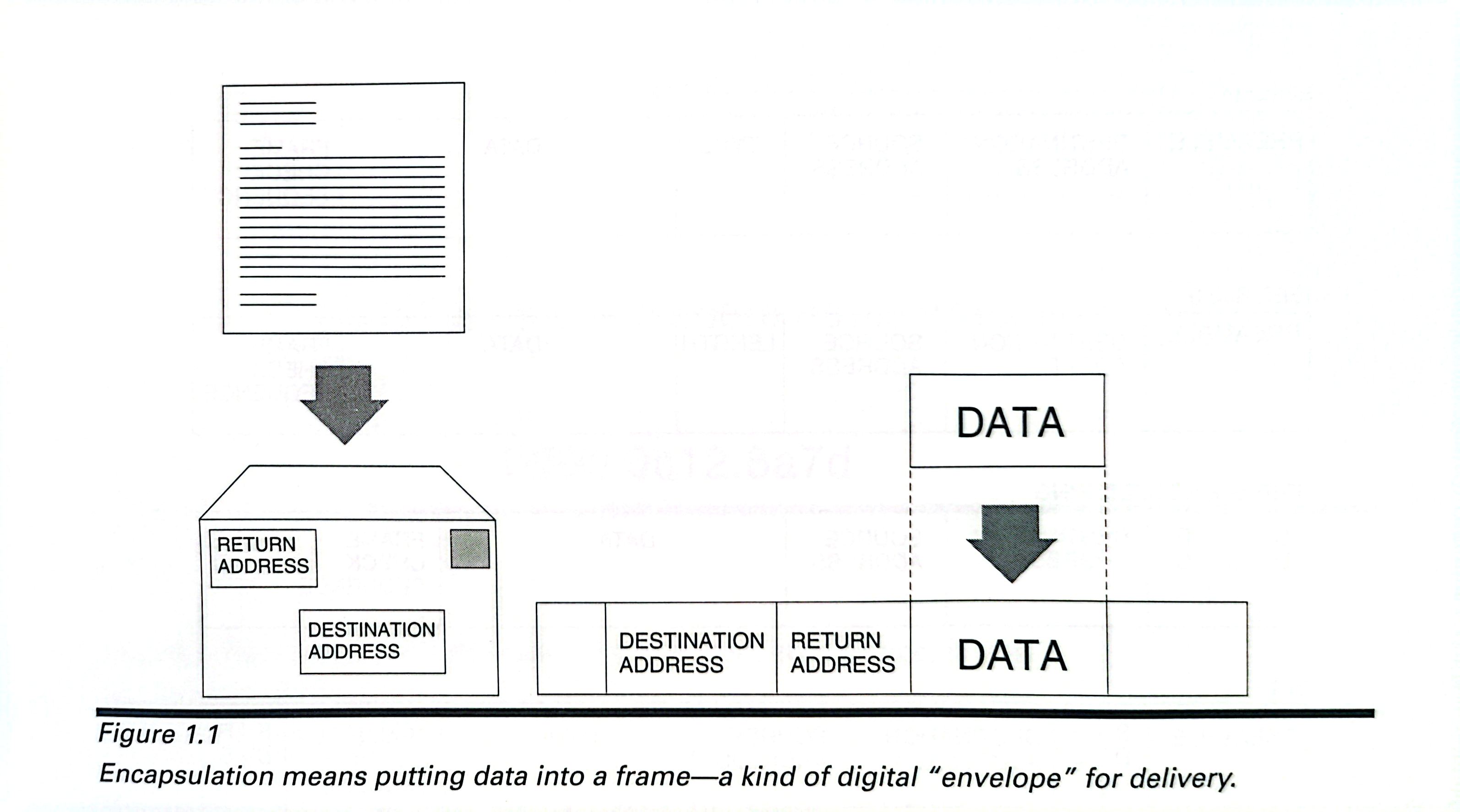
The format of the address depends on the particular MAC protocol, but all the addresses serve the same purpose: to uniquely idendify the machine for which the frame is destined and the device from which it was sent.
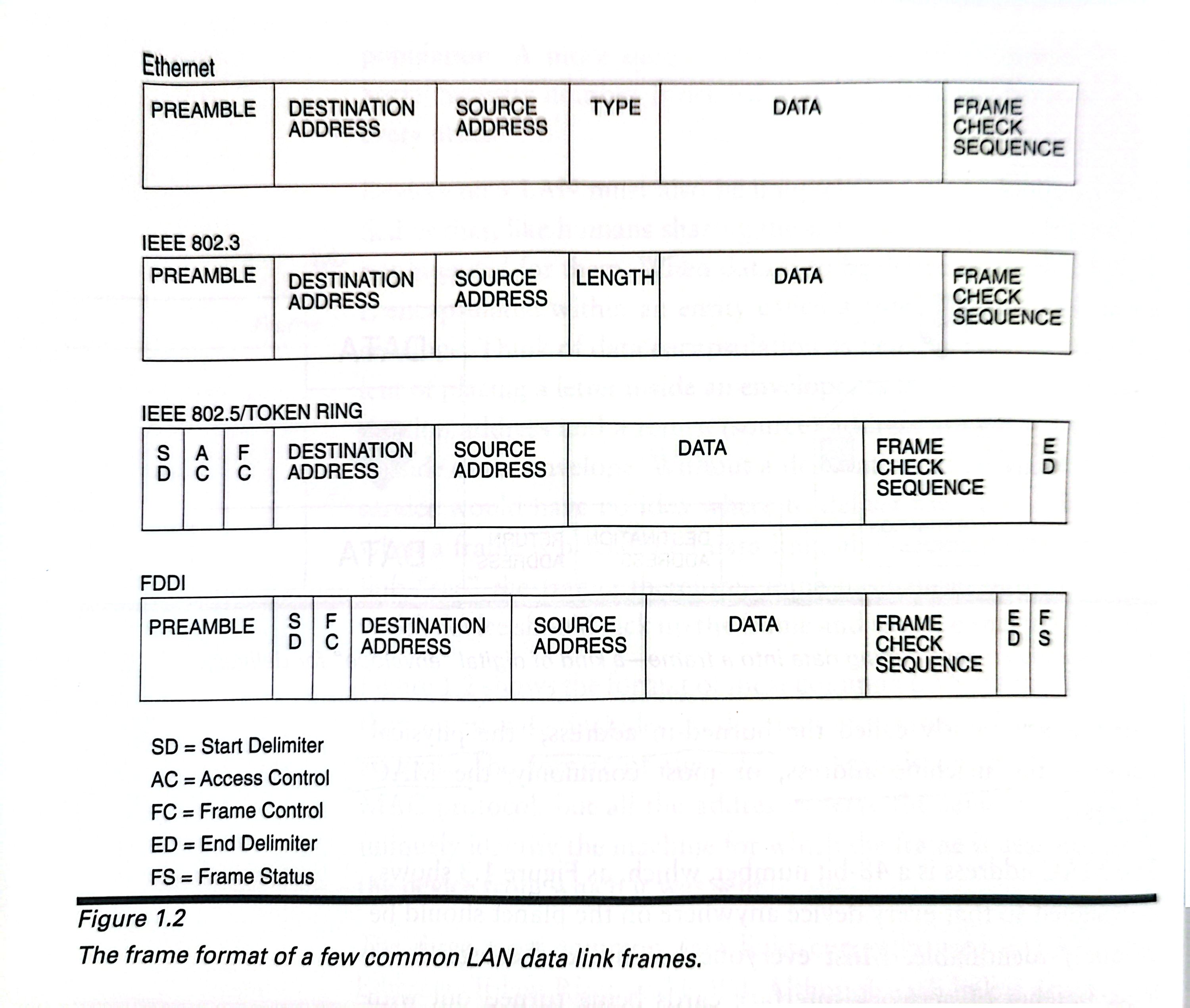
Although each link is drastically different from the others, they share a common format for addressing devices on the network. This format is variouslly called the brund-in address, the physical address, the machine address, or most commonly, the MAC address.
The MAC addresss is a 48-bit number, which, as Figure 1.3 shows, is designed so that every device anywhere on the planet shoud be uniquely identifiable.
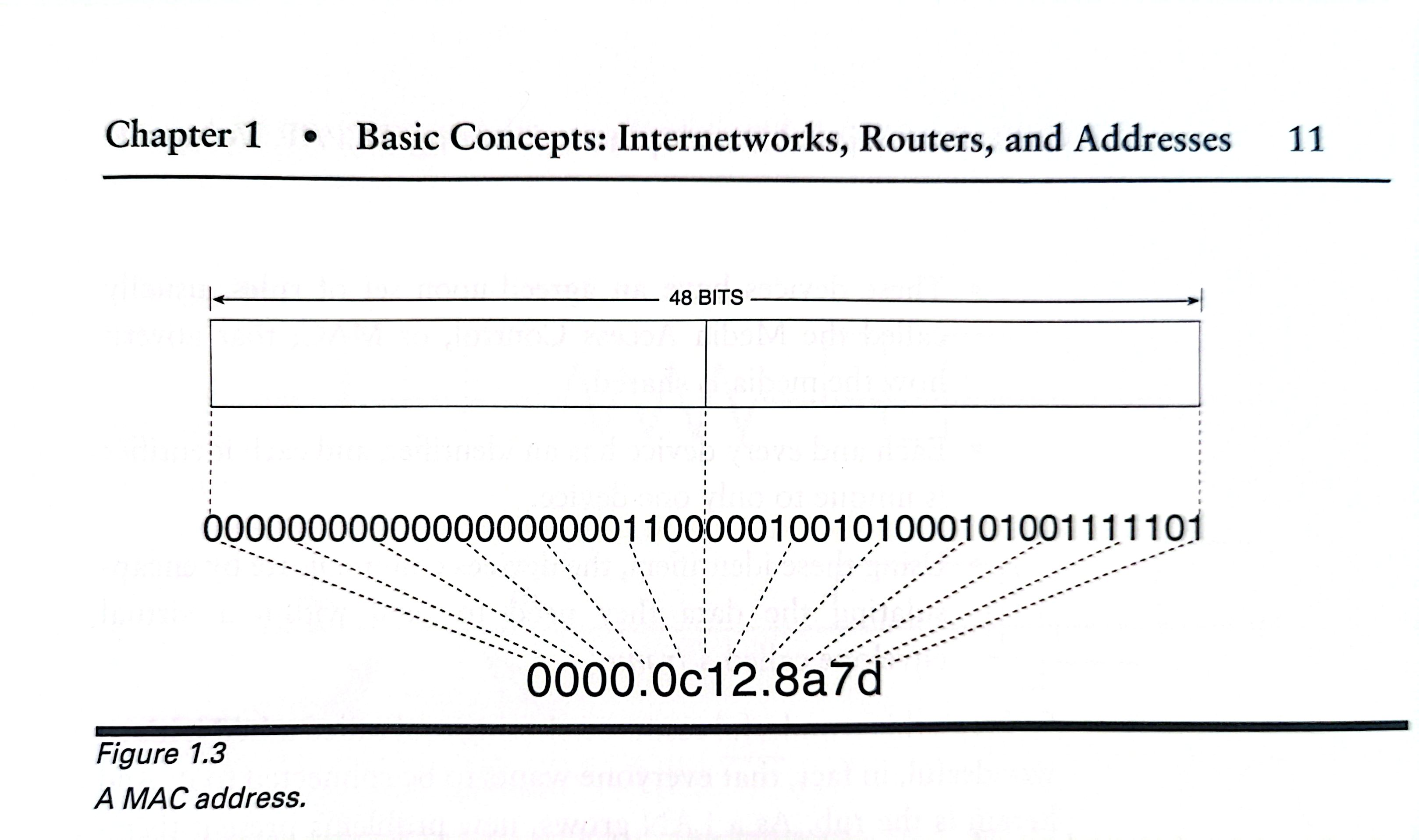
Although the MAC address are by convention referred to as "address",they are really name, which means it is a part of that device and goes wherever the device goes.
The information presented so far may be distilled into a few brief statements:
A date link communication network is a group of two or more devices connected by a common, shared medium.
These devices have a agreed-upon set of rules, usually called the Media Access Control, or MAC, that govern how the media is shared.
Each and every device has an identifier, and each identifier is unique to only one device.
Using these identifiers, the devices communicates by encapsulating the data they need to send with a virtual envelop called frame.
Repeaters and Bridges
As a LAN grows, new problems present themselves.
The first problem is one of the physical distance.
Repeaters are added to the wire at certain intervals to alleviate the difficulties associated with excesssive distance. A repeater is placed on the media some distance from the signal source but still near enough to be correctly interpret the signal(see Figure 1.5). It then repeats the signal by producing a new, clean copy of the old degraded signal.
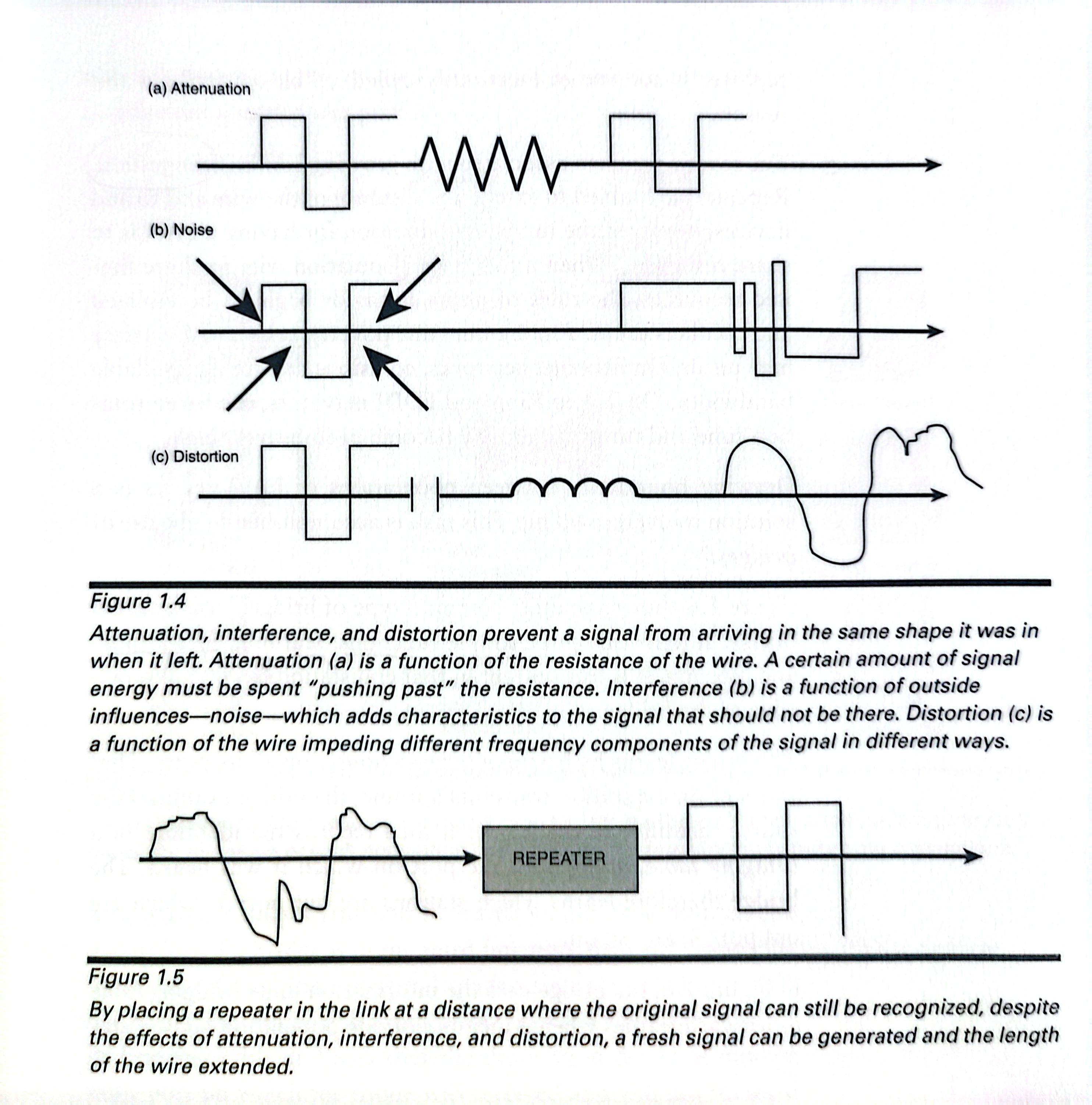
The second problem associated with growing LAN is congestion.
Drawing boundaries between polulations of LAN devices is a solution to overcrowding. This task is accomplished by the use of bridge.
It performs three simple functions: learning, forwarding, and filtering.
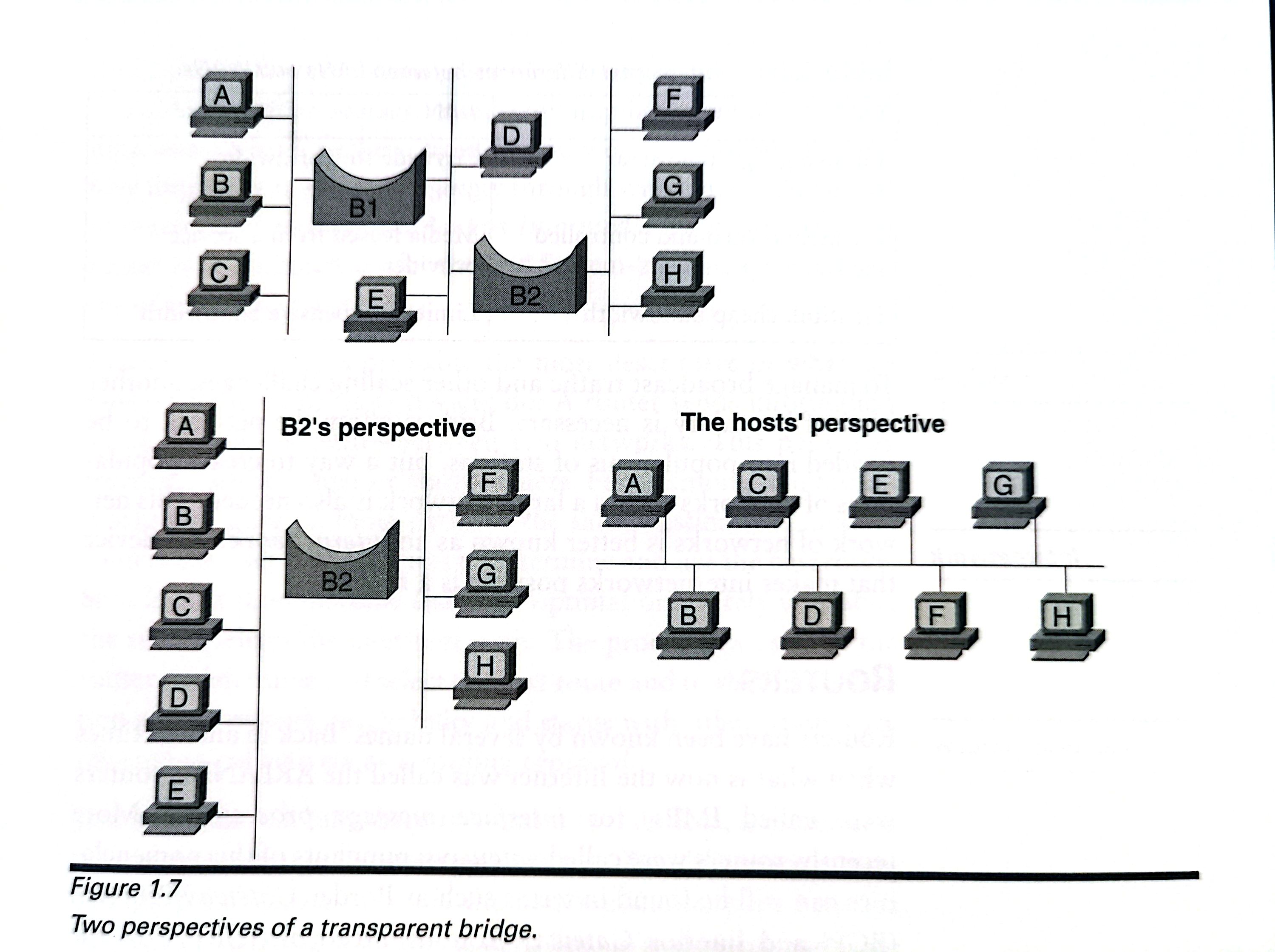
The bridge learns by listening promiscuously on all its ports.That is, every time a station transmits a frame, the bridge examines the source identifier of the frame. It then records the identifier in a bridging table, along with the port on which is was heard. The bridge therefore learns which stations are out port 1, which are out port 2, and so on.
The bridge uses the information in its bridging table to forward frames when a member of one polulation——say, a station out port 1——wants to send a frame to member of another population: a station out port 2.
IF a station out port 2 sends a frame to another station out port 2, the bridge will examine the frame. The bridge consults its bridging table and sees that the destination device is out the same port on which the frame was received and will not forward the frame. The frame is filtered.
Filtering means that only frames that need to be forwarded to another polupation will be, and resources are conserved. Ethernet networks are divided into collision domains.
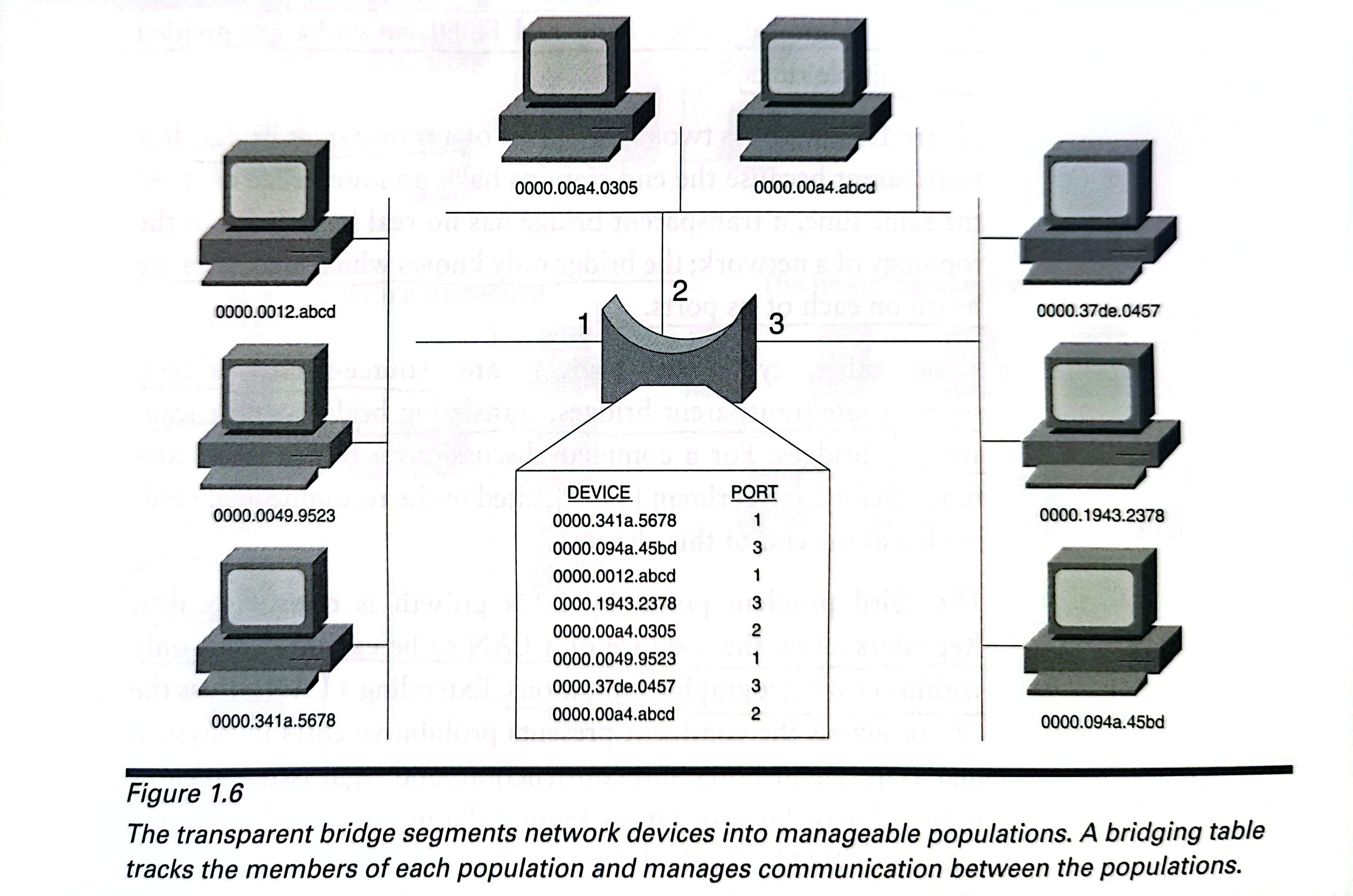
Fifure 1.7 illustrates two perspectives of a transparent bridge.It is transparent because the end stations have no knowledge of it.
The third problem posed by LAN growth is one of locality.
Extending a LAN across the city presents prohibitive costs in physical materials, engineering and construction,and legal issues such as right-of-way. Such distances require the use of a wide-area network, or WAN.
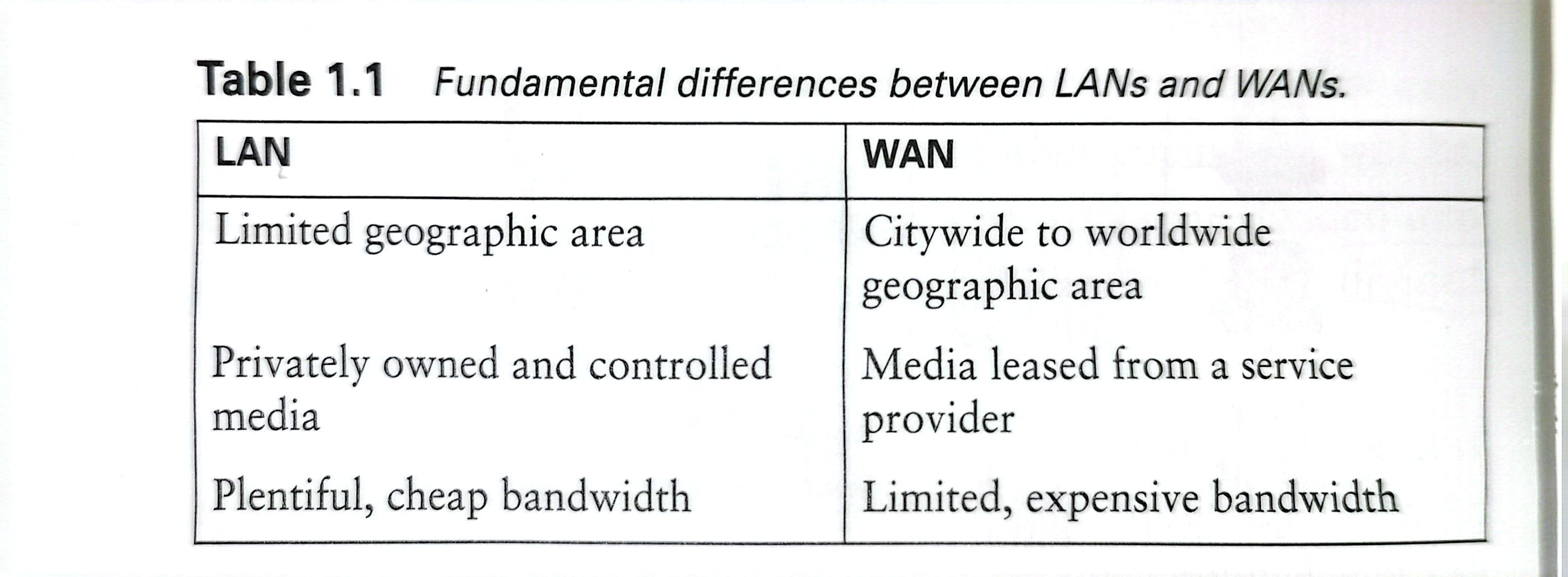
A fourth problem is one of scalability.
As a bridged network becomes larger and larger, more and more stations will be originating broadcast traffic, soon, broadcast frames cause the network to become congested again.
To manage broadcast traffic and other scaling chanllenges, another kind of boundry is necesary.Bridges allow the network to be divided into polulations of station, but a way to create populations of networks with a larger network is alse needed. This network of network is better known as an internetwork.The device that makes internetwork possible is a router.
Routers
Routers have been known by several names, such as IMPs(interface message processors), gateways and Intermediate Systems(IS).
Interface message processors: a router swtiches date messages, or packets, from one network to another.
Gateway: a router is a gateway through which data can be sent to reach another network.
Intermediate System: a router is an intermediary for the End System-to-End System delivery of internetwork data.
A router sends information along a route——a path——between two networks.In internetworks that have multiple paths to the same destination, modern routers use a set of procedures to determine and use the best route.The procedures used by the routersto determine and select best route and to share information about network reachability and status with other routers are referred to collectively as a routing protocol.
Just as a data link may directly connect devices, a router alse creates a connection between two devices.The difference is that it is a logical path.
To be delivered across the logical path of a routed internetwork, data must also be encapsulated; the digital envelope used by routers is a packet.
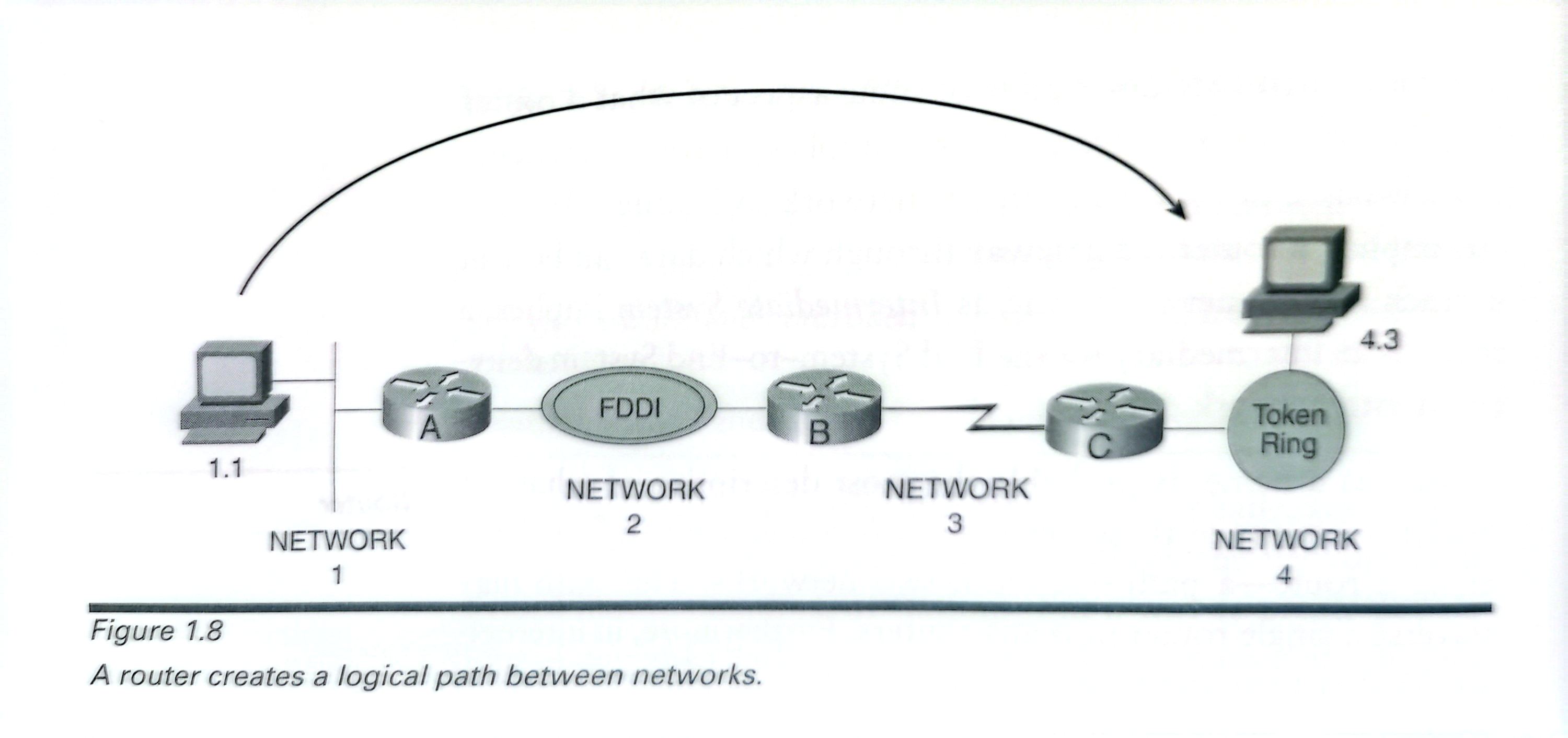
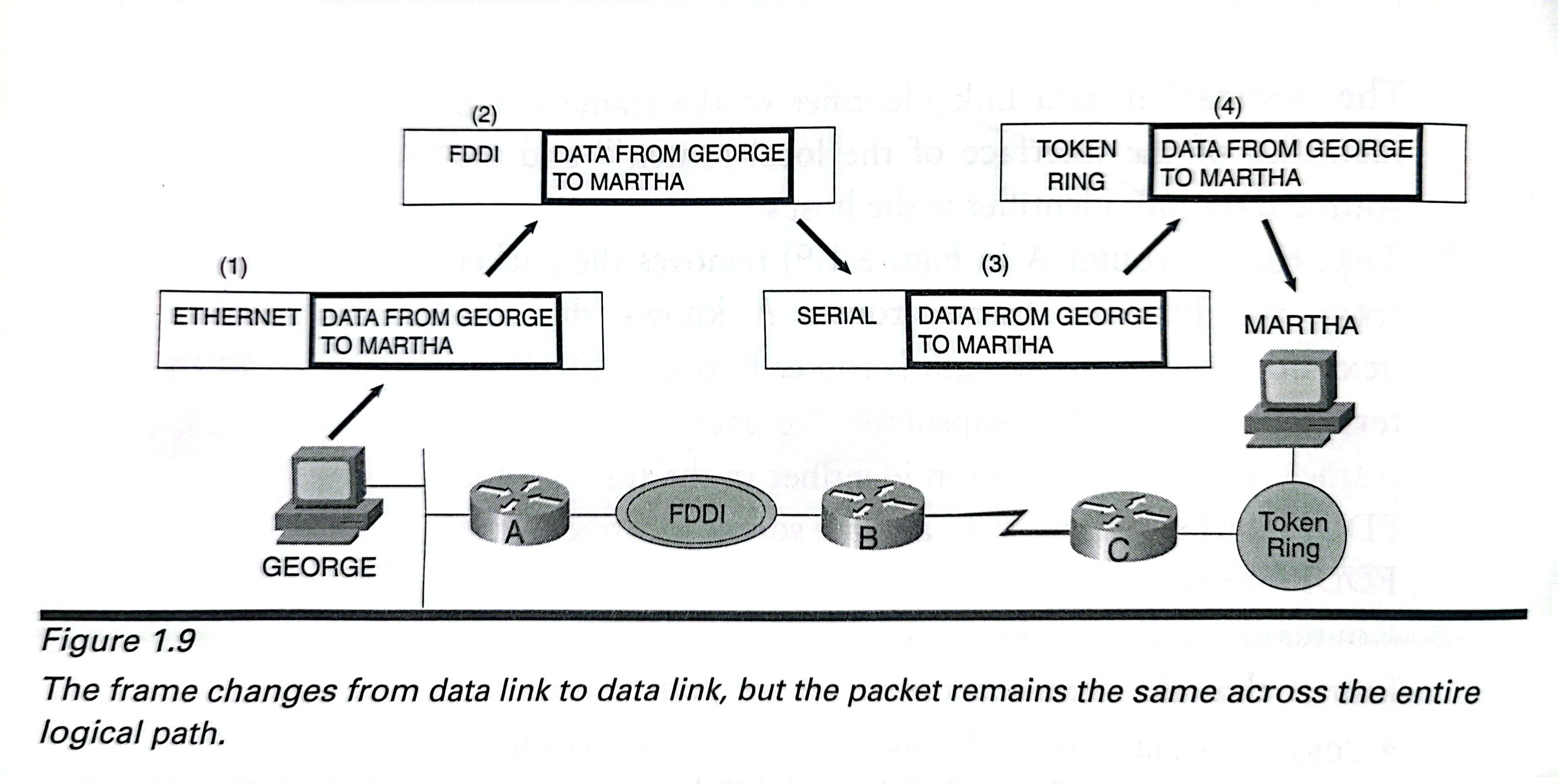
The packet remains the same from end to end:
1.The originating host encapsulates the data to be lelivered within a packet.The packet must then be delivered across the host's data link to the local router that host's default gateway——so the host encapsulates the packet within a frame.This operation is the same as placing an envelope inside of a larger envelope,for example,inserting an envelope containing a letter into a Federal Express envelope. The destination data link identifier of the frame is theidentifier of the interface of the local router,and the source data link identifier is the host's.
2.That router(router A in Figure1.9)removes the packetfrom the Ethernet frame;router A knows that thenext-hop router on the path is router B,out is FDDI interface,so router A encapsulates the packet in an FDDIframe.Now the destination identifier in the frame is theFDDI interface of router B,and the source identifier is the FDDI interface of router A.
3.Router B removes the packet from the FDDI frame,knows that the next-hop router on the path is router Cacross the serial link,and sends the packet to C encapsu-lated in the proper frame for the serial link.
4.Router C removes the packet and recognizes that the sta-tion for which the packet is destined is on its directly con-nected Token Ring network;C encapsulates the packet in a Token Ring frame with the destination identifier of thedestination station and the source identifier of its TokenRing interface.The packet has been delivered.
The key to understanding this entire process is to notice that the frames and their related data link identifiers, which have relevance only for each individual network, change for each network the packet traverses. The packet remains the same form end to end.
Network Addresses
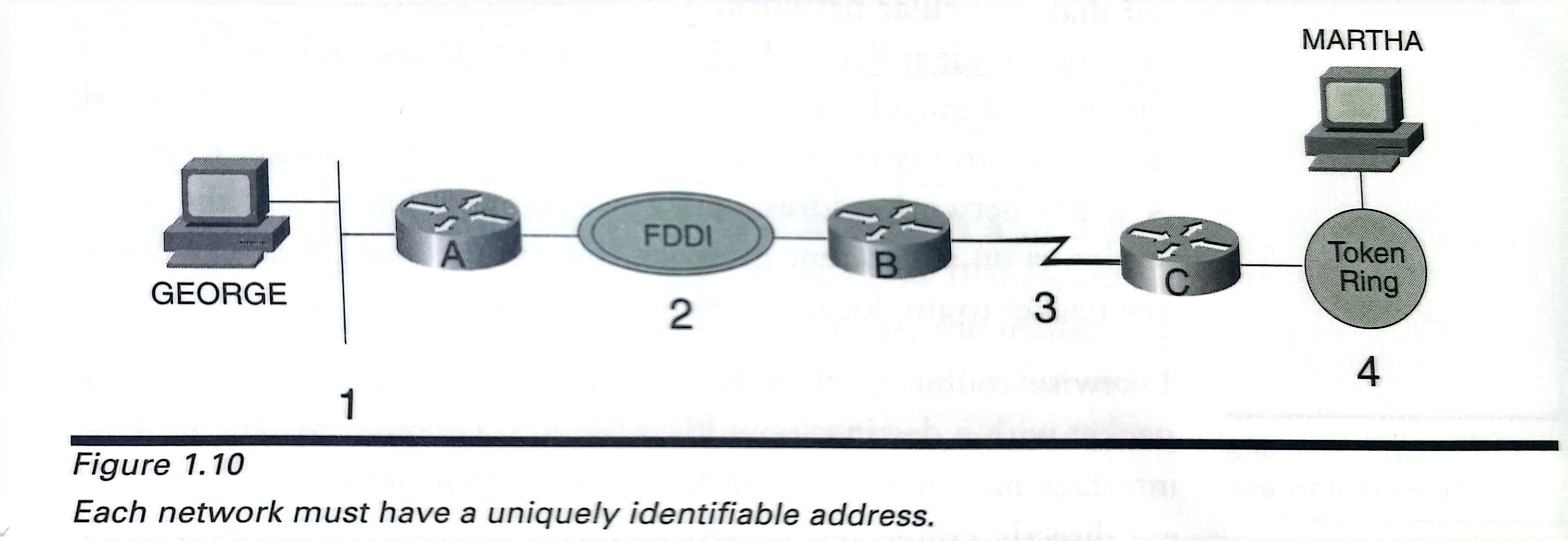
Each member network in a routed internetwork requires a unique idendifier: network address.
Figure 1.10 suggests a type of network address. Notich that every network has its own unique address.
Let's back in Figure 1.9:
How did the originating host know that the packet needed to be belivered to its gateway for routing?And how did the routers know where to send the packet?
The routers can deliver the packet because the originating host put a destination address in the packet.From the perspective of the router,the destination address is all that isneeded.As a rule,all routers really care about is the location of each network.Individual devices are not relevant to the router;the router only needs to deliver the packet to the correct destinationnetwork.When the packet arrives at the network,the data link identifier can be used to deliver the data to the individual device on the network.
The purpose of a router is to deliver packets to the proper destination networks. As such, the only individual devices router typically care about are other routers.
The network address must have both a network identifier and a host identifier(Figure 1.11)
When the routers sees that the destination address of a packet is one of its directly connected networks, how does the router know where to deliever the packet?
Likewise router C must be able to recognize,“I've received apacket with a destination address of 4.3.Because my Token Ring interface has an address of 4.1,I know that network4is one ofmy directly connected networks.As a member of that networkmyself,I know that station 4.3 has a MAC identifier of 0000.2354.AC6B;I'll just pop this packet into a Token Ringframe and deliver it.”
How did the originating host know that the packet needed to be delieverd to its default gateway for routing?
The origi-nating host must be able to recognize its own and others'network addresses,to say in effect:“I need to deliver this packet to device 4.3.My network address is1.2;therefore,I know that the desti-nation is on a different network than mine,and I'll need to sendthe packet to my local router for delivery.”
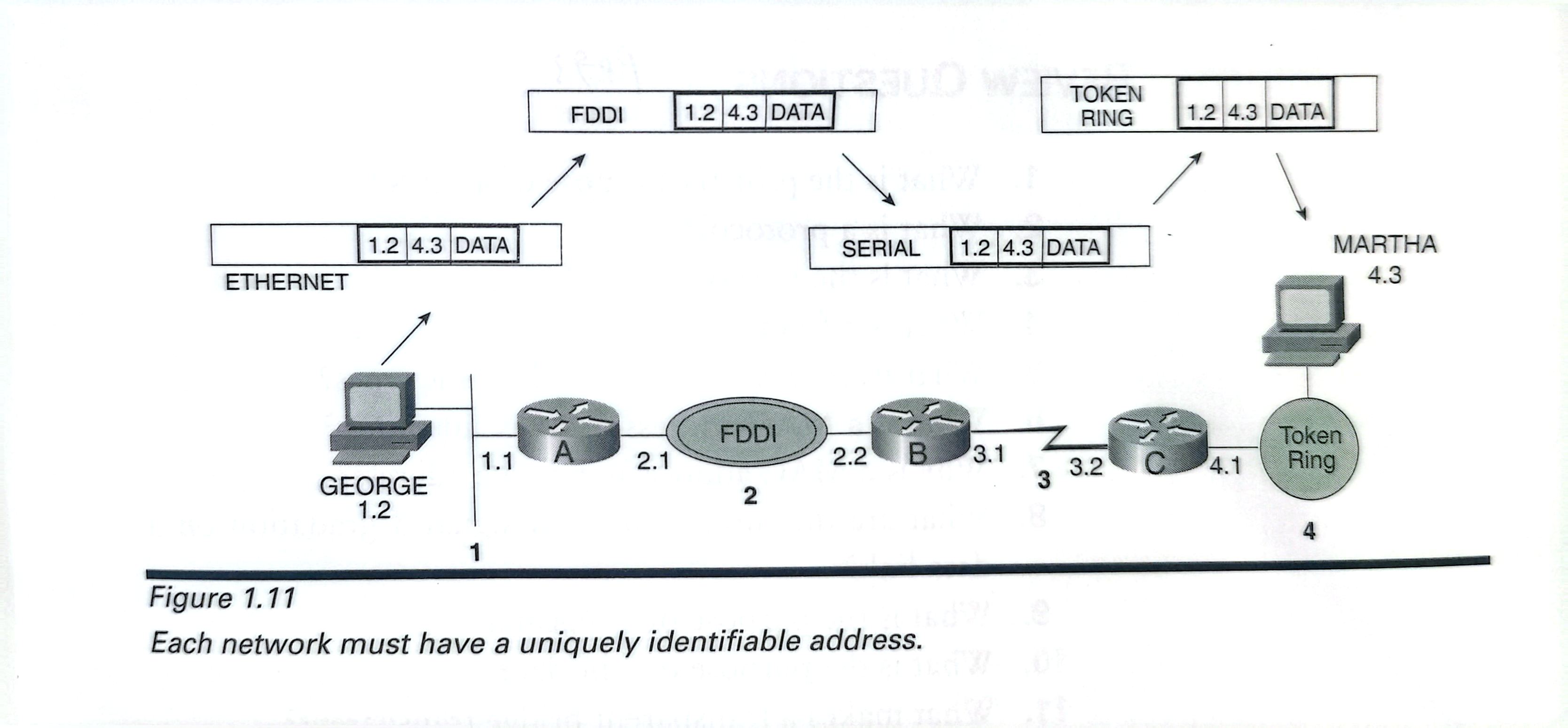
acnnewwork mosnave a umyuery emmaie auuress.
LOOKING AHEAD
This chapter has established that a network address must have both a network portion and a host portion and that some mechanism must exist for mapping a network address to a data link identifier.Chapter2,“TCP/IP Review,” shows how IP meets these requirements.It examines the IP address format,the method by which IP does network-to-data link mappings,and a few other mechanisms important to the IP routing process.
Charpter 2 TCP/IP Review
This purpose of this charpter is to examine the details of the protocols that enable, control, or contribute to the routing of TCP/IP, not to do an in-depth study of the TCP/IP protocol suite.
A biref review of TCP/IP's layers will be useful in understanding how the various functions and services examined in this charpter interrelate.
The TCP/IP Protocols Layers
Figure 2.1 shows the TCP/IP protocol suite in relationship to the OSI reference model.

The physical layer contains the protocols relating to the physical medium on which TCP/IP will be communicating.
- Electrical/optical protocols describe signal characteristcs.
- Mechanical protocols are spefications such as the dimensions of a connector or the metallic makeup of a wire.
- Function protocols describe what something does.
- Procedural protocols describe how something is done.
The data link layer contains the protocols that control the physical layer: how the medium is accessed and shared, how device on the medium are identified, and how data is framed before being transmitted on the medium.
The internet layer is primarily responsible for enabling the routing of data across logical internetwork paths, by defining a packet format and a addressing format.
The host-to-host layer,corresponding to the OSI transport layer,specifies the protocols that control the internet layer,much as the data link layer controls the physical layer.Both the host-to-host and data link layers can define such mechanisms as flow and error control.The difference is that while data link protocols control traffic on the data link——the physical medium connecting two devices——the transport layer controls traffic on the logical link——the end-to-end connection of two devices whose logical connection traverses a series of data links.
The application layer corresponds to the OSI session,presentation,and application layers.Although some routing protocols such as BGP and RIP reside at this layer,the most common services of the application layer provide the interfaces by which user applications access the network.
A function common on the protocol suite of Figure 2.1 and any other protocol suites is multiplexing between layers.
The IP Packet Header
Figure 2.2 shows the format of the IP packet header.

Version(four bits) idendifies the IP version to which the packet belongs, as shown in Table 2.1. Version 6(IPv6) sometimes refered to as "next-generation IP(IPng)"

Header Length is a four-bits field that tells, as the name implies, the length of the IP header.The reason this field is included is that the Options field. The minimum length of IP header is 20 octets, and the options may increase this size up to a maximun of 24 octets.This field describes the length of the header in terms of 32-bit words——five for minimun 160-bit size and six for the maxmimum.(jus like figure 2.8 shows)
Type of Service(TOS)is an eight-bit field that can be used for specifying special handling of the packet.This field actually can be broken down into two subfields:Precedence and TOS.Precedence sets a priority for the packet,the way a package might be sent overnight,2-day delivery,or general post.TOS allows the selection of a delivery service in terms of throughput,delay,reliabiity,and monetary cost.Although this field is not commonly used(all the bits will usually be set to zero),early specifications of the OpenShortest Path First(OSPF)protocol called for TOS routing.Also,the Precedence bits are occasionally used in Quality of Service(QoS)applications.

Total Length is a 16-bit field specifying the total length of the packet, including the header, in octets.The largest decimal number that can be described with 16 is 65,535, the maximum possible size of an IP packet is 65,535 octets.
Identifier is a 16-bit field used in conjunction with the Flags and Fragment Offset fields for fragmentation of a packet.Packets must be fragmented into smaller packets if the original length exceeds the Maximum Transmission Unit(MTU)of a data link through which they pass.For example,consider a 5,000-byte packet traveling through an internetwork.It encounters a data link whose MTU is 1,500 bytes-that is,the frame can contain a maximum packet size of 1,500 bytes.The router that places the packet onto this data link must first fragment the packet into chunks of no more than 1,500 octets each.The router then mark seach fragment with the same number in the Identifier field so that a receiving device can identify the fragments that go together.
Flags is a three-bit field in which the first bit is unused.The secondis the Don't Fragment(DF) bit.The DF bit can be used in troubleshooting to determine a path's MTU.When the DF bit is set to one,a router cannot fragment the packet.If the packet cannot be forwarded without fragmenting,the router drops the packet and sends an error message to the source.This function enables the testing of MTUs in an internetwork.The DF bit can be set using the Extended Ping utility on Cisco routers,as shown in Figure 2.4.

The third bit is the More Fragments(MF)bit.When a router fragments a packet,it sets the MF bit to one in all but the last fragmentso that the receiver knows to keep expecting fragments until it encounters a fragment with MF=0.
Fragment Offset is a 13-bit field that specifies the offset,in units of eight octets,from the beginning of the header to the beginning of the fragment.Because fragments may not always arrive in sequence,the Fragment Offset field allows the pieces to be reassembled in the correct order.
Note that if a single fragment is lost during a transmission,the entire packet must be resent and refragmented at the same point in the internetwork.Therefore,error-prone data links could causea disproporrionate delay.And if a fragment is lost because of congestion,the retransmission of the entire series of fragments may increase the congestion.
Time to Live(TTL)is an eight-bit field that will be set with a certain number when the packet is first generated.As the packet is passed from router to router,each router will decrement this number.If the number reaches zero,the packet will be discarded and an error message will be sent to the source.This process prevents “lost” packets from wandering endlessly through an internetwork.
As originally conceived,the TTL was specified in seconds;if apacket was delayed more than a second in a router,the router would adjust the TTL accordingly.However,this approach is difficult to implement and is rarely supported.Most routers simply decrement the TTL by one,no matter what the actual delay,so the TTL is really a hop count.The recommended default TTL is 64,although values such as 15 and 32 are not uncommon.
Some trace utilities,such as Cisco's trace command,make use of the TTL field.If the router is told to trace the route to a host address such as 10.11.12.13,the router will send three packets with the TTL set to one;the first router will decrement it to zero,drop the packets,and send back error messages to the source.By reading the source address of the error messages,the first router on the path is now known.The next three packets will be sent with a TTL of two.The first router decrements to one,the second to zero,and an error message is received from the second router.The third set has a TTL of three,and so forth,until the destination is found.All routers along the internetwork path will have identified themselves.Figure 2.5 shows the output from a trace on a Cisco router.

Protocol is an eight-bit field that gives the “address,” or protocol number,of the host-to-host or transport layer protocol for which the information in the packet is destined.Table 2.2 shows a few ofthe more common of the 100 different protocol numbers currently assigned.


Header Checksum is the error correction field for the IP header.The checksum is not calculated for the encapsulated data;UDP,TCP,and ICMP have their own checksums for doing this.The field contains a 16-bit one's complement checksum,calculated by the originator of the packet.The receiver will again calculate a 16-bit one's complement sum,including the original checksum.If no errors have occurred during the packet's travels,the resulting check-sum will be all ones.Remember that each router decrements theTTL;therefore,the checksum must be recalculated at each router.RFC1141discusses some strategies for simpliying this calculation.
Source and Destination Addresses are the 32-bit IP addresses of the originator of the packet and the destination of the packet.The format of IP addresses is covered in the next section,“IP Addresses.”
Options is a variable-length field and,as the name implies,is optional.Space is added to the packet header to contain either source-generated information or for other routers to enter information;the options are used primarily for testing.The most frequently used options follow.
- Loose source routing,in which a series of IP addresses for router interfaces is listed.The packet must pass through each of these addresses,although multiple hops may betaken between the addresses.
- Strict source routing,where again a series of router addresses is listed.Unlike loose source routing,the packet must follow the route exactly.If the next hop is not the next address on the list,an error occurs.
- Record route provides room for each router to enter the address of its outgoing interface as the packet transits so that a record is kept of all routers the packet encounters.Record route provides a function similar to trace except that the outgoing interfaces both on the path to the destination and on the return path are recorded.
- Timestamp is an option similar to record route except each router also enters a timestamp-the packet not only keep strack of where it has been but also records when it was there.
All these options may be invoked by using the Extended Ping on Cisco routers.Record route is used in Figure 2.4,loose source routing and timestamp are used in Figure 2.6,and strict source routing is used in Figure 2.7.


Padding ensures that the header ends on a 32-bit boundary by adding zeros after the option field until a multiple of 32 is reached.
A protocol analyzer capture of an IP header is shown below. You can see the fields of an IP packet's header and the values contained in each field in this protocol analyzer displat.
Compare the information shown with Figure 2.2.

IP ADDRESSES
IP addresses are 32 bits long;like all network-level addresses,theyhave a network portion and a host portion.The network portion uniquely identifies the data link(that is,the network)and is common to all devices attached to the network.The host portion uniquely identifies a particular device attached to the network.
There are several ways to represent the32bits of an IP address.For instance,the32-bit IP address
00001010110101100101011110000011
could be represented in decimal as
181,819,267.
The binary format is cumbersome,and the decimal format istime-consuming to calculate.A better format is shown in Figure 2.9.The 32 bits of the address comprise four octets,each of whichcan be represented with a decimal number between0and255,with dots between the decimal representations.In the figure,the 32-bit address is mapped into a dotted-decimal representation.
An important distinction to remember when working with IP addresses is that dotted decimal is just an easy way for humans toread and write IP addresses.Always remember that the router is not reading an address in terms of four octets;rather,the routersees a 32-bit binary string.Many pitfalls can be avoided by keep-ing this fact firmly in mind.
Probably the most distinctive characteristic of IP addresses is that unlike other network-level addresses,the network and host portions can vary in size within the 32-bit boundaries.That is,the network portion might take up most of the32bits or the host portion might or they might divide the bits equally.Protocols,such as NetWare and AppleTalk,were designed for use in relatively small internetworks,and as a result their network-level addresses have fixed-length network and host portions.This arrangement certainly makes life easier;a receiving device knows to read a certain number of bits into the address to find the network part,and the rest is host address.
TCP/IP,however,was designed from the first to be flexible enoughto be used in any internetwork,from the tiny to the colossal.This flexibility makes IP addresses more difficult to manage.The basics of administeraing IP address are presented in this section,and then some more advanced techniques are introduced in Charpter 7,"Routing Information Protocol Version 2."

The First Octet Rule
The big,medium,and small networks described thus far map toaddress classes as follows:
- Class A IP addresses are for big internetworks.The firstoctet is the network portion,and the last three octets arethe host portion.Only256numbers are available in theeight-bit network part,but224or16,777,216numbersare available in the host part of each of those networkaddresses.
- Class B addresses are for medium-size internetworks.Thefirst two octets are the network portion,and the last twooctets are the host portion.There are216or65,536availablenumbers in the network part and an equalnumber in the host part.
- Class C addresses are just the opposite of class A.The firstthree octets are the network portion,and the last octet isthe host portion.


The first octet rule, illustrated in Figure 2.11, provides the means to make such a distinction and can be described as follows:
- For class A addresses,the first bit of the first octet-that is,the left-most bit of the entire 32-bit string-is always setto zero.Therefore,we can find the minimum and maximum numbers in the class A range by setting all the remaining bits in the first octet to zero(for the minimum)and one(for the maximum).This action results in the decimal numbers 0 and 127 with a few exceptions:0 is reserved as part of the default address,(Chapter12,“Default Routes and On-Demand Routing”),and 127 is reserved for internal loopback addresses.That leaves 1 through 126;any IP address whose first octet is between 1 and 126 inclusive is a class A address.
- Class B addresses always have their left-most bit set to one and the second bit set to zero.Again finding the minimum and maximum number of the first octet by setting all remaining bits to zero and then to one,we see in Figure 2.9 tha tany address whose first ocet is in the decimal range 128 through 191 is a class B address.
- In class C addresses,the first two bits are set to one,and the third bit is set to zero.The result is a first octet range of 192 through 223.

Address Masks
The address mask is a 32-bit string,one bit for each bit of the IPaddress.As a 32-bit string,the mask can be represented in dotted-decimal format just like an IP address.This representation tends to be a stumbling block for some beginners:Although the address mask can be written in dotted decimal,it is not an address.Table 2.3 shows the standard address masks for the three classes of IP address.

For each bitdithe IP address performs a Boolean(logical) AND fynction with the corresponding bit of the address mask.
A logical AND is performed on the IP address and its mask forevery bit position;the result is shown in Figure 2.12.In the result,every network bit is repeated,and all the host bits become zeros.So by assigning an address of 172.21.35.17 and a mask of255.255.0.0 to an interface,the device will know that the interface belongs to network 172.21.0.0.Applying the AND operator to an IP address and its address mask always reveals the network address.

An address and mask are assigned to an interface of a Cisco router(in this example,the E0 interface)by means of the following commands:
Smokey(config)#interface ethernet 0
Smokey(config-if)#ip address 172.21.35.17 255.255.0.0
Subnets and Subnet Masks
The only way to make class A,B,or C addresses practical is by dividing each major address,such as 172.21.0.0,into subnet workaddresses.Recall two facts:
- The host portion of an address can be used as desired.
- The network portion of an IP address is determined by theaddress mask assigned to that interface.
Figure 2.13 shows an internetwork to which the major class Baddress 172.21.0.0 has been assigned.Five data links are interconnecting the routers,each one of which requires a network address.As it stands,172.21.0.0 would have to be assigned to a single data link,and then four more addresses would have to be requested for the other four data links.

The IP address now has three parts:the network part,the subnet part,and the host part.The address mask is now a subnet mask,or a mask that is longer than the standard address mask.The first two octets of the address will always be 172.21,but the third octet-whose bits are now subnet bits instead of host bits-may range from 0 to 255.The internetwork in Figure 2.12 has subnets 1,2,3,4,and 5(172.21.1.0 through 172.21.5.0).Up to 256 subnets may be assigned under the single class B address,using the mask shown.
Two words of caution are in order.First,not all routing protocolscan support subnet addresses in which the subnet bits are all zerosor all ones.The reason is that these protocols,called classful protocols,cannot differentiate between an all-zero subnet and the major network number.For instance,subnet 0 in Figure 2.13 would be 172.21.0.0;the major IP address is also 172.21.0.0.The two cannot be distinguished without further information.
Likewise,classful routing protocols cannot differentiate a broadcast on the all-ones subnet from an all-subnets broadcast address.For example,the all-ones subnet in Figure 2.13 would be 172.21.255.0.For that subnet,the all-hosts broadcast address would be 172.21.255.255,but that is also the broadcast for all hosts on all subnets of major network 172.21.0.0.Again,the two addresses cannot be distinguished without further information.RIP version 1 and IGRL are both classful routing protocols;Chapter 7 introduces classless routing protocols,which can indeed usethe all-zeros and all-ones subnets.
The second caution has to do with the verbal description of subnets and their masks.Subnetting the third octet of a class Baddress,as is done is Figure 2.13,is very common;also commonis hearing people describe such a subnet design as “using a class Cmask with a class B address,” or “subnetting a class B address intoa class C.” Both descriptions are wrong!Such descriptions frequently lead to misunderstandings about the subnet design or to a poor understanding of subnetting itself.The proper way todescribe the subnetting scheme of Figure 2.12 is either as “a class B address with 8 bits of subnetting,"or as“a class B address with a 24-bit mask.”

Although the address mask must be specified to Cisco routers indotted decimal,using the command shown previously,the mask may be displayed by various show commands in any of the three formats by using the command ip netmask format[declhexlbit]inline configuration mode.For example,to configure a router to display its masks in bitcount format,use:
Gladys(config)#line vty4
Gladys(config-line)#ip netmask-format bit
Designing Subnets
When designing subnets and their masks,the number of available subnets under a major network address and the number of available hosts on each subnet are both calculated with the same formula:\(2^n-2\),where n is the number of bits in the subnet or host space and 2 is subtracted to account for the unavailable all-zeros and all-ones addresses.For example,given a class A address of 10.0.0.0,a subnet mask of 10.0.0.0/16(255.255.0.0) means that the 8-bit subnet space will yield \(2^8 -2\)=254 available subnets and \(2^8*2^8-2\)=65,534 host addresses available on each of those subnets.On the other hand,a mask of 10.0.0.0/24(255.255.255.0)means that a 16-bit subnet space is yielding 65,534 subnets and an 8-bit host space is yielding 254 host addresses for each subnet.
The following steps are used to subnet an IP address:
- Determine how many subnets are required and how many hosts per subnet are required.
- Use the \(2^n\) -2 formula to determine the number of subnetbits and the number of host bits that will satisfy the requirements established in step 1.If multiple subnet maskscan satisfy the requirements,choose the one that will best scale to future needs.For example,if the internetwork is most likely to grow by adding subnets,choose more subnet bits;if the internetwork is most likely to grow by adding hosts to existing subnets,choose more host bits.Avoid choosing a scheme in which either all subnets or all host addresses within the subnets will be used up immediately,leaving no room for future growth.
- Working in binary,determine all available bit combinations in the subnet space;in each instance,set all the host bits to zero.Convert the resulting subnet addresses to dotted decimal.These are the subnet addresses.
- For each subnet address,again working in binary,write all possible bit combinations for the host space without changing the subnet bits.Convert the results to dotted decimal;these are the host addresses available for each subnet.
The importance of doing the last two steps in binary cannot be overemphasized.The single greatest source of mistakes when working with subnets is trying to work with them in dotted decimal witbout understanding what is happening at the binary level.Again,dotted decimal is for convenience in reading and writing IP addresses.Routers and hosts see the addresses as 32-bit binary strings;to successfully work with IP addresses,they must be seenthe way the routers and hosts see them.
When configuring subnets,always work in binary instead of dotted decimal.
The last paragraph may seem a bit overzealous in light of the examples given so far;the patterns of subnet and host addresseshave been quite apparent without having to see the addresses and masks in binary.The next section uses the four design steps to derive a subnet design in which the dotted-decimal representationsare not so obvious.
Breaking the Octet Boundary
Step 1:Figure 2.15 shows the internetwork of Figure 2.13 but witha class C address of 192.168.100.0 assigned.There are five data links;therefore,the address must be subnetted to provide for atleast five subnet addresses.The illustration also indicates the number of hosts(including router interfaces)that need to be addressed on each subnet.The maximum host address requirement is 25 for the two ethernets.Therefore,the full subnetting requirements are at least five subnets and at least 25 host addresses per subnet.

Step2:Applying the \(2^n-2\) formula,three subnet bits and five hostbits will satisfy the requirements:\(2^3\)-2=6 and $ 2 ^5$-2=30.AclassC mask with three bits of subnetting is represented as 255.255.255.224 in dotted decimal.
Step 3:Figure 2.16 shows the derivation of the subnet bits.The subnet mask derived in step 2 is written in binary,and the IP address is written below it.Vertical lines are drawn as markers for the subnet space,and within this space all possible bit combinations are written by counting up from zero in binary.

In Figure 2.17,the unchanged network bits are filled in to the left of the subnet space and the host bits,which are all zeros in the subnet addresses,are filled in to the right of the subnet space.The results are converted to dotted decimal,and these are the six subnet addresses(remembering that the first and last addresses,which have 000 and 111 in the subnet space,cannot be used).

Step 4:The last step is to calculate the host addresses avaiable to each subnet.This step is done by choosing a subnet and,keepingthe network and subnet bits unchanged,writing all bit combinations in the host space by counting up from zero in binary.
Figure 2.18 shows this step for subnet 192.168.100.32.Notice the patterns in the results:The first address,in which the host bits are all zero,is the subnet address.The last address,in which the host bits are all one,is the broadcast address for subnet 192.168.100.32.The host addresses count up from the subnet address to the broadcast address,and if the sequence were to continue,the next address would be the second subnet,192.168.100.64.

The importance of understanding subnetting at the binary level should now be clear.Presented with an address such as 192.168.100.160,you cannot be sure whether it is a host address,a subnet address,or a broadcast address.Even when the subnet mask is known,things are not always readily apparent.
Readers are encouraged to calculate all host addresses for all the remaining subnets in the example and to carefully observe the patterns that result in the addresses.Understanding these patterns will help in situations such as the one presented in the next section.
Troubleshooting a Subnet Mask
A stepwise method for finding the subnet and broadcast address of a host address:
- Write the given subnet mask in binary.
- Write the IP host address in binary.
- Knowing the class of the host address,the subnet bits ofthe mask should be apparent.Using the mask bits as aguide,draw a line between the last network bit and the first subnet bit of the address.Draw another line between the last subnet bit and the first host bit.
- Write the network and subnet bits of the address,setting all host bits to zero.The result is the address of the subnet to which the host address belongs.
- Again write the network and subnet bits of the address,this time setting all host bits to one.The result is the broadcast address of the subnet.
- Knowing that the subnet address is the first address in the sequence and that the broadcast address is the last address in the sequence,you also know that all addresses between these two are valid host addresses.
Figure 2.19 shows these steps applied to 172.30.0.141/25.The address is a class B,so it is known that the first 16 bits are the network bits;therefore,the last nine bits of the 25-bit mask mark the subnet space.The subnet address is found to be 172.30.0.128,andthe broadcast address is 172.30.0.255.Knowing that the valid host addresses for the subnet are bounded by these two addresses,it is determined that the host addresses for subnet 172.30.0.128 are 172.30.0.129 through 172.30.0.254.


 浙公网安备 33010602011771号