

Vue的二级联动和图片上传
-
-
dal层绑定下拉框
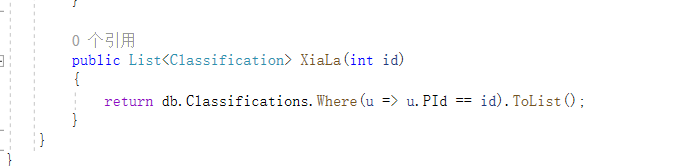
在控制器里面写二级联动的代码
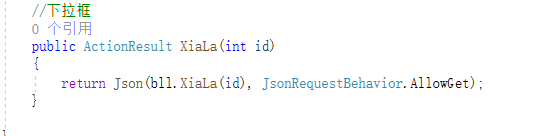
在视图中用二级联动 加载一下
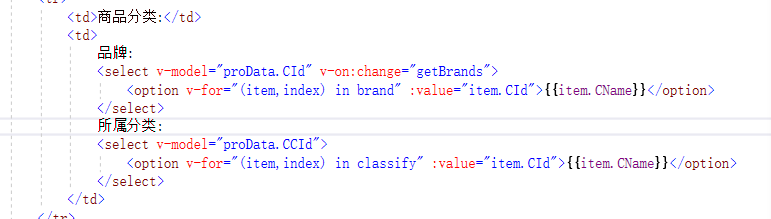
 //加载品牌
            getBrand() {
                axios.get('/Commodity/XiaLa?id=0').then(res => {
                    this.brand = res.data;
                    this.brand.unshift({ "CId": "0", "CName": "请选择" });
                })
            },
            getBrands() {
                if (this.proData.CId > 0) {
                    axios.get('/Commodity/XiaLa?id=' + this.proData.CId).then(res => {
                        this.classify = res.data;
                        this.classify.unshift({ "CId": "0", "CName": "请选择" });
                        this.proData.CCId = 0;   //将品牌 变成 请选择状态
                    })
                }
                this.classify = [];
同时在控制器里面写图片的操作如下:
先获取前台传过来的文件
在将虚拟路径转成物理路径
try { //一、获取前台传过来的文件 var file = Request.Files[0]; //将虚拟路径转成物理路径 var imgDir = Server.MapPath("/Images/"); //判断你要存储的文件夹是否存在,不存在创建 if (!Directory.Exists(imgDir)) { //创建文件夹 Directory.CreateDirectory(imgDir); } //保存 file.SaveAs(imgDir + file.FileName); return Json(new { code = 1, fileName = file.FileName, msg = "" }, JsonRequestBehavior.DenyGet); } catch (Exception ex) { return Json(new { code = 0, fileName ="", msg = ex.Message}, JsonRequestBehavior.DenyGet); }
在视图上写图片上传的代码先获取图片
代码如下:
//获取图片 let file = event.target.files[0]; //let config = { // hrader: { // 'Context-Type':"multipart/form-data" // } //} let fd = new FormData(); fd.append("file", file); axios.post('/Commodity/UpLoad',fd).then(res => { if (res.data.code > 0) { this.proData.ImgUrl = res.data.fileName; alert('上传成功'); } else { alert('上传失败'); } })

 浙公网安备 33010602011771号